
Solved Pendrive folders are inaccessible/not showing

WalkD

New member
Local time
2:55 PM
Messages
12
Hi, this is very weird, an I've never seen this before.. but today I was working on a .psd file that was in my pendrive. I finished working on it, saved the changes, and took the pendrive to school. But when I opened the pendrive at school, 2 folders were missing (one being the one the .psd file was in).

The pendrive is not corrupted though.. ..running Recuva doesn't even shows traces of this folder's contents, what is very weird ...(it's like Recuva thinks the folders were never erased at all, or like they never existed..).

I've tried this unhide command:
Code:
Click "Start" Menu > "Run" > type "cmd" > type "attrib -h -r -s /s /d h:\*.* "
and all it did was show the "System Volume Information" foder..

But then I verified the Pendrive's used space, and compared with the size of the files shown inside of it:
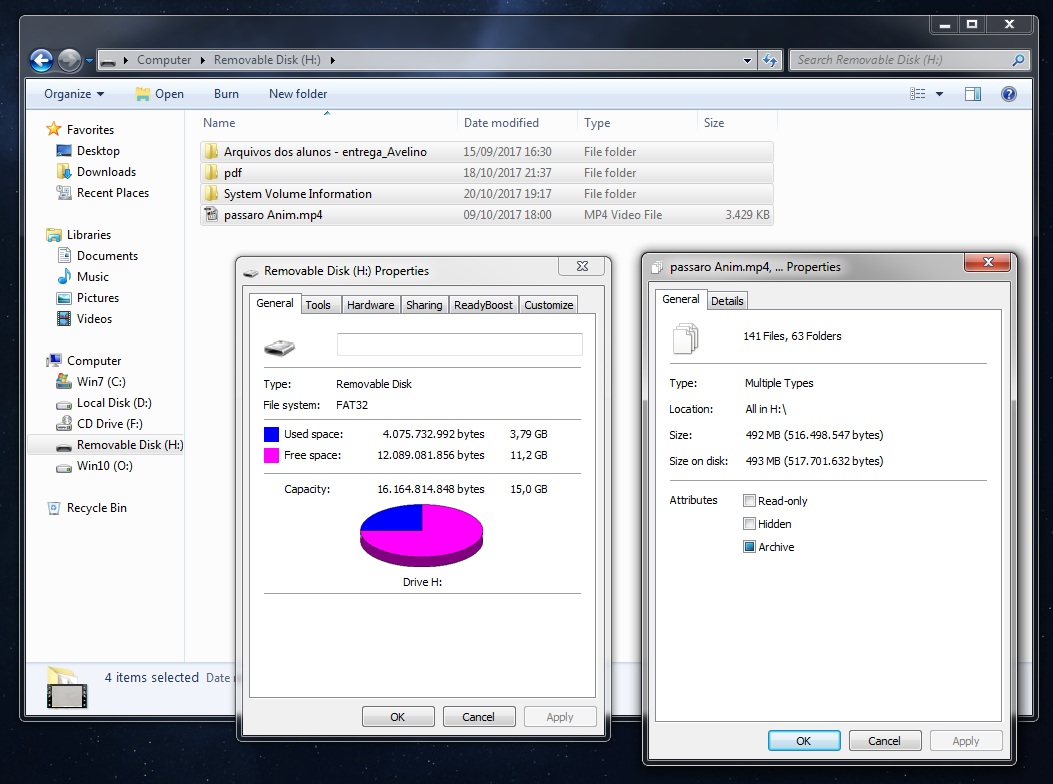
Z2S11AE.jpg


so it seems the hidden folders are still there...somewhere ..I just need to enable them somehow. Hope someone here has an idea for helping me with it. Thank you
 

My Computer My Computer

At a glance

Windows 7 Home Premium 64bit
Computer type
PC/Desktop
OS
Windows 7 Home Premium 64bit
It may be hidden.
Open Control Panel\All Control Panel Items\Folder Options
On View tab
- Hidden files and folders - Show Hidden files and folders

On Explorer, right click on the column (Name, Date, Type, etc) and choose to show Attributes

As I have seen this happening due to virus, scan your drives with an antivirus.
 

My Computers My Computers

  • At a glance

    Windows 7 HP 64i5 6600K - 800MHz to 4200MHz4+4G GSkill DDR4 3000IG - Intel 530
    Computer type
    PC/Desktop
    Computer Manufacturer/Model Number
    custom build
    OS
    Windows 7 HP 64
    CPU
    i5 6600K - 800MHz to 4200MHz
    Motherboard
    GA-Z170-HD3P
    Memory
    4+4G GSkill DDR4 3000
    Graphics Card(s)
    IG - Intel 530
    Monitor(s) Displays
    Samsung 226BW
    Screen Resolution
    1680x1050
    Hard Drives
    (1) -1 SM951 – 128GB M.2 AHCI PCIe SSD drive for Windows 7 and Lubuntu
    (2) -1 WD SATA 3 - 1T for Data
    (3) -1 WD SATA 3 - 1T for backup
    PSU
    Thermaltake 450W TR2 gold
    Keyboard
    Old and good Chicony mechanical keyboard
    Mouse
    Logitech mX performance - 9 buttons (had to disable some)
    Internet Speed
    500Mb/s
    Browser
    Firefox 64
    Other Info
    TinyWall firewall
  • At a glance

    Windows 7 Proi7-4500U 800MHz to 3.0GHz(4+4)G DDR3 1600IG intel 4400 + NVIDIA GeForce GT 745M
    Computer type
    Laptop
    System Manufacturer/Model Number
    Asus Q550LF
    OS
    Windows 7 Pro
    CPU
    i7-4500U 800MHz to 3.0GHz
    Motherboard
    Asus Q550LF
    Memory
    (4+4)G DDR3 1600
    Graphics Card(s)
    IG intel 4400 + NVIDIA GeForce GT 745M
    Sound Card
    Realtek
    Monitor(s) Displays
    LG Display LP156WF4-SPH1
    Screen Resolution
    1920 x 1080
    Hard Drives
    BX500 120G SSD for Windows and programs +
    1T HDD for data
    Internet Speed
    500 Mb/s
    Browser
    Firefox
    Other Info
    TinyWall firewall
What Megahertz07 said above is a conventional solution. If that does not work:

Is it a virus affliction? If so why only two folders got hidden? I have no answer. I don't even know what is .psd file. Well, I see that it Adobe photoshop file ( learnt :D)

Leaving aside the research on the file format and whether it is due to a virus infliction, try this.

Download and install your Windows bit version of WinRAR.

Run WinRAR and navigate to your pendrive in it. It should show all your folders and files in the pendrive. That includes even superhidden folders/files that wouldn't show anywhere else. If those folders really do exist on your pendrive, those will definitely show up in WinRAR.

Open the folder and you should see the files in it. Open the .psd file and then save it to a different location. Check whether you can open the file saved in the different location. Once you have saved all the files in those two folders to a different location and convinced everything is beautiful, go to WinRAR again, right click on those two folders and in the Menu > Delete files.

Let me know whether this worked. For now it is only my thought process :D.

Of course, you have to run a virus check later to make sure you have no virus.
 

My Computer My Computer

At a glance

Windows 7 Home Premium 32 bit
OS
Windows 7 Home Premium 32 bit
Look in your computer, (search) to see if maybe that file/folder got saved somewhere other than the Pendrive.

Stuff happens! And over the past 37 years, I can't tell you how many times I thought I'd saved a file to one location and later found out that it went somewhere else. Arggg!

Sometimes it may seem like the computer has a mind of its own, and does what IT wants and not what you want.

just a thought

TechnoMage :cool:
 

My Computer My Computer

At a glance

Win 7 Pro, SP1, x86, Win-11/Pro/64AMD8GB CrucialVarious
Computer type
PC/Desktop
Computer Manufacturer/Model Number
Various
OS
Win 7 Pro, SP1, x86, Win-11/Pro/64
CPU
AMD
Motherboard
Various
Memory
8GB Crucial
Graphics Card(s)
Various
Sound Card
OnBoard
Monitor(s) Displays
Acer 21.5"
Hard Drives
Crucial SSD, 500 GB
PSU
OEM
Case
SFF Slim Line Case
Cooling
OEM
Keyboard
eMachines
Mouse
Logitech Wireless
Internet Speed
varies
Antivirus
Windows Defender/Super Anti-Spyware
Browser
Firefox
Thank you all for the replies
It may be hidden.
Open Control Panel\All Control Panel Items\Folder Options
On View tab
- Hidden files and folders - Show Hidden files and folders

On Explorer, right click on the column (Name, Date, Type, etc) and choose to show Attributes

As I have seen this happening due to virus, scan your drives with an antivirus.

Did that, but had no luck. Only the previous displayed files were shown. I checked for virus and spyware, and nothing was infecting the pc.

Run WinRAR and navigate to your pendrive in it. It should show all your folders and files in the pendrive. That includes even superhidden folders/files that wouldn't show anywhere else. If those folders really do exist on your pendrive, those will definitely show up in WinRAR.
Let me know whether this worked. For now it is only my thought process :D

Tried that with no luck again. Winrar doesn't shows any new file or folder

Look in your computer, (search) to see if maybe that file/folder got saved somewhere other than the Pendrive.

Stuff happens! And over the past 37 years, I can't tell you how many times I thought I'd saved a file to one location and later found out that it went somewhere else. Arggg!

Good thought. I thought about that the moment I was back home actually. I searched everywhere with Everything (a search software that I recommend), but didn't had any luck finding the files or folders.. quite weird indeed.

Now after your replies, I'm thinking more strongly that, in this case, the sector of the pendrive (usb flash drive) got deeply frozen somehow. Like this specific chuck of the flash drive died or something.. ..maybe it's not a digital problem, but a physical malfunction?
 

My Computer My Computer

At a glance

Windows 7 Home Premium 64bit
Computer type
PC/Desktop
OS
Windows 7 Home Premium 64bit
I recently bought a USB flash drive that was defective.
My suggestion is that you format your drive and then test it with H2testw.
It will write and read till the drive is full.
H2testw Download
 

My Computers My Computers

  • At a glance

    Windows 7 HP 64i5 6600K - 800MHz to 4200MHz4+4G GSkill DDR4 3000IG - Intel 530
    Computer type
    PC/Desktop
    Computer Manufacturer/Model Number
    custom build
    OS
    Windows 7 HP 64
    CPU
    i5 6600K - 800MHz to 4200MHz
    Motherboard
    GA-Z170-HD3P
    Memory
    4+4G GSkill DDR4 3000
    Graphics Card(s)
    IG - Intel 530
    Monitor(s) Displays
    Samsung 226BW
    Screen Resolution
    1680x1050
    Hard Drives
    (1) -1 SM951 – 128GB M.2 AHCI PCIe SSD drive for Windows 7 and Lubuntu
    (2) -1 WD SATA 3 - 1T for Data
    (3) -1 WD SATA 3 - 1T for backup
    PSU
    Thermaltake 450W TR2 gold
    Keyboard
    Old and good Chicony mechanical keyboard
    Mouse
    Logitech mX performance - 9 buttons (had to disable some)
    Internet Speed
    500Mb/s
    Browser
    Firefox 64
    Other Info
    TinyWall firewall
  • At a glance

    Windows 7 Proi7-4500U 800MHz to 3.0GHz(4+4)G DDR3 1600IG intel 4400 + NVIDIA GeForce GT 745M
    Computer type
    Laptop
    System Manufacturer/Model Number
    Asus Q550LF
    OS
    Windows 7 Pro
    CPU
    i7-4500U 800MHz to 3.0GHz
    Motherboard
    Asus Q550LF
    Memory
    (4+4)G DDR3 1600
    Graphics Card(s)
    IG intel 4400 + NVIDIA GeForce GT 745M
    Sound Card
    Realtek
    Monitor(s) Displays
    LG Display LP156WF4-SPH1
    Screen Resolution
    1920 x 1080
    Hard Drives
    BX500 120G SSD for Windows and programs +
    1T HDD for data
    Internet Speed
    500 Mb/s
    Browser
    Firefox
    Other Info
    TinyWall firewall
I recently bought a USB flash drive that was defective.
My suggestion is that you format your drive and then test it with H2testw.
It will write and read till the drive is full.
H2testw Download

Yup, I think that's what is left to do now.
The situation was different to me cause the flash drive didn't show any obvious sign of defect or corruption..

Thank you, I'll download H2testw and do that.
 

My Computer My Computer

At a glance

Windows 7 Home Premium 64bit
Computer type
PC/Desktop
OS
Windows 7 Home Premium 64bit
There are many fake drives around the corner. I once had a 64G Pendrive. On Explorer it showed as 64G but was in fact 4G.
 

My Computers My Computers

  • At a glance

    Windows 7 HP 64i5 6600K - 800MHz to 4200MHz4+4G GSkill DDR4 3000IG - Intel 530
    Computer type
    PC/Desktop
    Computer Manufacturer/Model Number
    custom build
    OS
    Windows 7 HP 64
    CPU
    i5 6600K - 800MHz to 4200MHz
    Motherboard
    GA-Z170-HD3P
    Memory
    4+4G GSkill DDR4 3000
    Graphics Card(s)
    IG - Intel 530
    Monitor(s) Displays
    Samsung 226BW
    Screen Resolution
    1680x1050
    Hard Drives
    (1) -1 SM951 – 128GB M.2 AHCI PCIe SSD drive for Windows 7 and Lubuntu
    (2) -1 WD SATA 3 - 1T for Data
    (3) -1 WD SATA 3 - 1T for backup
    PSU
    Thermaltake 450W TR2 gold
    Keyboard
    Old and good Chicony mechanical keyboard
    Mouse
    Logitech mX performance - 9 buttons (had to disable some)
    Internet Speed
    500Mb/s
    Browser
    Firefox 64
    Other Info
    TinyWall firewall
  • At a glance

    Windows 7 Proi7-4500U 800MHz to 3.0GHz(4+4)G DDR3 1600IG intel 4400 + NVIDIA GeForce GT 745M
    Computer type
    Laptop
    System Manufacturer/Model Number
    Asus Q550LF
    OS
    Windows 7 Pro
    CPU
    i7-4500U 800MHz to 3.0GHz
    Motherboard
    Asus Q550LF
    Memory
    (4+4)G DDR3 1600
    Graphics Card(s)
    IG intel 4400 + NVIDIA GeForce GT 745M
    Sound Card
    Realtek
    Monitor(s) Displays
    LG Display LP156WF4-SPH1
    Screen Resolution
    1920 x 1080
    Hard Drives
    BX500 120G SSD for Windows and programs +
    1T HDD for data
    Internet Speed
    500 Mb/s
    Browser
    Firefox
    Other Info
    TinyWall firewall
When WinRAR does not show your two folders , it is absolutely certain that those folders do not exist. Folders getting lost surely is a pointer to a fake drive.

If it is a genuine drive ( I shall still give you the benefit of doubt) , go to the manufacturer's website and check whether there is any recovery software offered in Support and try that.

( You must always give full details of your pendrive, - manufacturer, Model, Capacity, whether it is a real branded pen drive or purchased cheaply from a footpath vendor, for how long you have been using etc., or else you are only taking us for a ride :) )
 

My Computer My Computer

At a glance

Windows 7 Home Premium 32 bit
OS
Windows 7 Home Premium 32 bit
When WinRAR does not show your two folders , it is absolutely certain that those folders do not exist. Folders getting lost surely is a pointer to a fake drive.

If it is a genuine drive ( I shall still give you the benefit of doubt) , go to the manufacturer's website and check whether there is any recovery software offered in Support and try that.

( You must always give full details of your pendrive, - manufacturer, Model, Capacity, whether it is a real branded pen drive or purchased cheaply from a footpath vendor, for how long you have been using etc., or else you are only taking us for a ride :) )

Sorry, it's a Markvision USB2 16GB RB2.MV original USB drive. By what I saw from your responses, the issue may have come from it's age, since it's a reasonably old usb drive (around 6 years old I think). I'm considering this issue as a signal that it's time to retire this drive (even though it's working apparently normally, but without the 2 missing folders and some GBs).
 

My Computer My Computer

At a glance

Windows 7 Home Premium 64bit
Computer type
PC/Desktop
OS
Windows 7 Home Premium 64bit
That your flash drive is such an old device puts everything in proper perspective.The memory technology and controllers used in the first generation flash drives is not the same as that used today. As with everything, technology has evolved over a period time and soon we forget the past.

The first generation flash drives may not have the same "wear levelling" process that is present in the present day drives. So it is quite possible that certain memory has "worn" more than the rest becoming unreadable ( readability below threshold level). That cannot happen in the present day flash drives. Once the drive controller detects something is amiss, it shuts down the whole drive making it unusable for further data storage. ( If you say folders lost, we can only think of fake drives where it happens today :))

So your conjecture that certain portions of the drive could have gone bad may be right. Linux in many cases can read what Windows cannot read. So you may still try to recover that "lost data" with a live Linux.

My post #8 here on creating a Live Linux flash drive : Is there any way of saving a completely unrecognisable hard drive? It will also take you to Lucid Puppy way to recover files from a non-bootable computer. In your case it is your unreadable (in parts) flash drive.
 

My Computer My Computer

At a glance

Windows 7 Home Premium 32 bit
OS
Windows 7 Home Premium 32 bit
I see, interesting. That seems to explain everything. Time to retire this drive then :p
Maybe I'll try looking for lost data with Linux as you said on the weekend, but at least I found part of the files from the lost folders in my "usb Backups" that I did some weeks ago in my external HDD. It's not the best solution, but it's good enough for such unpredictable events.
Thank you jumanji and all you guys for the help :)
 

My Computer My Computer

At a glance

Windows 7 Home Premium 64bit
Computer type
PC/Desktop
OS
Windows 7 Home Premium 64bit
Back
Top