Permission rights

skyred5

New member
Member
Local time
2:21 PM
Messages
73
Hi all,

Not sure if this is the correct place to post this, as what I'm about to ask is actually a server-related. But nonetheless, it can be applicable to windows 7.

So my question is this.

Folder A
Subfolders
Files

I have a file server and some permission settings to be put in place. Folder A and subfolders are read-only access to all, and I have put in authorized permission groups to access the various subfolders. However, I want the authorized permission groups to be able to have modify permissions on files, or whatever that is beyond the subfolders.

Currently my settings is as follows;

Root drive - shared to domain users, permission group
Folder A - This folder and subfolders; read only
subfolders - (inherited) folder and subfolders read only
Files - read, write, execute

When I open files such as powerpoint, I am not able to save/make changes. It prompts me "access denied. Contact your administrator."

Appreciate any advice in advance. Thanks!
 

My Computer

Computer type
Laptop
Computer Manufacturer/Model Number
Lenovo E450
OS
Windows 10 Pro
Take a look at the 'Advanced Security Settings' for the folder, accessed from the Security tab (at least on Server 2003R2). From there you can change both the inheritance of settings from the parent, and more granular control over creating files/folders, reading, writing etc in each folder level and whether it applies to the selected folder, subfolders, and/or files. You might need to set some 'Deny' options instead of just unticking 'Allow', depending on how things are set up.

I think you can do what you need from there.

For instance, to check it I just created a folder tree and in the Advanced Security Settings for a test user account I first unticked 'allow settings to propagate...'. Then I unticked create files/folders and delete and set that to apply to This Folder and subfolders. Now, that user can browse, open and save existing files, but cannot create new files or folders anywhere under the root.
 

My Computer

Computer type
PC/Desktop
Computer Manufacturer/Model Number
Custom
OS
Windows 7 Ultimate x64
CPU
i7-2600K @ 3.4GHz
Motherboard
Gigabyte GA-Z68X-UD5-B3
Memory
16GB
Graphics Card(s)
MSI GTX970
Hard Drives
Crucial CT512MX100 System Drive
3x Seagate 4TB Data
Antivirus
Microsoft
Browser
Firefox+IE
Take a look at the 'Advanced Security Settings' for the folder, accessed from the Security tab (at least on Server 2003R2). From there you can change both the inheritance of settings from the parent, and more granular control over creating files/folders, reading, writing etc in each folder level and whether it applies to the selected folder, subfolders, and/or files. You might need to set some 'Deny' options instead of just unticking 'Allow', depending on how things are set up.

I think you can do what you need from there.

Hi foxyrick, yes I am actually using the advanced security settings for the permissions. In fact, the permission settings is like this:

Root drive - read only; this folder and subfolders only
root folders - read, write, execute; files only

Is this correct? Because it doesn't work when I test it out.
 

My Computer

Computer type
Laptop
Computer Manufacturer/Model Number
Lenovo E450
OS
Windows 10 Pro
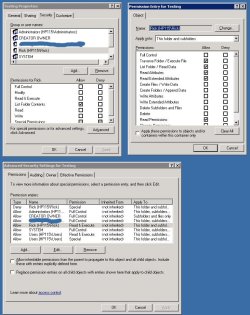
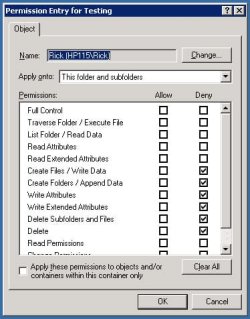
It worked the way I did it (not sure it's exactly what your after though). This is what I have:

C:\test1\test2\files...

Right-clicked on test1 and did this... see attachment I think - yep, that worked.. the allow and deny settings show in different windows. I forgot that.

The user (rick) can now not create or delete anything from the test1 folder down, but can edit and save files there.
 

Attachments

  • perms.jpg
    perms.jpg
    130 KB · Views: 0
  • perms2.jpg
    perms2.jpg
    55.6 KB · Views: 14

My Computer

Computer type
PC/Desktop
Computer Manufacturer/Model Number
Custom
OS
Windows 7 Ultimate x64
CPU
i7-2600K @ 3.4GHz
Motherboard
Gigabyte GA-Z68X-UD5-B3
Memory
16GB
Graphics Card(s)
MSI GTX970
Hard Drives
Crucial CT512MX100 System Drive
3x Seagate 4TB Data
Antivirus
Microsoft
Browser
Firefox+IE
I just realised that the ability to modify and save the files is coming from the user being a member of the 'all users' group as well, since otherwise there's nowhere saying that files can be written to.

Anyway, it's time I was in bed. It's 3am here. Good luck getting it sorted out!
 

My Computer

Computer type
PC/Desktop
Computer Manufacturer/Model Number
Custom
OS
Windows 7 Ultimate x64
CPU
i7-2600K @ 3.4GHz
Motherboard
Gigabyte GA-Z68X-UD5-B3
Memory
16GB
Graphics Card(s)
MSI GTX970
Hard Drives
Crucial CT512MX100 System Drive
3x Seagate 4TB Data
Antivirus
Microsoft
Browser
Firefox+IE
I just realised that the ability to modify and save the files is coming from the user being a member of the 'all users' group as well, since otherwise there's nowhere saying that files can be written to.

Anyway, it's time I was in bed. It's 3am here. Good luck getting it sorted out!

Okay. Didnt thought of using deny permission settings. Thanks for the suggestion. Good night!
 

My Computer

Computer type
Laptop
Computer Manufacturer/Model Number
Lenovo E450
OS
Windows 10 Pro
The deny permission doesn't work.
 

My Computer

Computer type
Laptop
Computer Manufacturer/Model Number
Lenovo E450
OS
Windows 10 Pro
Back
Top