Solved Picture Library Problem

DG8

New member
Member
Local time
7:39 AM
Messages
33
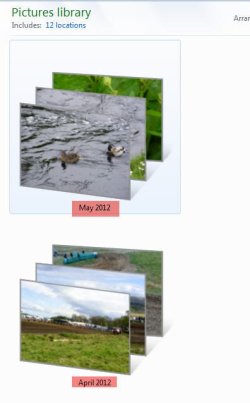
I somehow managed to put a wrong date on two folders in my picture lidrary. I would like to remove the photos in the two folders into a folder of the right date and delete the empty folder, or can someone tell me how to change the wrong date on the two folders.
I have included an attachment of the two wronge dated folders.
 

Attachments
  • wrong date.jpg
    wrong date.jpg
    24 KB · Views: 16

My Computer

OS
windows 7 ultimate 32 bit
Can't you Right-Click the folder and Rename-it?
 

My Computer

Computer Manufacturer/Model Number
HP pavilion DV6-Laptop
OS
win7 home premium-64bit-SP1-IE9RTM
CPU
Intel core2 duo - T6600 2.2GHZ
Memory
4.00Gb
Graphics Card(s)
ATI Mobility Radeon HD 4530
Sound Card
IDT audio Monitor
Screen Resolution
32Bpp,1366x768
Hard Drives
Western Digital 500Gb
Internet Speed
Fast DSL
  • Like
Reactions: DG8
try right clicking the pics in the library.
in the context menu select open folder location, in the window that opens the folder will be there and then you should be able to change the date from there ,this will then show up in the library
 

My Computer

Computer Manufacturer/Model Number
Hewlett packard/p6512uk
OS
Microsoft Windows 7 Home Premium 64-bit 7600
CPU
IIx4 amd athelon 635 processor
Motherboard
FOXCONN 2AA9
Memory
2x2gb
Graphics Card(s)
ati radeon HD 5450
Sound Card
(1) Realtek High Definition Audio (2) AMD High Definition
Monitor(s) Displays
samsung lcd tv 32"
Screen Resolution
1360x 768
Hard Drives
(1) WDC WD10 01FAES-60Z2A0 SATA Disk Device (2) Maxtor OneTouch USB Device (3) ST310003 33AS USB Device (4) WD My Book 1111 USB Device
PSU
?
Cooling
air!
Keyboard
wireless hp
Mouse
wireless Hp,optical
Internet Speed
1.10mb/s
Antivirus
MSE
Browser
Firefox
  • Like
Reactions: DG8
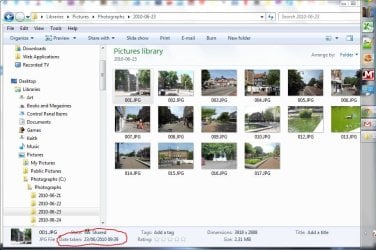
I think that is "arrange by Month". If that is the case you will need to change the date taken tag for each image.
Capture.JPG
 

My Computer

Computer type
Laptop
Computer Manufacturer/Model Number
Hewlett-Packard/G62-107SA Notebook
OS
Microsoft Windows 7 Home Premium 64-bit Service Pack 1
CPU
Intel(R) Core(TM) i3 CPU M 330 @ 2.13GHz
Motherboard
Hewlett-Packard 1425
Memory
8 GB DDR3
Graphics Card(s)
Intel(R) HD Graphics
Sound Card
Realtek High Definition Audio
Monitor(s) Displays
Builtin
Screen Resolution
1366 x 768 x 32 bits (4294967296 colors) @ 60 Hz
Hard Drives
250 GB SATA Hard Disk Drive 7200 rpm
2TB Seagate GoFlex USB 2 Drive
1TB Iomega Prestige USB 2 Drive
1.5TB Iomega Prestige USB 2 Drive (Samsung)
2TB WD MyBook Live NAS.
Mouse
Logitech Anywhere MX
Internet Speed
152 Mbs download 10 Mbs upload
Antivirus
Norton 360
Browser
Chrome
  • Like
Reactions: DG8
Hello guys
WE are not in 2012 yet (as per the attached thumbnails); all he have to do is renaming the folders.
 

My Computer

Computer Manufacturer/Model Number
HP pavilion DV6-Laptop
OS
win7 home premium-64bit-SP1-IE9RTM
CPU
Intel core2 duo - T6600 2.2GHZ
Memory
4.00Gb
Graphics Card(s)
ATI Mobility Radeon HD 4530
Sound Card
IDT audio Monitor
Screen Resolution
32Bpp,1366x768
Hard Drives
Western Digital 500Gb
Internet Speed
Fast DSL
Thanks to John 47, Kedo897 and DoohDah for helping me. the issue is now resolved thanks to all three for puting in you time and suggestions to try and help a stranger. Cheers
 

My Computer

OS
windows 7 ultimate 32 bit
You are welcome DG8. It would be useful if you told us what the solution was in case anyone else has it.
 

My Computer

Computer type
Laptop
Computer Manufacturer/Model Number
Hewlett-Packard/G62-107SA Notebook
OS
Microsoft Windows 7 Home Premium 64-bit Service Pack 1
CPU
Intel(R) Core(TM) i3 CPU M 330 @ 2.13GHz
Motherboard
Hewlett-Packard 1425
Memory
8 GB DDR3
Graphics Card(s)
Intel(R) HD Graphics
Sound Card
Realtek High Definition Audio
Monitor(s) Displays
Builtin
Screen Resolution
1366 x 768 x 32 bits (4294967296 colors) @ 60 Hz
Hard Drives
250 GB SATA Hard Disk Drive 7200 rpm
2TB Seagate GoFlex USB 2 Drive
1TB Iomega Prestige USB 2 Drive
1.5TB Iomega Prestige USB 2 Drive (Samsung)
2TB WD MyBook Live NAS.
Mouse
Logitech Anywhere MX
Internet Speed
152 Mbs download 10 Mbs upload
Antivirus
Norton 360
Browser
Chrome
Sorry Kado897 - I thought I had but clearly not, so I will attempt to try and explain what I did.

I opened each file independently, selected all photos by right clicking and holding down the shift key, Clicked on delete, then opened the correct folder I wanted the photos in and pasted.

When I went back to folders to do the same to the other folder - the first folder which I had just done was now no longer visible and all the photos from it were saved in correct folder. I hope this makes sense, but it worked for me.
Sorry for my stupid mistake and thanks again.
 

My Computer

OS
windows 7 ultimate 32 bit
No problem DG8. Thanks for the reply.
 

My Computer

Computer type
Laptop
Computer Manufacturer/Model Number
Hewlett-Packard/G62-107SA Notebook
OS
Microsoft Windows 7 Home Premium 64-bit Service Pack 1
CPU
Intel(R) Core(TM) i3 CPU M 330 @ 2.13GHz
Motherboard
Hewlett-Packard 1425
Memory
8 GB DDR3
Graphics Card(s)
Intel(R) HD Graphics
Sound Card
Realtek High Definition Audio
Monitor(s) Displays
Builtin
Screen Resolution
1366 x 768 x 32 bits (4294967296 colors) @ 60 Hz
Hard Drives
250 GB SATA Hard Disk Drive 7200 rpm
2TB Seagate GoFlex USB 2 Drive
1TB Iomega Prestige USB 2 Drive
1.5TB Iomega Prestige USB 2 Drive (Samsung)
2TB WD MyBook Live NAS.
Mouse
Logitech Anywhere MX
Internet Speed
152 Mbs download 10 Mbs upload
Antivirus
Norton 360
Browser
Chrome
Back
Top