Pictures or My Picures

cfourkays

New member
Member
Local time
3:39 AM
Messages
62
Location
Jensen Beach FL
I think I have this right. Pictures is an example.
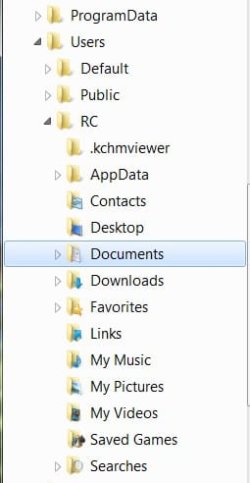
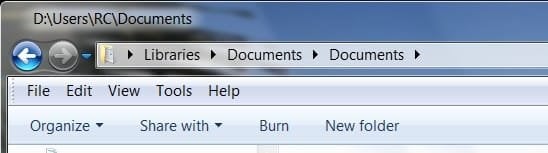
My Vista default folders that was de-personalized from "My Pictures" in XP, .etc, to "Pictures" in Vista is back to "My Pictures" in W7 except if I feel lonesome for the Vista folders I was just getting use to I can go to the Library "Pictures" in which I'll find my old "My Pictures" folder.

Pete
 

My Computer My Computer

Computer Manufacturer/Model Number
Home Built
OS
Windows 7 Professional
CPU
AMD 64 Athlon X2 Dual Core
Motherboard
Asus M3A
Memory
6 Gig
Graphics Card(s)
Nvidia GeForce 8800GTS
Hard Drives
500GB Seagate (2)
Other Info
Laptop is Gateway NV52 with Windows 7 Home Premium
LOL! who's on first
 

My Computer My Computer

Computer type
PC/Desktop
Computer Manufacturer/Model Number
Bruce ... somewhere in his 40's
OS
Windows 7 Ultimate 32bit SP1
CPU
Intel(R) Core(TM)2 Quad CPU @ 2.40GHz, 2400 MHz
Motherboard
INTEL/D975XBX2
Memory
4 GB
Graphics Card(s)
ATI Radeon HD 2600 Pro
Monitor(s) Displays
Samsung SyncMaster 914v
Screen Resolution
1280 x 1024
Hard Drives
2/500GB each ... ST3500630AS ATA Device.
One is not connected
PSU
Rocketfish 700 W
Case
G.Skill Gigabyte Chassis
Keyboard
Standard PS/2 Keyboard
Mouse
Microsoft PS/2 Mouse
Internet Speed
DSL
Antivirus
Avira Internet Security
Browser
IE 11
Other Info
ATI HDMI Audio
I think I have this right. Pictures is an example.
My Vista default folders that was de-personalized from "My Pictures" in XP, .etc, to "Pictures" in Vista is back to "My Pictures" in W7 except if I feel lonesome for the Vista folders I was just getting use to I can go to the Library "Pictures" in which I'll find my old "My Pictures" folder.

Pete

could you translate a little better pls


while i think the answer to this is probably "add to library" and be done.
 

My Computer My Computer

Computer Manufacturer/Model Number
CUSTOM
OS
XP/win7 x86 build 7127
CPU
Athlon64 X2 DUAL 4200+ 2.21ghz
Motherboard
ASUS K8 PRO SLI
Memory
2GB Dual Chan DDR2 Corsair
Graphics Card(s)
Nvidia 6800GT
Sound Card
nvidia
Monitor(s) Displays
19' LCD
Screen Resolution
1280x1024
Hard Drives
WD 250, 2x500, 2x1TB IDE/USB
WD 250 SATA (system)
SEAGATE 120 Sata
PSU
coolermaster 450
Case
SUPERFLOWER
Cooling
1 HDD bay fan, 5x80mm Case Fans, AEROGATE II Fan/Temp
Keyboard
MS wireless
Mouse
MS Wireless
Internet Speed
fassssssssst
Heres one way to achieve that:

Create a folder called Documents in C:\Users\<accountname>
Open Windows explorer
Go to C:\Users\<accountname>
Right click on My Documents and select properties
Go to the location tab
Click the Move button and navigate to the Documents folder you created earlier
Click on ok and then yes and you will now have Documents back.
 

My Computer My Computer

Computer Manufacturer/Model Number
self built
OS
Windows 7 Professional 64-bit
CPU
Intel E8400 3GHz
Motherboard
Intel DX48BT2
Memory
Kingston PC3-10700H 4Gb
Graphics Card(s)
XFX Radeon HD 5850 BlackEd.
Sound Card
Asus Xonar DG
Monitor(s) Displays
2x Samsung SM-T220HD 22"
Screen Resolution
1680x1050 on two monitors
Hard Drives
OCZ Vertex 2 120gb 3.5" (OS)
Seagate Momentus XT 500gb
Samsung F3 1Tb (games)
2x Samsung F1 1Tb
PSU
Thermaltake ToughPower 850w
Case
Thermaltake Armor
Cooling
Scythe Mugen II
Keyboard
Microsoft Comfort Curve USB
Mouse
Razer Diamondback 3G
Internet Speed
8128/443
Let me ask this a little better without an attempt at sarcasm:
In W7, is the default folder for images, pictures, etc., back to "My Pictures" which, Ithink, is in the Library folder "Pictures"?
 

My Computer My Computer

Computer Manufacturer/Model Number
Home Built
OS
Windows 7 Professional
CPU
AMD 64 Athlon X2 Dual Core
Motherboard
Asus M3A
Memory
6 Gig
Graphics Card(s)
Nvidia GeForce 8800GTS
Hard Drives
500GB Seagate (2)
Other Info
Laptop is Gateway NV52 with Windows 7 Home Premium
Let me ask this a little better without an attempt at sarcasm:
In W7, is the default folder for images, pictures, etc., back to "My Pictures" which, Ithink, is in the Library folder "Pictures"?

correct, also in there will be public pictures if not mistaken by default
 

My Computer My Computer

Computer Manufacturer/Model Number
CUSTOM
OS
XP/win7 x86 build 7127
CPU
Athlon64 X2 DUAL 4200+ 2.21ghz
Motherboard
ASUS K8 PRO SLI
Memory
2GB Dual Chan DDR2 Corsair
Graphics Card(s)
Nvidia 6800GT
Sound Card
nvidia
Monitor(s) Displays
19' LCD
Screen Resolution
1280x1024
Hard Drives
WD 250, 2x500, 2x1TB IDE/USB
WD 250 SATA (system)
SEAGATE 120 Sata
PSU
coolermaster 450
Case
SUPERFLOWER
Cooling
1 HDD bay fan, 5x80mm Case Fans, AEROGATE II Fan/Temp
Keyboard
MS wireless
Mouse
MS Wireless
Internet Speed
fassssssssst
Let me ask this a little better without an attempt at sarcasm:
In W7, is the default folder for images, pictures, etc., back to "My Pictures" which, Ithink, is in the Library folder "Pictures"?


Hello Welcome to SevenForums, cfourkays

Hope that you have a good stay here on SF.
A SevenForums tutorial may help you with that try looking here http://www.sevenforums.com/tutorials/257-windows-7-tutorial-index.html
That will take you to an index of all the tutorials and look for the letter l its on the second page I think and you will find a lot of stuff on this new feature called libraries. lm
 

My Computer My Computer

Computer Manufacturer/Model Number
Gateway GT5692
OS
Windows 7 Ulti. x64
CPU
AMD Phenom 8450 triple-core 2.10 ghz
Memory
4GB
Graphics Card(s)
ATI Radion HD 3200
Monitor(s) Displays
Gateway FPD1775W
Screen Resolution
1280x720
Hard Drives
465.6613 Gibibytes
It's was a strange decision to add the prefix "My" to documents, pictures, music etc. in the earlier build that was not the case, I guess it was so all the XP users didn't bitch so much about loosing it, personally I preferred it the Vista way without having My on it, I mean who else's would it be?
 

My Computer My Computer

Computer Manufacturer/Model Number
Home Brew
OS
Windows 7 Ultimate Vista Ultimate x64
CPU
Core 2 Duo E8500 3.16Ghz @ 3.8Ghz
Motherboard
eVGA 750i FTW
Memory
2x2Gigs Patriot PC2-6400 LL
Graphics Card(s)
Inno3D GeForce GTX260 216 SP
Monitor(s) Displays
ASUS VW222U 22" 2ms Response time
Screen Resolution
1680x1050
Hard Drives
SATA 150GB
SATA II 250GB
USB IDE 750GB Ext.
PSU
HYTEC 600W & Thermaltake 650W Toughpower Power Exp
Case
Thermaltake Armor LCS (Liquid Cooling System)
Cooling
Liquid Cooling System
Keyboard
Logitech G15 Gaming Keyboard
Mouse
Logitech G9 Gaming Mouse
M$ did a lot of research into this, I believe.

They also changed the wording on on other things e.g. "Let me choose". The idea is to give users the feeling of ownership.

Seems bizarre to me.

You could always rename it:

DOCUMENTS-2009-05-08_011228.jpg

DOCUMENTS-2-2009-05-08_011314.jpg

Glad we don't have My Computer - that would be nauseating.:)
 

My Computers My Computers

System One System Two

  • Computer type
    PC/Desktop
    OS
    7 X64
    CPU
    i5 8400
    Motherboard
    gigabyte b365m ds3h
    Memory
    2x8gb 3200mhz
    Hard Drives
    various
    PSU
    pure power 11 400w cm
    Case
    Coolermaster
    Cooling
    cryorig m9i
  • Computer type
    PC/Desktop
    OS
    7x64
    CPU
    g5400
    Motherboard
    ga b365m ds3h
    Memory
    8gb ddr4 2400
    PSU
    xfx pro 450w
Hi Si
Glad we don't have My Computer - that would be nauseating.:)
Especially true if you spend a lot of time on other peoples computers :p

But seriously this research into wording is important - remember the "any" key change to "a" key fiasco in the early days
 

My Computers My Computers

System One System Two

  • Computer type
    PC/Desktop
    Computer Manufacturer/Model Number
    ChillBlast - Custom to my design
    OS
    Windows 11 Pro x64 [Latest Release and Release Preview]
    CPU
    Ryzen 9 5950X, 3.8 - 5.2 MHz
    Motherboard
    Asus Prime X570-Pro
    Memory
    64GB [2 x 32GB] DDR4 3200MHz
    Graphics Card(s)
    4GB NVIDIA GEFORCE GTX 1650 Ti
    Sound Card
    On-board SPDIF to 5.1 System + HDMI [5.1 system]
    Monitor(s) Displays
    32" UHD 32 Bit HDR Monitor + 43" UHD 4K 32Bit HDR TV
    Screen Resolution
    2 x 3840 x 2160 @60Hz
    Hard Drives
    1TB M2 SSD OS, 500GB Fast Access SSD, 2 x 8TB Data + Various Externals from 1TB to 4TB, 10TB NAS
    PSU
    NZXT C750 80 PLUS Gold 750W Modular PSU
    Case
    Workstation Case [Matt Black]
    Cooling
    NZXT Kraken X63 280mm CPU Cooler +2x Quiet Case fans
    Keyboard
    Logitech Wireless MX Keys & K400 + others
    Mouse
    Logitech Wireless MX Master 3S
    Internet Speed
    920 MB Down 50 MB Up
    Antivirus
    BitDefender Total Security Pro
    Browser
    Chrome (always run latest Non-Beta)
    Other Info
    Also run ...
    Laptop - Quad 8GB - Windows 10 Pro x64
    Nexus 7 Android tablet x2
    Samsung 10.2" tablet
    Blackview TAB 8 4G Android Tablet c/w Keyboard
    Wacom Intuos Pro Medium Pen Pad
    Wacom Intuos Pro Small Pen Pad
    Wacom Expresskeys Remote
    Loopdeck+ Graphics Controller
    Shuttle Pro v2 Control
  • Computer type
    Laptop
    System Manufacturer/Model Number
    Dell XPS 17 10750H
    OS
    Windows 11 Pro x64 Latest RP
    CPU
    Intel I7 10750H 5.0GHz
    Motherboard
    Dell XPS
    Memory
    32GB [2x16GB] DDR4 2933 MHz
    Graphics Card(s)
    nVidia GTX1650Ti 4 GB GDDR6
    Sound Card
    Stock [Realtek] 4 Speaker
    Monitor(s) Displays
    17" IPS UHD+ Infinity Edge Touchscreen
    Screen Resolution
    3840 x 2400
    Hard Drives
    2TB M2 NVMe, 4TB External + various 500GB & 1TB External NVMe (also have access to spinner HDD from
    PSU
    Stock
    Case
    Stock XPS Aluminium & Carbon Fibre
    Cooling
    Stock - Active Fan Control
    Keyboard
    Backlit + Various Logitech
    Mouse
    Stock Track Pad + Logitech MX Trackball
    Internet Speed
    72 MB Down 18MB Up
    Browser
    Chrome
    Other Info
    Also run ...
    Laptop - Quad 8GB - Windows 10 Pro x64
    Nexus 7 Android tablet x2
    10.2" tablet
    Sony Z3 Android Smartphone
    Wacom Intuos Pro Medium Pen Pad
    Wacom Intuos Pro Small Pen Pad
    Wacom Expresskeys Remote
    Loopdeck+ Graphics Controller
    Shuttle Pro v2 Control Pad
    10TB NAS
Thanks for the welcome, myzr7.
I was with you folks from the first Vista Beta 2.
In fact, I think it was Brink who set me up dual booting the Vista RC's with my XP.
 

My Computer My Computer

Computer Manufacturer/Model Number
Home Built
OS
Windows 7 Professional
CPU
AMD 64 Athlon X2 Dual Core
Motherboard
Asus M3A
Memory
6 Gig
Graphics Card(s)
Nvidia GeForce 8800GTS
Hard Drives
500GB Seagate (2)
Other Info
Laptop is Gateway NV52 with Windows 7 Home Premium
Thanks for the welcome, myzr7.
Been with you folkswith the Vista forums back when Brink first walked me through dual-booting Vista Beta 2 with XP.

Pete
 

My Computer My Computer

Computer Manufacturer/Model Number
Home Built
OS
Windows 7 Professional
CPU
AMD 64 Athlon X2 Dual Core
Motherboard
Asus M3A
Memory
6 Gig
Graphics Card(s)
Nvidia GeForce 8800GTS
Hard Drives
500GB Seagate (2)
Other Info
Laptop is Gateway NV52 with Windows 7 Home Premium
Thanks for the welcome, myzr7.
Been with you folkswith the Vista forums back when Brink first walked me through dual-booting Vista Beta 2 with XP.

Pete
Hi Pete. Dual boot is the way to go huh. Some of my pictures are on vista and all my pictures are on xp but some of my best my pictures are on my wall. How's the weather in Fla. its turning hot here in do da land of oz, enjoy seven.. Larry
 

My Computer My Computer

Computer Manufacturer/Model Number
Gateway GT5692
OS
Windows 7 Ulti. x64
CPU
AMD Phenom 8450 triple-core 2.10 ghz
Memory
4GB
Graphics Card(s)
ATI Radion HD 3200
Monitor(s) Displays
Gateway FPD1775W
Screen Resolution
1280x720
Hard Drives
465.6613 Gibibytes
Back
Top