please don't laugh...

Finally got the screenshot to open so I could see there is no OS on Part2.

It's an Acer Upgrade DVD which should have it's own Product Key. If key is rejected up front because no OS is seen at boot on HD then wait until after install to use one of the workarounds here: http://www.sevenforums.com/tutorials/31402-clean-install-upgrade-windows-7-version.html

Doc: you don't think it's necessary to wipe the HD to overwrite factory code?
 
I really appreciate all the help and hopefully I don't run into any more problems while following your instructions, but it's 3am eastern and I'm barely staying awake (an old James Bond movie in the background is kinda helping...). The partition wizard and going s~l~o~w~l~y so I'll let it run and do the Windows install tomorrow morning before work.

I'll check back in tomorrow to tell you my results (or ask more questions...whichever).

Thanks again everyone!
 

My Computer

Computer Manufacturer/Model Number
Acer Aspire 4810tz
OS
Windows Home Premium 32bit
Just read the whole thread and well done for helping her the way you all did. I agree with Doc. Clean install onto the unallocated partition then look at making her 1 more partition for her data..
 

My Computer

Computer Manufacturer/Model Number
tw33k
OS
Windows 7 Ultimate (x64) SP1
CPU
Intel 3770k 4.6GHz
Motherboard
ASUS Maximus V Formula
Memory
8GB (2x 4GB) Crucial Ballistix
Graphics Card(s)
Sapphire 7950 (1060/1600)
Sound Card
On Board Realtek HD Audio
Monitor(s) Displays
27" Acer B273HU (via HDMI)
Screen Resolution
2048 x 1152
Hard Drives
Crucial M4 128GB
2TB WD Black
1TB Samsung F3 SATA
1TB WD Elite External
2TB WD USB 3.0
PSU
Corsair AX750 Gold
Case
Corsair Obsidian 800DW
Cooling
Corsair H100 (2x AP-121/2x UK-3000 push/pull)
Keyboard
Microsoft Wireless 5000
Mouse
Microsoft Wireless 5000
Internet Speed
5mb/s
Other Info
Logitech z-2300 2.1 speakers
Lamptron FC-5 v2
Hello mypcbroke, welcome to Seven Forums; I've just read this whole thread and you're doing good.


I just want to make sure it is clear that since you have an upgrade version of Windows 7 this is the guide that you will have to use as has been posted earlier.

Do a Clean Install with a Upgrade Windows 7 Version


have you guys noticed the win7 dvd the OP has is an upgrade version?
 

My Computer

Computer Manufacturer/Model Number
* BFK Customs *
OS
W 7 64-bit Ultimate
CPU
Intel Q9550 Yorkfield
Motherboard
ASUS P5Q Pro
Memory
8GB Dominator 8500C5D
Graphics Card(s)
ATI : XFX 5870
Sound Card
Realtek HD Audio 7-1
Monitor(s) Displays
1x 47" LCD HDMI & 3x 26" LCD HDMI
Screen Resolution
1920x1080P & 1920x1200
Hard Drives
1x 80GB Intel X25-M G2 SSD : 1x 500GB & 1x 640GB WD Caviar Black(s)
PSU
Corsair 620HX
Case
Cooler Master RC-690
Cooling
Tuniq Tower 120, 2x 140mm and 3x 120mm case fans
Keyboard
Microsoft 500
Mouse
Razer Diamondback 3G
Internet Speed
14 Mb/s
Other Info
1x Koutech 3Gb/s SATA HDD Hot Swap Rack
Good morning everyone! Ok, I tried the installation after partition wizard wiped my disk.
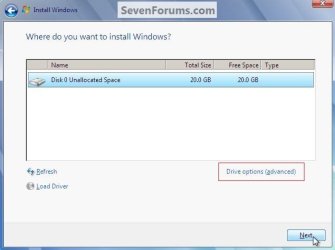
I went to the "where do you want to install windows?" and selected the disk and then New.
I let it decide for itself the size, then hit Apply.
It made 2 partitions. 1. 100MB, and 2. 298GB.
I selected the 298GB disk and hit next. It was going pretty well -it got passed 3 check marks. Then it suddenly stopped I received the error code:
Windows could not set the offline locale information. Error Code: 0x80FE0000

?What did I do wrong?
 

My Computer

Computer Manufacturer/Model Number
Acer Aspire 4810tz
OS
Windows Home Premium 32bit
Please follow these suggestions...

The error you are encountering that "could not set the offline locale infomation (error 0x80fe000), you may
be trying to install onto a logical drive instead of the primary drive. If you have two hard drives on your computer, look and see which one is set as the primary and make sure you start the install there.

You need to install Windows 7 on a primary partition not a logical partition. Make sure that the partition is created as primary one.

I would also run some diagnostics on your hard drive and make sure you aren't having any problems before starting the install.

1. Date and time is set correctly on the BIOS.
2. You also need to set the bios to boot disk 1, instead of the required disk 0. You may contact your computer manufactuerer for making any changes to the BIOS.
3. You need to disconnect any external devices from your computer, except Keyboard and Mouse and start the installation.

BIOS Disclaimer:
Modifying BIOS/ complementary metal oxide semiconductor (CMOS) settings incorrectly can causeserious problems that may prevent your computer from booting properly. Microsoft cannot guarantee that any problems resulting from the configuring of BIOS/CMOS settings can be solved.
Modifications of the settings are at your own risk.

Follow the below link to install Windows 7 on your computer.
Installing Windows 7: frequently asked questions

Also if you find any issues while installing the Operating system then you may follow the below link.
Windows 7 installation problems: frequently asked questions

source
 

My Computer

Computer type
PC/Desktop
Computer Manufacturer/Model Number
LENOVO K450 @3.0GHZ
OS
64-bit Windows 8.1 Pro
CPU
Core(TM) i5 CPU 4330 Haswell @ 3.20GHz
Motherboard
LENOVO
Memory
12.00 GB
Graphics Card(s)
Intel(R) HD Graphics
Sound Card
Intel HD integtrated
Monitor(s) Displays
HP 25' ISP Monitor
Screen Resolution
1900/1020
Hard Drives
(1) ST1000DM003-1CH162 (2) Generic STORAGE DEVICE USB Device (3) Generic STORAGE DEVICE USB Device
Internet Speed
100mb down/10mb up
I found info like TEWS did. Did you have the computer connected to the internet during the Install? When you used Partition Wizard, did you just use it to clean & make a new partition that is unallowcated without formatting it ?
 

My Computer

Computer type
PC/Desktop
Computer Manufacturer/Model Number
Built them myself, Science Experiments !
OS
Win7 Enterprise, Win7 x86 (Ult 7600), Win7 x64 Ult 7600, TechNet RTM on AMD x64 (2.8Ghz)
CPU
AMD fx8350 4ghz, AMD-32 2400mhz, AMD-64 3200mhz, AMDx64 2.8G
Motherboard
SIS 755, ECS-K8M890M-M (Ult 7600), GigaByte & others
Memory
2gb, 4gb on the Ult 7600, 4gb on Technet RTM, 32gb on FX8350
Graphics Card(s)
Draw my own Graphics, several nVidia cards
Sound Card
on motherboard
Monitor(s) Displays
19" flat scr, 28" I-Inc widescr,22" Emprex Widescr, 23" Acer
Screen Resolution
1280 x 1024, 1440 x 900, 1920 x 1080
Hard Drives
6 pata Ide HD's & 2 Sata HD's
added 80gb external on Ult 7600 computer,
numerous extra 1tb, 2TB, 3Tb SATA HD's
A collection of ext HD Docks w/ HDs
PSU
430w, 550w, 600w, 700, 800, etc
Case
All Generic Full Towers
Cooling
Open Air & a few fans, some w/ colored LEDs
Keyboard
Compaq & Dell recycled from GoodWill
Mouse
Made in China Optical Wired Mouse
Internet Speed
Fast Cable InterNet
Antivirus
AVG Free on 24 different Desktops, NO Problems!
Browser
IE 8 is preferred, but use FireFox sometimes
Other Info
Linksys Routers, switches, & Hubs
Too Many USB Flash Drives to count, Biggest is 64GB !
Eight computers in my home network.
Sixteen computers at my business network.
Linked via TeamViewer !
Lots of old used spare computer parts everywhere!
I was not connected to the internet when I installed (it's on a wireless connection) and there is nothing pluggged into my laptop aside from my AC adapter.)
I am currently re-wiping through partition wizard (because I assumed I did that wrong).
Last time, I did nothing else aside from wiping in partition wizard. Then I hit New in Windows install and formatted it there. Should I do that in partition wizard instead?

1. Date and time is set correctly on the BIOS.
yes
2. You also need to set the bios to boot disk 1, instead of the required disk 0. You may contact your computer manufactuerer for making any changes to the BIOS.
Only IDE0 is populated, IDE1 isn't...
3. You need to disconnect any external devices from your computer, except Keyboard and Mouse and start the installation.
nothing connected
 

My Computer

Computer Manufacturer/Model Number
Acer Aspire 4810tz
OS
Windows Home Premium 32bit
I have not done that many laptop installs, just a few. But on desktops I have the best luck on installs with a pre-formatted HD in NTFS format & being connected to the internet with a Cat5 ethernet cable. That way the Windows 7 installation can check for any needed updates or drivers. So you may try this combo with the link to the install using the Clean Install with the Upgrade DVD. I just love Trial & Error experiments :geek:
 

My Computer

Computer type
PC/Desktop
Computer Manufacturer/Model Number
Built them myself, Science Experiments !
OS
Win7 Enterprise, Win7 x86 (Ult 7600), Win7 x64 Ult 7600, TechNet RTM on AMD x64 (2.8Ghz)
CPU
AMD fx8350 4ghz, AMD-32 2400mhz, AMD-64 3200mhz, AMDx64 2.8G
Motherboard
SIS 755, ECS-K8M890M-M (Ult 7600), GigaByte & others
Memory
2gb, 4gb on the Ult 7600, 4gb on Technet RTM, 32gb on FX8350
Graphics Card(s)
Draw my own Graphics, several nVidia cards
Sound Card
on motherboard
Monitor(s) Displays
19" flat scr, 28" I-Inc widescr,22" Emprex Widescr, 23" Acer
Screen Resolution
1280 x 1024, 1440 x 900, 1920 x 1080
Hard Drives
6 pata Ide HD's & 2 Sata HD's
added 80gb external on Ult 7600 computer,
numerous extra 1tb, 2TB, 3Tb SATA HD's
A collection of ext HD Docks w/ HDs
PSU
430w, 550w, 600w, 700, 800, etc
Case
All Generic Full Towers
Cooling
Open Air & a few fans, some w/ colored LEDs
Keyboard
Compaq & Dell recycled from GoodWill
Mouse
Made in China Optical Wired Mouse
Internet Speed
Fast Cable InterNet
Antivirus
AVG Free on 24 different Desktops, NO Problems!
Browser
IE 8 is preferred, but use FireFox sometimes
Other Info
Linksys Routers, switches, & Hubs
Too Many USB Flash Drives to count, Biggest is 64GB !
Eight computers in my home network.
Sixteen computers at my business network.
Linked via TeamViewer !
Lots of old used spare computer parts everywhere!
This can be because the partition was not formatted first. It's a HD error.

Use PW CD to check file system on full HD.

I would Create & Format install partition Primary (not Logical) NTFS using PW CD, then Modify>Set to Active. Now try install to partition you've created.

Test your HD using maker's full diag/repair CD scan: http://www.tacktech.com/display.cfm?ttid=287

Test your memory using memtest86 bootable CD for 5-6 passes. Then remove all but 2gb for RAM to try install. http://www.memtest86.com/download.html
 
MyPCbroke,

Now a couple of practical questions.

If you turn your laptop upside down is there a COA (certificate of authorization) sticker there with a product nr?

On the DVD you got from the computer mfg, is there a product number or whatevere it is called?

This info you will need since you have already used Partition Wizard on the disk.

Personally, I think your ram and your harddisk are ok, otherwise, you would have had other problems.

I don't know what you have tried in the meantime or what the status is.

You are almost there.
 

My Computer

Computer Manufacturer/Model Number
Toshiba Satellite S875D-S7239 laptop
OS
MS Windows 7 Ultimate SP1 64-bit
CPU
AMD A10-4600M
Motherboard
AMD Pumori (Socket FT1)
Memory
6.00 GB Dual-Channel DDR3 @ 798MHz (11-11-12-28)
Graphics Card(s)
AMD Radeon HD 7660G
Sound Card
High Definition Audio Device
Monitor(s) Displays
Generic PnP Monitor (1600x900@60Hz)
Screen Resolution
1600x900@60Hz
Hard Drives
SSD 119GB Corsair CSSD-V128GB2 ATA Device
Keyboard
Standard PS/2 Keyboard
Mouse
HP Wireless Optical Mobile Mouse Model FHA-3410
Internet Speed
What the local pub, local coffee shop offers.
Other Info
Optical Drive:MATSHITA BD-CMB UJ160B ATA Device


Also have an Asus ha1002xp netbook with Win 7 Ultimate installed.
I haven't tried anything since rewiping via PW because I had to head off to work, but I'll try your advice when I get back.

In regard to the COA, yes it is there -but no legible (it is legit laptop, not laptop sitting on table). But the Windows 7 DVD does have a product key clearly written.

I would Create & Format install partition Primary (not Logical) NTFS using PW CD, then Modify>Set to Active. Now try install to partition you've created.

If given the option by PW, what size should I make the partitions? Because with Windows install I was guessing...
 

My Computer

Computer Manufacturer/Model Number
Acer Aspire 4810tz
OS
Windows Home Premium 32bit
I haven't tried anything since rewiping via PW because I had to head off to work, but I'll try your advice when I get back.

In regard to the COA, yes it is there -but no legible (it is legit laptop, not laptop sitting on table). But the Windows 7 DVD does have a product key clearly written.

I would Create & Format install partition Primary (not Logical) NTFS using PW CD, then Modify>Set to Active. Now try install to partition you've created.

If given the option by PW, what size should I make the partitions? Because with Windows install I was guessing...


:orb:

I always do the maximum, but if you want other partitions for data, etc, then make at leats a 40gb partition for win7 ;)
 

My Computer

Computer type
PC/Desktop
Computer Manufacturer/Model Number
Built them myself, Science Experiments !
OS
Win7 Enterprise, Win7 x86 (Ult 7600), Win7 x64 Ult 7600, TechNet RTM on AMD x64 (2.8Ghz)
CPU
AMD fx8350 4ghz, AMD-32 2400mhz, AMD-64 3200mhz, AMDx64 2.8G
Motherboard
SIS 755, ECS-K8M890M-M (Ult 7600), GigaByte & others
Memory
2gb, 4gb on the Ult 7600, 4gb on Technet RTM, 32gb on FX8350
Graphics Card(s)
Draw my own Graphics, several nVidia cards
Sound Card
on motherboard
Monitor(s) Displays
19" flat scr, 28" I-Inc widescr,22" Emprex Widescr, 23" Acer
Screen Resolution
1280 x 1024, 1440 x 900, 1920 x 1080
Hard Drives
6 pata Ide HD's & 2 Sata HD's
added 80gb external on Ult 7600 computer,
numerous extra 1tb, 2TB, 3Tb SATA HD's
A collection of ext HD Docks w/ HDs
PSU
430w, 550w, 600w, 700, 800, etc
Case
All Generic Full Towers
Cooling
Open Air & a few fans, some w/ colored LEDs
Keyboard
Compaq & Dell recycled from GoodWill
Mouse
Made in China Optical Wired Mouse
Internet Speed
Fast Cable InterNet
Antivirus
AVG Free on 24 different Desktops, NO Problems!
Browser
IE 8 is preferred, but use FireFox sometimes
Other Info
Linksys Routers, switches, & Hubs
Too Many USB Flash Drives to count, Biggest is 64GB !
Eight computers in my home network.
Sixteen computers at my business network.
Linked via TeamViewer !
Lots of old used spare computer parts everywhere!
Make the partition 50 GB. Later we will show you how to create a data partition in the rest of the space.

Alternatively, you can just use it all and then use PartitionWizard afterwards to shrink the partition so that you can have a separate data partition.

I've done both and the mileage is about the same.

When I think about it, for the time being, just create that one monster partition. That's a simpler approach.
 
Last edited by a moderator:

My Computer

Computer Manufacturer/Model Number
Toshiba Satellite S875D-S7239 laptop
OS
MS Windows 7 Ultimate SP1 64-bit
CPU
AMD A10-4600M
Motherboard
AMD Pumori (Socket FT1)
Memory
6.00 GB Dual-Channel DDR3 @ 798MHz (11-11-12-28)
Graphics Card(s)
AMD Radeon HD 7660G
Sound Card
High Definition Audio Device
Monitor(s) Displays
Generic PnP Monitor (1600x900@60Hz)
Screen Resolution
1600x900@60Hz
Hard Drives
SSD 119GB Corsair CSSD-V128GB2 ATA Device
Keyboard
Standard PS/2 Keyboard
Mouse
HP Wireless Optical Mobile Mouse Model FHA-3410
Internet Speed
What the local pub, local coffee shop offers.
Other Info
Optical Drive:MATSHITA BD-CMB UJ160B ATA Device


Also have an Asus ha1002xp netbook with Win 7 Ultimate installed.
You would save a lot of work later if you create a 40/50GB partition to install to before the install.


If you want to have the 100MB "System, Reserved" boot partition added, you can do the create/format at this dialog box during the install; that is if the HDD is still "unallocated" after the wipe.


click to enlarge
New Partition.jpg
 

My Computer

Computer Manufacturer/Model Number
* BFK Customs *
OS
W 7 64-bit Ultimate
CPU
Intel Q9550 Yorkfield
Motherboard
ASUS P5Q Pro
Memory
8GB Dominator 8500C5D
Graphics Card(s)
ATI : XFX 5870
Sound Card
Realtek HD Audio 7-1
Monitor(s) Displays
1x 47" LCD HDMI & 3x 26" LCD HDMI
Screen Resolution
1920x1080P & 1920x1200
Hard Drives
1x 80GB Intel X25-M G2 SSD : 1x 500GB & 1x 640GB WD Caviar Black(s)
PSU
Corsair 620HX
Case
Cooler Master RC-690
Cooling
Tuniq Tower 120, 2x 140mm and 3x 120mm case fans
Keyboard
Microsoft 500
Mouse
Razer Diamondback 3G
Internet Speed
14 Mb/s
Other Info
1x Koutech 3Gb/s SATA HDD Hot Swap Rack
Haha. Someone is going to have TELL me what to do about the make partition now or later issue, I am no where near qualified/know what I'm doing to make decision -because either way I'm still not sure what I'm doing.
 

My Computer

Computer Manufacturer/Model Number
Acer Aspire 4810tz
OS
Windows Home Premium 32bit
Hello again.


Did you read everyone's opinion in the posts above your last post? ^ ^
 

My Computer

Computer Manufacturer/Model Number
* BFK Customs *
OS
W 7 64-bit Ultimate
CPU
Intel Q9550 Yorkfield
Motherboard
ASUS P5Q Pro
Memory
8GB Dominator 8500C5D
Graphics Card(s)
ATI : XFX 5870
Sound Card
Realtek HD Audio 7-1
Monitor(s) Displays
1x 47" LCD HDMI & 3x 26" LCD HDMI
Screen Resolution
1920x1080P & 1920x1200
Hard Drives
1x 80GB Intel X25-M G2 SSD : 1x 500GB & 1x 640GB WD Caviar Black(s)
PSU
Corsair 620HX
Case
Cooler Master RC-690
Cooling
Tuniq Tower 120, 2x 140mm and 3x 120mm case fans
Keyboard
Microsoft 500
Mouse
Razer Diamondback 3G
Internet Speed
14 Mb/s
Other Info
1x Koutech 3Gb/s SATA HDD Hot Swap Rack
MyPCbroke,

Just charge ahead with the install. If a problem occurs, then yell.

We quite ofter forget that the average user has not been installing Win 7 many times and that the average user is not an expert at this kind of thing.

The procedures we follow simply aren't always the easiest for a neophyte.

You just go ahead and install.

You need a working computer.
 

My Computer

Computer Manufacturer/Model Number
Toshiba Satellite S875D-S7239 laptop
OS
MS Windows 7 Ultimate SP1 64-bit
CPU
AMD A10-4600M
Motherboard
AMD Pumori (Socket FT1)
Memory
6.00 GB Dual-Channel DDR3 @ 798MHz (11-11-12-28)
Graphics Card(s)
AMD Radeon HD 7660G
Sound Card
High Definition Audio Device
Monitor(s) Displays
Generic PnP Monitor (1600x900@60Hz)
Screen Resolution
1600x900@60Hz
Hard Drives
SSD 119GB Corsair CSSD-V128GB2 ATA Device
Keyboard
Standard PS/2 Keyboard
Mouse
HP Wireless Optical Mobile Mouse Model FHA-3410
Internet Speed
What the local pub, local coffee shop offers.
Other Info
Optical Drive:MATSHITA BD-CMB UJ160B ATA Device


Also have an Asus ha1002xp netbook with Win 7 Ultimate installed.
Click Drive Options (Advanced) and create a 60GB partition for Windows and your programs. Make a 2nd partition with the rest of the available space for your data.
 

My Computer

Computer Manufacturer/Model Number
tw33k
OS
Windows 7 Ultimate (x64) SP1
CPU
Intel 3770k 4.6GHz
Motherboard
ASUS Maximus V Formula
Memory
8GB (2x 4GB) Crucial Ballistix
Graphics Card(s)
Sapphire 7950 (1060/1600)
Sound Card
On Board Realtek HD Audio
Monitor(s) Displays
27" Acer B273HU (via HDMI)
Screen Resolution
2048 x 1152
Hard Drives
Crucial M4 128GB
2TB WD Black
1TB Samsung F3 SATA
1TB WD Elite External
2TB WD USB 3.0
PSU
Corsair AX750 Gold
Case
Corsair Obsidian 800DW
Cooling
Corsair H100 (2x AP-121/2x UK-3000 push/pull)
Keyboard
Microsoft Wireless 5000
Mouse
Microsoft Wireless 5000
Internet Speed
5mb/s
Other Info
Logitech z-2300 2.1 speakers
Lamptron FC-5 v2
Back
Top