please don't laugh...

Change letter isn't an option in PW... it's also greyed out

Probably greyed out because they are unformatted partitions :huh:
 

My Computer

Computer type
PC/Desktop
Computer Manufacturer/Model Number
Built them myself, Science Experiments !
OS
Win7 Enterprise, Win7 x86 (Ult 7600), Win7 x64 Ult 7600, TechNet RTM on AMD x64 (2.8Ghz)
CPU
AMD fx8350 4ghz, AMD-32 2400mhz, AMD-64 3200mhz, AMDx64 2.8G
Motherboard
SIS 755, ECS-K8M890M-M (Ult 7600), GigaByte & others
Memory
2gb, 4gb on the Ult 7600, 4gb on Technet RTM, 32gb on FX8350
Graphics Card(s)
Draw my own Graphics, several nVidia cards
Sound Card
on motherboard
Monitor(s) Displays
19" flat scr, 28" I-Inc widescr,22" Emprex Widescr, 23" Acer
Screen Resolution
1280 x 1024, 1440 x 900, 1920 x 1080
Hard Drives
6 pata Ide HD's & 2 Sata HD's
added 80gb external on Ult 7600 computer,
numerous extra 1tb, 2TB, 3Tb SATA HD's
A collection of ext HD Docks w/ HDs
PSU
430w, 550w, 600w, 700, 800, etc
Case
All Generic Full Towers
Cooling
Open Air & a few fans, some w/ colored LEDs
Keyboard
Compaq & Dell recycled from GoodWill
Mouse
Made in China Optical Wired Mouse
Internet Speed
Fast Cable InterNet
Antivirus
AVG Free on 24 different Desktops, NO Problems!
Browser
IE 8 is preferred, but use FireFox sometimes
Other Info
Linksys Routers, switches, & Hubs
Too Many USB Flash Drives to count, Biggest is 64GB !
Eight computers in my home network.
Sixteen computers at my business network.
Linked via TeamViewer !
Lots of old used spare computer parts everywhere!
How about Surface Scan?

Is there any chance you tried install to Logical partition? Because that is the first cause of this error.

You've tried partitioning and formatting using Win7 DVD resulting in error, then partitioning, formatting and marking Active with PW resulting in same error, correct?
Yes

I am running Surface Scan right now.
 

My Computer

Computer Manufacturer/Model Number
Acer Aspire 4810tz
OS
Windows Home Premium 32bit
To run Disk Check from booted DVD, first repartition, format, assign drive letter.

Boot DVD, press shift F10 to open a Command Line, type:
DISKPART
SELECT DISK 0
CLEAN
CREATE PARTITION PRIMARY
FORMAT FS=NTFS
ASSIGN letter=C
EXIT (only exits Diskpart)
CHKDSK C: /f
EXIT

Then select Install Now to try install to C partition.
 
It looks like Gateway has taken down GWScan which is the Data Lifeguard version I have used for years on all makes and models of HD"s. I can put it up briefly for you to download to burn to CD as it may work better than Data Lifeguard, which gets regular complaints.

When you run .exe file (as Admin) it will unzip to C:Cabs where you can browse to the ISO file to burn to CD with ImgBurn at 4x speed. Let me know when you get it done as I need to take down this file.

I have downloaded the file and currently burning it. Also, I am also at the format fs=ntfs step. It's crawling along at 31%.
 

My Computer

Computer Manufacturer/Model Number
Acer Aspire 4810tz
OS
Windows Home Premium 32bit
It's a 320gb HD, so it will go slow formatting to 100%
 

My Computer

Computer type
PC/Desktop
Computer Manufacturer/Model Number
Built them myself, Science Experiments !
OS
Win7 Enterprise, Win7 x86 (Ult 7600), Win7 x64 Ult 7600, TechNet RTM on AMD x64 (2.8Ghz)
CPU
AMD fx8350 4ghz, AMD-32 2400mhz, AMD-64 3200mhz, AMDx64 2.8G
Motherboard
SIS 755, ECS-K8M890M-M (Ult 7600), GigaByte & others
Memory
2gb, 4gb on the Ult 7600, 4gb on Technet RTM, 32gb on FX8350
Graphics Card(s)
Draw my own Graphics, several nVidia cards
Sound Card
on motherboard
Monitor(s) Displays
19" flat scr, 28" I-Inc widescr,22" Emprex Widescr, 23" Acer
Screen Resolution
1280 x 1024, 1440 x 900, 1920 x 1080
Hard Drives
6 pata Ide HD's & 2 Sata HD's
added 80gb external on Ult 7600 computer,
numerous extra 1tb, 2TB, 3Tb SATA HD's
A collection of ext HD Docks w/ HDs
PSU
430w, 550w, 600w, 700, 800, etc
Case
All Generic Full Towers
Cooling
Open Air & a few fans, some w/ colored LEDs
Keyboard
Compaq & Dell recycled from GoodWill
Mouse
Made in China Optical Wired Mouse
Internet Speed
Fast Cable InterNet
Antivirus
AVG Free on 24 different Desktops, NO Problems!
Browser
IE 8 is preferred, but use FireFox sometimes
Other Info
Linksys Routers, switches, & Hubs
Too Many USB Flash Drives to count, Biggest is 64GB !
Eight computers in my home network.
Sixteen computers at my business network.
Linked via TeamViewer !
Lots of old used spare computer parts everywhere!
You are moving right along. Anything found on the PW surface scan?

It would be disturbing if GWScan doesn't see the HD.

GWscan should autostart to a DOS screen with 3 choices: type in 1 to Run GWScan, press Enter. On next screen, use down arrow to select Extended Scan. After scan completes, arrow down to Exit, then restart computer into DVD to try install again.

It's a 320gb HD, so it will go slow formatting to 100%

Doesn't the full format include chkdsk, but only quarantines bad sectors?

If so, it should still be a good idea to run chkdsk /f.
 
It came out all green for the surface scan. And I'm at 41% now...
 

My Computer

Computer Manufacturer/Model Number
Acer Aspire 4810tz
OS
Windows Home Premium 32bit
The full format may do it. THis is a disk or BIOS problem according to Google results I skimmed.

If you're forced to recover Vista then a BIOS update should be done from Vista if one is available from the Support Downloads webpage for your model computer. This has also solved the error for some.

Once the BIOS is updated, I'd try the booted clean installer again, next run installer from Vista, then as a last resort in-place Upgrade.
 
Last edited:
Ok, to clarify, I am doing these steps:
Boot DVD, press shift F10 to open a Command Line, type:
DISKPART
SELECT DISK 0
CLEAN
CREATE PARTITION PRIMARY
FORMAT FS=NTFS
ASSIGN letter=C
EXIT (only exits Diskpart)
CHKDSK C: /f
EXIT

Then I'm going to boot with the GWScan disc

Then I'm attempting to install via Windows DVD on C:
 

My Computer

Computer Manufacturer/Model Number
Acer Aspire 4810tz
OS
Windows Home Premium 32bit
Good.

If all that fails, then I'd complete testing hardware by running memtest86 CD for 5-6 passes. Memtest86 - Download Page

Then you can either Google the error text and number and read more in depth to try to get to a fix, or run the Vista Recovery disk, Update BIOS, try install from Vista - even an in-place Upgrade as a last resort.

Others may have more ideas. I will call in some heavier artillery.
 
Wow, one hell of a week.

Alright, since the integrity of the drive and whatnot seems to be in question...

Can you download Ubuntu, burn it to a CD, and then boot onto it? I just want to check that everything is more or less working alright. We will also be able to see your partitions (and work with them) from within Ubuntu.
http://www.ubuntu.com/desktop/get-ubuntu/download

~Lordbob
 

My Computer

Computer Manufacturer/Model Number
Hera
OS
Windows 7 Ultimate x64, Mint 9
CPU
Intel i5-2500k
Motherboard
ASUS P8P67 Pro
Memory
2x 4Gb Corsair VENGEANCE DDR3-1600
Graphics Card(s)
NVidia GeForce N260GTX Twin Frozr
Sound Card
Realtek HD OnBoard Audio
Monitor(s) Displays
ASUS 24" Monitor
Screen Resolution
1920x1080
Hard Drives
G.SKILL Phoenix Series 60GB SATA II MLC Internal Solid State Drive (SSD)
SAMSUNG Spinpoint F3R 1TB 7200 RPM 32MB Cache SATA II
PSU
Cooler Master Real Power Pro 750W
Case
Cooler Master Haf 932
Cooling
Fans
Keyboard
Razer Tarantula
Mouse
Razer Lachesis
Internet Speed
not fast enough
What stage are you at now ?
 

My Computer

Computer type
PC/Desktop
Computer Manufacturer/Model Number
Built them myself, Science Experiments !
OS
Win7 Enterprise, Win7 x86 (Ult 7600), Win7 x64 Ult 7600, TechNet RTM on AMD x64 (2.8Ghz)
CPU
AMD fx8350 4ghz, AMD-32 2400mhz, AMD-64 3200mhz, AMDx64 2.8G
Motherboard
SIS 755, ECS-K8M890M-M (Ult 7600), GigaByte & others
Memory
2gb, 4gb on the Ult 7600, 4gb on Technet RTM, 32gb on FX8350
Graphics Card(s)
Draw my own Graphics, several nVidia cards
Sound Card
on motherboard
Monitor(s) Displays
19" flat scr, 28" I-Inc widescr,22" Emprex Widescr, 23" Acer
Screen Resolution
1280 x 1024, 1440 x 900, 1920 x 1080
Hard Drives
6 pata Ide HD's & 2 Sata HD's
added 80gb external on Ult 7600 computer,
numerous extra 1tb, 2TB, 3Tb SATA HD's
A collection of ext HD Docks w/ HDs
PSU
430w, 550w, 600w, 700, 800, etc
Case
All Generic Full Towers
Cooling
Open Air & a few fans, some w/ colored LEDs
Keyboard
Compaq & Dell recycled from GoodWill
Mouse
Made in China Optical Wired Mouse
Internet Speed
Fast Cable InterNet
Antivirus
AVG Free on 24 different Desktops, NO Problems!
Browser
IE 8 is preferred, but use FireFox sometimes
Other Info
Linksys Routers, switches, & Hubs
Too Many USB Flash Drives to count, Biggest is 64GB !
Eight computers in my home network.
Sixteen computers at my business network.
Linked via TeamViewer !
Lots of old used spare computer parts everywhere!
Wow, one hell of a week.

Alright, since the integrity of the drive and whatnot seems to be in question...

Can you download Ubuntu, burn it to a CD, and then boot onto it? I just want to check that everything is more or less working alright. We will also be able to see your partitions (and work with them) from within Ubuntu.
Download | Ubuntu

~Lordbob
That we can do with the Win 7 DVD or with a WiN 7 System Repair Disc.
 

My Computer

Computer Manufacturer/Model Number
Toshiba Satellite S875D-S7239 laptop
OS
MS Windows 7 Ultimate SP1 64-bit
CPU
AMD A10-4600M
Motherboard
AMD Pumori (Socket FT1)
Memory
6.00 GB Dual-Channel DDR3 @ 798MHz (11-11-12-28)
Graphics Card(s)
AMD Radeon HD 7660G
Sound Card
High Definition Audio Device
Monitor(s) Displays
Generic PnP Monitor (1600x900@60Hz)
Screen Resolution
1600x900@60Hz
Hard Drives
SSD 119GB Corsair CSSD-V128GB2 ATA Device
Keyboard
Standard PS/2 Keyboard
Mouse
HP Wireless Optical Mobile Mouse Model FHA-3410
Internet Speed
What the local pub, local coffee shop offers.
Other Info
Optical Drive:MATSHITA BD-CMB UJ160B ATA Device


Also have an Asus ha1002xp netbook with Win 7 Ultimate installed.
Wow, one hell of a week.

Alright, since the integrity of the drive and whatnot seems to be in question...

Can you download Ubuntu, burn it to a CD, and then boot onto it? I just want to check that everything is more or less working alright. We will also be able to see your partitions (and work with them) from within Ubuntu.
Download | Ubuntu

~Lordbob
That we can do with the Win 7 DVD or with a WiN 7 System Repair Disc.
You can't boot into Windows without installing it first...

My point is that it will be a lot easier to work with since she is having problems with the harddrive booting.

~Lordbob
 

My Computer

Computer Manufacturer/Model Number
Hera
OS
Windows 7 Ultimate x64, Mint 9
CPU
Intel i5-2500k
Motherboard
ASUS P8P67 Pro
Memory
2x 4Gb Corsair VENGEANCE DDR3-1600
Graphics Card(s)
NVidia GeForce N260GTX Twin Frozr
Sound Card
Realtek HD OnBoard Audio
Monitor(s) Displays
ASUS 24" Monitor
Screen Resolution
1920x1080
Hard Drives
G.SKILL Phoenix Series 60GB SATA II MLC Internal Solid State Drive (SSD)
SAMSUNG Spinpoint F3R 1TB 7200 RPM 32MB Cache SATA II
PSU
Cooler Master Real Power Pro 750W
Case
Cooler Master Haf 932
Cooling
Fans
Keyboard
Razer Tarantula
Mouse
Razer Lachesis
Internet Speed
not fast enough
My good man.

You boot up the Win 7 DVD and at the first dialog you push SHIFT F10 key combo. This gets you to a WinPE installed in ram. From this point, with DiskPart you can do everything and more than disk managment does.
 

My Computer

Computer Manufacturer/Model Number
Toshiba Satellite S875D-S7239 laptop
OS
MS Windows 7 Ultimate SP1 64-bit
CPU
AMD A10-4600M
Motherboard
AMD Pumori (Socket FT1)
Memory
6.00 GB Dual-Channel DDR3 @ 798MHz (11-11-12-28)
Graphics Card(s)
AMD Radeon HD 7660G
Sound Card
High Definition Audio Device
Monitor(s) Displays
Generic PnP Monitor (1600x900@60Hz)
Screen Resolution
1600x900@60Hz
Hard Drives
SSD 119GB Corsair CSSD-V128GB2 ATA Device
Keyboard
Standard PS/2 Keyboard
Mouse
HP Wireless Optical Mobile Mouse Model FHA-3410
Internet Speed
What the local pub, local coffee shop offers.
Other Info
Optical Drive:MATSHITA BD-CMB UJ160B ATA Device


Also have an Asus ha1002xp netbook with Win 7 Ultimate installed.
My good man.

You boot up the Win 7 DVD and at the first dialog you push SHIFT F10 key combo. This gets you to a WinPE installed in ram. From this point, with DiskPart you can do everything and more than disk managment does.
I never knew that...
Learn something everyday I suppose.

In that case, we don't need to use Ubuntu (though we still could).
My only other concern is the disk she has. I know she mentioned it, but I know it was not a full install disk...

~Lordbob
 

My Computer

Computer Manufacturer/Model Number
Hera
OS
Windows 7 Ultimate x64, Mint 9
CPU
Intel i5-2500k
Motherboard
ASUS P8P67 Pro
Memory
2x 4Gb Corsair VENGEANCE DDR3-1600
Graphics Card(s)
NVidia GeForce N260GTX Twin Frozr
Sound Card
Realtek HD OnBoard Audio
Monitor(s) Displays
ASUS 24" Monitor
Screen Resolution
1920x1080
Hard Drives
G.SKILL Phoenix Series 60GB SATA II MLC Internal Solid State Drive (SSD)
SAMSUNG Spinpoint F3R 1TB 7200 RPM 32MB Cache SATA II
PSU
Cooler Master Real Power Pro 750W
Case
Cooler Master Haf 932
Cooling
Fans
Keyboard
Razer Tarantula
Mouse
Razer Lachesis
Internet Speed
not fast enough
Ok, aside from the past few posts confusing me, I am currently at GWScan and I'm not sure what I'm doing.

I have these options:
Select Drive
Check Smart Status
Quick Test
Extended Test
Write Zeros To Drive
View Test Results
Print Test Results
Log File Open/Close
Help
Quit

?which do I pick?
 

My Computer

Computer Manufacturer/Model Number
Acer Aspire 4810tz
OS
Windows Home Premium 32bit
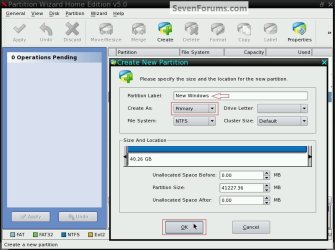
You may be getting "Logical" partitions by default when you create them using Partition Wizard as the default is logical and Windows cannot / is not able to boot (start) from a logical partition; be sure to pay attention when presented with this dialog box.


click to enlarge
Create_Primary.jpg
 

My Computer

Computer Manufacturer/Model Number
* BFK Customs *
OS
W 7 64-bit Ultimate
CPU
Intel Q9550 Yorkfield
Motherboard
ASUS P5Q Pro
Memory
8GB Dominator 8500C5D
Graphics Card(s)
ATI : XFX 5870
Sound Card
Realtek HD Audio 7-1
Monitor(s) Displays
1x 47" LCD HDMI & 3x 26" LCD HDMI
Screen Resolution
1920x1080P & 1920x1200
Hard Drives
1x 80GB Intel X25-M G2 SSD : 1x 500GB & 1x 640GB WD Caviar Black(s)
PSU
Corsair 620HX
Case
Cooler Master RC-690
Cooling
Tuniq Tower 120, 2x 140mm and 3x 120mm case fans
Keyboard
Microsoft 500
Mouse
Razer Diamondback 3G
Internet Speed
14 Mb/s
Other Info
1x Koutech 3Gb/s SATA HDD Hot Swap Rack
You're right BFK, the System Reserved partition is now 'Logical' and should be 'Primary'.


You need to give partition a drive letter in PW to Check File System. WHile you're at it, Resize partition to include whole HD.


How do I give the partition a drive letter?
Also, I'm not sure what you mean with resive to include whole HD.
Currently, I have 2. One with 297.99GB (Primary Active) and the other has 104.47MB (logical)


You need to change this: the other has 104.47MB (logical), to a Primary Partition.

This was initially setup as your System Reserved Boot Partition.
It will Fail to install as the boot files are there and the OS is in the other Partition.

Boot into the Partition Wizard CD and change the 104.47MB partition to Primary and Active.
First, Partition Tab > Modify > Set Partition as Primary
Then, Partition Tab > Modify > Set Active
Make sure they are both 'Primary' partitions.

Then post a camera shot of PW with the two partitions.
 
Last edited:

My Computer

Computer type
PC/Desktop
Computer Manufacturer/Model Number
76~2.0
OS
Windows 7 Ult x64 - SP1/ Windows 8 Pro x64
CPU
Intel Core i5-3570K 4.6GHz
Motherboard
Gigabyte GA-Z77X UD3H, f18
Memory
8GB (2X4GB) DDR3 1600 Corsair Vengeance CL8 1.5v
Graphics Card(s)
Sapphire HD 7770 Vapor-X OC 1GB DDR5
Sound Card
Onboard VIA VT2021
Monitor(s) Displays
22" LCD Dell
Screen Resolution
1680x1050
Hard Drives
Samsung 840Pro 128GB SSD,
Seagate Barracuda 500GB SATA2 7200rpm 32MB cache, Seagate Barracuda 1TB SATA2 7200rpm 32MB cache,
PSU
Corsair HX650W
Case
Cooler Master Storm Scout
Cooling
Corsair H80 2x12cm Noctua NF P12 , 2x14cm case fans
Keyboard
Logitech Wave
Mouse
CM Sentinel
Internet Speed
Dismal
Antivirus
Avast
Browser
Opera Next
Other Info
Haswell laptop: HP Envy 17t-j, i7-4700MQ, GeForce 740M 2GB DDR3, 17.3" Full HD 1920x1080, 16GB RAM, Samsung 840 Pro 128GB, 1TB Hitachi 7200 HDD,
Desktop: eSATA ports,
External eSATA Seagate 500GB SATA2 7200rpm,
External WD USB 500GB
Ok, to clarify, I am doing these steps:
Boot DVD, press shift F10 to open a Command Line, type:
DISKPART
SELECT DISK 0
CLEAN
CREATE PARTITION PRIMARY
FORMAT FS=NTFS
ASSIGN letter=C
EXIT (only exits Diskpart)
CHKDSK C: /f
EXIT

Ok, I did this step then per the suggestion of other I booted PW again. Now I only have 1 partition listed...
Partition *:
File Stystem
NTFS
Capacity
298.09 GB
Used
95.05 MB
Unused
298.00 GB
Status
Active
Type
Primary

?confused
 

My Computer

Computer Manufacturer/Model Number
Acer Aspire 4810tz
OS
Windows Home Premium 32bit
Back
Top