please don't laugh...

Again, question: Will I be asked to "hit any key to load CD/DVD" after each repair/restart? because I feel like I'm going in circles. If it's repairing, I'll keep doing it, but I was assuming the pc would take action on its own (which it doesn't at the beginning)

You want to see if HD will start up before booting back into DVD to run another repair.

The Recovered flag means it should start IF it is marked Active. I highly recommend you use Partition Wizard bootable CD to look at the Disk Management picture which will confirm Active flag, allow you to browse for files and reveal unexpected issues:

Example: Is WIn7 installed on a Logical partition which cannot be marked Active to recover the System MBR into it? Instead it must be recovered into a primary SysReserved partition. In that case look for the 100mb SysReserved partition to mark Active. The PW picture can tell us this.
 
Also, this time after hitting "Repair My Computer" it had (recovered) listed instead of "Windows 7" like before... am I on the right track?

Did it have windows seven and Windows seven recovered listed and you had to make a choice?
If it did chose recovered and see if it loads.

It only has:
(recovered) 10138 MB (C:) Local Disk
 

My Computer

Computer Manufacturer/Model Number
Acer Aspire 4810tz
OS
Windows Home Premium 32bit
Aside from the happy face that I didn't mean in the prev post, I have the boot order as 1. IDE0 and 2. CD/DVD.

Am I correct in assuming that the HD will try to load, then it will go to CD/DVD if it doesn't? Or will I always get a press any key for CD/DVD if I have the windows DVD in there?
 

My Computer

Computer Manufacturer/Model Number
Acer Aspire 4810tz
OS
Windows Home Premium 32bit
I marked it active via command prompt. And I was under the assumption I couldn't retreive files because Microsoft phone guy told me to do certain command (not sure what they were for, I think he heard the desperation in my voice)
if I remember correctly it was: clean, format fs=ntfs
does that mean anything to anyone?

With Clean command you had your HD wiped and formatted. Did it ever start up during install?

Am I correct in assuming that the HD will try to load, then it will go to CD/DVD if it doesn't? Or will I always get a press any key for CD/DVD if I have the windows DVD in there?

It should not even be offering you to boot DVD if you have HD set first to boot. But if you don't press any key then it should boot to HD and it appears it is trying if you are getting that error. Try again.

There should also be a popup Boot Menu accessed by tapping F2 key at boot to make these choices if you are unsure.
 
Last edited:
I don't know if I'm doing everything wrong. But I tried all steps up to getting the Partition Wizard. I burned it to a CD, but I keep getting "No bootable device -- insert boot disk and press any key"
and I have selected CD/DVD from my boot menu...
 

My Computer

Computer Manufacturer/Model Number
Acer Aspire 4810tz
OS
Windows Home Premium 32bit
Did you click on the ISO to use built-in Windows Image Burner to burn PW ISO file to CD? You can't just copy it to DVD. It needs an Image BUrner.

Use ImgBurn at 4x speed to know it is burned bootable. http://www.imgburn.com/

Where did you get Win7 DVD? Did you burn it yourself? Was this a factory install?
 
This is a Windows 7 Retail DVD you are using for the repair ?
 

My Computer

Computer type
PC/Desktop
Computer Manufacturer/Model Number
Built them myself, Science Experiments !
OS
Win7 Enterprise, Win7 x86 (Ult 7600), Win7 x64 Ult 7600, TechNet RTM on AMD x64 (2.8Ghz)
CPU
AMD fx8350 4ghz, AMD-32 2400mhz, AMD-64 3200mhz, AMDx64 2.8G
Motherboard
SIS 755, ECS-K8M890M-M (Ult 7600), GigaByte & others
Memory
2gb, 4gb on the Ult 7600, 4gb on Technet RTM, 32gb on FX8350
Graphics Card(s)
Draw my own Graphics, several nVidia cards
Sound Card
on motherboard
Monitor(s) Displays
19" flat scr, 28" I-Inc widescr,22" Emprex Widescr, 23" Acer
Screen Resolution
1280 x 1024, 1440 x 900, 1920 x 1080
Hard Drives
6 pata Ide HD's & 2 Sata HD's
added 80gb external on Ult 7600 computer,
numerous extra 1tb, 2TB, 3Tb SATA HD's
A collection of ext HD Docks w/ HDs
PSU
430w, 550w, 600w, 700, 800, etc
Case
All Generic Full Towers
Cooling
Open Air & a few fans, some w/ colored LEDs
Keyboard
Compaq & Dell recycled from GoodWill
Mouse
Made in China Optical Wired Mouse
Internet Speed
Fast Cable InterNet
Antivirus
AVG Free on 24 different Desktops, NO Problems!
Browser
IE 8 is preferred, but use FireFox sometimes
Other Info
Linksys Routers, switches, & Hubs
Too Many USB Flash Drives to count, Biggest is 64GB !
Eight computers in my home network.
Sixteen computers at my business network.
Linked via TeamViewer !
Lots of old used spare computer parts everywhere!
Greg,
Sonic RecordNow! picked the option for me and it is saved as:
pwhe52
ISO Image file

Doc,
It is the Windows 7 upgrade DVD they sent from Acer. My pc originally had Vista but I bought it after a certain date so I received a free (?) update
 

My Computer

Computer Manufacturer/Model Number
Acer Aspire 4810tz
OS
Windows Home Premium 32bit
I don't know if Sonic burns ISO disks. It is not being seen as a bootable disk anyway.

Best to use the built-in Win7 image burner or ImgBurn.

It would be good to see a picture of your HD using PW CD to know what is there. But if Win7 is on a primary partition and is marked System Active and won't repair after 3 attempts, there isn't much else we can do - Except look to see if you have a Recovery partition to run in case Win7 won't install. That way you can upgrade to 7 from Vista if it becomes necessary. Or do you have the Vista recov disks?

If you're ready to try reinstall we can do that, too. Or wait until tomorrow?
 
Greg,
Sonic RecordNow! picked the option for me and it is saved as:
pwhe52
ISO Image file

Doc,
It is the Windows 7 upgrade DVD they sent from Acer. My pc originally had Vista but I bought it after a certain date so I received a free (?) update


In reading all the different posts here, I think the Microsoft helpers may have Cleaned & deleted the main win7 OS. So Fresh Clean install might be the best option ;)


" It only has:
(recovered) 10138 MB
(C:) Local Disk "

That sounds like the size of the recovery partition installed by the manufacture :shock:
 

My Computer

Computer type
PC/Desktop
Computer Manufacturer/Model Number
Built them myself, Science Experiments !
OS
Win7 Enterprise, Win7 x86 (Ult 7600), Win7 x64 Ult 7600, TechNet RTM on AMD x64 (2.8Ghz)
CPU
AMD fx8350 4ghz, AMD-32 2400mhz, AMD-64 3200mhz, AMDx64 2.8G
Motherboard
SIS 755, ECS-K8M890M-M (Ult 7600), GigaByte & others
Memory
2gb, 4gb on the Ult 7600, 4gb on Technet RTM, 32gb on FX8350
Graphics Card(s)
Draw my own Graphics, several nVidia cards
Sound Card
on motherboard
Monitor(s) Displays
19" flat scr, 28" I-Inc widescr,22" Emprex Widescr, 23" Acer
Screen Resolution
1280 x 1024, 1440 x 900, 1920 x 1080
Hard Drives
6 pata Ide HD's & 2 Sata HD's
added 80gb external on Ult 7600 computer,
numerous extra 1tb, 2TB, 3Tb SATA HD's
A collection of ext HD Docks w/ HDs
PSU
430w, 550w, 600w, 700, 800, etc
Case
All Generic Full Towers
Cooling
Open Air & a few fans, some w/ colored LEDs
Keyboard
Compaq & Dell recycled from GoodWill
Mouse
Made in China Optical Wired Mouse
Internet Speed
Fast Cable InterNet
Antivirus
AVG Free on 24 different Desktops, NO Problems!
Browser
IE 8 is preferred, but use FireFox sometimes
Other Info
Linksys Routers, switches, & Hubs
Too Many USB Flash Drives to count, Biggest is 64GB !
Eight computers in my home network.
Sixteen computers at my business network.
Linked via TeamViewer !
Lots of old used spare computer parts everywhere!
Mypcborke,
Please follow Greg's advice and use ImgBurn to burn that iso file. This is a 100% solution to burning an iso file.

ImgBurn
 

My Computer

Computer Manufacturer/Model Number
Toshiba Satellite S875D-S7239 laptop
OS
MS Windows 7 Ultimate SP1 64-bit
CPU
AMD A10-4600M
Motherboard
AMD Pumori (Socket FT1)
Memory
6.00 GB Dual-Channel DDR3 @ 798MHz (11-11-12-28)
Graphics Card(s)
AMD Radeon HD 7660G
Sound Card
High Definition Audio Device
Monitor(s) Displays
Generic PnP Monitor (1600x900@60Hz)
Screen Resolution
1600x900@60Hz
Hard Drives
SSD 119GB Corsair CSSD-V128GB2 ATA Device
Keyboard
Standard PS/2 Keyboard
Mouse
HP Wireless Optical Mobile Mouse Model FHA-3410
Internet Speed
What the local pub, local coffee shop offers.
Other Info
Optical Drive:MATSHITA BD-CMB UJ160B ATA Device


Also have an Asus ha1002xp netbook with Win 7 Ultimate installed.
CD burned via ImgBurn and booted! (it's the small victories)
In regard to Vista recover disk I do no have them (of course I would make it more difficult).
The Windows 7 was sent to me from Acer it says:
Windows 7 Upgrade Media
The disc contains 32-bit software only
 

My Computer

Computer Manufacturer/Model Number
Acer Aspire 4810tz
OS
Windows Home Premium 32bit
Since you have the Recov Disks, I'd recommend zeroing the whole drive when you choose to reinstall. You can do it from the Disk tab on Partition Wizard.

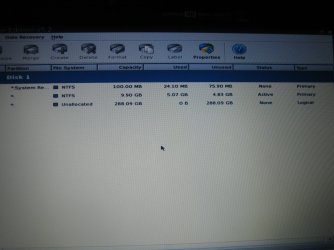
Can you first post back a clear camera snap of the booted Partition Wizard drive map?

Attach using paper clip in Reply box.

If the listings on each partition are not clear, please type them out for us.
 
I'm hoping that's clear enough
 

Attachments

  • IMG_5954.JPG
    IMG_5954.JPG
    343.9 KB · Views: 70

My Computer

Computer Manufacturer/Model Number
Acer Aspire 4810tz
OS
Windows Home Premium 32bit
The middle partition is likely an old OEM factory utility partition as it is too small to install WIn7 into.

I would wipe the HD now from the PW CD Disk tab, writing one set of zeroes.

Then boot the Win7 installer, select Custom install, use Drive options to create an install partition. It will assign the 100mb SysReserved partition for booting, which is good since it adds the DVD Repair console to your F8 Advanced Boot Tools menu. Format both before installing to the larger second partition. http://www.sevenforums.com/tutorials/1649-clean-install-windows-7-a.html

The installer is mostly driver-complete, with newer arriving quickly via optional Windows Updates. Any drivers then missing in Device Manager can be found on the Support Downloads webpage for your model computer or device.

Install updates and then programs slowly over time to gauge performance after each. Don't let any programs write themselves into msconfig>Startup as they become freeloaders on your RAM/CPU and can spy on you. I only allow AV and gadgets. http://www.sevenforums.com/crashes-debugging/70248-troubleshooting-msconfig.html

Use a lightweight free AV like MS Security Essentials which works perfectly with Windows 7 Firewall. http://www.microsoft.com/security_essentials/

When it is finished, clean and order the HD perfectly using state-of-the-art free CCleaner then Auslogics Disk and Registry defraggers monthly. http://download.cnet.com/ccleaner/
http://download.cnet.com/Auslogics-...67503.html?part=dl-6267754&subj=dl&tag=button
http://download.cnet.com/Auslogics-Registry-Defrag/3000-2094_4-10678033.html?tag=mncol;1

Then save a Win7 Backup image externally so you never have to reinstall again, just reimage the HD or replacement using DVD or Repair CD. http://www.sevenforums.com/tutorials/663-backup-complete-computer-create-image-backup.html
 
Ok, you guys have been AWESOME and I can't thank you enough, but I may have to bug you tomorrow. I have work in the morning (wompwomp) and I unfortunately have the odd hours where I work till 9pm (hence the late night pc panic).

Thank you so much for all the help! I'll get back tomorrow because this is as close to a possible repair as I have gotten in the past six days :)
 

My Computer

Computer Manufacturer/Model Number
Acer Aspire 4810tz
OS
Windows Home Premium 32bit
Greg,
It looks like Win 7 is not installed. She has a large unallocated partition where normally Win 7 would be installed. Looks to me like she has the 100mb and the recovery partition from the mfg.
 

My Computer

Computer Manufacturer/Model Number
Toshiba Satellite S875D-S7239 laptop
OS
MS Windows 7 Ultimate SP1 64-bit
CPU
AMD A10-4600M
Motherboard
AMD Pumori (Socket FT1)
Memory
6.00 GB Dual-Channel DDR3 @ 798MHz (11-11-12-28)
Graphics Card(s)
AMD Radeon HD 7660G
Sound Card
High Definition Audio Device
Monitor(s) Displays
Generic PnP Monitor (1600x900@60Hz)
Screen Resolution
1600x900@60Hz
Hard Drives
SSD 119GB Corsair CSSD-V128GB2 ATA Device
Keyboard
Standard PS/2 Keyboard
Mouse
HP Wireless Optical Mobile Mouse Model FHA-3410
Internet Speed
What the local pub, local coffee shop offers.
Other Info
Optical Drive:MATSHITA BD-CMB UJ160B ATA Device


Also have an Asus ha1002xp netbook with Win 7 Ultimate installed.
have you guys noticed the win7 dvd the OP has is an upgrade version?
 

My Computer

Computer Manufacturer/Model Number
HP dv6519tx
OS
Windows 7 Ultimate x64
CPU
1.80 GHz Intel Core 2 Duo processor T7100
Memory
3 gig ddr2
Graphics Card(s)
NVIDIA GeForce 8400M GS
Sound Card
Realtek High Definition Audio
Monitor(s) Displays
15.4” WXGA High Definition BrightView Widescreen
Screen Resolution
1280 x 800
Hard Drives
Hitachi 320 GB (5400 rpm)
PSU
90 W AC Power Adapter
Cooling
Kitchen plate under the lappy
Keyboard
101 key compatible
Mouse
Touch Pad with On/Off button and dedicated vertical Scroll
Internet Speed
Three Wireless internet prepaid using E160G USB dongle
Greg,
It looks like Win 7 is not installed. She has a large unallocated partition where normally Win 7 would be installed. Looks to me like she has the 100mb and the recovery partition from the mfg.


I agree with Karl, Clean install on the large unallocated partition should work.
 

My Computer

Computer type
PC/Desktop
Computer Manufacturer/Model Number
Built them myself, Science Experiments !
OS
Win7 Enterprise, Win7 x86 (Ult 7600), Win7 x64 Ult 7600, TechNet RTM on AMD x64 (2.8Ghz)
CPU
AMD fx8350 4ghz, AMD-32 2400mhz, AMD-64 3200mhz, AMDx64 2.8G
Motherboard
SIS 755, ECS-K8M890M-M (Ult 7600), GigaByte & others
Memory
2gb, 4gb on the Ult 7600, 4gb on Technet RTM, 32gb on FX8350
Graphics Card(s)
Draw my own Graphics, several nVidia cards
Sound Card
on motherboard
Monitor(s) Displays
19" flat scr, 28" I-Inc widescr,22" Emprex Widescr, 23" Acer
Screen Resolution
1280 x 1024, 1440 x 900, 1920 x 1080
Hard Drives
6 pata Ide HD's & 2 Sata HD's
added 80gb external on Ult 7600 computer,
numerous extra 1tb, 2TB, 3Tb SATA HD's
A collection of ext HD Docks w/ HDs
PSU
430w, 550w, 600w, 700, 800, etc
Case
All Generic Full Towers
Cooling
Open Air & a few fans, some w/ colored LEDs
Keyboard
Compaq & Dell recycled from GoodWill
Mouse
Made in China Optical Wired Mouse
Internet Speed
Fast Cable InterNet
Antivirus
AVG Free on 24 different Desktops, NO Problems!
Browser
IE 8 is preferred, but use FireFox sometimes
Other Info
Linksys Routers, switches, & Hubs
Too Many USB Flash Drives to count, Biggest is 64GB !
Eight computers in my home network.
Sixteen computers at my business network.
Linked via TeamViewer !
Lots of old used spare computer parts everywhere!
Back
Top