please don't laugh...

Can you do the install now to that partition?
 

My Computer

Computer Manufacturer/Model Number
* BFK Customs *
OS
W 7 64-bit Ultimate
CPU
Intel Q9550 Yorkfield
Motherboard
ASUS P5Q Pro
Memory
8GB Dominator 8500C5D
Graphics Card(s)
ATI : XFX 5870
Sound Card
Realtek HD Audio 7-1
Monitor(s) Displays
1x 47" LCD HDMI & 3x 26" LCD HDMI
Screen Resolution
1920x1080P & 1920x1200
Hard Drives
1x 80GB Intel X25-M G2 SSD : 1x 500GB & 1x 640GB WD Caviar Black(s)
PSU
Corsair 620HX
Case
Cooler Master RC-690
Cooling
Tuniq Tower 120, 2x 140mm and 3x 120mm case fans
Keyboard
Microsoft 500
Mouse
Razer Diamondback 3G
Internet Speed
14 Mb/s
Other Info
1x Koutech 3Gb/s SATA HDD Hot Swap Rack
Ok, to clarify, I am doing these steps:
Boot DVD, press shift F10 to open a Command Line, type:
DISKPART
SELECT DISK 0
CLEAN
CREATE PARTITION PRIMARY
FORMAT FS=NTFS
ASSIGN letter=C
EXIT (only exits Diskpart)
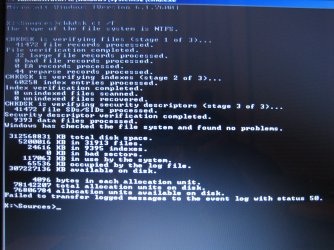
CHKDSK C: /f
EXIT

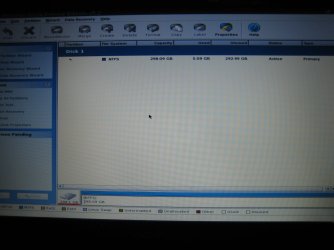
Ok, I did this step then per the suggestion of other I booted PW again. Now I only have 1 partition listed...
Partition File Stystem Capacity Used Unused Status Type
*: NTFS 298.09 GB 95.05 MB 298.00 GB Active Primary

?confused

That sounds about correct for one large partition.

Now try the install to it, but when it asks for the serial key code, DO NOT ENTER IT, Leave it blank, for 30 days free before activation required. Can you have it connected to the internet with a Cat5 ethernet cable? to get windows updates & drivers during install ?
 

My Computer

Computer type
PC/Desktop
Computer Manufacturer/Model Number
Built them myself, Science Experiments !
OS
Win7 Enterprise, Win7 x86 (Ult 7600), Win7 x64 Ult 7600, TechNet RTM on AMD x64 (2.8Ghz)
CPU
AMD fx8350 4ghz, AMD-32 2400mhz, AMD-64 3200mhz, AMDx64 2.8G
Motherboard
SIS 755, ECS-K8M890M-M (Ult 7600), GigaByte & others
Memory
2gb, 4gb on the Ult 7600, 4gb on Technet RTM, 32gb on FX8350
Graphics Card(s)
Draw my own Graphics, several nVidia cards
Sound Card
on motherboard
Monitor(s) Displays
19" flat scr, 28" I-Inc widescr,22" Emprex Widescr, 23" Acer
Screen Resolution
1280 x 1024, 1440 x 900, 1920 x 1080
Hard Drives
6 pata Ide HD's & 2 Sata HD's
added 80gb external on Ult 7600 computer,
numerous extra 1tb, 2TB, 3Tb SATA HD's
A collection of ext HD Docks w/ HDs
PSU
430w, 550w, 600w, 700, 800, etc
Case
All Generic Full Towers
Cooling
Open Air & a few fans, some w/ colored LEDs
Keyboard
Compaq & Dell recycled from GoodWill
Mouse
Made in China Optical Wired Mouse
Internet Speed
Fast Cable InterNet
Antivirus
AVG Free on 24 different Desktops, NO Problems!
Browser
IE 8 is preferred, but use FireFox sometimes
Other Info
Linksys Routers, switches, & Hubs
Too Many USB Flash Drives to count, Biggest is 64GB !
Eight computers in my home network.
Sixteen computers at my business network.
Linked via TeamViewer !
Lots of old used spare computer parts everywhere!
Ok, aside from the past few posts confusing me, I am currently at GWScan and I'm not sure what I'm doing.

I have these options:
Select Drive
Check Smart Status
Quick Test
Extended Test
Write Zeros To Drive
View Test Results
Print Test Results
Log File Open/Close
Help
Quit

?which do I pick?

I gave you the steps earlier here:
GWscan should autostart to a DOS screen with 3 choices: type in 1 to Run GWScan, press Enter. On next screen, use down arrow to select Extended Test. After scan completes, arrow down to Quit, then restart computer into DVD to try install again.

Let us know the results of the Disk Check and GWScan full test.

Then try install to partition you created which is correct.

Follow Doc's suggestion to select Remain Connected to Internet during Install if that option is presented by installer, plug in ethernet cable.
 
Last edited:
Ok, so I tried installing Windows 7 this morning and it cleared all the way through the check marks and I did not receive an error. However, it still does not boot...
I received this error after the DVD restarted my pc:
Press Any Key to boot from CD or DVD....Error Loading operating system

So I restarted and then received this:
No bootable device -- insert boot disk and press any key

So I booted via Windows DVD again, and hit "Repair my Computer." This time under the "System Recovery Option" this was listed:
Operating System
Windows 7
Partition Size
305242MB
Location
(C:) Local Disk

I even ran "Startup repair," but alas no go.

I also restarted without the DVD:
A disk read error occurred
Press Ctrl+Alt+Del to restart

Ok, I may have tried one too many things in my desperation and rush to work... but this looks a lot like where I started...
If this is/I am a lost cause someone is going to have to say it... and I'll have to pick up a few shifts to buy another pc? (I liked mine because of its 6~8 hour battery life and being 4.2lbs)
 

My Computer

Computer Manufacturer/Model Number
Acer Aspire 4810tz
OS
Windows Home Premium 32bit
We have not achieved our objective.

A suggestion is: show this entire correspondence to one of your techie friends, surely you have one-from work, from church, from the local bar, show that person you computer, your dvd, and I'll bet that person can get you rolling. Some people work better with someone by there side as opposed to following directions over the internet.
 

My Computer

Computer Manufacturer/Model Number
Toshiba Satellite S875D-S7239 laptop
OS
MS Windows 7 Ultimate SP1 64-bit
CPU
AMD A10-4600M
Motherboard
AMD Pumori (Socket FT1)
Memory
6.00 GB Dual-Channel DDR3 @ 798MHz (11-11-12-28)
Graphics Card(s)
AMD Radeon HD 7660G
Sound Card
High Definition Audio Device
Monitor(s) Displays
Generic PnP Monitor (1600x900@60Hz)
Screen Resolution
1600x900@60Hz
Hard Drives
SSD 119GB Corsair CSSD-V128GB2 ATA Device
Keyboard
Standard PS/2 Keyboard
Mouse
HP Wireless Optical Mobile Mouse Model FHA-3410
Internet Speed
What the local pub, local coffee shop offers.
Other Info
Optical Drive:MATSHITA BD-CMB UJ160B ATA Device


Also have an Asus ha1002xp netbook with Win 7 Ultimate installed.
Take the DVD out and try to boot. What exactly does it do and say?

What were the GW Scan and DIsk Check results?

Can you post back a screenshot of Partition Wizard CD Drive Map?
 
Did you format the partition at the beginning of the installation?

What is the C partitions used volume?
Use PW bootable CD to find this, also post a camera shot of Partition Wizard disk layout.
 

My Computer

Computer type
PC/Desktop
Computer Manufacturer/Model Number
76~2.0
OS
Windows 7 Ult x64 - SP1/ Windows 8 Pro x64
CPU
Intel Core i5-3570K 4.6GHz
Motherboard
Gigabyte GA-Z77X UD3H, f18
Memory
8GB (2X4GB) DDR3 1600 Corsair Vengeance CL8 1.5v
Graphics Card(s)
Sapphire HD 7770 Vapor-X OC 1GB DDR5
Sound Card
Onboard VIA VT2021
Monitor(s) Displays
22" LCD Dell
Screen Resolution
1680x1050
Hard Drives
Samsung 840Pro 128GB SSD,
Seagate Barracuda 500GB SATA2 7200rpm 32MB cache, Seagate Barracuda 1TB SATA2 7200rpm 32MB cache,
PSU
Corsair HX650W
Case
Cooler Master Storm Scout
Cooling
Corsair H80 2x12cm Noctua NF P12 , 2x14cm case fans
Keyboard
Logitech Wave
Mouse
CM Sentinel
Internet Speed
Dismal
Antivirus
Avast
Browser
Opera Next
Other Info
Haswell laptop: HP Envy 17t-j, i7-4700MQ, GeForce 740M 2GB DDR3, 17.3" Full HD 1920x1080, 16GB RAM, Samsung 840 Pro 128GB, 1TB Hitachi 7200 HDD,
Desktop: eSATA ports,
External eSATA Seagate 500GB SATA2 7200rpm,
External WD USB 500GB
If you happen to be at Cal Poly, let me know, I can get you fixed up.

It could be that the HDD is bad, or the BIOS is not reading it, or the HDD firmware is screwed.

~Lordbob
 

My Computer

Computer Manufacturer/Model Number
Hera
OS
Windows 7 Ultimate x64, Mint 9
CPU
Intel i5-2500k
Motherboard
ASUS P8P67 Pro
Memory
2x 4Gb Corsair VENGEANCE DDR3-1600
Graphics Card(s)
NVidia GeForce N260GTX Twin Frozr
Sound Card
Realtek HD OnBoard Audio
Monitor(s) Displays
ASUS 24" Monitor
Screen Resolution
1920x1080
Hard Drives
G.SKILL Phoenix Series 60GB SATA II MLC Internal Solid State Drive (SSD)
SAMSUNG Spinpoint F3R 1TB 7200 RPM 32MB Cache SATA II
PSU
Cooler Master Real Power Pro 750W
Case
Cooler Master Haf 932
Cooling
Fans
Keyboard
Razer Tarantula
Mouse
Razer Lachesis
Internet Speed
not fast enough
Doc,
It is the Windows 7 upgrade DVD they sent from Acer. My pc originally had Vista but I bought it after a certain date so I received a free (?) update

Well here I go thinking again, into the Past & into the Future at the same time.

Just what if the Acer Home Premium 32 bit upgrade DVD is defective in some way and is not properly writing the boot info to the install. Does any of those other recovery Discs write a boot record by itself ? :huh:
 

My Computer

Computer type
PC/Desktop
Computer Manufacturer/Model Number
Built them myself, Science Experiments !
OS
Win7 Enterprise, Win7 x86 (Ult 7600), Win7 x64 Ult 7600, TechNet RTM on AMD x64 (2.8Ghz)
CPU
AMD fx8350 4ghz, AMD-32 2400mhz, AMD-64 3200mhz, AMDx64 2.8G
Motherboard
SIS 755, ECS-K8M890M-M (Ult 7600), GigaByte & others
Memory
2gb, 4gb on the Ult 7600, 4gb on Technet RTM, 32gb on FX8350
Graphics Card(s)
Draw my own Graphics, several nVidia cards
Sound Card
on motherboard
Monitor(s) Displays
19" flat scr, 28" I-Inc widescr,22" Emprex Widescr, 23" Acer
Screen Resolution
1280 x 1024, 1440 x 900, 1920 x 1080
Hard Drives
6 pata Ide HD's & 2 Sata HD's
added 80gb external on Ult 7600 computer,
numerous extra 1tb, 2TB, 3Tb SATA HD's
A collection of ext HD Docks w/ HDs
PSU
430w, 550w, 600w, 700, 800, etc
Case
All Generic Full Towers
Cooling
Open Air & a few fans, some w/ colored LEDs
Keyboard
Compaq & Dell recycled from GoodWill
Mouse
Made in China Optical Wired Mouse
Internet Speed
Fast Cable InterNet
Antivirus
AVG Free on 24 different Desktops, NO Problems!
Browser
IE 8 is preferred, but use FireFox sometimes
Other Info
Linksys Routers, switches, & Hubs
Too Many USB Flash Drives to count, Biggest is 64GB !
Eight computers in my home network.
Sixteen computers at my business network.
Linked via TeamViewer !
Lots of old used spare computer parts everywhere!
Doc we have two of the Acer Upgrade kits here and as best I can tell they are full retail Win7 DVD's. I didn't even have to do the Clean Install workaround after wiping the first HD of Vista, and the second one took the key upfront.

Sure it could be defective. If she could borrow any other Win7 DVD from a friend then we could help her unlock her version to try install with the Acer Upgrade DVD key. http://www.sevenforums.com/tutorials/85813-windows-7-universal-installation-disc-create.html

Once we hear back about the HD tests, then the BIOS HD settings need another look. It may even be as simple as a BIOS update needed, which could be done from VIsta reinstalled by her Recov disks. I doubt whether MS Tech Support delved into that. We need Make/Model to look that up for her.
 
We have not achieved our objective.

A suggestion is: show this entire correspondence to one of your techie friends, surely you have one-from work, from church, from the local bar, show that person you computer, your dvd, and I'll bet that person can get you rolling. Some people work better with someone by there side as opposed to following directions over the internet.

Sadly, all two of my techie friends are unreachable (and I'm in a new city) :(


Take the DVD out and try to boot. What exactly does it do and say?

No bootable device -- insert boot disk and press any key
A disk read error occurred
Press Ctrl+Alt+Del to restart

What were the GW Scan and DIsk Check results?

No error was found by GWScan.
And the result of the other Qs are at attached as pics.

Did you format the partition at the beginning of the installation?

Yes, I did format the partition at the beginning of the installation.

If you happen to be at Cal Poly, let me know, I can get you fixed up.

Thanks for the offer :)
but I'm on the other side of the country
 

Attachments

  • IMG_5955.JPG
    IMG_5955.JPG
    202.6 KB · Views: 21
  • IMG_5958.JPG
    IMG_5958.JPG
    414.8 KB · Views: 29

My Computer

Computer Manufacturer/Model Number
Acer Aspire 4810tz
OS
Windows Home Premium 32bit
This error with the DVD removed often means it is not booting past the DVD drive. This is why it cannot reboot into HD during install.

Try setting the HD as first boot device in BIOS setup, then to boot the DVD drive tap the Acer F12 key at bootup to select DVD drive.

Once you do this you can boot the DVD to try the install again to the same partition you've already created and formatted.
 
This error with the DVD removed often means it is not booting past the DVD drive. This is why it cannot reboot into HD during install.

Try setting the HD as first boot device in BIOS setup, then when you need to boot the DVD drive tap the F12 key at bootup on Acer and select DVD drive.

That's what I've been doing (I got tired of reordering boot order via F2)
 

My Computer

Computer Manufacturer/Model Number
Acer Aspire 4810tz
OS
Windows Home Premium 32bit
Check now in BIOS setup via F2 just to be sure that HD is set to boot first.

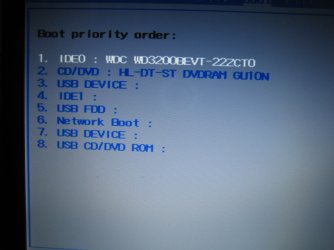
Can you post back a camera snap of the Boot Order listings and your IDE/SATA drives listings.

I notice on your Acer model's drivers page there are AHCI drivers. Check if SATA controller is set to AHCI in BIOS setup. This solves similar probs.

Before changing SATA controller, clear the CMOS: http://pcsupport.about.com/od/fixtheproblem/tp/clearcmos.htm

Try install again to partition already made.
 
Last edited:
Check now in BIOS setup via F2 just to be sure that HD is set to boot first.

Can you post back a camera snap of the Boot Order listings and your IDE/SATA drives listings. Where is this?

In notice on your Acer model's drivers page there are AHCI drivers. Check if SATA controller is set to AHCI in BIOS setup. This solves similar probs.

Before changing SATA controller, clear the CMOS: Clear CMOS - 3 Ways to Clear the CMOS - Reset BIOS

The factory default has Network Boot enabled and F12 Boot Menu disabled. And SATA mode has been in AHCI
 

Attachments

  • IMG_5960.JPG
    IMG_5960.JPG
    408.3 KB · Views: 7

My Computer

Computer Manufacturer/Model Number
Acer Aspire 4810tz
OS
Windows Home Premium 32bit
Yesterday I asked you about IDE1. This is because a MS advisory on your specific fail error said it is solved by plugging HD into IDE1. You told me only IDE0 was populated in BIOS.

I see IDE1 in the list there. You need to plug the HD into IDE1 to try install.

Once this has been tried, next change the SATA controller setting to IDE which also sometimes works.

Now is the time to clear the CMOS, before these changes are made.
 
Last edited:
Yesterday I asked you about IDE1. This is because a MS advisory on your specific fail error said it is solved by plugging HD into IDE1. You told me only IDE0 was populated in BIOS.

I see IDE1 in the list there. You need to plug the HD into IDE1 to try install.

Once this has been tried, next change the SATA controller setting to SATA or IDE which also sometimes works.

Now is the time to clear the CMOS, before these changes are made.

?!?!?!?! IDE1 listed but not populated... How do I plug the HD into IDE1????
 

My Computer

Computer Manufacturer/Model Number
Acer Aspire 4810tz
OS
Windows Home Premium 32bit
Not easy on a laptop. You need to find a schematic, or at least a diagram showing you how to slide out your HD to have access to the two IDE ports. Others can help you more on this.

Try resetting the CMOS, then try install.

Next try changing SATA controller to IDE to try install.
 
Last edited:
The WD 320gb HD is an IDE drive. So shouldn't the Bios be set to IDE mode.

In the last Compaq V5000 laptop I put win7 on for a student, I could disable the additional unwanted boot options by selecting then & using the Shift key & the Explanation (!) key to mark them disabled. So I only had HD & DVD active for boot.
 

My Computer

Computer type
PC/Desktop
Computer Manufacturer/Model Number
Built them myself, Science Experiments !
OS
Win7 Enterprise, Win7 x86 (Ult 7600), Win7 x64 Ult 7600, TechNet RTM on AMD x64 (2.8Ghz)
CPU
AMD fx8350 4ghz, AMD-32 2400mhz, AMD-64 3200mhz, AMDx64 2.8G
Motherboard
SIS 755, ECS-K8M890M-M (Ult 7600), GigaByte & others
Memory
2gb, 4gb on the Ult 7600, 4gb on Technet RTM, 32gb on FX8350
Graphics Card(s)
Draw my own Graphics, several nVidia cards
Sound Card
on motherboard
Monitor(s) Displays
19" flat scr, 28" I-Inc widescr,22" Emprex Widescr, 23" Acer
Screen Resolution
1280 x 1024, 1440 x 900, 1920 x 1080
Hard Drives
6 pata Ide HD's & 2 Sata HD's
added 80gb external on Ult 7600 computer,
numerous extra 1tb, 2TB, 3Tb SATA HD's
A collection of ext HD Docks w/ HDs
PSU
430w, 550w, 600w, 700, 800, etc
Case
All Generic Full Towers
Cooling
Open Air & a few fans, some w/ colored LEDs
Keyboard
Compaq & Dell recycled from GoodWill
Mouse
Made in China Optical Wired Mouse
Internet Speed
Fast Cable InterNet
Antivirus
AVG Free on 24 different Desktops, NO Problems!
Browser
IE 8 is preferred, but use FireFox sometimes
Other Info
Linksys Routers, switches, & Hubs
Too Many USB Flash Drives to count, Biggest is 64GB !
Eight computers in my home network.
Sixteen computers at my business network.
Linked via TeamViewer !
Lots of old used spare computer parts everywhere!
O_o
So I'm reinstalling Windows 7 over the one that's already there?

Also, I don't have any Vista recovery disks... never did
 

My Computer

Computer Manufacturer/Model Number
Acer Aspire 4810tz
OS
Windows Home Premium 32bit
Back
Top