please don't laugh...

Just a thought, have we determined if the HD in the Ext HD enclosure is an IDE HD ?
If it is a SATA HD, it will not work in the IDE connection bay of the laptop :(
 

My Computer

Computer type
PC/Desktop
Computer Manufacturer/Model Number
Built them myself, Science Experiments !
OS
Win7 Enterprise, Win7 x86 (Ult 7600), Win7 x64 Ult 7600, TechNet RTM on AMD x64 (2.8Ghz)
CPU
AMD fx8350 4ghz, AMD-32 2400mhz, AMD-64 3200mhz, AMDx64 2.8G
Motherboard
SIS 755, ECS-K8M890M-M (Ult 7600), GigaByte & others
Memory
2gb, 4gb on the Ult 7600, 4gb on Technet RTM, 32gb on FX8350
Graphics Card(s)
Draw my own Graphics, several nVidia cards
Sound Card
on motherboard
Monitor(s) Displays
19" flat scr, 28" I-Inc widescr,22" Emprex Widescr, 23" Acer
Screen Resolution
1280 x 1024, 1440 x 900, 1920 x 1080
Hard Drives
6 pata Ide HD's & 2 Sata HD's
added 80gb external on Ult 7600 computer,
numerous extra 1tb, 2TB, 3Tb SATA HD's
A collection of ext HD Docks w/ HDs
PSU
430w, 550w, 600w, 700, 800, etc
Case
All Generic Full Towers
Cooling
Open Air & a few fans, some w/ colored LEDs
Keyboard
Compaq & Dell recycled from GoodWill
Mouse
Made in China Optical Wired Mouse
Internet Speed
Fast Cable InterNet
Antivirus
AVG Free on 24 different Desktops, NO Problems!
Browser
IE 8 is preferred, but use FireFox sometimes
Other Info
Linksys Routers, switches, & Hubs
Too Many USB Flash Drives to count, Biggest is 64GB !
Eight computers in my home network.
Sixteen computers at my business network.
Linked via TeamViewer !
Lots of old used spare computer parts everywhere!
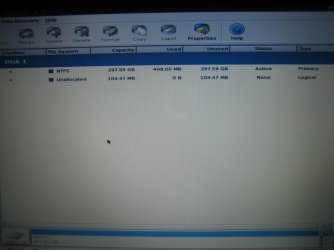
I don't think Windows Vista installed, but here is my PW snap
 

Attachments

  • IMG_5985.JPG
    IMG_5985.JPG
    57.7 KB · Views: 25

My Computer

Computer Manufacturer/Model Number
Acer Aspire 4810tz
OS
Windows Home Premium 32bit
Alright. Sorry, I kind of got lost in this thread.
This was your first installation with Vista, from a CD correct?

~Lordbob
 

My Computer

Computer Manufacturer/Model Number
Hera
OS
Windows 7 Ultimate x64, Mint 9
CPU
Intel i5-2500k
Motherboard
ASUS P8P67 Pro
Memory
2x 4Gb Corsair VENGEANCE DDR3-1600
Graphics Card(s)
NVidia GeForce N260GTX Twin Frozr
Sound Card
Realtek HD OnBoard Audio
Monitor(s) Displays
ASUS 24" Monitor
Screen Resolution
1920x1080
Hard Drives
G.SKILL Phoenix Series 60GB SATA II MLC Internal Solid State Drive (SSD)
SAMSUNG Spinpoint F3R 1TB 7200 RPM 32MB Cache SATA II
PSU
Cooler Master Real Power Pro 750W
Case
Cooler Master Haf 932
Cooling
Fans
Keyboard
Razer Tarantula
Mouse
Razer Lachesis
Internet Speed
not fast enough
mypcbroke, have you done the documentation? I'm really interested on how can you fail Windows installation so many times [that it's not even funny].

zzz2496
 

My Computer

Computer Manufacturer/Model Number
Self Built
OS
Windows7 Ultimate 64bit
CPU
Intel Core 2 Quad Q6600
Motherboard
Abit IN9-32X-MMAX
Memory
DDR2 Adata 4GB
Graphics Card(s)
Nvidia GeForce GTX 285 1024 and Nvidia GeForce 8800GT 512
Sound Card
Asus Xonar HDAV 1.3
Monitor(s) Displays
Dell 2407WFP and BenQ 2400v and Philips 150v3
Screen Resolution
3840x1200 and 1024x768
Hard Drives
2 WDC 1TB
1 WDC 1.5TB
1 WDC 640GB
1 WDC 320GB
1 Seagate 200GB
PSU
Corsair TX 850W
Case
Cooler Master HAF932
Cooling
Arctic Cooling Freezer Extreme and plenty of fans...
Keyboard
MicrosoftNaturalKeyboard 4000/Apple Alu keyboard/Dinovo mini
Mouse
Logitech G5/MarbleMouseTrackball/PerformanceMX/SpacePilotPRO
Internet Speed
1.5Mbps down/384Kbps up
Other Info
APC SURT 1000XL
Logitech Z-560
Wiimote
Mikrotik Router
Linksys (now Cisco) SD2008 8 port Gigabit switch
Linksys WRT54G (acting as AP)
Apple wireless Aluminium keyboard
Apple Magic Mouse
Xbox360 wired controller
mypcbroke, have you done the documentation? I'm really interested on how can you fail Windows installation so many times [that it's not even funny].

zzz2496
I agree. We need to see each step as you go through it.
It is possible you are making a mistake, or if you aren't then there is something we have overlooked.
Either way, it is important.

~Lordbob
 

My Computer

Computer Manufacturer/Model Number
Hera
OS
Windows 7 Ultimate x64, Mint 9
CPU
Intel i5-2500k
Motherboard
ASUS P8P67 Pro
Memory
2x 4Gb Corsair VENGEANCE DDR3-1600
Graphics Card(s)
NVidia GeForce N260GTX Twin Frozr
Sound Card
Realtek HD OnBoard Audio
Monitor(s) Displays
ASUS 24" Monitor
Screen Resolution
1920x1080
Hard Drives
G.SKILL Phoenix Series 60GB SATA II MLC Internal Solid State Drive (SSD)
SAMSUNG Spinpoint F3R 1TB 7200 RPM 32MB Cache SATA II
PSU
Cooler Master Real Power Pro 750W
Case
Cooler Master Haf 932
Cooling
Fans
Keyboard
Razer Tarantula
Mouse
Razer Lachesis
Internet Speed
not fast enough
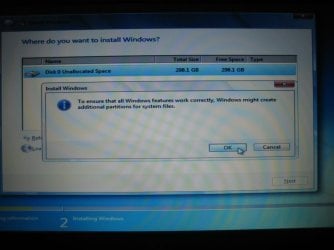
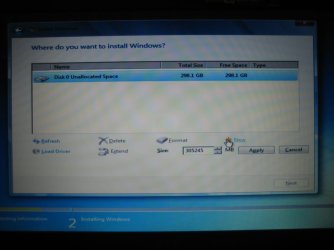
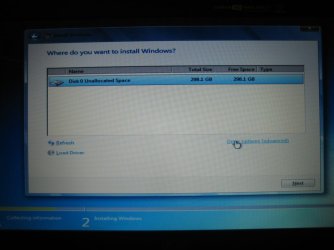
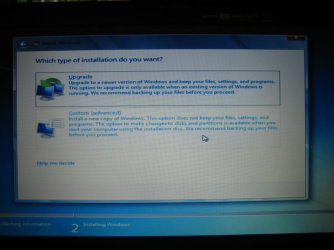
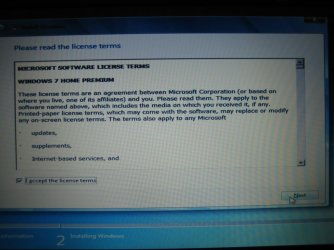
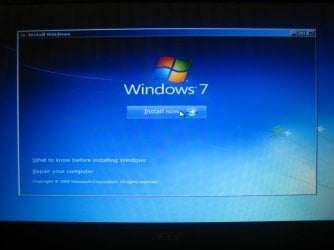
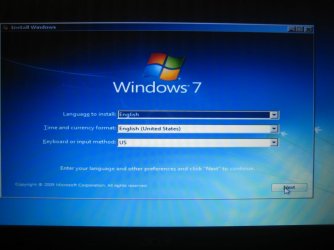
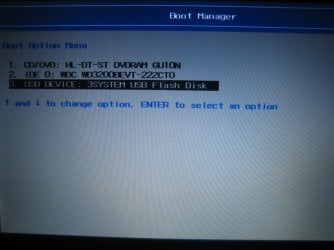
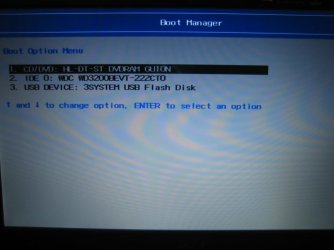
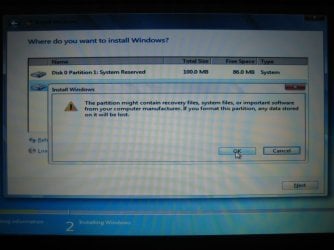
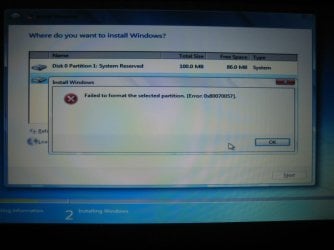
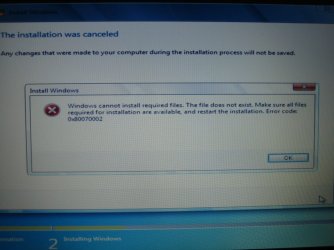
Sorry, after some previous comments, I wasn't sure if I should post anything else. Here is a step by step of what I did on my most recent Windows 7 install.
I followed the same steps for Vista (however in that one I did get the error message when formatting), and I received the error I mentioned earlier when it was at "completing installation":
"Windows could not prepare the computer to boot into the next phase of installation. To install Windows restart the installation."

Where the mouse is hovering is where I'm about to click.
 

Attachments

  • IMG_5981.JPG
    IMG_5981.JPG
    62.7 KB · Views: 18
  • IMG_5980.JPG
    IMG_5980.JPG
    52.7 KB · Views: 14
  • IMG_5979.JPG
    IMG_5979.JPG
    55.3 KB · Views: 15
  • IMG_5978.JPG
    IMG_5978.JPG
    63.5 KB · Views: 13
  • IMG_5977.JPG
    IMG_5977.JPG
    81.8 KB · Views: 11
  • IMG_5976.JPG
    IMG_5976.JPG
    53 KB · Views: 11
  • IMG_5975.JPG
    IMG_5975.JPG
    59.8 KB · Views: 13
  • IMG_5974.JPG
    IMG_5974.JPG
    68.3 KB · Views: 13
  • IMG_5973.JPG
    IMG_5973.JPG
    56.6 KB · Views: 13
  • IMG_5982.JPG
    IMG_5982.JPG
    70.4 KB · Views: 19
  • IMG_5983.JPG
    IMG_5983.JPG
    57.4 KB · Views: 17
  • IMG_5984.JPG
    IMG_5984.JPG
    75.2 KB · Views: 15

My Computer

Computer Manufacturer/Model Number
Acer Aspire 4810tz
OS
Windows Home Premium 32bit
  • Like
Reactions: JMH
Interesting errors.

Instead of creating a new partition, just chose the Unallocated Space and try installing it that way. Probably won't help, but it is possible.

As to the previous comments:
Paying someone to fix this would be faster, yes. Nonetheless, we are all still here to help you as much as we can.

~Lordbob
 

My Computer

Computer Manufacturer/Model Number
Hera
OS
Windows 7 Ultimate x64, Mint 9
CPU
Intel i5-2500k
Motherboard
ASUS P8P67 Pro
Memory
2x 4Gb Corsair VENGEANCE DDR3-1600
Graphics Card(s)
NVidia GeForce N260GTX Twin Frozr
Sound Card
Realtek HD OnBoard Audio
Monitor(s) Displays
ASUS 24" Monitor
Screen Resolution
1920x1080
Hard Drives
G.SKILL Phoenix Series 60GB SATA II MLC Internal Solid State Drive (SSD)
SAMSUNG Spinpoint F3R 1TB 7200 RPM 32MB Cache SATA II
PSU
Cooler Master Real Power Pro 750W
Case
Cooler Master Haf 932
Cooling
Fans
Keyboard
Razer Tarantula
Mouse
Razer Lachesis
Internet Speed
not fast enough
Here's what I think you can do: on the "Where do you want to install Windows" screen, the one that has "Refresh", "Delete", "Format", "New" controls under the disk selection box, if there's a defined partition on the disk, delete it using "Delete" control item. Delete every partition defined in there. Once you cleaned it up, press "New", create a 100GB partition. Once it's done, create another partition that will use the rest of the disk. Once it's done, select the first 100GB you created earlier, press the "Format" control item, post back what's the result, please...

I'll clear up the mess that automatic installation doing to you...

zzz2496
 

My Computer

Computer Manufacturer/Model Number
Self Built
OS
Windows7 Ultimate 64bit
CPU
Intel Core 2 Quad Q6600
Motherboard
Abit IN9-32X-MMAX
Memory
DDR2 Adata 4GB
Graphics Card(s)
Nvidia GeForce GTX 285 1024 and Nvidia GeForce 8800GT 512
Sound Card
Asus Xonar HDAV 1.3
Monitor(s) Displays
Dell 2407WFP and BenQ 2400v and Philips 150v3
Screen Resolution
3840x1200 and 1024x768
Hard Drives
2 WDC 1TB
1 WDC 1.5TB
1 WDC 640GB
1 WDC 320GB
1 Seagate 200GB
PSU
Corsair TX 850W
Case
Cooler Master HAF932
Cooling
Arctic Cooling Freezer Extreme and plenty of fans...
Keyboard
MicrosoftNaturalKeyboard 4000/Apple Alu keyboard/Dinovo mini
Mouse
Logitech G5/MarbleMouseTrackball/PerformanceMX/SpacePilotPRO
Internet Speed
1.5Mbps down/384Kbps up
Other Info
APC SURT 1000XL
Logitech Z-560
Wiimote
Mikrotik Router
Linksys (now Cisco) SD2008 8 port Gigabit switch
Linksys WRT54G (acting as AP)
Apple wireless Aluminium keyboard
Apple Magic Mouse
Xbox360 wired controller
Last edited by a moderator:

My Computer

Computer Manufacturer/Model Number
* BFK Customs *
OS
W 7 64-bit Ultimate
CPU
Intel Q9550 Yorkfield
Motherboard
ASUS P5Q Pro
Memory
8GB Dominator 8500C5D
Graphics Card(s)
ATI : XFX 5870
Sound Card
Realtek HD Audio 7-1
Monitor(s) Displays
1x 47" LCD HDMI & 3x 26" LCD HDMI
Screen Resolution
1920x1080P & 1920x1200
Hard Drives
1x 80GB Intel X25-M G2 SSD : 1x 500GB & 1x 640GB WD Caviar Black(s)
PSU
Corsair 620HX
Case
Cooler Master RC-690
Cooling
Tuniq Tower 120, 2x 140mm and 3x 120mm case fans
Keyboard
Microsoft 500
Mouse
Razer Diamondback 3G
Internet Speed
14 Mb/s
Other Info
1x Koutech 3Gb/s SATA HDD Hot Swap Rack
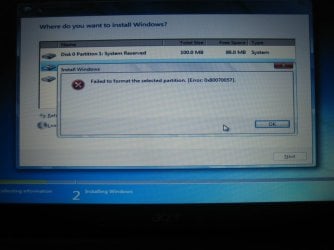
Since doing the DoD wipe, I have been getting this error everytime I try to format via installer. I might try formatting via PW instead
 

Attachments

  • IMG_5986.JPG
    IMG_5986.JPG
    62.4 KB · Views: 21

My Computer

Computer Manufacturer/Model Number
Acer Aspire 4810tz
OS
Windows Home Premium 32bit
Interesting....

This happens with both Windows 7 installation and Vista correct?

~Lordbob
 

My Computer

Computer Manufacturer/Model Number
Hera
OS
Windows 7 Ultimate x64, Mint 9
CPU
Intel i5-2500k
Motherboard
ASUS P8P67 Pro
Memory
2x 4Gb Corsair VENGEANCE DDR3-1600
Graphics Card(s)
NVidia GeForce N260GTX Twin Frozr
Sound Card
Realtek HD OnBoard Audio
Monitor(s) Displays
ASUS 24" Monitor
Screen Resolution
1920x1080
Hard Drives
G.SKILL Phoenix Series 60GB SATA II MLC Internal Solid State Drive (SSD)
SAMSUNG Spinpoint F3R 1TB 7200 RPM 32MB Cache SATA II
PSU
Cooler Master Real Power Pro 750W
Case
Cooler Master Haf 932
Cooling
Fans
Keyboard
Razer Tarantula
Mouse
Razer Lachesis
Internet Speed
not fast enough
Since doing the DoD wipe, I have been getting this error everytime I try to format via installer. I might try formatting via PW instead
As of this moment I know that there's something terribly wrong with your laptop. It might be your laptop's motherboard (specifically the storage controller part), or your harddisk. Doing wipes with PW won't get you anywhere (I think wiping your disk more than 3 times is enough to prove that point), neither formatting it with PW...

If you have another harddisk that's compatible with your laptop, you might want to try and switch the harddisk. If switching harddisk doesn't solve your problem, I suggest you make that trip to the nearest Acer Service center...

zzz2496
 

My Computer

Computer Manufacturer/Model Number
Self Built
OS
Windows7 Ultimate 64bit
CPU
Intel Core 2 Quad Q6600
Motherboard
Abit IN9-32X-MMAX
Memory
DDR2 Adata 4GB
Graphics Card(s)
Nvidia GeForce GTX 285 1024 and Nvidia GeForce 8800GT 512
Sound Card
Asus Xonar HDAV 1.3
Monitor(s) Displays
Dell 2407WFP and BenQ 2400v and Philips 150v3
Screen Resolution
3840x1200 and 1024x768
Hard Drives
2 WDC 1TB
1 WDC 1.5TB
1 WDC 640GB
1 WDC 320GB
1 Seagate 200GB
PSU
Corsair TX 850W
Case
Cooler Master HAF932
Cooling
Arctic Cooling Freezer Extreme and plenty of fans...
Keyboard
MicrosoftNaturalKeyboard 4000/Apple Alu keyboard/Dinovo mini
Mouse
Logitech G5/MarbleMouseTrackball/PerformanceMX/SpacePilotPRO
Internet Speed
1.5Mbps down/384Kbps up
Other Info
APC SURT 1000XL
Logitech Z-560
Wiimote
Mikrotik Router
Linksys (now Cisco) SD2008 8 port Gigabit switch
Linksys WRT54G (acting as AP)
Apple wireless Aluminium keyboard
Apple Magic Mouse
Xbox360 wired controller
Since the format failure error is new, let's use DISKPART to format and run chkdsk again at the same time. A failing HD may reveal itself in some redundant testing.

Boot DVD, press shift F10 to open a Command Line, type:
DISKPART
SELECT DISK 0
CLEAN
CREATE PARTITION PRIMARY
FORMAT FS=NTFS
ASSIGN letter=C
EXIT (only exits Diskpart)
CHKDSK C: /f
EXIT

Now try Win7 and Vista installs again to formatted HD, if it will.

Next I'd run GWScan Extended HD diag/repair test again, too, and memtest86 overnight to stress test the RAM to be thorough with the hardware testing. :geek:

Edit: I see you're getting a format with Vista DVD, so let's see what install to Unallocated Space does, something I also suggested 3-4 pages ago. Next use Diskpart commands above to format and Disk Check, try both again. Then finish the day by running GWScan again and memtest86 overnight.

How much RAM do you have?

Then on to either imaging or swapping HD's.
 
Last edited:
Interesting....

This happens with both Windows 7 installation and Vista correct?

~Lordbob

Just tried formatting with the Vista DVD instead, I did not receive an error. So, I'm following your previous steps with Vista right now.
 

My Computer

Computer Manufacturer/Model Number
Acer Aspire 4810tz
OS
Windows Home Premium 32bit
Interesting....

This happens with both Windows 7 installation and Vista correct?

~Lordbob

Just tried formatting with the Vista DVD instead, I did not receive an error. So, I'm following your previous steps with Vista right now.
Ah, thats good news then. So it might be a bad installation disk.

Let us know how this turns out.

~Lordbob
 

My Computer

Computer Manufacturer/Model Number
Hera
OS
Windows 7 Ultimate x64, Mint 9
CPU
Intel i5-2500k
Motherboard
ASUS P8P67 Pro
Memory
2x 4Gb Corsair VENGEANCE DDR3-1600
Graphics Card(s)
NVidia GeForce N260GTX Twin Frozr
Sound Card
Realtek HD OnBoard Audio
Monitor(s) Displays
ASUS 24" Monitor
Screen Resolution
1920x1080
Hard Drives
G.SKILL Phoenix Series 60GB SATA II MLC Internal Solid State Drive (SSD)
SAMSUNG Spinpoint F3R 1TB 7200 RPM 32MB Cache SATA II
PSU
Cooler Master Real Power Pro 750W
Case
Cooler Master Haf 932
Cooling
Fans
Keyboard
Razer Tarantula
Mouse
Razer Lachesis
Internet Speed
not fast enough
It looks as you are doing an upgrade install, if so this is the method you need to use, at this link below.

Do a Clean Install with a Upgrade Windows 7 Version


Don't mind him and his comment, he's an 4sshole anyway. ;)


Use the above method but I would do a CUSTOM install at this stage other than that you are going great dont listen to the knockers.
This site is here to help people like yourself who have problems and as long as you want we will be helping you
 

My Computer

Computer type
PC/Desktop
Computer Manufacturer/Model Number
Self Built Custom Computer.
OS
Windows 10 Pro x64
CPU
i7-4770K
Motherboard
Asus Z87 Sabertooth
Memory
16Gig DDR3-2400
Graphics Card(s)
Gigabyte GT740
Sound Card
Onboard
Monitor(s) Displays
Benq 27" - Dell 23' - Benq 22"
Screen Resolution
1680x1050
Hard Drives
Samsung 840 Pro 128g SSD
1xWestern Digital Caviar Green 1tb
2xWestern Digital Caviar Green 2 tb
PSU
Seasonic 760 watt Platinum
Case
Coolermaster Haf - X
Cooling
Noctua NH-C12P CPU Cooler
Keyboard
Logitech illuminated keyboard
Mouse
Logitech Perfomance MX
Internet Speed
Cable = speeds to 20Mbps downsteam and 512kbps upsteam
Antivirus
Avast Internet Security
Browser
Firefox
Her last pic shows 3 partitions. Where did the 3rd one come from?
 

My Computer

Computer Manufacturer/Model Number
tw33k
OS
Windows 7 Ultimate (x64) SP1
CPU
Intel 3770k 4.6GHz
Motherboard
ASUS Maximus V Formula
Memory
8GB (2x 4GB) Crucial Ballistix
Graphics Card(s)
Sapphire 7950 (1060/1600)
Sound Card
On Board Realtek HD Audio
Monitor(s) Displays
27" Acer B273HU (via HDMI)
Screen Resolution
2048 x 1152
Hard Drives
Crucial M4 128GB
2TB WD Black
1TB Samsung F3 SATA
1TB WD Elite External
2TB WD USB 3.0
PSU
Corsair AX750 Gold
Case
Corsair Obsidian 800DW
Cooling
Corsair H100 (2x AP-121/2x UK-3000 push/pull)
Keyboard
Microsoft Wireless 5000
Mouse
Microsoft Wireless 5000
Internet Speed
5mb/s
Other Info
Logitech z-2300 2.1 speakers
Lamptron FC-5 v2
likely Unallocated, since some suggested making C 100gb

The latest error

Windows could not prepare the computer to boot into the next
phase of installation. To install Windows, restart installation
seems to indicate chkdsk, memtest86 and resetting the CMOS.

I believe you've already reset the CMOS at least once, and are about to chkdsk during partitioning and run Memtest86 overnight to stress test your RAM.

If you have more than 2gb RAM, removing one stick may also help.
 
Last edited:
Her last pic shows 3 partitions. Where did the 3rd one come from?


That would be the 100mb system reserved partition that windows made
 

My Computer

Computer type
PC/Desktop
Computer Manufacturer/Model Number
Self Built Custom Computer.
OS
Windows 10 Pro x64
CPU
i7-4770K
Motherboard
Asus Z87 Sabertooth
Memory
16Gig DDR3-2400
Graphics Card(s)
Gigabyte GT740
Sound Card
Onboard
Monitor(s) Displays
Benq 27" - Dell 23' - Benq 22"
Screen Resolution
1680x1050
Hard Drives
Samsung 840 Pro 128g SSD
1xWestern Digital Caviar Green 1tb
2xWestern Digital Caviar Green 2 tb
PSU
Seasonic 760 watt Platinum
Case
Coolermaster Haf - X
Cooling
Noctua NH-C12P CPU Cooler
Keyboard
Logitech illuminated keyboard
Mouse
Logitech Perfomance MX
Internet Speed
Cable = speeds to 20Mbps downsteam and 512kbps upsteam
Antivirus
Avast Internet Security
Browser
Firefox
Since the format failure error is new, let's use DISKPART to format and run chkdsk again at the same time. A failing HD may reveal itself in some redundant testing.

Boot DVD, press shift F10 to open a Command Line, type:
DISKPART
SELECT DISK 0
CLEAN
CREATE PARTITION PRIMARY
FORMAT FS=NTFS
ASSIGN letter=C
EXIT (only exits Diskpart)
CHKDSK C: /f
EXIT

Now try Win7 and Vista installs again to formatted HD, if it will.

Next I'd run GWScan Extended HD diag/repair test again, too, and memtest86 overnight to stress test the RAM to be thorough with the hardware testing. :geek:

Edit: I see you're getting a format with Vista DVD, so let's see what install to Unallocated Space does, something I also suggested 3-4 pages ago. Next use Diskpart commands above to format and Disk Check, try both again. Then finish the day by running GWScan again and memtest86 overnight.

How much RAM do you have?

Then on to either imaging or swapping HD's.

Currently going through these steps and letting it run overnight.
As to the question of how much RAM I have 3gb.
 

My Computer

Computer Manufacturer/Model Number
Acer Aspire 4810tz
OS
Windows Home Premium 32bit
Back
Top