please don't laugh...

As Greg suggested sometimes more than 1 memory stick causes hang ups during an install.. Here is a link on adding laptop memory, so just think about it in reverse to only have 1 stick of memory installed in your laptop.

How To...Install RAM on a Laptop [Video] - How To
 

My Computer

Computer type
PC/Desktop
Computer Manufacturer/Model Number
Built them myself, Science Experiments !
OS
Win7 Enterprise, Win7 x86 (Ult 7600), Win7 x64 Ult 7600, TechNet RTM on AMD x64 (2.8Ghz)
CPU
AMD fx8350 4ghz, AMD-32 2400mhz, AMD-64 3200mhz, AMDx64 2.8G
Motherboard
SIS 755, ECS-K8M890M-M (Ult 7600), GigaByte & others
Memory
2gb, 4gb on the Ult 7600, 4gb on Technet RTM, 32gb on FX8350
Graphics Card(s)
Draw my own Graphics, several nVidia cards
Sound Card
on motherboard
Monitor(s) Displays
19" flat scr, 28" I-Inc widescr,22" Emprex Widescr, 23" Acer
Screen Resolution
1280 x 1024, 1440 x 900, 1920 x 1080
Hard Drives
6 pata Ide HD's & 2 Sata HD's
added 80gb external on Ult 7600 computer,
numerous extra 1tb, 2TB, 3Tb SATA HD's
A collection of ext HD Docks w/ HDs
PSU
430w, 550w, 600w, 700, 800, etc
Case
All Generic Full Towers
Cooling
Open Air & a few fans, some w/ colored LEDs
Keyboard
Compaq & Dell recycled from GoodWill
Mouse
Made in China Optical Wired Mouse
Internet Speed
Fast Cable InterNet
Antivirus
AVG Free on 24 different Desktops, NO Problems!
Browser
IE 8 is preferred, but use FireFox sometimes
Other Info
Linksys Routers, switches, & Hubs
Too Many USB Flash Drives to count, Biggest is 64GB !
Eight computers in my home network.
Sixteen computers at my business network.
Linked via TeamViewer !
Lots of old used spare computer parts everywhere!
I agree with Greg and Doc, take out one RAM stick.

Just continue with what you are doing now, run memtest86+ overnight, before the next install take one RAM stick out.

Let us know if memtest gives you any errors.

Can you give us another PW partition picuture?


@ everyone trying to help.

She keeps getting sector or file errors, check disk and all the work with PW should find any errors on the HDD but, maybe it hasen't.
Boot files have been repaired several times and still won't work.

Do you see any advantage loading the IDE (or SATA) drivers during install?

For testing purposes, should there be a 100MB to maybe 1GB of unallocated space at the begining of the HDD, maybe get away from those sectors and see if this will help with the boot files?

Since this has been a stubborn install, just brainstorming.

I see the likely HW caused to be faulty HDD or controller.
Possibly the drivers causing this, also new BIOS may help.
Clearing the CMOS hasen't seemed to help any.
 

My Computer

Computer type
PC/Desktop
Computer Manufacturer/Model Number
76~2.0
OS
Windows 7 Ult x64 - SP1/ Windows 8 Pro x64
CPU
Intel Core i5-3570K 4.6GHz
Motherboard
Gigabyte GA-Z77X UD3H, f18
Memory
8GB (2X4GB) DDR3 1600 Corsair Vengeance CL8 1.5v
Graphics Card(s)
Sapphire HD 7770 Vapor-X OC 1GB DDR5
Sound Card
Onboard VIA VT2021
Monitor(s) Displays
22" LCD Dell
Screen Resolution
1680x1050
Hard Drives
Samsung 840Pro 128GB SSD,
Seagate Barracuda 500GB SATA2 7200rpm 32MB cache, Seagate Barracuda 1TB SATA2 7200rpm 32MB cache,
PSU
Corsair HX650W
Case
Cooler Master Storm Scout
Cooling
Corsair H80 2x12cm Noctua NF P12 , 2x14cm case fans
Keyboard
Logitech Wave
Mouse
CM Sentinel
Internet Speed
Dismal
Antivirus
Avast
Browser
Opera Next
Other Info
Haswell laptop: HP Envy 17t-j, i7-4700MQ, GeForce 740M 2GB DDR3, 17.3" Full HD 1920x1080, 16GB RAM, Samsung 840 Pro 128GB, 1TB Hitachi 7200 HDD,
Desktop: eSATA ports,
External eSATA Seagate 500GB SATA2 7200rpm,
External WD USB 500GB

My Computer

Computer Manufacturer/Model Number
tw33k
OS
Windows 7 Ultimate (x64) SP1
CPU
Intel 3770k 4.6GHz
Motherboard
ASUS Maximus V Formula
Memory
8GB (2x 4GB) Crucial Ballistix
Graphics Card(s)
Sapphire 7950 (1060/1600)
Sound Card
On Board Realtek HD Audio
Monitor(s) Displays
27" Acer B273HU (via HDMI)
Screen Resolution
2048 x 1152
Hard Drives
Crucial M4 128GB
2TB WD Black
1TB Samsung F3 SATA
1TB WD Elite External
2TB WD USB 3.0
PSU
Corsair AX750 Gold
Case
Corsair Obsidian 800DW
Cooling
Corsair H100 (2x AP-121/2x UK-3000 push/pull)
Keyboard
Microsoft Wireless 5000
Mouse
Microsoft Wireless 5000
Internet Speed
5mb/s
Other Info
Logitech z-2300 2.1 speakers
Lamptron FC-5 v2
Saw that also, another PW patition pic should explain it.

The PW partition pic before that had the System Reserve listed as a logical partition, that needs to be changed to Primary.
 

My Computer

Computer type
PC/Desktop
Computer Manufacturer/Model Number
76~2.0
OS
Windows 7 Ult x64 - SP1/ Windows 8 Pro x64
CPU
Intel Core i5-3570K 4.6GHz
Motherboard
Gigabyte GA-Z77X UD3H, f18
Memory
8GB (2X4GB) DDR3 1600 Corsair Vengeance CL8 1.5v
Graphics Card(s)
Sapphire HD 7770 Vapor-X OC 1GB DDR5
Sound Card
Onboard VIA VT2021
Monitor(s) Displays
22" LCD Dell
Screen Resolution
1680x1050
Hard Drives
Samsung 840Pro 128GB SSD,
Seagate Barracuda 500GB SATA2 7200rpm 32MB cache, Seagate Barracuda 1TB SATA2 7200rpm 32MB cache,
PSU
Corsair HX650W
Case
Cooler Master Storm Scout
Cooling
Corsair H80 2x12cm Noctua NF P12 , 2x14cm case fans
Keyboard
Logitech Wave
Mouse
CM Sentinel
Internet Speed
Dismal
Antivirus
Avast
Browser
Opera Next
Other Info
Haswell laptop: HP Envy 17t-j, i7-4700MQ, GeForce 740M 2GB DDR3, 17.3" Full HD 1920x1080, 16GB RAM, Samsung 840 Pro 128GB, 1TB Hitachi 7200 HDD,
Desktop: eSATA ports,
External eSATA Seagate 500GB SATA2 7200rpm,
External WD USB 500GB
Dave, et al: a setting like SATA controller in BIOS could very well be responsible. We lost focus on that pages ago when it was listed in boot order as an IDE drive, but last she reported was SATA controller is set to AHCI as I recall. I'm not sure it was changed to IDE.

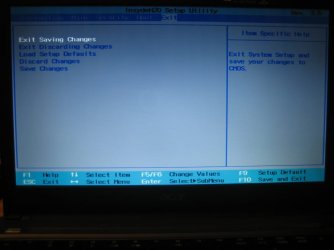
We need to see BIOS snaps for all the related SATA and IDE controller settings, not just boot order which is all we've seen.

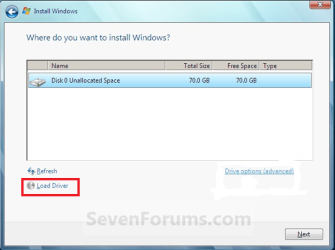
This will clarify if she's running SATA controller in IDE mode, or IDE controller. Loading the relevant driver from Acer Downloads pages (which have everything except BIOS) into the Load Drivers link at selection screen is a good idea. Who can sort what controller is being used?


The obscured 3rd listing in screenshot is Unallocated Space because she made install partition 100gb on that attempt.

The only logical was free space in her first PW screenshow here: http://www.sevenforums.com/installation-setup/119113-please-dont-laugh.html#post1024210
 
Last edited:
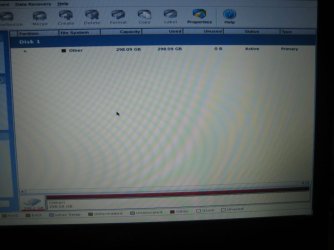
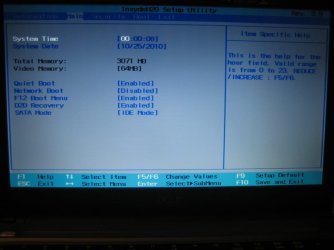
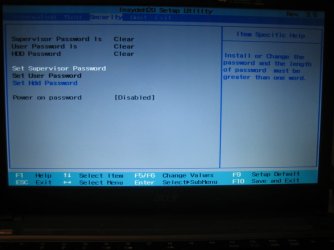
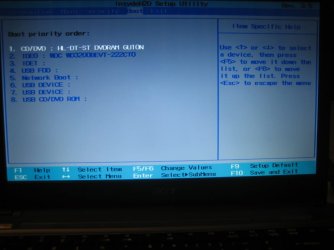
I'm currently letting Memtest run, will let it go through the night. Attached is a PW snap and BIOS screens you guys were asking about (hopefully they're the right screens).
 

Attachments

  • IMG_5990.JPG
    IMG_5990.JPG
    57.2 KB · Views: 18
  • IMG_5992.JPG
    IMG_5992.JPG
    59.5 KB · Views: 17
  • IMG_5993.JPG
    IMG_5993.JPG
    53 KB · Views: 15
  • IMG_5994.JPG
    IMG_5994.JPG
    56 KB · Views: 16
  • IMG_5995.JPG
    IMG_5995.JPG
    50.3 KB · Views: 16

My Computer

Computer Manufacturer/Model Number
Acer Aspire 4810tz
OS
Windows Home Premium 32bit
Great, let memtest run all night to really stress the RAM, then remove a stick to try install next. Remember to unplug power, remove battery, always touch metal on the case to discharge static electricity before touching any electronics parts. Ease the stick out which appears to be in the second slot. Doc posted a video which will prepare you.

Good screenshots: SATA controller is IDE mode. What are the other choices? This could matter.

Is my memory correct that you originally had it set AHCI but changed to IDE (I can't re-read this thread but once per day - takes too long)?

It is likely a SATA HD since aspire 4810 is new enough to spec SSD's in some editions.

You are doing great btw, far better than most. :geek:
 
Last edited:
Good job on the BIOS pictures, I agree with Greg "You are doing great btw, far better than most."

You will be helping other people with installation issues after you're finished with this.

The first BIOS picture lists the 'File System' as 'Other', this will be OK if you format during the install, if you're not going to format during the install you will need to format it to NTFS before the installation.

Good screenshots: SATA controller is IDE mode. What are the other choices? This could matter.

Is my memory correct that you originally had it set AHCI but changed to IDE (I can't re-read this thread but once per day - takes too long)?

It is likely a SATA HD since aspire 4810 is new enough to spec SSD's in some editions.

Was thinking the same thing, the HDD is more than likely SATA.
The specs on the Acer site doesn't say this specifically but, would be very strange if it's not SATA.
The strange name in the BIOS is probably a bad name choice by someone.
 

My Computer

Computer type
PC/Desktop
Computer Manufacturer/Model Number
76~2.0
OS
Windows 7 Ult x64 - SP1/ Windows 8 Pro x64
CPU
Intel Core i5-3570K 4.6GHz
Motherboard
Gigabyte GA-Z77X UD3H, f18
Memory
8GB (2X4GB) DDR3 1600 Corsair Vengeance CL8 1.5v
Graphics Card(s)
Sapphire HD 7770 Vapor-X OC 1GB DDR5
Sound Card
Onboard VIA VT2021
Monitor(s) Displays
22" LCD Dell
Screen Resolution
1680x1050
Hard Drives
Samsung 840Pro 128GB SSD,
Seagate Barracuda 500GB SATA2 7200rpm 32MB cache, Seagate Barracuda 1TB SATA2 7200rpm 32MB cache,
PSU
Corsair HX650W
Case
Cooler Master Storm Scout
Cooling
Corsair H80 2x12cm Noctua NF P12 , 2x14cm case fans
Keyboard
Logitech Wave
Mouse
CM Sentinel
Internet Speed
Dismal
Antivirus
Avast
Browser
Opera Next
Other Info
Haswell laptop: HP Envy 17t-j, i7-4700MQ, GeForce 740M 2GB DDR3, 17.3" Full HD 1920x1080, 16GB RAM, Samsung 840 Pro 128GB, 1TB Hitachi 7200 HDD,
Desktop: eSATA ports,
External eSATA Seagate 500GB SATA2 7200rpm,
External WD USB 500GB
I hope the storage controller doesn't give up while she's doing the test...

Btw, I read several page back, if I'm not mistaken (I forgot which page), mypcbroke wrote something about "the checksum doesn't match", referring to her Windows 7 install disk... If that's the case, then all of this might be caused by a corrupted install media, instead of dying hardware...

zzz2496
 

My Computer

Computer Manufacturer/Model Number
Self Built
OS
Windows7 Ultimate 64bit
CPU
Intel Core 2 Quad Q6600
Motherboard
Abit IN9-32X-MMAX
Memory
DDR2 Adata 4GB
Graphics Card(s)
Nvidia GeForce GTX 285 1024 and Nvidia GeForce 8800GT 512
Sound Card
Asus Xonar HDAV 1.3
Monitor(s) Displays
Dell 2407WFP and BenQ 2400v and Philips 150v3
Screen Resolution
3840x1200 and 1024x768
Hard Drives
2 WDC 1TB
1 WDC 1.5TB
1 WDC 640GB
1 WDC 320GB
1 Seagate 200GB
PSU
Corsair TX 850W
Case
Cooler Master HAF932
Cooling
Arctic Cooling Freezer Extreme and plenty of fans...
Keyboard
MicrosoftNaturalKeyboard 4000/Apple Alu keyboard/Dinovo mini
Mouse
Logitech G5/MarbleMouseTrackball/PerformanceMX/SpacePilotPRO
Internet Speed
1.5Mbps down/384Kbps up
Other Info
APC SURT 1000XL
Logitech Z-560
Wiimote
Mikrotik Router
Linksys (now Cisco) SD2008 8 port Gigabit switch
Linksys WRT54G (acting as AP)
Apple wireless Aluminium keyboard
Apple Magic Mouse
Xbox360 wired controller

My Computer

Computer type
PC/Desktop
Computer Manufacturer/Model Number
76~2.0
OS
Windows 7 Ult x64 - SP1/ Windows 8 Pro x64
CPU
Intel Core i5-3570K 4.6GHz
Motherboard
Gigabyte GA-Z77X UD3H, f18
Memory
8GB (2X4GB) DDR3 1600 Corsair Vengeance CL8 1.5v
Graphics Card(s)
Sapphire HD 7770 Vapor-X OC 1GB DDR5
Sound Card
Onboard VIA VT2021
Monitor(s) Displays
22" LCD Dell
Screen Resolution
1680x1050
Hard Drives
Samsung 840Pro 128GB SSD,
Seagate Barracuda 500GB SATA2 7200rpm 32MB cache, Seagate Barracuda 1TB SATA2 7200rpm 32MB cache,
PSU
Corsair HX650W
Case
Cooler Master Storm Scout
Cooling
Corsair H80 2x12cm Noctua NF P12 , 2x14cm case fans
Keyboard
Logitech Wave
Mouse
CM Sentinel
Internet Speed
Dismal
Antivirus
Avast
Browser
Opera Next
Other Info
Haswell laptop: HP Envy 17t-j, i7-4700MQ, GeForce 740M 2GB DDR3, 17.3" Full HD 1920x1080, 16GB RAM, Samsung 840 Pro 128GB, 1TB Hitachi 7200 HDD,
Desktop: eSATA ports,
External eSATA Seagate 500GB SATA2 7200rpm,
External WD USB 500GB
The other option in SATA mode is AHCI.

Chkdsk, GWScan and Memtest all cleared and I am attempting to install one more time. I'll try Vista because I seem to have a little better luck with that one.

As to the WD warranty, I was looking on their website and I thought I read somewhere that the warranty does not appy if the HD came with your computer. In other words, you have bought the HD alone. Or am I wrong?
 

My Computer

Computer Manufacturer/Model Number
Acer Aspire 4810tz
OS
Windows Home Premium 32bit
Let's also check the ISO to make sure it's checksum matches the official HASH, and verify the DVD.

Install Hashtab: HashTab... is the coolest thing ever!

When you rightclick on the ISO file there will be a HASH tab on it's Properties box. Compare HASH by pasting in the official Win7 HASH given here: Windows 7 RTM SHA-1 hash / checksums

Now open ImgBurn, click on Verify Disk, load the ISO file making sure it says "Bootable" in text at left, then insert the DVD and click the Verify button.

You can also extract the ISO from your Acer Install DVD to test it's HASH and verify that DVD the same way.
 
Last edited:
QUOTE=;1025975]
mypcbroke
:orb:
And my HD I think is this:
IDE0 Model Name: WDC WD3200BEVT-22ZCT0[/QUOTE]


WD Scorpio Blue
Mobile Hard Drives
320 GB, SATA 3 Gb/s, 8 MB Cache, 5400 RPM
Big capacity for portable computing.

WD Scorpio Blue 2.5-inch drives offer high-performance, low power consumption and cool operation, making them ideal for notebooks and other portable devices.
Interface: SATA 3 Gb/s w/AdvFormat SATA 3 Gb/s


All along I was asuming this was an IDE laptop HD, since we keep talking about IDE0 & IDE1 in the bios setup. :o

Dave's last post brought my attention to the fact it is a SATA HD :huh:

So should we have the bios set for SATA & load the Sata controller drivers ?

:orb:


:ar: @mypcbroke
Congrats on earning your Skilled Badge through all this :thumbsup:

:ar:


skilled-1.png


:orb:
 

My Computer

Computer type
PC/Desktop
Computer Manufacturer/Model Number
Built them myself, Science Experiments !
OS
Win7 Enterprise, Win7 x86 (Ult 7600), Win7 x64 Ult 7600, TechNet RTM on AMD x64 (2.8Ghz)
CPU
AMD fx8350 4ghz, AMD-32 2400mhz, AMD-64 3200mhz, AMDx64 2.8G
Motherboard
SIS 755, ECS-K8M890M-M (Ult 7600), GigaByte & others
Memory
2gb, 4gb on the Ult 7600, 4gb on Technet RTM, 32gb on FX8350
Graphics Card(s)
Draw my own Graphics, several nVidia cards
Sound Card
on motherboard
Monitor(s) Displays
19" flat scr, 28" I-Inc widescr,22" Emprex Widescr, 23" Acer
Screen Resolution
1280 x 1024, 1440 x 900, 1920 x 1080
Hard Drives
6 pata Ide HD's & 2 Sata HD's
added 80gb external on Ult 7600 computer,
numerous extra 1tb, 2TB, 3Tb SATA HD's
A collection of ext HD Docks w/ HDs
PSU
430w, 550w, 600w, 700, 800, etc
Case
All Generic Full Towers
Cooling
Open Air & a few fans, some w/ colored LEDs
Keyboard
Compaq & Dell recycled from GoodWill
Mouse
Made in China Optical Wired Mouse
Internet Speed
Fast Cable InterNet
Antivirus
AVG Free on 24 different Desktops, NO Problems!
Browser
IE 8 is preferred, but use FireFox sometimes
Other Info
Linksys Routers, switches, & Hubs
Too Many USB Flash Drives to count, Biggest is 64GB !
Eight computers in my home network.
Sixteen computers at my business network.
Linked via TeamViewer !
Lots of old used spare computer parts everywhere!
Congrats on the Skilled badge :cool:


The HDD should be still under warranty from either Acer or WD.

When was the laptop purchased?
 

My Computer

Computer type
PC/Desktop
Computer Manufacturer/Model Number
76~2.0
OS
Windows 7 Ult x64 - SP1/ Windows 8 Pro x64
CPU
Intel Core i5-3570K 4.6GHz
Motherboard
Gigabyte GA-Z77X UD3H, f18
Memory
8GB (2X4GB) DDR3 1600 Corsair Vengeance CL8 1.5v
Graphics Card(s)
Sapphire HD 7770 Vapor-X OC 1GB DDR5
Sound Card
Onboard VIA VT2021
Monitor(s) Displays
22" LCD Dell
Screen Resolution
1680x1050
Hard Drives
Samsung 840Pro 128GB SSD,
Seagate Barracuda 500GB SATA2 7200rpm 32MB cache, Seagate Barracuda 1TB SATA2 7200rpm 32MB cache,
PSU
Corsair HX650W
Case
Cooler Master Storm Scout
Cooling
Corsair H80 2x12cm Noctua NF P12 , 2x14cm case fans
Keyboard
Logitech Wave
Mouse
CM Sentinel
Internet Speed
Dismal
Antivirus
Avast
Browser
Opera Next
Other Info
Haswell laptop: HP Envy 17t-j, i7-4700MQ, GeForce 740M 2GB DDR3, 17.3" Full HD 1920x1080, 16GB RAM, Samsung 840 Pro 128GB, 1TB Hitachi 7200 HDD,
Desktop: eSATA ports,
External eSATA Seagate 500GB SATA2 7200rpm,
External WD USB 500GB
I know it is a while back but can you remember what the SATA controller Mode was set at IDE or AHCI when you first started this repair if so set it at what it was as we know it used to work from when the laptop was new
 

My Computer

Computer type
PC/Desktop
Computer Manufacturer/Model Number
Self Built Custom Computer.
OS
Windows 10 Pro x64
CPU
i7-4770K
Motherboard
Asus Z87 Sabertooth
Memory
16Gig DDR3-2400
Graphics Card(s)
Gigabyte GT740
Sound Card
Onboard
Monitor(s) Displays
Benq 27" - Dell 23' - Benq 22"
Screen Resolution
1680x1050
Hard Drives
Samsung 840 Pro 128g SSD
1xWestern Digital Caviar Green 1tb
2xWestern Digital Caviar Green 2 tb
PSU
Seasonic 760 watt Platinum
Case
Coolermaster Haf - X
Cooling
Noctua NH-C12P CPU Cooler
Keyboard
Logitech illuminated keyboard
Mouse
Logitech Perfomance MX
Internet Speed
Cable = speeds to 20Mbps downsteam and 512kbps upsteam
Antivirus
Avast Internet Security
Browser
Firefox
Had to search this thread like a database, but here is the AHCI>IDE history:

Check now in BIOS setup via F2 just to be sure that HD is set to boot first.

Can you post back a camera snap of the Boot Order listings and your IDE/SATA drives listings. Where is this?

I notice on your Acer model's drivers page there are AHCI drivers. Check if SATA controller is set to AHCI in BIOS setup. This solves similar probs.

Before changing SATA controller, clear the CMOS: Clear CMOS - 3 Ways to Clear the CMOS - Reset BIOS

The factory default has Network Boot enabled and F12 Boot Menu disabled. And SATA mode has been in AHCI

Disable network boot
Set sata mode to IDE
You are correct there is only one harddrive installed and it is at IDE0
Clear cmos
Try again
Let windows format and install if it asks.

If the only SATA controller settings are AHCI and IDE, and it was originally set at AHCI then I don't get why it has always been labeled IDE0 in boot order if it is a SATA drive.

In most BIOS there is a page where the HD and CD/DVD drive register. Can you find that?

Perhaps changing the setting back to AHCI and loading the AHCI driver at the HD selection screen during install is needed:
Capture.PNG
 
Congrats on the Skilled badge :cool:


The HDD should be still under warranty from either Acer or WD.

When was the laptop purchased?

Currently at work (break hour), just wanted to report in that my last install didn't work, but I'll follow the suggestions since then and try again when I get back.

I bought my pc June 2009, and out of the 1 year warranty with Acer. I have called and emailed them but I get the automated response that I am out of my warranty. However, in a response I received this morning, it said I can buy a recovery CD for 20 bucks. I was going to order it (as the word "recovery" gives me hope), but I wasn't sure if it would resolve me problem.

As for the default settings in BIOS, the SATA mode was set in AHCI (the only other option is IDE).

PS- thanks for the congrats on the "skilled" badge:party:
although the title is severely misleading, but I can press the heck out of F2 and F12 now
 

My Computer

Computer Manufacturer/Model Number
Acer Aspire 4810tz
OS
Windows Home Premium 32bit
Hello again.


You're doing good! ;)


How did the hash ckecks go?
 

My Computer

Computer Manufacturer/Model Number
* BFK Customs *
OS
W 7 64-bit Ultimate
CPU
Intel Q9550 Yorkfield
Motherboard
ASUS P5Q Pro
Memory
8GB Dominator 8500C5D
Graphics Card(s)
ATI : XFX 5870
Sound Card
Realtek HD Audio 7-1
Monitor(s) Displays
1x 47" LCD HDMI & 3x 26" LCD HDMI
Screen Resolution
1920x1080P & 1920x1200
Hard Drives
1x 80GB Intel X25-M G2 SSD : 1x 500GB & 1x 640GB WD Caviar Black(s)
PSU
Corsair 620HX
Case
Cooler Master RC-690
Cooling
Tuniq Tower 120, 2x 140mm and 3x 120mm case fans
Keyboard
Microsoft 500
Mouse
Razer Diamondback 3G
Internet Speed
14 Mb/s
Other Info
1x Koutech 3Gb/s SATA HDD Hot Swap Rack
I think the help is getting way too technical.
Windows is designed to install by inserting the CD/DVD and restarting that's it no other preparation is necessary.
It will format and mark active and all that other stuff you have been trying to do before installing.
My 2 cents worth;
Set the bios to the way it was when it was working.
Insert the VISTA disc and try to install.
If it fails that points to either hard drive or CD player.
I would not have the OP removing hard drives etc as that can be disastrous.
Get some money together and take it to a friendly small computer store and get them to check the hard drive.
They can do it quickly and correctly and should not charge too much for it.
 

My Computer

Computer type
PC/Desktop
Computer Manufacturer/Model Number
Self Built Custom Computer.
OS
Windows 10 Pro x64
CPU
i7-4770K
Motherboard
Asus Z87 Sabertooth
Memory
16Gig DDR3-2400
Graphics Card(s)
Gigabyte GT740
Sound Card
Onboard
Monitor(s) Displays
Benq 27" - Dell 23' - Benq 22"
Screen Resolution
1680x1050
Hard Drives
Samsung 840 Pro 128g SSD
1xWestern Digital Caviar Green 1tb
2xWestern Digital Caviar Green 2 tb
PSU
Seasonic 760 watt Platinum
Case
Coolermaster Haf - X
Cooling
Noctua NH-C12P CPU Cooler
Keyboard
Logitech illuminated keyboard
Mouse
Logitech Perfomance MX
Internet Speed
Cable = speeds to 20Mbps downsteam and 512kbps upsteam
Antivirus
Avast Internet Security
Browser
Firefox
Congrats on the Skilled badge :cool:

The HDD should be still under warranty from either Acer or WD.

When was the laptop purchased?

Currently at work (break hour), just wanted to report in that my last install didn't work, but I'll follow the suggestions since then and try again when I get back.

I bought my pc June 2009, and out of the 1 year warranty with Acer. I have called and emailed them but I get the automated response that I am out of my warranty. However, in a response I received this morning, it said I can buy a recovery CD for 20 bucks. I was going to order it (as the word "recovery" gives me hope), but I wasn't sure if it would resolve me problem.

As for the default settings in BIOS, the SATA mode was set in AHCI (the only other option is IDE).

PS- thanks for the congrats on the "skilled" badge:party:
although the title is severely misleading, but I can press the heck out of F2 and F12 now

Your hard drive warranty should be good with WD, follow up with them.

How many passes did memtest86+ make?

Do the hash checks as explained by Greg, this will tell you if the Vista and/or Win7 installation copy you have is complete and hasn't been corrupted during any burning or coping to USB.

Before your next installation, remember to take out one of the RAM cards.
This has worked in many win7 installs.
 

My Computer

Computer type
PC/Desktop
Computer Manufacturer/Model Number
76~2.0
OS
Windows 7 Ult x64 - SP1/ Windows 8 Pro x64
CPU
Intel Core i5-3570K 4.6GHz
Motherboard
Gigabyte GA-Z77X UD3H, f18
Memory
8GB (2X4GB) DDR3 1600 Corsair Vengeance CL8 1.5v
Graphics Card(s)
Sapphire HD 7770 Vapor-X OC 1GB DDR5
Sound Card
Onboard VIA VT2021
Monitor(s) Displays
22" LCD Dell
Screen Resolution
1680x1050
Hard Drives
Samsung 840Pro 128GB SSD,
Seagate Barracuda 500GB SATA2 7200rpm 32MB cache, Seagate Barracuda 1TB SATA2 7200rpm 32MB cache,
PSU
Corsair HX650W
Case
Cooler Master Storm Scout
Cooling
Corsair H80 2x12cm Noctua NF P12 , 2x14cm case fans
Keyboard
Logitech Wave
Mouse
CM Sentinel
Internet Speed
Dismal
Antivirus
Avast
Browser
Opera Next
Other Info
Haswell laptop: HP Envy 17t-j, i7-4700MQ, GeForce 740M 2GB DDR3, 17.3" Full HD 1920x1080, 16GB RAM, Samsung 840 Pro 128GB, 1TB Hitachi 7200 HDD,
Desktop: eSATA ports,
External eSATA Seagate 500GB SATA2 7200rpm,
External WD USB 500GB
Back
Top