please help error loading operating system

mitch04

New member
Local time
6:27 PM
Messages
24
Hi I have been trying all day to dual boot using the tutorial and no success.
I have windows 7 install on my computer. I want to have windows xp.
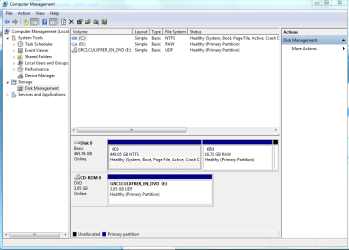
Now I have shrink my hard drive so I have 2 partitions now. Ok the problem is When I boot xp I goto install on D:/ the new partition it then copies all the files to that hard drive all good so then it wants to restart which is normal.
Then When it reboots it will say error loading operating system or just nothing.
Then I cant even Run windows 7 I have to delete that partition on windows xp and then put windows 7 and repair startup and Im back on again. It has to do something with the boot loader or something because I reckon Its trying to do start windows 7 but there is xp trying to install it self. Im not sure but I think I have tried every idea.
I have tried 2 different cds of xp.
 

Attachments

  • Capture.PNG
    Capture.PNG
    29.5 KB · Views: 384
  • Capture1.PNG
    Capture1.PNG
    29.5 KB · Views: 190

My Computer

OS
windows 7
Is Partition D what you are trying to install XP on?
 

My Computer

Computer Manufacturer/Model Number
Blue Shards 1.0
OS
Windows 7 Ultimate 64bit
CPU
AMD Phenom II 555 Black Edition Quad Core OC'd to 4.0GHz
Motherboard
ASUS M4A88T-M
Memory
G Skill RipJaw 1333MHz 4GB
Graphics Card(s)
ATI raideon 4250 HD/XFX ATI Radeon 1GB HD4650
Sound Card
Realteck HD Audio
Monitor(s) Displays
2x 22" Widescreen HD Monitors
Hard Drives
500GB Sata 7500RPM
80GB IDE
PSU
850W OCUK Modular
Case
Antec Dark Fleet DF-30
Cooling
Titan Fenrir Pro (CPU)
Keyboard
Logitech Wireless
Mouse
Logitech Wireless
Internet Speed
24Meg
Other Info
Getting soon-
2TB 7200RPM HDD
+8GB RAM
30GB SSD
HD6950/70
yes I have tried doing that tutorial
 

My Computer

OS
windows 7
I would make it a bit bigger.

Are you using partition Wizard?

Also,format and delete partition d and then shrink c a bit more,create new partition using from the free space,format and then run the boot disc again.

By chance did you burn the disc yourself?
If you did try a lower burn speed.
 

My Computer

Computer Manufacturer/Model Number
Blue Shards 1.0
OS
Windows 7 Ultimate 64bit
CPU
AMD Phenom II 555 Black Edition Quad Core OC'd to 4.0GHz
Motherboard
ASUS M4A88T-M
Memory
G Skill RipJaw 1333MHz 4GB
Graphics Card(s)
ATI raideon 4250 HD/XFX ATI Radeon 1GB HD4650
Sound Card
Realteck HD Audio
Monitor(s) Displays
2x 22" Widescreen HD Monitors
Hard Drives
500GB Sata 7500RPM
80GB IDE
PSU
850W OCUK Modular
Case
Antec Dark Fleet DF-30
Cooling
Titan Fenrir Pro (CPU)
Keyboard
Logitech Wireless
Mouse
Logitech Wireless
Internet Speed
24Meg
Other Info
Getting soon-
2TB 7200RPM HDD
+8GB RAM
30GB SSD
HD6950/70
Um yes through that computer management. See the pictures I uploaded They look right don't they? Im just thinking Should I install the boot loader now Or do I have to do it after xp is installed? It has to be something like that windows 7 wants to start but windows xp trying to install aswell and just hangs like that?
 

My Computer

OS
windows 7
Um yes through that computer management. See the pictures I uploaded They look right don't they? Im just thinking Should I install the boot loader now Or do I have to do it after xp is installed? It has to be something like that windows 7 wants to start but windows xp trying to install aswell and just hangs like that?
Install boot loader now.
I read wrong,do this after XP boots up
From tutorial
This is required to repair the Windows 7 boot file and add XP to the Windows Boot Manager list.
 
Last edited:

My Computer

Computer Manufacturer/Model Number
Blue Shards 1.0
OS
Windows 7 Ultimate 64bit
CPU
AMD Phenom II 555 Black Edition Quad Core OC'd to 4.0GHz
Motherboard
ASUS M4A88T-M
Memory
G Skill RipJaw 1333MHz 4GB
Graphics Card(s)
ATI raideon 4250 HD/XFX ATI Radeon 1GB HD4650
Sound Card
Realteck HD Audio
Monitor(s) Displays
2x 22" Widescreen HD Monitors
Hard Drives
500GB Sata 7500RPM
80GB IDE
PSU
850W OCUK Modular
Case
Antec Dark Fleet DF-30
Cooling
Titan Fenrir Pro (CPU)
Keyboard
Logitech Wireless
Mouse
Logitech Wireless
Internet Speed
24Meg
Other Info
Getting soon-
2TB 7200RPM HDD
+8GB RAM
30GB SSD
HD6950/70
Thanks for the replies.
I did exactly on that tutorial told me too should i download a third party program like Partition Wizard is a Windows based FREE Partition Manager. It works as partition magic and supports Windows 2000/XP/2003/Vista/2008 server and Windows 7. FREE for Home and Business user.. how much more larger should I put it too? Its just xp?
thanks again.
Minotar I am doing the bootloader now because it says do it after. So I will give that ago. When I go add type i should put windows xp then drive D:/ Not C:/ yeah thats right?


Update: I will go try that now I will be back in 10 mins
 

My Computer

OS
windows 7
Thanks for the replies.
I did exactly on that tutorial told me too should i download a third party program like Partition Wizard is a Windows based FREE Partition Manager. It works as partition magic and supports Windows 2000/XP/2003/Vista/2008 server and Windows 7. FREE for Home and Business user.. how much more larger should I put it too? Its just xp?
thanks again
First install EasyBC as per tutorial.
Depends on what you want to use it for,but seeing as you have near 500GB id give it 30GB.

Thats the link,heres a closer one Free Download Partition Wizard
Download the bottom one,the boot disc.Burn it at a slow speed.

Boot into PW,delete D,shrink C by 15, make new partition,mark as primary (click apply after EACH step,bottom left)

Boot the XP installation disc (should be burned at slow speed),install on D
 

My Computer

Computer Manufacturer/Model Number
Blue Shards 1.0
OS
Windows 7 Ultimate 64bit
CPU
AMD Phenom II 555 Black Edition Quad Core OC'd to 4.0GHz
Motherboard
ASUS M4A88T-M
Memory
G Skill RipJaw 1333MHz 4GB
Graphics Card(s)
ATI raideon 4250 HD/XFX ATI Radeon 1GB HD4650
Sound Card
Realteck HD Audio
Monitor(s) Displays
2x 22" Widescreen HD Monitors
Hard Drives
500GB Sata 7500RPM
80GB IDE
PSU
850W OCUK Modular
Case
Antec Dark Fleet DF-30
Cooling
Titan Fenrir Pro (CPU)
Keyboard
Logitech Wireless
Mouse
Logitech Wireless
Internet Speed
24Meg
Other Info
Getting soon-
2TB 7200RPM HDD
+8GB RAM
30GB SSD
HD6950/70
Minotar I am doing the bootloader now because it says do it after. So I will give that ago. When I go add type i should put windows xp then drive D:/ Not C:/ yeah thats right?


Update: I will go try that now I will be back in 10 mins
As in install?
You should install to the new partition you made.

I think there is a problem either with space on the partition to load files or the disc itself,i think it might be the disc as i dont think it needs that much just to run it,the extra space is for programs you will run on XP.
 

My Computer

Computer Manufacturer/Model Number
Blue Shards 1.0
OS
Windows 7 Ultimate 64bit
CPU
AMD Phenom II 555 Black Edition Quad Core OC'd to 4.0GHz
Motherboard
ASUS M4A88T-M
Memory
G Skill RipJaw 1333MHz 4GB
Graphics Card(s)
ATI raideon 4250 HD/XFX ATI Radeon 1GB HD4650
Sound Card
Realteck HD Audio
Monitor(s) Displays
2x 22" Widescreen HD Monitors
Hard Drives
500GB Sata 7500RPM
80GB IDE
PSU
850W OCUK Modular
Case
Antec Dark Fleet DF-30
Cooling
Titan Fenrir Pro (CPU)
Keyboard
Logitech Wireless
Mouse
Logitech Wireless
Internet Speed
24Meg
Other Info
Getting soon-
2TB 7200RPM HDD
+8GB RAM
30GB SSD
HD6950/70
Do the steps in the order given in the tutorial.

Don't add the bootloader until you get XP installed.

I believe you said that after the first restart, XP will not continue the install. Is this because you are following the prompt on the screen to "hit any key to boot from CD?"

Do not do that. Ignore that prompt and let XP start itself, as it should be trying to do at that point. (Common mistake - happened to me)
 
um I am on the other computer I have installed bootloader Im going to see what happens. Greg Yeah I leave it i dont click anything on the keyboard when it says boot from CD. then it will say error unable to load operating system.

Should I try this first or should I Put like 30 GB in for a new partition? And should I delete the boot loader im not sure.

Thanks again for the replies very helpfull
 

My Computer

OS
windows 7
Is the CD old or new?
Bought in a shop or downloaded from online store?
 

My Computer

Computer Manufacturer/Model Number
Blue Shards 1.0
OS
Windows 7 Ultimate 64bit
CPU
AMD Phenom II 555 Black Edition Quad Core OC'd to 4.0GHz
Motherboard
ASUS M4A88T-M
Memory
G Skill RipJaw 1333MHz 4GB
Graphics Card(s)
ATI raideon 4250 HD/XFX ATI Radeon 1GB HD4650
Sound Card
Realteck HD Audio
Monitor(s) Displays
2x 22" Widescreen HD Monitors
Hard Drives
500GB Sata 7500RPM
80GB IDE
PSU
850W OCUK Modular
Case
Antec Dark Fleet DF-30
Cooling
Titan Fenrir Pro (CPU)
Keyboard
Logitech Wireless
Mouse
Logitech Wireless
Internet Speed
24Meg
Other Info
Getting soon-
2TB 7200RPM HDD
+8GB RAM
30GB SSD
HD6950/70
downloaded from store. But Im pritty sure very sure it not long ago we had to format another computer and worked fine.

Update: Im trying again Its copying file over now so in about 5mins its going to restart I will see what happens again.

Fingers Cross
 

My Computer

OS
windows 7
downloaded from store. But Im pritty sure very sure it not long ago we had to format another computer and worked fine.

Update: Im trying again Its copying file over now so in about 5mins its going to restart I will see what happens again.

Fingers Cross
Try burning at a slower speed if you can.

Did you give more space and mark as primary?
 

My Computer

Computer Manufacturer/Model Number
Blue Shards 1.0
OS
Windows 7 Ultimate 64bit
CPU
AMD Phenom II 555 Black Edition Quad Core OC'd to 4.0GHz
Motherboard
ASUS M4A88T-M
Memory
G Skill RipJaw 1333MHz 4GB
Graphics Card(s)
ATI raideon 4250 HD/XFX ATI Radeon 1GB HD4650
Sound Card
Realteck HD Audio
Monitor(s) Displays
2x 22" Widescreen HD Monitors
Hard Drives
500GB Sata 7500RPM
80GB IDE
PSU
850W OCUK Modular
Case
Antec Dark Fleet DF-30
Cooling
Titan Fenrir Pro (CPU)
Keyboard
Logitech Wireless
Mouse
Logitech Wireless
Internet Speed
24Meg
Other Info
Getting soon-
2TB 7200RPM HDD
+8GB RAM
30GB SSD
HD6950/70
um no I Will try that next.
Ok i think its failed again its not giving me that error but It says hit any button to boot CD.....
and just staying like that
 

My Computer

OS
windows 7
If you know for sure the disk worked before, then make sure it is clean as a whistle.

THen use partition manager to shrink the Win7 a bit, expand your XP partition over into that space. Just delete the XP partition to do this, then re-gather the extra space and Create an NTFS partition that is Primary (not logical) and format. Try to install with the extra space.
 
ok Should I enlarger the hard drive like what Minotar said using that link. I will put it to 20 gb this time ok?
 

My Computer

OS
windows 7
Back
Top