Please help me to dual boot Windows 7 and XP

Combine

New member
Power User
Local time
7:25 PM
Messages
79
Location
Buenos Aires
Hi , after all I should say I really appreciate your help with this tutorial. But while I were reading that guide some doubts came up, and I expect that you maybe could help me.
I've a pc (hp) that had already installed windows 7 home basic 64 bits, then I upgrade it to ultimate. By defualt my hard drive has 3 primary partitions: one which is called System(i don't really understand what it inside it cause I'm unable to see it), another primary partition (the one I use always) with the start, page file and dump, and the last one is another primary partition with the factory _image inside.

So mi first question is if it is possible to install another OS in a logical partition and if it (logical partition) has another performance that prevent me to follow your guide.

Secondly, I want to install windows xp, so I must follow methow two. But how I shoud realise if I have a RAID setup or a SATA drive??

Thirdly, I have no floppy disk. I read it's no possible to use USB port, so is there another possibility instead?

And finally, if have no windows 7 installation disk so if I get Error loading Operating System after XP restarts, may I use a system repair disk? or what should I do?

I hope my english were understandable, because I speak spanish haha.
I'll be wainting for your answer.
 
Last edited by a moderator:

My Computer My Computer

At a glance

Windows 7 Ultimate 64 bitsDual Core Intel Core 2 Duo E75002x[2048 MB DDR2-SDRAM (PC2-6400 / 800 MHz), 2...Intel(R) G33/G31 Express Chipset Family (256 MB)
Computer Manufacturer/Model Number
HP Pavilon Slimline
OS
Windows 7 Ultimate 64 bits
CPU
Dual Core Intel Core 2 Duo E7500
Motherboard
MSI MS-7525 (Boston)
Memory
2x[2048 MB DDR2-SDRAM (PC2-6400 / 800 MHz), 2 Gb]; Total:4Gb
Graphics Card(s)
Intel(R) G33/G31 Express Chipset Family (256 MB)
Sound Card
Realtek ALC662 @ Intel 82801GB ICH7 - HD Audio Controller
Monitor(s) Displays
HP 2009m 20'' LCD
Screen Resolution
1600x900
Hard Drives
SAMSUNG HD642JJ (596 GB)
Hello Combine, welcome to Seven Forums!


As you say you have Windows 7 Ultimate, have you given any thought to using a Virtual Machine with XP installed in that instead of having an actual dual boot as it would solve a lot of problems you are going to have setting up a dual boot with Windows 7 and XP under the circumstances you out-lined above and it's free; have a look at the tutorial at the link below.
Be sure to post back with what you decide.

If you still want to dual boot we will try to help you.


Windows XP Mode - Install and Setup


Edit: This tutorial at the link below has been updated, have a look.

Partition Wizard : Use the Bootable CD
 
Last edited:

My Computer My Computer

At a glance

W 7 64-bit UltimateIntel Q9550 Yorkfield8GB Dominator 8500C5DATI : XFX 5870
Computer Manufacturer/Model Number
* BFK Customs *
OS
W 7 64-bit Ultimate
CPU
Intel Q9550 Yorkfield
Motherboard
ASUS P5Q Pro
Memory
8GB Dominator 8500C5D
Graphics Card(s)
ATI : XFX 5870
Sound Card
Realtek HD Audio 7-1
Monitor(s) Displays
1x 47" LCD HDMI & 3x 26" LCD HDMI
Screen Resolution
1920x1080P & 1920x1200
Hard Drives
1x 80GB Intel X25-M G2 SSD : 1x 500GB & 1x 640GB WD Caviar Black(s)
PSU
Corsair 620HX
Case
Cooler Master RC-690
Cooling
Tuniq Tower 120, 2x 140mm and 3x 120mm case fans
Keyboard
Microsoft 500
Mouse
Razer Diamondback 3G
Internet Speed
14 Mb/s
Other Info
1x Koutech 3Gb/s SATA HDD Hot Swap Rack
Thank you for your advice Bare Foot Kid, but a virtual machine does not let me use 3D programs, and also I want yo use windows XP not only for a few programs but for a lot of applications which mainly use 3D enviroments. So if you can help me with at least one of the topics I explained above, I will be really pleased.
 

My Computer My Computer

At a glance

Windows 7 Ultimate 64 bitsDual Core Intel Core 2 Duo E75002x[2048 MB DDR2-SDRAM (PC2-6400 / 800 MHz), 2...Intel(R) G33/G31 Express Chipset Family (256 MB)
Computer Manufacturer/Model Number
HP Pavilon Slimline
OS
Windows 7 Ultimate 64 bits
CPU
Dual Core Intel Core 2 Duo E7500
Motherboard
MSI MS-7525 (Boston)
Memory
2x[2048 MB DDR2-SDRAM (PC2-6400 / 800 MHz), 2 Gb]; Total:4Gb
Graphics Card(s)
Intel(R) G33/G31 Express Chipset Family (256 MB)
Sound Card
Realtek ALC662 @ Intel 82801GB ICH7 - HD Audio Controller
Monitor(s) Displays
HP 2009m 20'' LCD
Screen Resolution
1600x900
Hard Drives
SAMSUNG HD642JJ (596 GB)
Hello again.


Have a look at the tutorial at the link below, it will solve the Windows 7 repair problem, go ahead and get the disk created before you get started so you have that out of the way.

How to Create a Windows 7 System Repair Disc


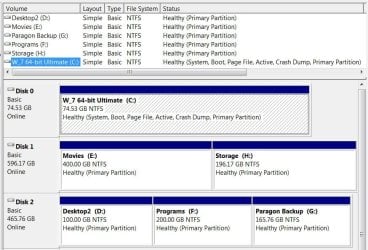
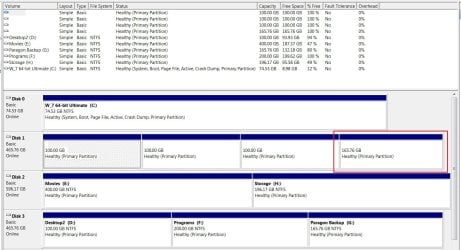
The next thing you can do is to post a snip/screen-shot of the entire disk management drive map so we can see what you have going on so we can advise you further, have a look at the one I posted below to see what we need.

How to Post a Screenshot in Seven Forums

click to enlarge
Disk Management.JPG
 

My Computer My Computer

At a glance

W 7 64-bit UltimateIntel Q9550 Yorkfield8GB Dominator 8500C5DATI : XFX 5870
Computer Manufacturer/Model Number
* BFK Customs *
OS
W 7 64-bit Ultimate
CPU
Intel Q9550 Yorkfield
Motherboard
ASUS P5Q Pro
Memory
8GB Dominator 8500C5D
Graphics Card(s)
ATI : XFX 5870
Sound Card
Realtek HD Audio 7-1
Monitor(s) Displays
1x 47" LCD HDMI & 3x 26" LCD HDMI
Screen Resolution
1920x1080P & 1920x1200
Hard Drives
1x 80GB Intel X25-M G2 SSD : 1x 500GB & 1x 640GB WD Caviar Black(s)
PSU
Corsair 620HX
Case
Cooler Master RC-690
Cooling
Tuniq Tower 120, 2x 140mm and 3x 120mm case fans
Keyboard
Microsoft 500
Mouse
Razer Diamondback 3G
Internet Speed
14 Mb/s
Other Info
1x Koutech 3Gb/s SATA HDD Hot Swap Rack
I´d already done a Windows 7 System Repair Disk, what I want to know if it then could fix the boot as well as the windows 7 installation disk does.

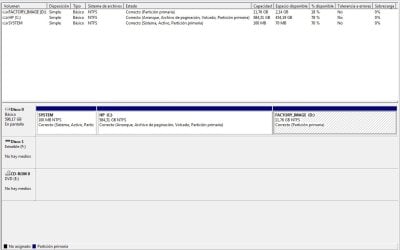
And this is how the entire disk management looks like:
diskmanagement.jpg
 

My Computer My Computer

At a glance

Windows 7 Ultimate 64 bitsDual Core Intel Core 2 Duo E75002x[2048 MB DDR2-SDRAM (PC2-6400 / 800 MHz), 2...Intel(R) G33/G31 Express Chipset Family (256 MB)
Computer Manufacturer/Model Number
HP Pavilon Slimline
OS
Windows 7 Ultimate 64 bits
CPU
Dual Core Intel Core 2 Duo E7500
Motherboard
MSI MS-7525 (Boston)
Memory
2x[2048 MB DDR2-SDRAM (PC2-6400 / 800 MHz), 2 Gb]; Total:4Gb
Graphics Card(s)
Intel(R) G33/G31 Express Chipset Family (256 MB)
Sound Card
Realtek ALC662 @ Intel 82801GB ICH7 - HD Audio Controller
Monitor(s) Displays
HP 2009m 20'' LCD
Screen Resolution
1600x900
Hard Drives
SAMSUNG HD642JJ (596 GB)
You don't have a RAID configuration and yes the repair disk is specifically for repairing boot problems; do you have all the XP drivers you will need on hand and ready to install?

Have you created the Factory Recovery disks that it is suggested to create, who manufactured the PC, what brand is it?
 

My Computer My Computer

At a glance

W 7 64-bit UltimateIntel Q9550 Yorkfield8GB Dominator 8500C5DATI : XFX 5870
Computer Manufacturer/Model Number
* BFK Customs *
OS
W 7 64-bit Ultimate
CPU
Intel Q9550 Yorkfield
Motherboard
ASUS P5Q Pro
Memory
8GB Dominator 8500C5D
Graphics Card(s)
ATI : XFX 5870
Sound Card
Realtek HD Audio 7-1
Monitor(s) Displays
1x 47" LCD HDMI & 3x 26" LCD HDMI
Screen Resolution
1920x1080P & 1920x1200
Hard Drives
1x 80GB Intel X25-M G2 SSD : 1x 500GB & 1x 640GB WD Caviar Black(s)
PSU
Corsair 620HX
Case
Cooler Master RC-690
Cooling
Tuniq Tower 120, 2x 140mm and 3x 120mm case fans
Keyboard
Microsoft 500
Mouse
Razer Diamondback 3G
Internet Speed
14 Mb/s
Other Info
1x Koutech 3Gb/s SATA HDD Hot Swap Rack
No, I haven't all the XP drivers, cause first I want to cover all the issues that come up to me; this is not only my pc so I need to do a good an secure install.

As you can see in the image, there is the FACTORY_IMAGE that cames by default; my pc had already istalled windows 7 when I bougth it.

My pc is a HP model 5230la; Intel Core 2 Duo CPU E7500; RAM 4 GB; OS Windows 7 Ultimate 64 bits
 

My Computer My Computer

At a glance

Windows 7 Ultimate 64 bitsDual Core Intel Core 2 Duo E75002x[2048 MB DDR2-SDRAM (PC2-6400 / 800 MHz), 2...Intel(R) G33/G31 Express Chipset Family (256 MB)
Computer Manufacturer/Model Number
HP Pavilon Slimline
OS
Windows 7 Ultimate 64 bits
CPU
Dual Core Intel Core 2 Duo E7500
Motherboard
MSI MS-7525 (Boston)
Memory
2x[2048 MB DDR2-SDRAM (PC2-6400 / 800 MHz), 2 Gb]; Total:4Gb
Graphics Card(s)
Intel(R) G33/G31 Express Chipset Family (256 MB)
Sound Card
Realtek ALC662 @ Intel 82801GB ICH7 - HD Audio Controller
Monitor(s) Displays
HP 2009m 20'' LCD
Screen Resolution
1600x900
Hard Drives
SAMSUNG HD642JJ (596 GB)
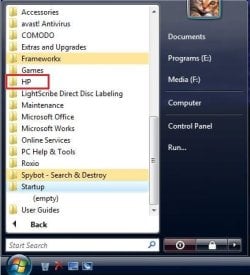
If I were you and you share the PC and you don't want to cause issues, I would also create the set of "Factory Recovery" disks that the PC will create for you to be used in case of issues, your changing the partition structure may disable the "Factory Recovery Partition" and make it not usable; have a look through the start menu and see what you will need to create the set of disks just to be on the safe side.


HP.jpg
 

My Computer My Computer

At a glance

W 7 64-bit UltimateIntel Q9550 Yorkfield8GB Dominator 8500C5DATI : XFX 5870
Computer Manufacturer/Model Number
* BFK Customs *
OS
W 7 64-bit Ultimate
CPU
Intel Q9550 Yorkfield
Motherboard
ASUS P5Q Pro
Memory
8GB Dominator 8500C5D
Graphics Card(s)
ATI : XFX 5870
Sound Card
Realtek HD Audio 7-1
Monitor(s) Displays
1x 47" LCD HDMI & 3x 26" LCD HDMI
Screen Resolution
1920x1080P & 1920x1200
Hard Drives
1x 80GB Intel X25-M G2 SSD : 1x 500GB & 1x 640GB WD Caviar Black(s)
PSU
Corsair 620HX
Case
Cooler Master RC-690
Cooling
Tuniq Tower 120, 2x 140mm and 3x 120mm case fans
Keyboard
Microsoft 500
Mouse
Razer Diamondback 3G
Internet Speed
14 Mb/s
Other Info
1x Koutech 3Gb/s SATA HDD Hot Swap Rack
So what u say is that if I created a dual boot the FACTORY_IMAGE will be disabled, rigth?
Meanwhile thanks for the set of disk you recomend.
 

My Computer My Computer

At a glance

Windows 7 Ultimate 64 bitsDual Core Intel Core 2 Duo E75002x[2048 MB DDR2-SDRAM (PC2-6400 / 800 MHz), 2...Intel(R) G33/G31 Express Chipset Family (256 MB)
Computer Manufacturer/Model Number
HP Pavilon Slimline
OS
Windows 7 Ultimate 64 bits
CPU
Dual Core Intel Core 2 Duo E7500
Motherboard
MSI MS-7525 (Boston)
Memory
2x[2048 MB DDR2-SDRAM (PC2-6400 / 800 MHz), 2 Gb]; Total:4Gb
Graphics Card(s)
Intel(R) G33/G31 Express Chipset Family (256 MB)
Sound Card
Realtek ALC662 @ Intel 82801GB ICH7 - HD Audio Controller
Monitor(s) Displays
HP 2009m 20'' LCD
Screen Resolution
1600x900
Hard Drives
SAMSUNG HD642JJ (596 GB)
No I'm not saying it will be only that it may be if you change the partition structure, which is what you will have to do to dual boot; helping people is what I try do, you're welcome.
 

My Computer My Computer

At a glance

W 7 64-bit UltimateIntel Q9550 Yorkfield8GB Dominator 8500C5DATI : XFX 5870
Computer Manufacturer/Model Number
* BFK Customs *
OS
W 7 64-bit Ultimate
CPU
Intel Q9550 Yorkfield
Motherboard
ASUS P5Q Pro
Memory
8GB Dominator 8500C5D
Graphics Card(s)
ATI : XFX 5870
Sound Card
Realtek HD Audio 7-1
Monitor(s) Displays
1x 47" LCD HDMI & 3x 26" LCD HDMI
Screen Resolution
1920x1080P & 1920x1200
Hard Drives
1x 80GB Intel X25-M G2 SSD : 1x 500GB & 1x 640GB WD Caviar Black(s)
PSU
Corsair 620HX
Case
Cooler Master RC-690
Cooling
Tuniq Tower 120, 2x 140mm and 3x 120mm case fans
Keyboard
Microsoft 500
Mouse
Razer Diamondback 3G
Internet Speed
14 Mb/s
Other Info
1x Koutech 3Gb/s SATA HDD Hot Swap Rack
Mmm I'm trying to understand rigth away wath u said but I not sure if I get it, maybe because of my traslate or because of my incomprehension... so there is a posibility than this partition, the FACTORY_IMAGE, could not be usable after dual boot. That's what I understood.
But let's supose it does not matter now, and I have these 3 primary partitions and I want to install another OS in a new partiton. So I need to create a new one, but there's only the posibility to deal with a extended partiton, which inside let me create logical partitions, because of the limit of partitioning(3 primary partitions an 1 extended). So my question is if it is posible to install an OS in a logical partition.
 

My Computer My Computer

At a glance

Windows 7 Ultimate 64 bitsDual Core Intel Core 2 Duo E75002x[2048 MB DDR2-SDRAM (PC2-6400 / 800 MHz), 2...Intel(R) G33/G31 Express Chipset Family (256 MB)
Computer Manufacturer/Model Number
HP Pavilon Slimline
OS
Windows 7 Ultimate 64 bits
CPU
Dual Core Intel Core 2 Duo E7500
Motherboard
MSI MS-7525 (Boston)
Memory
2x[2048 MB DDR2-SDRAM (PC2-6400 / 800 MHz), 2 Gb]; Total:4Gb
Graphics Card(s)
Intel(R) G33/G31 Express Chipset Family (256 MB)
Sound Card
Realtek ALC662 @ Intel 82801GB ICH7 - HD Audio Controller
Monitor(s) Displays
HP 2009m 20'' LCD
Screen Resolution
1600x900
Hard Drives
SAMSUNG HD642JJ (596 GB)
Mmm I'm trying to understand rigth away wath u said but I not sure if I get it, maybe because of my traslate or because of my incomprehension... so there is a posibility than this partition, the FACTORY_IMAGE, could not be usable after dual boot. That's what I understood.
But let's supose it does not matter now, and I have these 3 primary partitions and I want to install another OS in a new partiton. So I need to create a new one, but there's only the posibility to deal with a extended partiton, which inside let me create logical partitions, because of the limit of partitioning(3 primary partitions an 1 extended).

Everything here is correct. arrow2.png


To this question, yes. arrow3.png

So my question is if it is posible to install an OS in a logical partition.


The only exception is Windows will not boot on its own from a "Logical" partition.


Edit: This tutorial at the link below has been updated to include how to do this, have a look.

Partition Wizard : Use the Bootable CD
 
Last edited:

My Computer My Computer

At a glance

W 7 64-bit UltimateIntel Q9550 Yorkfield8GB Dominator 8500C5DATI : XFX 5870
Computer Manufacturer/Model Number
* BFK Customs *
OS
W 7 64-bit Ultimate
CPU
Intel Q9550 Yorkfield
Motherboard
ASUS P5Q Pro
Memory
8GB Dominator 8500C5D
Graphics Card(s)
ATI : XFX 5870
Sound Card
Realtek HD Audio 7-1
Monitor(s) Displays
1x 47" LCD HDMI & 3x 26" LCD HDMI
Screen Resolution
1920x1080P & 1920x1200
Hard Drives
1x 80GB Intel X25-M G2 SSD : 1x 500GB & 1x 640GB WD Caviar Black(s)
PSU
Corsair 620HX
Case
Cooler Master RC-690
Cooling
Tuniq Tower 120, 2x 140mm and 3x 120mm case fans
Keyboard
Microsoft 500
Mouse
Razer Diamondback 3G
Internet Speed
14 Mb/s
Other Info
1x Koutech 3Gb/s SATA HDD Hot Swap Rack
And my last question is if installing the OS in the logical partition is the same procedure as in a primary one.
 

My Computer My Computer

At a glance

Windows 7 Ultimate 64 bitsDual Core Intel Core 2 Duo E75002x[2048 MB DDR2-SDRAM (PC2-6400 / 800 MHz), 2...Intel(R) G33/G31 Express Chipset Family (256 MB)
Computer Manufacturer/Model Number
HP Pavilon Slimline
OS
Windows 7 Ultimate 64 bits
CPU
Dual Core Intel Core 2 Duo E7500
Motherboard
MSI MS-7525 (Boston)
Memory
2x[2048 MB DDR2-SDRAM (PC2-6400 / 800 MHz), 2 Gb]; Total:4Gb
Graphics Card(s)
Intel(R) G33/G31 Express Chipset Family (256 MB)
Sound Card
Realtek ALC662 @ Intel 82801GB ICH7 - HD Audio Controller
Monitor(s) Displays
HP 2009m 20'' LCD
Screen Resolution
1600x900
Hard Drives
SAMSUNG HD642JJ (596 GB)
And my last question is if installing the OS in the logical partition is the same procedure as in a primary one.


No, a Windows OS will not boot from a logical partition unless the boot files are on another, primary partition.

So what this means is XP will not be able to finish the install as it won't be able to re-boot during the process of installation to finish the process; there is another way to do this by removing one of the other primary partitions that are already on the HDD but it will take a lot of work to accomplish successfully.


Edit: This tutorial at the link below has been updated to include how to do this, have a look.

Partition Wizard : Use the Bootable CD
 
Last edited:

My Computer My Computer

At a glance

W 7 64-bit UltimateIntel Q9550 Yorkfield8GB Dominator 8500C5DATI : XFX 5870
Computer Manufacturer/Model Number
* BFK Customs *
OS
W 7 64-bit Ultimate
CPU
Intel Q9550 Yorkfield
Motherboard
ASUS P5Q Pro
Memory
8GB Dominator 8500C5D
Graphics Card(s)
ATI : XFX 5870
Sound Card
Realtek HD Audio 7-1
Monitor(s) Displays
1x 47" LCD HDMI & 3x 26" LCD HDMI
Screen Resolution
1920x1080P & 1920x1200
Hard Drives
1x 80GB Intel X25-M G2 SSD : 1x 500GB & 1x 640GB WD Caviar Black(s)
PSU
Corsair 620HX
Case
Cooler Master RC-690
Cooling
Tuniq Tower 120, 2x 140mm and 3x 120mm case fans
Keyboard
Microsoft 500
Mouse
Razer Diamondback 3G
Internet Speed
14 Mb/s
Other Info
1x Koutech 3Gb/s SATA HDD Hot Swap Rack

My Computer My Computer

At a glance

Windows 7 Ultimate 64 bitsDual Core Intel Core 2 Duo E75002x[2048 MB DDR2-SDRAM (PC2-6400 / 800 MHz), 2...Intel(R) G33/G31 Express Chipset Family (256 MB)
Computer Manufacturer/Model Number
HP Pavilon Slimline
OS
Windows 7 Ultimate 64 bits
CPU
Dual Core Intel Core 2 Duo E7500
Motherboard
MSI MS-7525 (Boston)
Memory
2x[2048 MB DDR2-SDRAM (PC2-6400 / 800 MHz), 2 Gb]; Total:4Gb
Graphics Card(s)
Intel(R) G33/G31 Express Chipset Family (256 MB)
Sound Card
Realtek ALC662 @ Intel 82801GB ICH7 - HD Audio Controller
Monitor(s) Displays
HP 2009m 20'' LCD
Screen Resolution
1600x900
Hard Drives
SAMSUNG HD642JJ (596 GB)
I just did this with another Hard Disk Drive I had around here; though I'm going to say that I can't be responsible if something goes wrong and you lose data, PLEASE make backups of anything that you don't want to lose before you start this.


Use the tutorial at the link below to shrink and create a new partition ...

make the new partition at least 60GB.

Partition or Volume - Shrink

Partition or Volume - Create New


Edit: This tutorial at the link below has been updated to include how to do this, have a look.

Partition Wizard : Use the Bootable CD


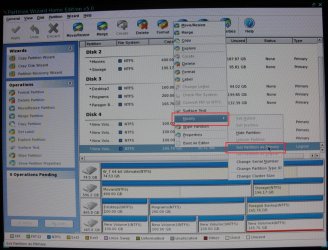
click any image to enlarge
Disk21.jpgDisk23.jpg
Disk22.jpg
 
Last edited:

My Computer My Computer

At a glance

W 7 64-bit UltimateIntel Q9550 Yorkfield8GB Dominator 8500C5DATI : XFX 5870
Computer Manufacturer/Model Number
* BFK Customs *
OS
W 7 64-bit Ultimate
CPU
Intel Q9550 Yorkfield
Motherboard
ASUS P5Q Pro
Memory
8GB Dominator 8500C5D
Graphics Card(s)
ATI : XFX 5870
Sound Card
Realtek HD Audio 7-1
Monitor(s) Displays
1x 47" LCD HDMI & 3x 26" LCD HDMI
Screen Resolution
1920x1080P & 1920x1200
Hard Drives
1x 80GB Intel X25-M G2 SSD : 1x 500GB & 1x 640GB WD Caviar Black(s)
PSU
Corsair 620HX
Case
Cooler Master RC-690
Cooling
Tuniq Tower 120, 2x 140mm and 3x 120mm case fans
Keyboard
Microsoft 500
Mouse
Razer Diamondback 3G
Internet Speed
14 Mb/s
Other Info
1x Koutech 3Gb/s SATA HDD Hot Swap Rack
You can have four primary partitions on a HD.

Use Partition Wizard to create Primary NTFS if Disk Management wants to make your fourth partition logical.

But I'd use Disk Mgmt to do the shrink since it's failsafe.

First save a Win7 Backup Image externally so you can reimage to where you are now in 15 minutes if necessary: http://www.sevenforums.com/tutorials/663-backup-complete-computer-create-image-backup.html

In addition make your Recovery Disks so you can return to Factory condition if need be.
 
Last edited:
See post #16 above. ;)
 

My Computer My Computer

At a glance

W 7 64-bit UltimateIntel Q9550 Yorkfield8GB Dominator 8500C5DATI : XFX 5870
Computer Manufacturer/Model Number
* BFK Customs *
OS
W 7 64-bit Ultimate
CPU
Intel Q9550 Yorkfield
Motherboard
ASUS P5Q Pro
Memory
8GB Dominator 8500C5D
Graphics Card(s)
ATI : XFX 5870
Sound Card
Realtek HD Audio 7-1
Monitor(s) Displays
1x 47" LCD HDMI & 3x 26" LCD HDMI
Screen Resolution
1920x1080P & 1920x1200
Hard Drives
1x 80GB Intel X25-M G2 SSD : 1x 500GB & 1x 640GB WD Caviar Black(s)
PSU
Corsair 620HX
Case
Cooler Master RC-690
Cooling
Tuniq Tower 120, 2x 140mm and 3x 120mm case fans
Keyboard
Microsoft 500
Mouse
Razer Diamondback 3G
Internet Speed
14 Mb/s
Other Info
1x Koutech 3Gb/s SATA HDD Hot Swap Rack
I read what you wrote Bare Foot Kid, and it's very helpful. However I have some other questions.
Firstly, when I create the logical partition, should I format it after using the Partition Wizard?
Secondly, in the http://www.sevenforums.com/tutorials/93322-partition-wizard-use-bootable-cd.html?ltr=P tutorial I will only need to follow Option Three, rigth?
Thirdly, when Partition Wizard make the fourth partition logical, then is needed to repair the boot?
And finally, if I succes creating a new primary partition and all works fine, and then I want to install windows XP, the installation will succed as well as in "normal partitioning" does? Have you done this? Or do you know someone who has done this? Or you just think it will probably work?

Up to now I very apreciate your help, hope you can solve my new doubts. ;)
 

My Computer My Computer

At a glance

Windows 7 Ultimate 64 bitsDual Core Intel Core 2 Duo E75002x[2048 MB DDR2-SDRAM (PC2-6400 / 800 MHz), 2...Intel(R) G33/G31 Express Chipset Family (256 MB)
Computer Manufacturer/Model Number
HP Pavilon Slimline
OS
Windows 7 Ultimate 64 bits
CPU
Dual Core Intel Core 2 Duo E7500
Motherboard
MSI MS-7525 (Boston)
Memory
2x[2048 MB DDR2-SDRAM (PC2-6400 / 800 MHz), 2 Gb]; Total:4Gb
Graphics Card(s)
Intel(R) G33/G31 Express Chipset Family (256 MB)
Sound Card
Realtek ALC662 @ Intel 82801GB ICH7 - HD Audio Controller
Monitor(s) Displays
HP 2009m 20'' LCD
Screen Resolution
1600x900
Hard Drives
SAMSUNG HD642JJ (596 GB)
Barefooted one:

Did you test to see if PW will create a fourth Primary partition without having to Modify it from Logical?

I believe it will.
 
Back
Top