windows 7 - dual boot windows 10 - partitions

mclaudiopt77

New member
Local time
11:02 AM
Messages
14
Hello
i need to have Windows 7 x32 on my laptop so i deleted all partitions and installed windows 7 in MBR - legacy

now i want to install win10 in dual boot and dont want to loose data on the hard disk

windows 10 does not allow me to install because it is not GPT

can someone please help?
thank you in advance
 

My Computers My Computers

System One System Two

  • Computer type
    Laptop
    Computer Manufacturer/Model Number
    Lenovo Yoga
    OS
    Microsoft Windows 10 Home 64 bits 19043 Multiprocessor Free
    CPU
    Intel(R) Core(TM) i5-8250U CPU @ 1.60GHz
    Motherboard
    LENOVO LNVNB161216
    Memory
    16.00 GB
    Graphics Card(s)
    Intel(R) UHD Graphics 620
    Sound Card
    (1) Áudio Intel(R) para Ecrãs (2) Realtek High Definition
    Screen Resolution
    1920 x 1080 x 32 bits (4294967296 colors) @ 60 Hz
    Hard Drives
    (1) HFS256GD9TNG-62A0A (2) Generic Flash Disk USB Device
  • Computer type
    PC/Desktop
Welcome to the forum. win10 will install on MBR parition no problems
 

My Computer My Computer

Computer type
PC/Desktop
OS
win 8 32 bit
Welcome to the forum. win10 will install on MBR parition no problems

thanks ...hope you can help me a little bit more
i have installed windows 7
on bios it is like legacy
when i try install windows 10 on other partition it says it cannot because it is not GPT :-(
 

My Computers My Computers

System One System Two

  • Computer type
    Laptop
    Computer Manufacturer/Model Number
    Lenovo Yoga
    OS
    Microsoft Windows 10 Home 64 bits 19043 Multiprocessor Free
    CPU
    Intel(R) Core(TM) i5-8250U CPU @ 1.60GHz
    Motherboard
    LENOVO LNVNB161216
    Memory
    16.00 GB
    Graphics Card(s)
    Intel(R) UHD Graphics 620
    Sound Card
    (1) Áudio Intel(R) para Ecrãs (2) Realtek High Definition
    Screen Resolution
    1920 x 1080 x 32 bits (4294967296 colors) @ 60 Hz
    Hard Drives
    (1) HFS256GD9TNG-62A0A (2) Generic Flash Disk USB Device
  • Computer type
    PC/Desktop
Please edit your profile with ALL your hardware specs. It will help us to help you
System Info - See Your System Specs

i have installed windows 7
on bios it is like legacy
when i try install windows 10 on other partition it says it cannot because it is not GPT :-(

That is because you're booting the Win 10 installation drive as UEFI.
You must boot it as legacy.

Under Win 7, open Disk Manager (C:\Windows\System32\diskmgmt.msc), select the C: partition and shrink by 60G to make space for Win 10. Leave the space unallocated.
Windows can be installed in two ways: Legacy-MBR or UEFI-GPT
To install as Legacy-MBR you must boot the installation drive as Legacy
To install as UEFI-GPT you must boot the installation drive as UEFI.


During POST, press F12 (?) to launch the boot menu. You will see two options for the USB drive. USB UEFI (Name) and USB (Name). Select USB (Name).
Go to install and select to install on the unallocated space created with Disk Manager and then proceed.
If you don't want to use MS account, don't enable updates or connect to the internet during installation.
 

My Computers My Computers

System One System Two

  • Computer type
    PC/Desktop
    Computer Manufacturer/Model Number
    custom build
    OS
    Windows 7 HP 64
    CPU
    i5 6600K - 800MHz to 4200MHz
    Motherboard
    GA-Z170-HD3P
    Memory
    4+4G GSkill DDR4 3000
    Graphics Card(s)
    IG - Intel 530
    Monitor(s) Displays
    Samsung 226BW
    Screen Resolution
    1680x1050
    Hard Drives
    (1) -1 SM951 – 128GB M.2 AHCI PCIe SSD drive for Windows 7 and Lubuntu
    (2) -1 WD SATA 3 - 1T for Data
    (3) -1 WD SATA 3 - 1T for backup
    PSU
    Thermaltake 450W TR2 gold
    Keyboard
    Old and good Chicony mechanical keyboard
    Mouse
    Logitech mX performance - 9 buttons (had to disable some)
    Internet Speed
    500Mb/s
    Browser
    Firefox 64
    Other Info
    TinyWall firewall
  • Computer type
    Laptop
    System Manufacturer/Model Number
    Asus Q550LF
    OS
    Windows 7 Pro
    CPU
    i7-4500U 800MHz to 3.0GHz
    Motherboard
    Asus Q550LF
    Memory
    (4+4)G DDR3 1600
    Graphics Card(s)
    IG intel 4400 + NVIDIA GeForce GT 745M
    Sound Card
    Realtek
    Monitor(s) Displays
    LG Display LP156WF4-SPH1
    Screen Resolution
    1920 x 1080
    Hard Drives
    BX500 120G SSD for Windows and programs +
    1T HDD for data
    Internet Speed
    500 Mb/s
    Browser
    Firefox
    Other Info
    TinyWall firewall
Please edit your profile with ALL your hardware specs. It will help us to help you
System Info - See Your System Specs


That is because you're booting the Win 10 installation drive as UEFI.
You must boot it as legacy.

Under Win 7, open Disk Manager (C:\Windows\System32\diskmgmt.msc), select the C: partition and shrink by 60G to make space for Win 10. Leave the space unallocated.
Windows can be installed in two ways: Legacy-MBR or UEFI-GPT
To install as Legacy-MBR you must boot the installation drive as Legacy
To install as UEFI-GPT you must boot the installation drive as UEFI.


During POST, press F12 (?) to launch the boot menu. You will see two options for the USB drive. USB UEFI (Name) and USB (Name). Select USB (Name).
Go to install and select to install on the unallocated space created with Disk Manager and then proceed.
If you don't want to use MS account, don't enable updates or connect to the internet during installation.

-------------------------------------------------

Hi
thank for the support
i dont know how but with hirenboot cd i was able to convert to GPT
now i have the following:

Windows 10

Windows 7 32 appears on boot menu (windows native boot menu)

altough booting from windows 7 gives error windows\system32\winload.efi
error: missing or damaged


windows 10 boots great

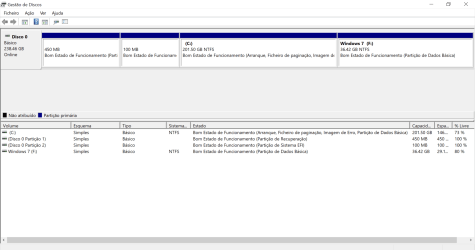
this is how it looks
link 1 - Imgur: The magic of the Internet

by bios is set as:
Legacy
UEFI first

hope can help me setting it up
 

My Computers My Computers

System One System Two

  • Computer type
    Laptop
    Computer Manufacturer/Model Number
    Lenovo Yoga
    OS
    Microsoft Windows 10 Home 64 bits 19043 Multiprocessor Free
    CPU
    Intel(R) Core(TM) i5-8250U CPU @ 1.60GHz
    Motherboard
    LENOVO LNVNB161216
    Memory
    16.00 GB
    Graphics Card(s)
    Intel(R) UHD Graphics 620
    Sound Card
    (1) Áudio Intel(R) para Ecrãs (2) Realtek High Definition
    Screen Resolution
    1920 x 1080 x 32 bits (4294967296 colors) @ 60 Hz
    Hard Drives
    (1) HFS256GD9TNG-62A0A (2) Generic Flash Disk USB Device
  • Computer type
    PC/Desktop
Windows 7x86 does not support efi boot.
 

My Computers My Computers

System One System Two

  • Computer type
    PC/Desktop
    OS
    7 X64
    CPU
    i5 8400
    Motherboard
    gigabyte b365m ds3h
    Memory
    2x8gb 3200mhz
    Hard Drives
    various
    PSU
    pure power 11 400w cm
    Case
    Coolermaster
    Cooling
    cryorig m9i
  • Computer type
    PC/Desktop
    OS
    7x64
    CPU
    g5400
    Motherboard
    ga b365m ds3h
    Memory
    8gb ddr4 2400
    PSU
    xfx pro 450w
Windows 7x86 does not support efi boot.

well i am a little desperate now.

i now changed to windows 7 x64

procedure:
bios: UEFI
Secure boot: disabled

boot - windows 7 USB pen
partitions: remove all volumes and let windows create. it creates 3 or 4 small partitions.
instalation: biggest partition available

symptom:
when rebooting gives error
\EFI\Microsoft\Boot\BCD

0xc0000000d
an error occuperdwhile attemting to read the boot configuration data


i cannot finalize this step :-(

second step i would like to dual boot windows 10


i have followed this
UEFI (Unified Extensible Firmware Interface) - Install Windows 7 with


UPDATE:
Changed UEFI to Legacy then other option UEFI first and it boots but gives blue screen and reboots
damn dont know what to do
 

My Computers My Computers

System One System Two

  • Computer type
    Laptop
    Computer Manufacturer/Model Number
    Lenovo Yoga
    OS
    Microsoft Windows 10 Home 64 bits 19043 Multiprocessor Free
    CPU
    Intel(R) Core(TM) i5-8250U CPU @ 1.60GHz
    Motherboard
    LENOVO LNVNB161216
    Memory
    16.00 GB
    Graphics Card(s)
    Intel(R) UHD Graphics 620
    Sound Card
    (1) Áudio Intel(R) para Ecrãs (2) Realtek High Definition
    Screen Resolution
    1920 x 1080 x 32 bits (4294967296 colors) @ 60 Hz
    Hard Drives
    (1) HFS256GD9TNG-62A0A (2) Generic Flash Disk USB Device
  • Computer type
    PC/Desktop

My Computers My Computers

System One System Two

  • Computer type
    PC/Desktop
    Computer Manufacturer/Model Number
    custom build
    OS
    Windows 7 HP 64
    CPU
    i5 6600K - 800MHz to 4200MHz
    Motherboard
    GA-Z170-HD3P
    Memory
    4+4G GSkill DDR4 3000
    Graphics Card(s)
    IG - Intel 530
    Monitor(s) Displays
    Samsung 226BW
    Screen Resolution
    1680x1050
    Hard Drives
    (1) -1 SM951 – 128GB M.2 AHCI PCIe SSD drive for Windows 7 and Lubuntu
    (2) -1 WD SATA 3 - 1T for Data
    (3) -1 WD SATA 3 - 1T for backup
    PSU
    Thermaltake 450W TR2 gold
    Keyboard
    Old and good Chicony mechanical keyboard
    Mouse
    Logitech mX performance - 9 buttons (had to disable some)
    Internet Speed
    500Mb/s
    Browser
    Firefox 64
    Other Info
    TinyWall firewall
  • Computer type
    Laptop
    System Manufacturer/Model Number
    Asus Q550LF
    OS
    Windows 7 Pro
    CPU
    i7-4500U 800MHz to 3.0GHz
    Motherboard
    Asus Q550LF
    Memory
    (4+4)G DDR3 1600
    Graphics Card(s)
    IG intel 4400 + NVIDIA GeForce GT 745M
    Sound Card
    Realtek
    Monitor(s) Displays
    LG Display LP156WF4-SPH1
    Screen Resolution
    1920 x 1080
    Hard Drives
    BX500 120G SSD for Windows and programs +
    1T HDD for data
    Internet Speed
    500 Mb/s
    Browser
    Firefox
    Other Info
    TinyWall firewall
You're shooting in the dark.
Where is the hardware specs?
System Info - See Your System Specs


Is Win 7 or Win10 working?


----
hi there
well i was so tired that i made a w10 x6 fresh install.
what i would wish now is, make the 2nd boot with windows 7.
i already shrinked my windows 10 partition and have the volume for windows 7 free

mybios is UEFI now - no secure boot

now aded specs
 

My Computers My Computers

System One System Two

  • Computer type
    Laptop
    Computer Manufacturer/Model Number
    Lenovo Yoga
    OS
    Microsoft Windows 10 Home 64 bits 19043 Multiprocessor Free
    CPU
    Intel(R) Core(TM) i5-8250U CPU @ 1.60GHz
    Motherboard
    LENOVO LNVNB161216
    Memory
    16.00 GB
    Graphics Card(s)
    Intel(R) UHD Graphics 620
    Sound Card
    (1) Áudio Intel(R) para Ecrãs (2) Realtek High Definition
    Screen Resolution
    1920 x 1080 x 32 bits (4294967296 colors) @ 60 Hz
    Hard Drives
    (1) HFS256GD9TNG-62A0A (2) Generic Flash Disk USB Device
  • Computer type
    PC/Desktop
What I would have done is set the BIOS in legacy/MBR mode, then do a clean install of Windows 7 SP1 32-bit, then use Disk Management to create a second partition in the hard drive, then do a clean install of Windows 10 32-bit in the second partition.
 
Last edited:

My Computer My Computer

Computer type
PC/Desktop
Computer Manufacturer/Model Number
Dell OptiPlex 9020
OS
Windows 7 Professional SP1 64-bit
CPU
Intel Core i7-4790 3.60 GHz
Memory
32 GB DDR3-1600 MHz
Graphics Card(s)
Integrated Intel HD Graphics 4600
Monitor(s) Displays
Viewsonic 32" LCD
Hard Drives
Kingston SATA 3 240 GB SSD
Internet Speed
Spectrum Internet 1000 Mbps
You want to install Win 7 on a Lenovo Yoga with i5-8250U CPU?
 

My Computers My Computers

System One System Two

  • Computer type
    PC/Desktop
    Computer Manufacturer/Model Number
    custom build
    OS
    Windows 7 HP 64
    CPU
    i5 6600K - 800MHz to 4200MHz
    Motherboard
    GA-Z170-HD3P
    Memory
    4+4G GSkill DDR4 3000
    Graphics Card(s)
    IG - Intel 530
    Monitor(s) Displays
    Samsung 226BW
    Screen Resolution
    1680x1050
    Hard Drives
    (1) -1 SM951 – 128GB M.2 AHCI PCIe SSD drive for Windows 7 and Lubuntu
    (2) -1 WD SATA 3 - 1T for Data
    (3) -1 WD SATA 3 - 1T for backup
    PSU
    Thermaltake 450W TR2 gold
    Keyboard
    Old and good Chicony mechanical keyboard
    Mouse
    Logitech mX performance - 9 buttons (had to disable some)
    Internet Speed
    500Mb/s
    Browser
    Firefox 64
    Other Info
    TinyWall firewall
  • Computer type
    Laptop
    System Manufacturer/Model Number
    Asus Q550LF
    OS
    Windows 7 Pro
    CPU
    i7-4500U 800MHz to 3.0GHz
    Motherboard
    Asus Q550LF
    Memory
    (4+4)G DDR3 1600
    Graphics Card(s)
    IG intel 4400 + NVIDIA GeForce GT 745M
    Sound Card
    Realtek
    Monitor(s) Displays
    LG Display LP156WF4-SPH1
    Screen Resolution
    1920 x 1080
    Hard Drives
    BX500 120G SSD for Windows and programs +
    1T HDD for data
    Internet Speed
    500 Mb/s
    Browser
    Firefox
    Other Info
    TinyWall firewall
yes i need for some special software


currrently i have:

- windows 10 - OK booting
- Windows 7 - installed but does not boook - freeze at disk.sys

i think i am close to solution....

do you have a suggestion?

Bios is in UEFI
 

My Computers My Computers

System One System Two

  • Computer type
    Laptop
    Computer Manufacturer/Model Number
    Lenovo Yoga
    OS
    Microsoft Windows 10 Home 64 bits 19043 Multiprocessor Free
    CPU
    Intel(R) Core(TM) i5-8250U CPU @ 1.60GHz
    Motherboard
    LENOVO LNVNB161216
    Memory
    16.00 GB
    Graphics Card(s)
    Intel(R) UHD Graphics 620
    Sound Card
    (1) Áudio Intel(R) para Ecrãs (2) Realtek High Definition
    Screen Resolution
    1920 x 1080 x 32 bits (4294967296 colors) @ 60 Hz
    Hard Drives
    (1) HFS256GD9TNG-62A0A (2) Generic Flash Disk USB Device
  • Computer type
    PC/Desktop
What type of disk did you install windows 7 onto.

Lenovo Yoga is not enough information. There are many models.

What is the exact model name and number?

The motherboard in your specs is apparently for Lenovo Ideapad 520

Lenovo Ideapad 520-15IKBR-81BF0074SP - Notebookcheck.net External Reviews

- - - Updated - - -

According to the now defunct lenovo solution centre, that laptop supports win7x64

Lenovo Solution Center for Windows 7 (64-bit) - Desktops, Notebooks, Workstations - Lenovo Support GB
 

My Computers My Computers

System One System Two

  • Computer type
    PC/Desktop
    OS
    7 X64
    CPU
    i5 8400
    Motherboard
    gigabyte b365m ds3h
    Memory
    2x8gb 3200mhz
    Hard Drives
    various
    PSU
    pure power 11 400w cm
    Case
    Coolermaster
    Cooling
    cryorig m9i
  • Computer type
    PC/Desktop
    OS
    7x64
    CPU
    g5400
    Motherboard
    ga b365m ds3h
    Memory
    8gb ddr4 2400
    PSU
    xfx pro 450w
What type of disk did you install windows 7 onto.

Lenovo Yoga is not enough information. There are many models.

What is the exact model name and number? -->

The motherboard in your specs is apparently for Lenovo Ideapad 520

Lenovo Ideapad 520-15IKBR-81BF0074SP - Notebookcheck.net External Reviews

- - - Updated - - -

According to the now defunct lenovo solution centre, that laptop supports win7x64

Lenovo Solution Center for Windows 7 (64-bit) - Desktops, Notebooks, Workstations - Lenovo Support GB
here it is Yoga 530-14IKB Laptop (ideapad) - Type 81EK
 

My Computers My Computers

System One System Two

  • Computer type
    Laptop
    Computer Manufacturer/Model Number
    Lenovo Yoga
    OS
    Microsoft Windows 10 Home 64 bits 19043 Multiprocessor Free
    CPU
    Intel(R) Core(TM) i5-8250U CPU @ 1.60GHz
    Motherboard
    LENOVO LNVNB161216
    Memory
    16.00 GB
    Graphics Card(s)
    Intel(R) UHD Graphics 620
    Sound Card
    (1) Áudio Intel(R) para Ecrãs (2) Realtek High Definition
    Screen Resolution
    1920 x 1080 x 32 bits (4294967296 colors) @ 60 Hz
    Hard Drives
    (1) HFS256GD9TNG-62A0A (2) Generic Flash Disk USB Device
  • Computer type
    PC/Desktop

My Computers My Computers

System One System Two

  • Computer type
    PC/Desktop
    Computer Manufacturer/Model Number
    custom build
    OS
    Windows 7 HP 64
    CPU
    i5 6600K - 800MHz to 4200MHz
    Motherboard
    GA-Z170-HD3P
    Memory
    4+4G GSkill DDR4 3000
    Graphics Card(s)
    IG - Intel 530
    Monitor(s) Displays
    Samsung 226BW
    Screen Resolution
    1680x1050
    Hard Drives
    (1) -1 SM951 – 128GB M.2 AHCI PCIe SSD drive for Windows 7 and Lubuntu
    (2) -1 WD SATA 3 - 1T for Data
    (3) -1 WD SATA 3 - 1T for backup
    PSU
    Thermaltake 450W TR2 gold
    Keyboard
    Old and good Chicony mechanical keyboard
    Mouse
    Logitech mX performance - 9 buttons (had to disable some)
    Internet Speed
    500Mb/s
    Browser
    Firefox 64
    Other Info
    TinyWall firewall
  • Computer type
    Laptop
    System Manufacturer/Model Number
    Asus Q550LF
    OS
    Windows 7 Pro
    CPU
    i7-4500U 800MHz to 3.0GHz
    Motherboard
    Asus Q550LF
    Memory
    (4+4)G DDR3 1600
    Graphics Card(s)
    IG intel 4400 + NVIDIA GeForce GT 745M
    Sound Card
    Realtek
    Monitor(s) Displays
    LG Display LP156WF4-SPH1
    Screen Resolution
    1920 x 1080
    Hard Drives
    BX500 120G SSD for Windows and programs +
    1T HDD for data
    Internet Speed
    500 Mb/s
    Browser
    Firefox
    Other Info
    TinyWall firewall

My Computers My Computers

System One System Two

  • Computer type
    Laptop
    Computer Manufacturer/Model Number
    Lenovo Yoga
    OS
    Microsoft Windows 10 Home 64 bits 19043 Multiprocessor Free
    CPU
    Intel(R) Core(TM) i5-8250U CPU @ 1.60GHz
    Motherboard
    LENOVO LNVNB161216
    Memory
    16.00 GB
    Graphics Card(s)
    Intel(R) UHD Graphics 620
    Sound Card
    (1) Áudio Intel(R) para Ecrãs (2) Realtek High Definition
    Screen Resolution
    1920 x 1080 x 32 bits (4294967296 colors) @ 60 Hz
    Hard Drives
    (1) HFS256GD9TNG-62A0A (2) Generic Flash Disk USB Device
  • Computer type
    PC/Desktop
You want to install Win 7 on a Lenovo Yoga with i5-8250U CPU?
here it is Yoga 530-14IKB Laptop (ideapad) - Type 81EK
mclaudiopt77:
Disregard what I said in post #10.
I wasn't aware that you want to dual boot Windows 7 and 10 in an 8th generation laptop.
 

My Computer My Computer

Computer type
PC/Desktop
Computer Manufacturer/Model Number
Dell OptiPlex 9020
OS
Windows 7 Professional SP1 64-bit
CPU
Intel Core i7-4790 3.60 GHz
Memory
32 GB DDR3-1600 MHz
Graphics Card(s)
Integrated Intel HD Graphics 4600
Monitor(s) Displays
Viewsonic 32" LCD
Hard Drives
Kingston SATA 3 240 GB SSD
Internet Speed
Spectrum Internet 1000 Mbps
mclaudiopt77:
Disregard what I said in post #10.
I wasn't aware that you want to dual boot Windows 7 and 10 in an 8th generation laptop.

so not possible?
 

My Computers My Computers

System One System Two

  • Computer type
    Laptop
    Computer Manufacturer/Model Number
    Lenovo Yoga
    OS
    Microsoft Windows 10 Home 64 bits 19043 Multiprocessor Free
    CPU
    Intel(R) Core(TM) i5-8250U CPU @ 1.60GHz
    Motherboard
    LENOVO LNVNB161216
    Memory
    16.00 GB
    Graphics Card(s)
    Intel(R) UHD Graphics 620
    Sound Card
    (1) Áudio Intel(R) para Ecrãs (2) Realtek High Definition
    Screen Resolution
    1920 x 1080 x 32 bits (4294967296 colors) @ 60 Hz
    Hard Drives
    (1) HFS256GD9TNG-62A0A (2) Generic Flash Disk USB Device
  • Computer type
    PC/Desktop
It is possible

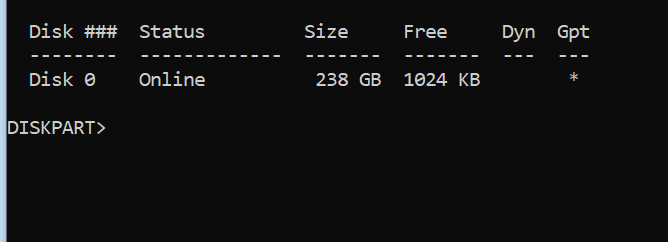
Just confirm that your drive is GPT
Open a CMD window as administrator and type:
diskpart
list disk (see if in the GPT column there is a *)
exit

report
 

My Computers My Computers

System One System Two

  • Computer type
    PC/Desktop
    Computer Manufacturer/Model Number
    custom build
    OS
    Windows 7 HP 64
    CPU
    i5 6600K - 800MHz to 4200MHz
    Motherboard
    GA-Z170-HD3P
    Memory
    4+4G GSkill DDR4 3000
    Graphics Card(s)
    IG - Intel 530
    Monitor(s) Displays
    Samsung 226BW
    Screen Resolution
    1680x1050
    Hard Drives
    (1) -1 SM951 – 128GB M.2 AHCI PCIe SSD drive for Windows 7 and Lubuntu
    (2) -1 WD SATA 3 - 1T for Data
    (3) -1 WD SATA 3 - 1T for backup
    PSU
    Thermaltake 450W TR2 gold
    Keyboard
    Old and good Chicony mechanical keyboard
    Mouse
    Logitech mX performance - 9 buttons (had to disable some)
    Internet Speed
    500Mb/s
    Browser
    Firefox 64
    Other Info
    TinyWall firewall
  • Computer type
    Laptop
    System Manufacturer/Model Number
    Asus Q550LF
    OS
    Windows 7 Pro
    CPU
    i7-4500U 800MHz to 3.0GHz
    Motherboard
    Asus Q550LF
    Memory
    (4+4)G DDR3 1600
    Graphics Card(s)
    IG intel 4400 + NVIDIA GeForce GT 745M
    Sound Card
    Realtek
    Monitor(s) Displays
    LG Display LP156WF4-SPH1
    Screen Resolution
    1920 x 1080
    Hard Drives
    BX500 120G SSD for Windows and programs +
    1T HDD for data
    Internet Speed
    500 Mb/s
    Browser
    Firefox
    Other Info
    TinyWall firewall
It is possible

Just confirm that your drive is GPT
Open a CMD window as administrator and type:
diskpart
list disk (see if in the GPT column there is a *)
exit

report

yes it has
image.png
 

My Computers My Computers

System One System Two

  • Computer type
    Laptop
    Computer Manufacturer/Model Number
    Lenovo Yoga
    OS
    Microsoft Windows 10 Home 64 bits 19043 Multiprocessor Free
    CPU
    Intel(R) Core(TM) i5-8250U CPU @ 1.60GHz
    Motherboard
    LENOVO LNVNB161216
    Memory
    16.00 GB
    Graphics Card(s)
    Intel(R) UHD Graphics 620
    Sound Card
    (1) Áudio Intel(R) para Ecrãs (2) Realtek High Definition
    Screen Resolution
    1920 x 1080 x 32 bits (4294967296 colors) @ 60 Hz
    Hard Drives
    (1) HFS256GD9TNG-62A0A (2) Generic Flash Disk USB Device
  • Computer type
    PC/Desktop
Back
Top