
Solved Possible rootkit infection?

gabe22

New member
Local time
4:09 PM
Messages
146
Hi

My system was detecting some strange virus etc yesterday for a brief period of time ... but fortunately avast free version(latest update) .. detected and quarintined all of them. Most their paths were like:

C:\user\public\documents\DELL.exe
C:\user\public\documents\documents.exe
C:\user\public\documents\downloads\downloads.exe


Then I scaned with avast+malewarebytes+supertin ... and all results nothing found.
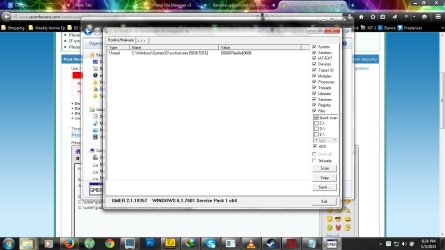
After google'ing a bit .. I found this article that suggested it could be a possible rootkit infection, so I downloaded .. GMER and with its quick scan it found the following(screenshot attached)

Although it stopped after a while ... I mean the avast detection but GMER still detects something (I'm quite clueless here though) .. however I would like to know if the thing virus or rootkit is still there within my system .. because from what I recall .. i just scanned with the above mentioned security tools and they found nothing ang GMER found something .. that I cant delete (delete button deactive) but perhaps its because the file it detects is part of the OS .. I'm wondering if I didn't delete the file then .. how did it stop and just to be on the safe side .. is there anyway to know if its still within my system.

Finally if anyone knows any security tools that can prevent rootkits or whatever(I'm pretty much guessing here) from entering the system .. would save me from lots of trouble.

Thanks in advance!
 

Attachments
  • possible-rootkit.jpg
    possible-rootkit.jpg
    101.8 KB · Views: 10

My Computer

OS
Windows 7 Home Premium, Version 6.1 (Build 7601: Service Pack 1)
There are several rootkit scanners you can use. TDSSKiller is the one normally recommended. The link below will give you 4 additional scanners you can use with results that are easier to decode.

Five free portable rootkit removers - TechRepublic

GMER is another top pick that can easily outperform all other tools in its class. The one caveat to this software is that it does require a bit of knowledge to interpret the results. This tool isn't one you simply click and disinfect. You let the tool scan, you pour through the results, and you decide what should be repaired/removed.
 

My Computer

Computer type
PC/Desktop
Computer Manufacturer/Model Number
Dell Hell oh Well
OS
Win 7 32 Home Premium, Win 7 64 Pro, Win 8.1, Win 10
CPU
Intel Core 2 Duo 2.93GHz
Memory
Not much with my ADHD
Graphics Card(s)
ATI Radeon HD 4350
Monitor(s) Displays
24" HDTV/Monitor
Screen Resolution
Blurry after a Scotch or 2
Hard Drives
1 HDD 250 GB, 1 HDD 1 TB, 3 - 1 TB Externals
Case
Don't get on my case...man :D
Cooling
I have an Air Conditioner & Diet Pepsi
Keyboard
Saitek Cyborg
Mouse
10 yr old MS optical mouse that still works
Internet Speed
Never fast enough
Antivirus
Various
Browser
Various
thank you but the avast is detecting threats again .. the detections are about the same as yesterday ... would scanning with TDSSKiller help with finding and possibly removing the actual virus/rootkit thats trying to infect other files?

new detection:

C:\users\public\public.exe
C:\users\public\documents\dell\musicstage\MusicStage.scr

any idea on how to resolve this issue?
 

My Computer

OS
Windows 7 Home Premium, Version 6.1 (Build 7601: Service Pack 1)

My Computer

Computer type
PC/Desktop
Computer Manufacturer/Model Number
Dell Hell oh Well
OS
Win 7 32 Home Premium, Win 7 64 Pro, Win 8.1, Win 10
CPU
Intel Core 2 Duo 2.93GHz
Memory
Not much with my ADHD
Graphics Card(s)
ATI Radeon HD 4350
Monitor(s) Displays
24" HDTV/Monitor
Screen Resolution
Blurry after a Scotch or 2
Hard Drives
1 HDD 250 GB, 1 HDD 1 TB, 3 - 1 TB Externals
Case
Don't get on my case...man :D
Cooling
I have an Air Conditioner & Diet Pepsi
Keyboard
Saitek Cyborg
Mouse
10 yr old MS optical mouse that still works
Internet Speed
Never fast enough
Antivirus
Various
Browser
Various
Suggestion

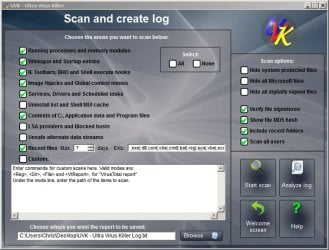
Well if you like you could run a scan with UVK. It will create a log and it might be possible to figure out what's going on.

UVK - Ultra Virus Killer

If you download and install UVK - once installed right click the desktop icon and choose "Run as admin"

On the welcome screen choose "Scan & Create Log" and use the following settings.

UVK.jpg

Choose to save the log to your desktop and then upload it here. It will take a few minutes to scan.
 

My Computer

Computer type
Laptop
Computer Manufacturer/Model Number
ASUS
OS
Microsoft Windows 7 Home Premium 64-bit 7601 Multiprocessor Free Service Pack 1
CPU
AMD C-60 APU with Radeon(tm) HD Graphics
Motherboard
ASUSTeK COMPUTER INC. X501U
Memory
4.00 GB
Graphics Card(s)
AMD Radeon HD 6290 Graphics
Sound Card
(1) AMD High Definition Audio Device (2) Realtek High Defi
Screen Resolution
1366 x 768 x 32 bits (4294967296 colors) @ 60 Hz
Hard Drives
Hitachi HTS545050A7E380 SATA Disk Device
Antivirus
Comodo CIS & FW, SecureAplus App Whitelisting, Threatfire
Browser
Cyberfox 64bit, Opera 64bit, Airfox
Other Info
Spy-The-Spy, HitmanPro.Alert, Norton Connect Safe, MJRegWatcher, BitDefender TrafficLight, Voodoo Shield, Zemana AntiMalware
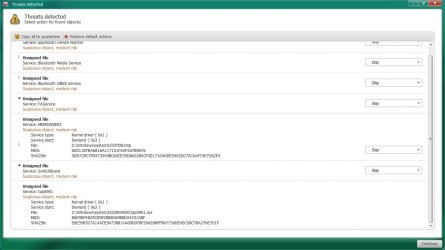
I just ran scan with TDSSKiller and in normal search it found nothing .. so I changed its parameters to "Loaded Modules" and after restart it found couple of items in next scan with all options selected.

I've attached screenshot with suspicious detections(as I couldn't identify them) tabs enlarged ... any ideas?

Also attached the VK scan log
 

Attachments

My Computer

OS
Windows 7 Home Premium, Version 6.1 (Build 7601: Service Pack 1)
Re: TDSS Killer. I wouln't worry about those results. It shows files that are hidden from Windows but that doesn't mean that they're dodgy. Will llok at your uploaded log.
 

My Computer

Computer type
Laptop
Computer Manufacturer/Model Number
ASUS
OS
Microsoft Windows 7 Home Premium 64-bit 7601 Multiprocessor Free Service Pack 1
CPU
AMD C-60 APU with Radeon(tm) HD Graphics
Motherboard
ASUSTeK COMPUTER INC. X501U
Memory
4.00 GB
Graphics Card(s)
AMD Radeon HD 6290 Graphics
Sound Card
(1) AMD High Definition Audio Device (2) Realtek High Defi
Screen Resolution
1366 x 768 x 32 bits (4294967296 colors) @ 60 Hz
Hard Drives
Hitachi HTS545050A7E380 SATA Disk Device
Antivirus
Comodo CIS & FW, SecureAplus App Whitelisting, Threatfire
Browser
Cyberfox 64bit, Opera 64bit, Airfox
Other Info
Spy-The-Spy, HitmanPro.Alert, Norton Connect Safe, MJRegWatcher, BitDefender TrafficLight, Voodoo Shield, Zemana AntiMalware
Suggested fix

Okay so try this:

Download and save this file to your desktop:

View attachment UVK Fix List.txt

Once you've downloaded it - right click the file and rename it to UVK Fix List.uvk

In other words replace .txt with .uvk in the file name.

Run UVK (run as admin) and on the Welcome Screen choose "Run Scripts"

Then choose "Import Commands From File"

Browse to the UVK Fix List.uvk file on your desktop and import it.

Choose "Run / Fix Listed"

When complete - reboot.

Edit: See my post below for another folder that needs removal.
 
Last edited:

My Computer

Computer type
Laptop
Computer Manufacturer/Model Number
ASUS
OS
Microsoft Windows 7 Home Premium 64-bit 7601 Multiprocessor Free Service Pack 1
CPU
AMD C-60 APU with Radeon(tm) HD Graphics
Motherboard
ASUSTeK COMPUTER INC. X501U
Memory
4.00 GB
Graphics Card(s)
AMD Radeon HD 6290 Graphics
Sound Card
(1) AMD High Definition Audio Device (2) Realtek High Defi
Screen Resolution
1366 x 768 x 32 bits (4294967296 colors) @ 60 Hz
Hard Drives
Hitachi HTS545050A7E380 SATA Disk Device
Antivirus
Comodo CIS & FW, SecureAplus App Whitelisting, Threatfire
Browser
Cyberfox 64bit, Opera 64bit, Airfox
Other Info
Spy-The-Spy, HitmanPro.Alert, Norton Connect Safe, MJRegWatcher, BitDefender TrafficLight, Voodoo Shield, Zemana AntiMalware
More action required:

Looked at your log in more detail and see the following suspicious entry:

ContentsCommonAppData> | 34BE82C4-E596-4e99-A191-52C6199EBF69

Would you also run the following fix like you did before?

View attachment UVK - Fix List 2.txt
 

My Computer

Computer type
Laptop
Computer Manufacturer/Model Number
ASUS
OS
Microsoft Windows 7 Home Premium 64-bit 7601 Multiprocessor Free Service Pack 1
CPU
AMD C-60 APU with Radeon(tm) HD Graphics
Motherboard
ASUSTeK COMPUTER INC. X501U
Memory
4.00 GB
Graphics Card(s)
AMD Radeon HD 6290 Graphics
Sound Card
(1) AMD High Definition Audio Device (2) Realtek High Defi
Screen Resolution
1366 x 768 x 32 bits (4294967296 colors) @ 60 Hz
Hard Drives
Hitachi HTS545050A7E380 SATA Disk Device
Antivirus
Comodo CIS & FW, SecureAplus App Whitelisting, Threatfire
Browser
Cyberfox 64bit, Opera 64bit, Airfox
Other Info
Spy-The-Spy, HitmanPro.Alert, Norton Connect Safe, MJRegWatcher, BitDefender TrafficLight, Voodoo Shield, Zemana AntiMalware
Ran both scripts ... and the UVK removed some files etc ..

Whats the next step? I mean is there anyway to figureout if the issue(virus/rootkit) is actually gone?
 

My Computer

OS
Windows 7 Home Premium, Version 6.1 (Build 7601: Service Pack 1)
If you still suspect a rootkit, then you need to look at it with GParted. This is a bootable partition manager that will allow you to see the contents of your drive, including any hidden partitions.

Rootkits generally cloak themselves from Windows disk management. This application will show the entire contents of the disk.

GParted -- A free application for graphically managing disk device partitions

D/L GParted, select the boot medium you wish to use & run it at boot time. Any rootkit will show up, usually at the end of the drive, as a hidden boot partition between 1 to 10 MB depending on the variant.

You might want to d/l & run RKill, then run your malware scanners again. After running RKill, do NOT reboot.

RKill Download

RKill is a program that was developed at BleepingComputer.com that attempts to terminate known malware processes so that your normal security software can then run and clean your computer of infections. When RKill runs it will kill malware processes and then removes incorrect executable associations and fixes policies that stop us from using certain tools. When finished it will display a log file that shows the processes that were terminated while the program was running.


As RKill only terminates a program's running process, and does not delete any files, after running it you should not reboot your computer as any malware processes that are configured to start automatically will just be started again. Instead, after running RKill you should immediately scan your computer using some sort of anti-malware or anti-virus program so that the infections can be properly removed.
 

My Computer

Computer type
PC/Desktop
Computer Manufacturer/Model Number
Dell Hell oh Well
OS
Win 7 32 Home Premium, Win 7 64 Pro, Win 8.1, Win 10
CPU
Intel Core 2 Duo 2.93GHz
Memory
Not much with my ADHD
Graphics Card(s)
ATI Radeon HD 4350
Monitor(s) Displays
24" HDTV/Monitor
Screen Resolution
Blurry after a Scotch or 2
Hard Drives
1 HDD 250 GB, 1 HDD 1 TB, 3 - 1 TB Externals
Case
Don't get on my case...man :D
Cooling
I have an Air Conditioner & Diet Pepsi
Keyboard
Saitek Cyborg
Mouse
10 yr old MS optical mouse that still works
Internet Speed
Never fast enough
Antivirus
Various
Browser
Various
I Understand and I'll try what you suggested but from my previous scans ... this virus keeps creating files within public directory ... good thing is avast can detect the infected autogenerated files .. however avast+malewarebytes+supertin .. none of these found anything on my system while the virus or rootkit(i'm suspecting rootkit as traditional AV's cant detect it) .. I'm saying this cause "after running RKill you should immediately scan your computer using some sort of anti-malware or anti-virus program so that the infections can be properly removed." ... it seems the like this suggests as if the antivirus can detect the program .. but in my case it doesn't ... should I still run AV scan after Rkill?

With "GParted" ... how would I know which one is the virus or rootkit(to be sure, I don't want to mess up the system if possible)? I mean what should I look for? does the program creates scan log or should I post screenshots?
 

My Computer

OS
Windows 7 Home Premium, Version 6.1 (Build 7601: Service Pack 1)
Yes, run an AV Scan after running RKill. And the other Malware scanners.

RKill works by trying to identify known malware processes & shutting them down. In some instances, malware can't be removed while it's active. Being shut down gives your malware scanner a better chance of isolating it.

Another option you have is to boot into Safe Mode & then do a scan with your malware scanners.

GParted will show you a graphical interface of the partitions on your drive. Rootkits are usually located at the end of the drive, generally between 1 - 10MB, set as a hidden boot partition.

GParted -- Screenshots

Have a look with GParted to see if the partition is there.

The fact you keep getting reinfected suggests that something is reintroducing the infection to the system, or it hasn't properly been weeded out.
 
Last edited:

My Computer

Computer type
PC/Desktop
Computer Manufacturer/Model Number
Dell Hell oh Well
OS
Win 7 32 Home Premium, Win 7 64 Pro, Win 8.1, Win 10
CPU
Intel Core 2 Duo 2.93GHz
Memory
Not much with my ADHD
Graphics Card(s)
ATI Radeon HD 4350
Monitor(s) Displays
24" HDTV/Monitor
Screen Resolution
Blurry after a Scotch or 2
Hard Drives
1 HDD 250 GB, 1 HDD 1 TB, 3 - 1 TB Externals
Case
Don't get on my case...man :D
Cooling
I have an Air Conditioner & Diet Pepsi
Keyboard
Saitek Cyborg
Mouse
10 yr old MS optical mouse that still works
Internet Speed
Never fast enough
Antivirus
Various
Browser
Various
In addition: Update Avast virus definitions and rescan. Post any detections.

On another note: I've used a few rootkit scanners in the past and they've all suffered from false positive detections. It's best to scan only and post the log.

I've used MBAR too and it's the only one I've use that didn't give false positive detections. Perhaps you could scan and post results. (without removing anything)

Instructions and download link:

https://blog.malwarebytes.org/news/2012/11/meet-malwarebytes-anti-rootkit/
 
Last edited:

My Computer

Computer type
Laptop
Computer Manufacturer/Model Number
ASUS
OS
Microsoft Windows 7 Home Premium 64-bit 7601 Multiprocessor Free Service Pack 1
CPU
AMD C-60 APU with Radeon(tm) HD Graphics
Motherboard
ASUSTeK COMPUTER INC. X501U
Memory
4.00 GB
Graphics Card(s)
AMD Radeon HD 6290 Graphics
Sound Card
(1) AMD High Definition Audio Device (2) Realtek High Defi
Screen Resolution
1366 x 768 x 32 bits (4294967296 colors) @ 60 Hz
Hard Drives
Hitachi HTS545050A7E380 SATA Disk Device
Antivirus
Comodo CIS & FW, SecureAplus App Whitelisting, Threatfire
Browser
Cyberfox 64bit, Opera 64bit, Airfox
Other Info
Spy-The-Spy, HitmanPro.Alert, Norton Connect Safe, MJRegWatcher, BitDefender TrafficLight, Voodoo Shield, Zemana AntiMalware
I follow both your suggestions and nothing detected in MBAR or rkill or GParted ... so does it means its probably gone (assuming it being removed probably has something to do with UKV @Callender suggestion)

Thanks!
BTW is there any aditional security measures that I can take to prevent this sort of things from happening in future? Ffrom my guess ... I think it came from one of my clients pc when they emailed me a .zip file (although I have AV+MBAM running .. still didn't detect the core virus/rootkit for some reason)
 

My Computer

OS
Windows 7 Home Premium, Version 6.1 (Build 7601: Service Pack 1)
Additional security measures? Usually there's a sacrifice to be made regarding system performance and usability. You can take additional measures but do you mind being bothered by pop ups?

You can change UAC to maximum level. See Option One - Always Notify in the tutorial here:

http://www.sevenforums.com/tutorials/299-user-account-control-uac-change-notification-settings.html

You can add additional anti-executable solutions if you like:

See:

http://www.sevenforums.com/system-security/354233-voodooshield-free-blocks-exploits-more.html

VS can be tricky to configure though. Personally I use the Pro version. Just my preference and not a recommendation.

A decent free alternative:

https://secureaplus.secureage.com/Main/secureaplus_download.php - need free (offline installer) no AV version.

Some more info and screenshots from my machine:

http://www.sevenforums.com/2932674-post21.html

Basically it blocks any unsigned executable that's not in the whitelist from running and scans the file on VirusTotal. You then get the option to either allow the file to run or you can block it.

Other than that just keep all third party software patched an up to date. Browsers and plugins, Java, Flash Player etc.

You can also check all running processes using Tookeri's tutorial here:

http://www.sevenforums.com/tutorial...er-virustotal-check-all-processes-50-avs.html
 

My Computer

Computer type
Laptop
Computer Manufacturer/Model Number
ASUS
OS
Microsoft Windows 7 Home Premium 64-bit 7601 Multiprocessor Free Service Pack 1
CPU
AMD C-60 APU with Radeon(tm) HD Graphics
Motherboard
ASUSTeK COMPUTER INC. X501U
Memory
4.00 GB
Graphics Card(s)
AMD Radeon HD 6290 Graphics
Sound Card
(1) AMD High Definition Audio Device (2) Realtek High Defi
Screen Resolution
1366 x 768 x 32 bits (4294967296 colors) @ 60 Hz
Hard Drives
Hitachi HTS545050A7E380 SATA Disk Device
Antivirus
Comodo CIS & FW, SecureAplus App Whitelisting, Threatfire
Browser
Cyberfox 64bit, Opera 64bit, Airfox
Other Info
Spy-The-Spy, HitmanPro.Alert, Norton Connect Safe, MJRegWatcher, BitDefender TrafficLight, Voodoo Shield, Zemana AntiMalware
Alright thank you both!
 

My Computer

OS
Windows 7 Home Premium, Version 6.1 (Build 7601: Service Pack 1)
You might want to add AdwCleaner to the list of Malware scanners you run on a regular basis. Run Malwarebytes & other malware scanners once a week to be sure your system hasn't been compromised. This is called a layered approach. Since no program catches/finds everything 100%, you need to utilize other scanners to find anything your AV may have missed.

AdwCleaner Download
 

My Computer

Computer type
PC/Desktop
Computer Manufacturer/Model Number
Dell Hell oh Well
OS
Win 7 32 Home Premium, Win 7 64 Pro, Win 8.1, Win 10
CPU
Intel Core 2 Duo 2.93GHz
Memory
Not much with my ADHD
Graphics Card(s)
ATI Radeon HD 4350
Monitor(s) Displays
24" HDTV/Monitor
Screen Resolution
Blurry after a Scotch or 2
Hard Drives
1 HDD 250 GB, 1 HDD 1 TB, 3 - 1 TB Externals
Case
Don't get on my case...man :D
Cooling
I have an Air Conditioner & Diet Pepsi
Keyboard
Saitek Cyborg
Mouse
10 yr old MS optical mouse that still works
Internet Speed
Never fast enough
Antivirus
Various
Browser
Various
Other Scanners?

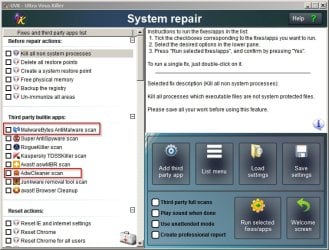
Some good advice in the above post. If you kept UVK installed you can just auto-update and run scans with MBAM and ADWcleaner from within UVK's GUI. It will update to the latest versions for you then launch the scan.

You find the third party scanners in the "System Repair" section and if you want to you can add more of your own choices.

UVK - Scans.jpg

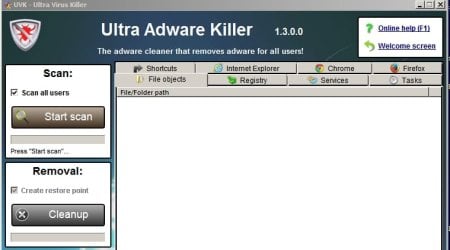
On another note the latest version includes Ultra Adware Killer which in my opinion detects and removes more stuff than ADWcleaner but Ultra Adware Killer is a new release just out of Beta so caution is needed.

Ultra Adware Killer.jpg
 
Last edited:

My Computer

Computer type
Laptop
Computer Manufacturer/Model Number
ASUS
OS
Microsoft Windows 7 Home Premium 64-bit 7601 Multiprocessor Free Service Pack 1
CPU
AMD C-60 APU with Radeon(tm) HD Graphics
Motherboard
ASUSTeK COMPUTER INC. X501U
Memory
4.00 GB
Graphics Card(s)
AMD Radeon HD 6290 Graphics
Sound Card
(1) AMD High Definition Audio Device (2) Realtek High Defi
Screen Resolution
1366 x 768 x 32 bits (4294967296 colors) @ 60 Hz
Hard Drives
Hitachi HTS545050A7E380 SATA Disk Device
Antivirus
Comodo CIS & FW, SecureAplus App Whitelisting, Threatfire
Browser
Cyberfox 64bit, Opera 64bit, Airfox
Other Info
Spy-The-Spy, HitmanPro.Alert, Norton Connect Safe, MJRegWatcher, BitDefender TrafficLight, Voodoo Shield, Zemana AntiMalware
I hate to open up the thread again but it seems same issue is back into play .. yet again.

Since I last posted here .. no detections so far up untill now, Just moments ago avast started detecting same files thats mentioned before.
Although I think .. it could be because I downloaded a zip pack from the same client just hours ago (the one who's zip pack started this in the first place .. this is just a guess though) .. however what I'm wondering is .. I haven't opened the zip pack .. so how can my system be infected yet again?

Please advise how to remove this, thanks!
 

My Computer

OS
Windows 7 Home Premium, Version 6.1 (Build 7601: Service Pack 1)
Back
Top