
Solved Possible rootkit infection?

Thank you both for your suggestions ...

@Callender
The ones you mentioned chrome and firefox prefer files .. are deleted. and about Conduit Toolbar .. I don't remember installing any such software and nor can I find it in uninstall list or in any browsers .. how do I remove it?

What about the other files .. such as anchor free from hotspot shield and other ones .. that's mentioned checked?

Key: @MARUF\Software\ej-technologies
Key: HKLM32\SOFTWARE\ej-technologies
* what is this? assuming its a sfotware .. I don't remember installing anything with such names, nor I have similar named installation listed on my uninstall list.

Key: @SYSTEM\Software\AskPartnerNetwork
* I uninstalled ask .. a while ago .. not sure but I think its just some remaining fragment perhaps?

Key: HKLM64\SOFTWARE\Microsoft\Windows\CurrentVersion\Explorer\Browser Helper Objects\{0055C089-8582-441B-A0BF-17B458C2A3A8}
Key: HKLM32\SOFTWARE\Microsoft\Windows\CurrentVersion\Explorer\Browser Helper Objects\{0055C089-8582-441B-A0BF-17B458C2A3A8}
Folder: C:\Users\MARUF\AppData\Roaming\Tencent
* What is this/whats its use? should it be removed?

Folder: C:\Program Files (x86)\Mozilla Firefox\Extensions\[email protected]
Folder: C:\Program Files (x86)\Mozilla Firefox\browser\Extensions\[email protected]
* I messed up the and uninstalled hotspot shield a while back .. I think they are fragments .. should I remove them?

Folder: C:\Users\MARUF\AppData\Roaming\ExpressFiles
* I used this express files software (its like torrent with better speed, better ui) like 2/3 years back .. and removed it after a few months .. should i remove it?


Also one out of context question .. I use firefox as primary browser and after deleting the user preferance file it seem it have lost my previous sync account connection, and everytime I tried to reconnent, it wouldn't accept my old account .. it seems I had older sync account .. so I had to create mozilla account ... what I'm wondering is .. this mozilla account after signing in just have 3 buttons ...
"change password"
"delete account"
"signout"

previous one had management/increase quota etc options ... this new page seems rather empty and also I have lots of data in bookmarks etc ... but my sync took only like 2sec and I couldn't figureout anyway to see if it actually synced my data .. is this how its supposed to be? anyway to check if my data actually synced?


Update on the firefox thing ...

I followed up this article and https://support.mozilla.org/en-US/questions/917119 and as per their suggestion I enabled sysn success logging ... strangely afer I press sync .. it took like 1sec for the success log to appear or in other words .. it took 1sec for the sync process ... how how's that possible when I have huge amount of data there? just wondering ..
 
Last edited:

My Computer

OS
Windows 7 Home Premium, Version 6.1 (Build 7601: Service Pack 1)
@Borg 386
did you mean this add-on? https://addons.mozilla.org/en-us/firefox/addon/noscript/ would it effect browsing or anything by any chance?

That's it. What happens is when you go to a page, if there are any hidden commands to d/l malware automatically, they will get blocked. When you go to a page, such as youtube, the play screen it will be blank with the snake logo over it. You will have to click it to allow it, or if you have it on the browser bar, it will bring up a list of all things blocked & you can allow them.

The trade off is sometimes you have to allow multiple things for the page to function properly. However, you don't have to worry about drive-by malware or some malicious script running something without your knowledge. It's a trade off & not everyone likes it, but it's an added safety measure & I'm used to it. Take it for a test drive & see if you like it.

Key: @SYSTEM\Software\AskPartnerNetwork
* I uninstalled ask .. a while ago .. not sure but I think its just some remaining fragment perhaps?

Perhaps. D/L CCLeaner (the free version) & run it to clean out temp/junk files & then the run the reg cleaner it has. When you clean the registry, it will give you the option to back up the reg files in case you need to re-install them should something not function. Back them up & place them on the desktop or somewhere you can access them easily.

Suggest you run RKill (do not reboot after running it) & run the programs listed by Callander & me. After running full system scan with them, run CCleaner & clean all the temp files & the leftover reg keys.

Folder: C:\Users\MARUF\AppData\Roaming\Tencent

Tencent is listed as a undesirable program.

Tencent QQ - Rund1132.exe qq.dll, Rundll32 - Program Information

Software\ej-technologies

This looks to be a downloader.

Manual Removal Guide for JDownloader
 

My Computer

Computer type
PC/Desktop
Computer Manufacturer/Model Number
Dell Hell oh Well
OS
Win 7 32 Home Premium, Win 7 64 Pro, Win 8.1, Win 10
CPU
Intel Core 2 Duo 2.93GHz
Memory
Not much with my ADHD
Graphics Card(s)
ATI Radeon HD 4350
Monitor(s) Displays
24" HDTV/Monitor
Screen Resolution
Blurry after a Scotch or 2
Hard Drives
1 HDD 250 GB, 1 HDD 1 TB, 3 - 1 TB Externals
Case
Don't get on my case...man :D
Cooling
I have an Air Conditioner & Diet Pepsi
Keyboard
Saitek Cyborg
Mouse
10 yr old MS optical mouse that still works
Internet Speed
Never fast enough
Antivirus
Various
Browser
Various
Re: FF sync. Personally I've never used it. Sorry about your issue with prefs.js as I had no idea that it would mess with FF sync. If you need to recover your original prefs.js file it's possible. I will PM you a link to some software but as it's a direct download link it's better not to post it here.

Instructions if needed:

Run the program and in the window that opens choose a recent restore point to mount.

Then in the window that opens up browse to:

Users\MARUF\AppData\Roaming\Mozilla\Firefox\Profiles\<profile folder>

Locate the file prefs.js in the profile folder and copy it back to your current desktop:

Close the HardDiskShadowCopy(number) window.

In the System Restore Explorer window choose Unmount. Close the window.

Now copy the prefs.js file from your desktop into your current Firefox profile.

C:\Users\MARUF\AppData\Roaming\Mozilla\Firefox\Profiles\<profile folder>

Then if you could move the prefs.js file located on your desktop into a new folder and zip it then upload it - I'll take a look at it and see if there's anything that needs removing manually.

As for the rest of your questions I will post responses later!
 

My Computer

Computer type
Laptop
Computer Manufacturer/Model Number
ASUS
OS
Microsoft Windows 7 Home Premium 64-bit 7601 Multiprocessor Free Service Pack 1
CPU
AMD C-60 APU with Radeon(tm) HD Graphics
Motherboard
ASUSTeK COMPUTER INC. X501U
Memory
4.00 GB
Graphics Card(s)
AMD Radeon HD 6290 Graphics
Sound Card
(1) AMD High Definition Audio Device (2) Realtek High Defi
Screen Resolution
1366 x 768 x 32 bits (4294967296 colors) @ 60 Hz
Hard Drives
Hitachi HTS545050A7E380 SATA Disk Device
Antivirus
Comodo CIS & FW, SecureAplus App Whitelisting, Threatfire
Browser
Cyberfox 64bit, Opera 64bit, Airfox
Other Info
Spy-The-Spy, HitmanPro.Alert, Norton Connect Safe, MJRegWatcher, BitDefender TrafficLight, Voodoo Shield, Zemana AntiMalware
@Callender

Its alright ... don't worry about it, I ddid some extensive research and found Mozilla updated its systems and I found a way to test and it seems sync is working, besides Mozilla will be discontinuing their older sync services in upcoming days so I suppose we made an obviously necessary change.
However if you need the prefer js for some testing purpose, let me know.

@Borg 386
I think I used this program before ... it was part of "Tor Browser" bundle ... its a very good one, I'll try it out, just one question ... is there anyway to whitelist sites in this add-on so I don't have to manually unblock on pages I visit frequently?

Also question about ccleaner, I've heard that sometimes registry cleaning can cause blue screen and other issues? what do you think about this?
 

My Computer

OS
Windows 7 Home Premium, Version 6.1 (Build 7601: Service Pack 1)
CCleaner generally removes only leftover reg files & is fairly safe. It gets good reviews. However since you are messing with the registry, it would be a good idea to make a restore point before applying any fixes it recommends. I've never had it pick anything out that caused problems. (Knock on wood....LOL....hey, stuff happens). Make a restore point then run the cleaner to get rid of the temp files & then let it scan the registry. What you will normally see is leftover reg files from removed programs.

There is a program that is good at removing most everything, including reg files when it comes to software. It's called Revo Uninstaller.

You can opt to use this, but be sure to read the tutorial & have backups & restore points. While it is good at ferreting out anything related to a program, it can hose your system if used incorrectly.

Yes, you can whitelist certain functions on NoScript. There is also a "temporarily allow all of this page" on the menu functions.
 

My Computer

Computer type
PC/Desktop
Computer Manufacturer/Model Number
Dell Hell oh Well
OS
Win 7 32 Home Premium, Win 7 64 Pro, Win 8.1, Win 10
CPU
Intel Core 2 Duo 2.93GHz
Memory
Not much with my ADHD
Graphics Card(s)
ATI Radeon HD 4350
Monitor(s) Displays
24" HDTV/Monitor
Screen Resolution
Blurry after a Scotch or 2
Hard Drives
1 HDD 250 GB, 1 HDD 1 TB, 3 - 1 TB Externals
Case
Don't get on my case...man :D
Cooling
I have an Air Conditioner & Diet Pepsi
Keyboard
Saitek Cyborg
Mouse
10 yr old MS optical mouse that still works
Internet Speed
Never fast enough
Antivirus
Various
Browser
Various
ej-technologies

Re: ej-technologies. Doesn't look good if you read the available reports here:

ThreatExpert Reports

I see that you have Hitman Pro so why don't you run a scan with that if you haven't already done so?

I don't think you need to upload your FF prefs.js file if you deleted it then sorted out your issue with FF sync.

You might want to run a scan with ADWcleaner and compare results with those from Ultra Adware Killer. You can update and run ADWcleaner from within UVK. It's in the System Repair section under Third Party built in Apps. Just let it scan and create a report rather than let it remove anything.
 

My Computer

Computer type
Laptop
Computer Manufacturer/Model Number
ASUS
OS
Microsoft Windows 7 Home Premium 64-bit 7601 Multiprocessor Free Service Pack 1
CPU
AMD C-60 APU with Radeon(tm) HD Graphics
Motherboard
ASUSTeK COMPUTER INC. X501U
Memory
4.00 GB
Graphics Card(s)
AMD Radeon HD 6290 Graphics
Sound Card
(1) AMD High Definition Audio Device (2) Realtek High Defi
Screen Resolution
1366 x 768 x 32 bits (4294967296 colors) @ 60 Hz
Hard Drives
Hitachi HTS545050A7E380 SATA Disk Device
Antivirus
Comodo CIS & FW, SecureAplus App Whitelisting, Threatfire
Browser
Cyberfox 64bit, Opera 64bit, Airfox
Other Info
Spy-The-Spy, HitmanPro.Alert, Norton Connect Safe, MJRegWatcher, BitDefender TrafficLight, Voodoo Shield, Zemana AntiMalware
I installed hitmanpro .. like years ago I think .. I had a security issue back then and removed it later on, I think what u saw was fragments/leftover files from previous installations ..do you want me to download and try out trail/free version whichever they offer(if it helps)?
Also no avast detections since my last update (after that zip deletion)
 
Last edited:

My Computer

OS
Windows 7 Home Premium, Version 6.1 (Build 7601: Service Pack 1)
No Avast detections? Well that's good news. It's up to you if you want to run HitmanPro but it's pretty good at detecting and removing remnants of anything dodgy.
 

My Computer

Computer type
Laptop
Computer Manufacturer/Model Number
ASUS
OS
Microsoft Windows 7 Home Premium 64-bit 7601 Multiprocessor Free Service Pack 1
CPU
AMD C-60 APU with Radeon(tm) HD Graphics
Motherboard
ASUSTeK COMPUTER INC. X501U
Memory
4.00 GB
Graphics Card(s)
AMD Radeon HD 6290 Graphics
Sound Card
(1) AMD High Definition Audio Device (2) Realtek High Defi
Screen Resolution
1366 x 768 x 32 bits (4294967296 colors) @ 60 Hz
Hard Drives
Hitachi HTS545050A7E380 SATA Disk Device
Antivirus
Comodo CIS & FW, SecureAplus App Whitelisting, Threatfire
Browser
Cyberfox 64bit, Opera 64bit, Airfox
Other Info
Spy-The-Spy, HitmanPro.Alert, Norton Connect Safe, MJRegWatcher, BitDefender TrafficLight, Voodoo Shield, Zemana AntiMalware
Just needed to roll back my system due to windows updates issues. Have fixed it but lost your downloaded logs. Will re-download them and try to figure out where I saw that conduit toolbar entry.
 

My Computer

Computer type
Laptop
Computer Manufacturer/Model Number
ASUS
OS
Microsoft Windows 7 Home Premium 64-bit 7601 Multiprocessor Free Service Pack 1
CPU
AMD C-60 APU with Radeon(tm) HD Graphics
Motherboard
ASUSTeK COMPUTER INC. X501U
Memory
4.00 GB
Graphics Card(s)
AMD Radeon HD 6290 Graphics
Sound Card
(1) AMD High Definition Audio Device (2) Realtek High Defi
Screen Resolution
1366 x 768 x 32 bits (4294967296 colors) @ 60 Hz
Hard Drives
Hitachi HTS545050A7E380 SATA Disk Device
Antivirus
Comodo CIS & FW, SecureAplus App Whitelisting, Threatfire
Browser
Cyberfox 64bit, Opera 64bit, Airfox
Other Info
Spy-The-Spy, HitmanPro.Alert, Norton Connect Safe, MJRegWatcher, BitDefender TrafficLight, Voodoo Shield, Zemana AntiMalware
Request another UVK scan and create log just to get a look at your current setup.

On another note if everything is okay and there are no detections would you like to install Secure Aplus?

There's a few things you need to know:

The initial scan and whitelisting process is likely to take time - up to a couple of hours.

Once that's finished it needs configuring. Best configuration is to disable the internal AV and set it to trust processes by digital signature where the signature is in the trusted certificate list. That way if any unsigned executable attemps to run it will automatically be blocked and uploaded to VirusTotal and the results are displayed in a pop up box. You then get the option to allow the file if you want to allow it to run.

When installing trusted software there's various options:

SAPlus.jpg

Let us know if you're interested. It checks all unsigned executables no matter how they're launched.
 

My Computer

Computer type
Laptop
Computer Manufacturer/Model Number
ASUS
OS
Microsoft Windows 7 Home Premium 64-bit 7601 Multiprocessor Free Service Pack 1
CPU
AMD C-60 APU with Radeon(tm) HD Graphics
Motherboard
ASUSTeK COMPUTER INC. X501U
Memory
4.00 GB
Graphics Card(s)
AMD Radeon HD 6290 Graphics
Sound Card
(1) AMD High Definition Audio Device (2) Realtek High Defi
Screen Resolution
1366 x 768 x 32 bits (4294967296 colors) @ 60 Hz
Hard Drives
Hitachi HTS545050A7E380 SATA Disk Device
Antivirus
Comodo CIS & FW, SecureAplus App Whitelisting, Threatfire
Browser
Cyberfox 64bit, Opera 64bit, Airfox
Other Info
Spy-The-Spy, HitmanPro.Alert, Norton Connect Safe, MJRegWatcher, BitDefender TrafficLight, Voodoo Shield, Zemana AntiMalware
Avast settings?

Just a thought really but I wonder if it's possible that the whole problem is related to Avast settings?

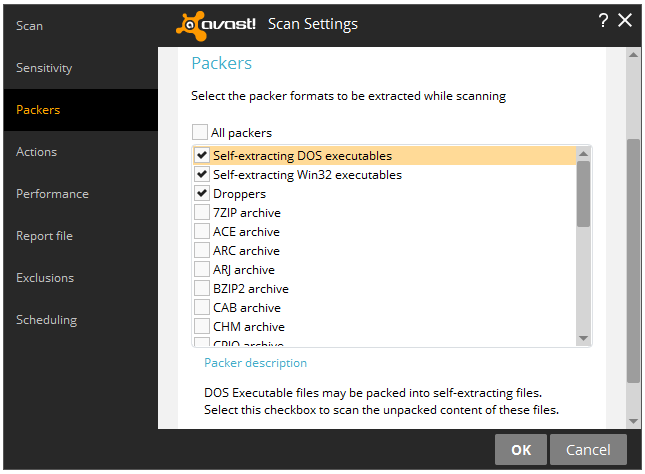
It's a long time since I used Avast but as far as I can work out it can be set to scan inside packed archives (zips) and sensitivity level can be set. Those zip files you uploaded were fine but did contain folders for MAC OSX which shouldn't be a problem but maybe Avast just doesn't like the files or can't scan them.

Just as a test:

Try configuring Avast not to scan inside zipped files:

https://www.avast.com/en-us/faq.php?article=AVKB178#artTitle

scan_settings_packers.png


If all boxes are checked in the settings in the above screenshot - uncheck them leaving only the ones shown in the screenshot checked.

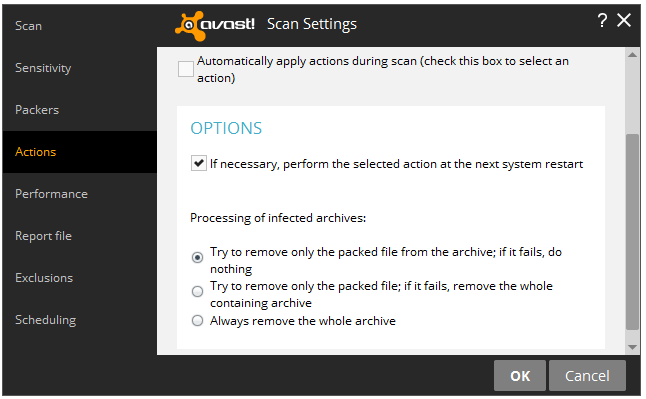
Also for the following screenshot check that your settings are the same as the ones shown:

scan_settings_actions.png


I'm not sure if changing Avast settings requires a reboot. Anyway once settings are as above try downloading one or all of the zip files that you attached earlier to see if you get the same problem.

Note: If you Avast settings for packed archives are the same as shown then there's no point in trying the above steps.
 

My Computer

Computer type
Laptop
Computer Manufacturer/Model Number
ASUS
OS
Microsoft Windows 7 Home Premium 64-bit 7601 Multiprocessor Free Service Pack 1
CPU
AMD C-60 APU with Radeon(tm) HD Graphics
Motherboard
ASUSTeK COMPUTER INC. X501U
Memory
4.00 GB
Graphics Card(s)
AMD Radeon HD 6290 Graphics
Sound Card
(1) AMD High Definition Audio Device (2) Realtek High Defi
Screen Resolution
1366 x 768 x 32 bits (4294967296 colors) @ 60 Hz
Hard Drives
Hitachi HTS545050A7E380 SATA Disk Device
Antivirus
Comodo CIS & FW, SecureAplus App Whitelisting, Threatfire
Browser
Cyberfox 64bit, Opera 64bit, Airfox
Other Info
Spy-The-Spy, HitmanPro.Alert, Norton Connect Safe, MJRegWatcher, BitDefender TrafficLight, Voodoo Shield, Zemana AntiMalware
About avast, its already set to the settings you mentioned as default.

As for the secure APlus, what do you mean by "Best configuration is to disable the internal AV and set it to trust processes by digital signature where the signature is in the trusted certificate list." .. it disables AV and something like replace it?

I'm gonna try ccleaner registry clean @Borg 386 suggested .. will post back UVK scan results afterwards.
 

My Computer

OS
Windows 7 Home Premium, Version 6.1 (Build 7601: Service Pack 1)
cleaned registry ..
@Borg 386
Just wondering something, it could be just me but after registry clean + system restart(cold boot) .. it seems in firefox(no script installed) .. is working a bit .. i mean slightly slower, not that ts causing a big fuss, just wondering .. is it normal(as we messed with registry i wanna be on the safe side .. is all)?

ADW log attached
UKV scan log attached

@Callender
Should I remove the other detections(mentioned in page5) from UVK adware killer?
 

Attachments

My Computer

OS
Windows 7 Home Premium, Version 6.1 (Build 7601: Service Pack 1)
Re: AdwCleaner - your latest log. It's fine. Those detections appear to be related to Internet Download Manager so if you use it no furter action is needed.

Re: UVK log. I'll take a look at it and let you know if I can spot anything.

Re: Secure Aplus. Sorry for the confusion. It has it's own built in secondary AV and real time AV scanning but it's based on ClamWin and although it could be used alongside Avast it's best to disable the Secure Aplus AV entirely but enable the Application Whitelisting component if using this software.

There's no real need to install Secure Aplus but the Application Whitelisting feature is very good at detecting unsigned executables, PUP installers or anything else dodgy that attempts to run. It works alongside your existing AV. It was mentioned as something to think about regarding additional protection if you think you need it.
 

My Computer

Computer type
Laptop
Computer Manufacturer/Model Number
ASUS
OS
Microsoft Windows 7 Home Premium 64-bit 7601 Multiprocessor Free Service Pack 1
CPU
AMD C-60 APU with Radeon(tm) HD Graphics
Motherboard
ASUSTeK COMPUTER INC. X501U
Memory
4.00 GB
Graphics Card(s)
AMD Radeon HD 6290 Graphics
Sound Card
(1) AMD High Definition Audio Device (2) Realtek High Defi
Screen Resolution
1366 x 768 x 32 bits (4294967296 colors) @ 60 Hz
Hard Drives
Hitachi HTS545050A7E380 SATA Disk Device
Antivirus
Comodo CIS & FW, SecureAplus App Whitelisting, Threatfire
Browser
Cyberfox 64bit, Opera 64bit, Airfox
Other Info
Spy-The-Spy, HitmanPro.Alert, Norton Connect Safe, MJRegWatcher, BitDefender TrafficLight, Voodoo Shield, Zemana AntiMalware
Re: UVK log. Nothing dodgy found.
 

My Computer

Computer type
Laptop
Computer Manufacturer/Model Number
ASUS
OS
Microsoft Windows 7 Home Premium 64-bit 7601 Multiprocessor Free Service Pack 1
CPU
AMD C-60 APU with Radeon(tm) HD Graphics
Motherboard
ASUSTeK COMPUTER INC. X501U
Memory
4.00 GB
Graphics Card(s)
AMD Radeon HD 6290 Graphics
Sound Card
(1) AMD High Definition Audio Device (2) Realtek High Defi
Screen Resolution
1366 x 768 x 32 bits (4294967296 colors) @ 60 Hz
Hard Drives
Hitachi HTS545050A7E380 SATA Disk Device
Antivirus
Comodo CIS & FW, SecureAplus App Whitelisting, Threatfire
Browser
Cyberfox 64bit, Opera 64bit, Airfox
Other Info
Spy-The-Spy, HitmanPro.Alert, Norton Connect Safe, MJRegWatcher, BitDefender TrafficLight, Voodoo Shield, Zemana AntiMalware
If you cleaned the reg with CCleaner & all is running good, then that's a good sign, just hang on to the backed up removed reg files for a bit. NoScript shouldn't slow down FF. But I couldn't tell you if it actually does because I've used NoScript since day 1 & I have no basis for comparison. You can always look at your sys with process explorer to see if anything is causing a drain.

+1 Callender
 

My Computer

Computer type
PC/Desktop
Computer Manufacturer/Model Number
Dell Hell oh Well
OS
Win 7 32 Home Premium, Win 7 64 Pro, Win 8.1, Win 10
CPU
Intel Core 2 Duo 2.93GHz
Memory
Not much with my ADHD
Graphics Card(s)
ATI Radeon HD 4350
Monitor(s) Displays
24" HDTV/Monitor
Screen Resolution
Blurry after a Scotch or 2
Hard Drives
1 HDD 250 GB, 1 HDD 1 TB, 3 - 1 TB Externals
Case
Don't get on my case...man :D
Cooling
I have an Air Conditioner & Diet Pepsi
Keyboard
Saitek Cyborg
Mouse
10 yr old MS optical mouse that still works
Internet Speed
Never fast enough
Antivirus
Various
Browser
Various
Just for information

Here's a video demo of Secure Aplus Appication Whitelising in action.

Explanation:

Comodo is onboard AV. Downloaded Crypto locker for test purposes. Comodo detects it and I choose to allow CryptoLocker to run since we need to test what happens next.

Around 42s in the video you see Secure Aplus spring into action. Comodo now allows Cryptolocker to run but Secure Aplus detects the file attempting to run and temporarily blocks it and uploads to VirusTotal for scanning. Reports a threat. I then choose to allow the file to run.

Around 1 minute in the video you see VoodooShield temporarilly block CyptoLocker and then scan it. Around 1min 15s you see another VoodooShield alert and I quarantine the file.

Around 1 minute 46 seconds you see Secure Aplus detecting VoodooShield Quarantine procees. I choose to allow.

At various other points in the video you see Comodo's on access file scan spring into action and I have to keep telling Comodo to ignore the detection.

So what's the point? Well if my onboard AV misses something it won't sneak through the additional protection and in fact remains blocked from running at all.


My Computer

Computer type
Laptop
Computer Manufacturer/Model Number
ASUS
OS
Microsoft Windows 7 Home Premium 64-bit 7601 Multiprocessor Free Service Pack 1
CPU
AMD C-60 APU with Radeon(tm) HD Graphics
Motherboard
ASUSTeK COMPUTER INC. X501U
Memory
4.00 GB
Graphics Card(s)
AMD Radeon HD 6290 Graphics
Sound Card
(1) AMD High Definition Audio Device (2) Realtek High Defi
Screen Resolution
1366 x 768 x 32 bits (4294967296 colors) @ 60 Hz
Hard Drives
Hitachi HTS545050A7E380 SATA Disk Device
Antivirus
Comodo CIS & FW, SecureAplus App Whitelisting, Threatfire
Browser
Cyberfox 64bit, Opera 64bit, Airfox
Other Info
Spy-The-Spy, HitmanPro.Alert, Norton Connect Safe, MJRegWatcher, BitDefender TrafficLight, Voodoo Shield, Zemana AntiMalware

My Computer

OS
Windows 7 Home Premium, Version 6.1 (Build 7601: Service Pack 1)
Well the correct download is bottom right of the page - click "need offline installer" then version "Without offline AV" but I suggest avoiding that download for now. If you want to install it it will take some time to whitelist everything. It might take a couple of hours. If you want to go ahead I'll PM you a link to download a slightly older version that in my opinion works better than the one that's currently available. If you decide to install it it will require a little configuration after the initial whitelist process has finished.

Sending PM with download link.
 

My Computer

Computer type
Laptop
Computer Manufacturer/Model Number
ASUS
OS
Microsoft Windows 7 Home Premium 64-bit 7601 Multiprocessor Free Service Pack 1
CPU
AMD C-60 APU with Radeon(tm) HD Graphics
Motherboard
ASUSTeK COMPUTER INC. X501U
Memory
4.00 GB
Graphics Card(s)
AMD Radeon HD 6290 Graphics
Sound Card
(1) AMD High Definition Audio Device (2) Realtek High Defi
Screen Resolution
1366 x 768 x 32 bits (4294967296 colors) @ 60 Hz
Hard Drives
Hitachi HTS545050A7E380 SATA Disk Device
Antivirus
Comodo CIS & FW, SecureAplus App Whitelisting, Threatfire
Browser
Cyberfox 64bit, Opera 64bit, Airfox
Other Info
Spy-The-Spy, HitmanPro.Alert, Norton Connect Safe, MJRegWatcher, BitDefender TrafficLight, Voodoo Shield, Zemana AntiMalware
Back
Top