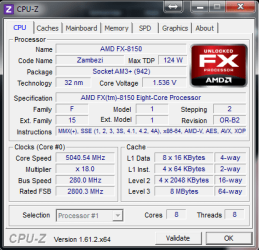
Post Your Overclock! [2]

tw33k

New member
Guru
VIP
Local time
12:21 AM
Messages
3,028

My Computer

Computer Manufacturer/Model Number
tw33k
OS
Windows 7 Ultimate (x64) SP1
CPU
Intel 3770k 4.6GHz
Motherboard
ASUS Maximus V Formula
Memory
8GB (2x 4GB) Crucial Ballistix
Graphics Card(s)
Sapphire 7950 (1060/1600)
Sound Card
On Board Realtek HD Audio
Monitor(s) Displays
27" Acer B273HU (via HDMI)
Screen Resolution
2048 x 1152
Hard Drives
Crucial M4 128GB
2TB WD Black
1TB Samsung F3 SATA
1TB WD Elite External
2TB WD USB 3.0
PSU
Corsair AX750 Gold
Case
Corsair Obsidian 800DW
Cooling
Corsair H100 (2x AP-121/2x UK-3000 push/pull)
Keyboard
Microsoft Wireless 5000
Mouse
Microsoft Wireless 5000
Internet Speed
5mb/s
Other Info
Logitech z-2300 2.1 speakers
Lamptron FC-5 v2

My Computer

Computer type
PC/Desktop
Computer Manufacturer/Model Number
Home Built Desktop By DataTech
OS
Windows 7 Ultimate X64 SP1
CPU
Intel i5-2550K, Differing ~4.4-4.8GHz No built in GPU
Motherboard
ASUS P8Z68-V PRO/GEN3
Memory
16GB G.Skill Sniper 1866MHz @ 2133MHz 2x8GB
Graphics Card(s)
ASUS GTX650TIB-DC2OC-2GD5, (650TI Boost)
Sound Card
Onboard Realtek 5-1
Monitor(s) Displays
Samsung P2570HD
Screen Resolution
1920x1080
Hard Drives
Samsung 840 Pro 256GB SSD for OS, 500GB Seagate Constellation (Enterprise drive) for Data
PSU
Corsair HX650W
Case
Inwin Dragon Rider
Cooling
Hyper 212 EVO w/two Noctua fans, push-pull, @1300 RPM
Keyboard
E-Z Eyes, bright yellow keys with large characters
Mouse
steelseries SENSEI Laser Pro Gaming
Internet Speed
48-51Mbs Mbs down, 11 Mbs up Xfinity Cable
Antivirus
Norton Internet Security 2013
Browser
IE 10, Opera, Pale Moon if needed
Other Info
4 case fans, LG BluRay-RE, ASUS DVD-RW, Mr. Fusion power supply, 1.21 gigawatts.
I haven't tweaked it properly. It's not stable enough to put it under load (yet)
 

My Computer

Computer Manufacturer/Model Number
tw33k
OS
Windows 7 Ultimate (x64) SP1
CPU
Intel 3770k 4.6GHz
Motherboard
ASUS Maximus V Formula
Memory
8GB (2x 4GB) Crucial Ballistix
Graphics Card(s)
Sapphire 7950 (1060/1600)
Sound Card
On Board Realtek HD Audio
Monitor(s) Displays
27" Acer B273HU (via HDMI)
Screen Resolution
2048 x 1152
Hard Drives
Crucial M4 128GB
2TB WD Black
1TB Samsung F3 SATA
1TB WD Elite External
2TB WD USB 3.0
PSU
Corsair AX750 Gold
Case
Corsair Obsidian 800DW
Cooling
Corsair H100 (2x AP-121/2x UK-3000 push/pull)
Keyboard
Microsoft Wireless 5000
Mouse
Microsoft Wireless 5000
Internet Speed
5mb/s
Other Info
Logitech z-2300 2.1 speakers
Lamptron FC-5 v2
Great work, Mark. Well done.
 

My Computers

System One System Two

  • Computer type
    PC/Desktop
    Computer Manufacturer/Model Number
    ALWAYS UNDER CONSTRUCTION
    OS
    Windows 11 Pro
    CPU
    Ryzen 9 5900X
    Motherboard
    Asus X570 Crosshair Viii Hero
    Memory
    32GB G Skill DDR4-3600
    Graphics Card(s)
    EVGA RTX 3080 FTW 3 Ultra
    Sound Card
    On Board/Sennheiser PC37X Headset
    Monitor(s) Displays
    3 X Asus 27"
    Screen Resolution
    2560x1440
    Hard Drives
    2 X 1 TB NVME drives
    PSU
    EVGA 850
    Case
    Phanteks Eclipse P400A
    Cooling
    EVGA 280 AIO
    Keyboard
    Logitech G510s/ Logitech G13
    Mouse
    Logitech G502
    Internet Speed
    24/1
    Antivirus
    ESET/MBAM Pro/SAS Pro
    Browser
    Chrome/ Firefox/ Edge
  • Computer type
    Laptop
    System Manufacturer/Model Number
    Dell 16 Plus
    OS
    Windows 11 Pro
    CPU
    Intel Ultra 9 288V
    Memory
    32 GB LPDDR5X 8533
    Monitor(s) Displays
    16" Mini-LED HDR600 Touch 90 Hz
    Screen Resolution
    2560X1600
    Hard Drives
    1 TB NVME

My Computer

Computer type
PC/Desktop
Computer Manufacturer/Model Number
CoreI7-6700K MrFingerIII Special Builds
OS
Windows 10 Home Premium 64bit sp1
CPU
Intel I7-6700K @ 4.6 Ghz 1.344 volts everyday OC
Motherboard
Asrock Fatality K6 Z170 Socket 1151
Memory
32GB G-Skill TridentZ 3200mhz 16-18-18-38 DDR4
Graphics Card(s)
Sli Gigabyte Windforce GTX 980 G1
Sound Card
AC97 Creative Rage Tactic 3D Headphones Bluetooth
Monitor(s) Displays
27" Asus ROG Swift PG278Q G-Sync 48" Vizio Smart HD TV
Screen Resolution
2560x1440p 27"- 48" Currently Gaming at 2560x1440p Res 2K
Hard Drives
250GB Samsung Evo840SSD Seagate baracuda 500 GB WD Mybook 500Gb 1TB Seagate Barracuda
PSU
HX1050w Corsair Silver 80plus certified crosfire/sli
Case
Enthod Pro Full Tower
Cooling
Corsair H110i GT 280 mm High Performance WaterBlock
Keyboard
Logitech wireless keyboard
Mouse
Logitech wireless mouse
Internet Speed
Cox Cable 100+ mb
Antivirus
WebRoot Spysweeper with Antivirus
Browser
IE-10, Chrome, Opera
Other Info
My Other Rig is a AMD FX8320E @4.6Ghz 16GB Ballistic Sport Ram
Mobo Asrock Fatality 990FX 120GB OCZ SSD 1TB Seagate Barracuda Corsair H75 Cooling PSU Corsair CX750
GPU GTX Gigabyte 970G1
Nice job Mark :thumbsup:


Also, if anybody has the 3570K and an Asus Z77 motherboard, feel free to send me a message if you have any tips or tricks on how you got the numbers you got. Always appreciate tried and true information!

I don't have a Z77 mobo, but I do have a 3770K that sits comfortably @ 4.7ghz on a Z68 board with under 1.3v on full load. (I've also helped a a few with Z77 boards - the fundamentals are the same. It's mainly the wording/names for a few settings that are different).


Personally, I do all my Ocing in the BIOS. The app is fine for quick testing, mild overclocks etc, but doesn't give you access to all settings needed to fine tune a higher OC. Ocing via the BIOS is always preferable.

You can take the values you've got via the app and then input them manually.

Yours coolers performance is around mid range but 4.5-4.6ghz should be doable.

If you'd like some help with BIOS ocing, just let me know.
 

My Computer

Computer type
PC/Desktop
Computer Manufacturer/Model Number
Systems by SmartEyeball
OS
8 Pro x64
CPU
i7 3770K 4.6GHz
Motherboard
ASUS P8Z77 WS
Memory
16GB G.Skill Trident X 2666mhz
Graphics Card(s)
x2 EVGA 780 Ti Superclocked SLI
Sound Card
SB X-FI Surround 5.1 PRO USB / ATH-AD900 Headphones
Monitor(s) Displays
x3 Dell U2410 / 58" Samsung
Screen Resolution
5760*1200/ 1920*1200
Hard Drives
2x Intel 520 240GB (RAID 0) * 2x WD Caviar Blacks 2TB (RAID 0) * 2TB WD Caviar Black * Sony Optirac DVD
PSU
Silverstone Strider Evolution 1200W
Case
Thermaltake Level 10 GT Snow Edition
Cooling
Noctua NH-D14
Keyboard
Topre Realforce // Ducky Shine MX Black // Filco Ninja TKL
Mouse
Thermaltake Theron (Highly Recommended) + Razer Imperator
Antivirus
MSE
Browser
IE, FF, WaterFox
Other Info
GT Extreme V2 Sim Racing Cockpit + 40" LCD and K/B Mouse stand ▼
Fanatec CSR Elite Wheel + Clubsport V1 Pedals + CSR shifter/7G-H ▼Saitek X52 Pro ▼ TrackIR 5 Pro
Buttkicker v2 Seat Rumbler with Dedicated 5.1 and Sub Woofer attached to frame ▼
=
Bloody Big Grin
The OC tuner is actually in the BIOS (I also do all my overclocking in the BIOS) and using it shuts the computer down for about a minute or two where it "does things" and then comes back overclocked. It is a very safe OC and is probably closer to a preset, but it does work. I'm not crazy about how it just pours on the core voltage to get where it gets, but it's never in the danger zone. Cooling isn't a problem in my rig as I've never seen it past 60-62* C, and that was @ 4.5GHz with no real tweaks, just to see if it would do it. Stress testing @ my current OC gets it to about 50-55*C.

I will continue to fiddle with some things and see where I end up. Current thoughts are to run it like this for awhile, and then maybe bump it up to 4.4GHz....that's a solid 1GHz gain from stock clock. That is still borderline conservative for some of you guys, but I am thinking it should be achievable by bumping up the multiplier and adjusting the core voltage to a more tolerable level. I don't want to run 4.4GHz with it using 1.3xx volts, it's just not necessary.

I will be in touch if I get to a point where I'm at a loss, but hopefully, that won't happen lol.
 

My Computer

Computer type
PC/Desktop
Computer Manufacturer/Model Number
Custom Built
OS
Windows 7 Professional 64bit SP1
CPU
Intel Core i5-3570K @ 4.5GHz
Motherboard
Asus Sabertooth Z77
Memory
Corsair Vengeance 16GB (4x4) @1866MHz CL 9-9-9-24 1T
Graphics Card(s)
EVGA GTX 750 Ti FTW
Sound Card
Onboard Audio
Monitor(s) Displays
Dell S2309W
Screen Resolution
1920x1080
Hard Drives
Samsung 830 128GB SSD - OS
(4) Seagate 5TB HDD
(1) Seagate 2TB HDD
PSU
Seasonic X750 80+ Gold Full Modular
Case
Antec Eleven Hundred Super Mid Tower
Cooling
Intel Liquid Cooler
Keyboard
Max Nighthawk X8 Mechanical keyboard
Mouse
Mionix Naos 7000
Internet Speed
50 Mbps Down / 10 Mbps Up
Antivirus
Microsoft Security Essentials/Malwarebytes Anti-Malware
Browser
Chrome/Firefox
Other Info
Klipsch ProMedia 2.1's
Asus RT-N66R Wireless Router

My Computer

Computer type
PC/Desktop
OS
Windows 10 Home x64
CPU
INTEL Core i5-750 Quad-Core 3.37GHz
Motherboard
ASUS P7P55D
Memory
HyperX Fury Black Series 8GB (2 x 4GB) 1866Mhz
Graphics Card(s)
EVGA GeForce GTX 750 Superclocked 1GB 128-Bit GDDR5
Monitor(s) Displays
LG 32MA68HY 32" IPS
Screen Resolution
1920 x 1080
Hard Drives
Samsung 840 Evo 120GB, SEAGATE 500GB Barracuda® 7200.12, SATA 3 Gb/s, 7200 RPM, 16MB cache
PSU
ANTEC TruePower New TP-550, 80 PLUS, 550W
Case
ANTEC Three Hundred Illusion
Cooling
COOLER MASTER Hyper 212 Plus, 4 x 120mm 1 x 140mm Noctua's
Internet Speed
85 + Mbps
Antivirus
Avast
Browser
Vivaldi
The OC tuner is actually in the BIOS (I also do all my overclocking in the BIOS)

My bad - I don't know why I automatically assumed 'app' (was thinking of the Asus Suite for some reason :rolleyes:).

The OC tuner is pretty much the BIOS based 'auto overclock' /Asus Suite type function. And 'auto overclock' always errs on the side of extra voltage. (Which is why I don't use the OC tuner either ;) )


I'm not crazy about how it just pours on the core voltage to get where it gets, but it's never in the danger zone. Cooling isn't a problem in my rig as I've never seen it past 60-62* C, and that was @ 4.5GHz with no real tweaks, just to see if it would do it. Stress testing @ my current OC gets it to about 50-55*C.


Leaving the OC Tuner alone and entering the values manually is still the optimal method, although just going by temps alone (which doesn't reflect on other voltages though), is still well within acceptable limits as you've mentioned.

That is still borderline conservative for some of you guys, but I am thinking it should be achievable by bumping up the multiplier and adjusting the core voltage to a more tolerable level.

Never mind what others go for - it's the target your happy with that counts :)

Are you planning to use a fixed/manual vcore or the offset function?

I'd recommend a +offset over a fixed vcore. (for 4.4, I'd start around+0.050)

That way you can maintain the lower idle volts with Speedstep, C1E etc enabled. There's simply no need to have a fixed vcore unless you are going for a max OC. SB and Ivy work very well with the offset function.


I don't want to run 4.4GHz with it using 1.3xx volts, it's just not necessary.

With fine tuning, you'd be looking at roughly around 1.2xx for 4.4ghz. You may not even need to use LLC.

But it's your rig - have a fiddle, but again if you need help - we're here :)
 

My Computer

Computer type
PC/Desktop
Computer Manufacturer/Model Number
Systems by SmartEyeball
OS
8 Pro x64
CPU
i7 3770K 4.6GHz
Motherboard
ASUS P8Z77 WS
Memory
16GB G.Skill Trident X 2666mhz
Graphics Card(s)
x2 EVGA 780 Ti Superclocked SLI
Sound Card
SB X-FI Surround 5.1 PRO USB / ATH-AD900 Headphones
Monitor(s) Displays
x3 Dell U2410 / 58" Samsung
Screen Resolution
5760*1200/ 1920*1200
Hard Drives
2x Intel 520 240GB (RAID 0) * 2x WD Caviar Blacks 2TB (RAID 0) * 2TB WD Caviar Black * Sony Optirac DVD
PSU
Silverstone Strider Evolution 1200W
Case
Thermaltake Level 10 GT Snow Edition
Cooling
Noctua NH-D14
Keyboard
Topre Realforce // Ducky Shine MX Black // Filco Ninja TKL
Mouse
Thermaltake Theron (Highly Recommended) + Razer Imperator
Antivirus
MSE
Browser
IE, FF, WaterFox
Other Info
GT Extreme V2 Sim Racing Cockpit + 40" LCD and K/B Mouse stand ▼
Fanatec CSR Elite Wheel + Clubsport V1 Pedals + CSR shifter/7G-H ▼Saitek X52 Pro ▼ TrackIR 5 Pro
Buttkicker v2 Seat Rumbler with Dedicated 5.1 and Sub Woofer attached to frame ▼
=
Bloody Big Grin
Definitely using an offset over a manual/fixed voltage. I used the OC tuner mainly to give me a baseline result, and I figured I could take over from there....took a lot of the guesswork out of it. The last time I had it at 4.4GHz it was running at about 1.300 volts, and I offset it to ~ 1.256v, temps were great. At those settings @ idle it runs at about 1.080v if I remember correctly, which is great.

I know what you mean about OC'ing from the Asus AI Suite, it's decent for basic oc'ing but not much past that.....I didn't even bother installing it this time.
 

My Computer

Computer type
PC/Desktop
Computer Manufacturer/Model Number
Custom Built
OS
Windows 7 Professional 64bit SP1
CPU
Intel Core i5-3570K @ 4.5GHz
Motherboard
Asus Sabertooth Z77
Memory
Corsair Vengeance 16GB (4x4) @1866MHz CL 9-9-9-24 1T
Graphics Card(s)
EVGA GTX 750 Ti FTW
Sound Card
Onboard Audio
Monitor(s) Displays
Dell S2309W
Screen Resolution
1920x1080
Hard Drives
Samsung 830 128GB SSD - OS
(4) Seagate 5TB HDD
(1) Seagate 2TB HDD
PSU
Seasonic X750 80+ Gold Full Modular
Case
Antec Eleven Hundred Super Mid Tower
Cooling
Intel Liquid Cooler
Keyboard
Max Nighthawk X8 Mechanical keyboard
Mouse
Mionix Naos 7000
Internet Speed
50 Mbps Down / 10 Mbps Up
Antivirus
Microsoft Security Essentials/Malwarebytes Anti-Malware
Browser
Chrome/Firefox
Other Info
Klipsch ProMedia 2.1's
Asus RT-N66R Wireless Router

My Computer

Computer Manufacturer/Model Number
tw33k
OS
Windows 7 Ultimate (x64) SP1
CPU
Intel 3770k 4.6GHz
Motherboard
ASUS Maximus V Formula
Memory
8GB (2x 4GB) Crucial Ballistix
Graphics Card(s)
Sapphire 7950 (1060/1600)
Sound Card
On Board Realtek HD Audio
Monitor(s) Displays
27" Acer B273HU (via HDMI)
Screen Resolution
2048 x 1152
Hard Drives
Crucial M4 128GB
2TB WD Black
1TB Samsung F3 SATA
1TB WD Elite External
2TB WD USB 3.0
PSU
Corsair AX750 Gold
Case
Corsair Obsidian 800DW
Cooling
Corsair H100 (2x AP-121/2x UK-3000 push/pull)
Keyboard
Microsoft Wireless 5000
Mouse
Microsoft Wireless 5000
Internet Speed
5mb/s
Other Info
Logitech z-2300 2.1 speakers
Lamptron FC-5 v2
Nice OC, very well done tw33k :cool:
 

My Computer

Computer type
PC/Desktop
Computer Manufacturer/Model Number
76~2.0
OS
Windows 7 Ult x64 - SP1/ Windows 8 Pro x64
CPU
Intel Core i5-3570K 4.6GHz
Motherboard
Gigabyte GA-Z77X UD3H, f18
Memory
8GB (2X4GB) DDR3 1600 Corsair Vengeance CL8 1.5v
Graphics Card(s)
Sapphire HD 7770 Vapor-X OC 1GB DDR5
Sound Card
Onboard VIA VT2021
Monitor(s) Displays
22" LCD Dell
Screen Resolution
1680x1050
Hard Drives
Samsung 840Pro 128GB SSD,
Seagate Barracuda 500GB SATA2 7200rpm 32MB cache, Seagate Barracuda 1TB SATA2 7200rpm 32MB cache,
PSU
Corsair HX650W
Case
Cooler Master Storm Scout
Cooling
Corsair H80 2x12cm Noctua NF P12 , 2x14cm case fans
Keyboard
Logitech Wave
Mouse
CM Sentinel
Internet Speed
Dismal
Antivirus
Avast
Browser
Opera Next
Other Info
Haswell laptop: HP Envy 17t-j, i7-4700MQ, GeForce 740M 2GB DDR3, 17.3" Full HD 1920x1080, 16GB RAM, Samsung 840 Pro 128GB, 1TB Hitachi 7200 HDD,
Desktop: eSATA ports,
External eSATA Seagate 500GB SATA2 7200rpm,
External WD USB 500GB
Definitely using an offset over a manual/fixed voltage. I used the OC tuner mainly to give me a baseline result, and I figured I could take over from there....took a lot of the guesswork out of it. The last time I had it at 4.4GHz it was running at about 1.300 volts, and I offset it to ~ 1.256v, temps were great. At those settings @ idle it runs at about 1.080v if I remember correctly, which is great.

I know what you mean about OC'ing from the Asus AI Suite, it's decent for basic oc'ing but not much past that.....I didn't even bother installing it this time.

It sounds like you're definitely on the right track :)

(And my apologies if any of my posts sounded like 'teaching granny to suck eggs'. It's not always apparent of a users skillset. )
 

My Computer

Computer type
PC/Desktop
Computer Manufacturer/Model Number
Systems by SmartEyeball
OS
8 Pro x64
CPU
i7 3770K 4.6GHz
Motherboard
ASUS P8Z77 WS
Memory
16GB G.Skill Trident X 2666mhz
Graphics Card(s)
x2 EVGA 780 Ti Superclocked SLI
Sound Card
SB X-FI Surround 5.1 PRO USB / ATH-AD900 Headphones
Monitor(s) Displays
x3 Dell U2410 / 58" Samsung
Screen Resolution
5760*1200/ 1920*1200
Hard Drives
2x Intel 520 240GB (RAID 0) * 2x WD Caviar Blacks 2TB (RAID 0) * 2TB WD Caviar Black * Sony Optirac DVD
PSU
Silverstone Strider Evolution 1200W
Case
Thermaltake Level 10 GT Snow Edition
Cooling
Noctua NH-D14
Keyboard
Topre Realforce // Ducky Shine MX Black // Filco Ninja TKL
Mouse
Thermaltake Theron (Highly Recommended) + Razer Imperator
Antivirus
MSE
Browser
IE, FF, WaterFox
Other Info
GT Extreme V2 Sim Racing Cockpit + 40" LCD and K/B Mouse stand ▼
Fanatec CSR Elite Wheel + Clubsport V1 Pedals + CSR shifter/7G-H ▼Saitek X52 Pro ▼ TrackIR 5 Pro
Buttkicker v2 Seat Rumbler with Dedicated 5.1 and Sub Woofer attached to frame ▼
=
Bloody Big Grin
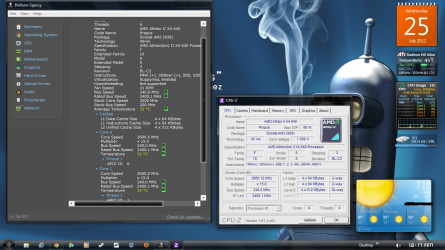
Got my OC from 3.4GHz to 3.6GHz and at stock volts ,stock settings were 3.0GHz for my Althon ii 640 x4.Seems stable to me so far and idles at 32-34c and ran prime95 for around 30mins and was at 55c,not sure if that was long enough but no errors or blue screens.Will test this out a couple days and if it's unstable i will put back my old oc to 3.4GHz instead.
 

Attachments

  • oc36.png
    oc36.png
    790.9 KB · Views: 47

My Computer

Computer type
PC/Desktop
Computer Manufacturer/Model Number
custom build
OS
Windows 10 64bit
CPU
AMD Phenom II X4 925 (Deneb)(2.8GHz) OC 3.4GHz
Motherboard
M5A78L-MLX Plus
Memory
Corsair Vengeance DDR3 4GBX2 (8192MB)
Graphics Card(s)
XFX HD 6870 1GB (OC)- 940MHz core, mem 1150MHz
Monitor(s) Displays
Vizio 26' 1920x1080 / Acer 1336x768
Screen Resolution
1920x1080 60Hz /1336x768
Hard Drives
Kingston Digital 60GB SSDNow V300/500gb HDD Western Digital 7200rpm (/WD 160GB HDD 7200rpm
PSU
CORSAIR CX600 600w
Case
AZZA Orion 202 EVO
Cooling
cooler master hyper TX3 cpu cooler
Keyboard
Razer DeathStalker
Mouse
Logitech Optical Gaming Mouse G400
Antivirus
Defualt on win 10
Browser
Firefox
Other Info
cpu is overclocked in bios
Sweet OC M1GU31. If you have a multiplier setting for the HT Link, try lowering it so it it around 2000MHz while keeping the NB Frequency at 2400MHz. A lower HT will be less stressful on the CPU and possibly allow for even lower temps although your are well within safety margins. :D

Like the Bender Wallpaper too.
 

My Computer

Computer type
PC/Desktop
Computer Manufacturer/Model Number
Home Built Desktop By DataTech
OS
Windows 7 Ultimate X64 SP1
CPU
Intel i5-2550K, Differing ~4.4-4.8GHz No built in GPU
Motherboard
ASUS P8Z68-V PRO/GEN3
Memory
16GB G.Skill Sniper 1866MHz @ 2133MHz 2x8GB
Graphics Card(s)
ASUS GTX650TIB-DC2OC-2GD5, (650TI Boost)
Sound Card
Onboard Realtek 5-1
Monitor(s) Displays
Samsung P2570HD
Screen Resolution
1920x1080
Hard Drives
Samsung 840 Pro 256GB SSD for OS, 500GB Seagate Constellation (Enterprise drive) for Data
PSU
Corsair HX650W
Case
Inwin Dragon Rider
Cooling
Hyper 212 EVO w/two Noctua fans, push-pull, @1300 RPM
Keyboard
E-Z Eyes, bright yellow keys with large characters
Mouse
steelseries SENSEI Laser Pro Gaming
Internet Speed
48-51Mbs Mbs down, 11 Mbs up Xfinity Cable
Antivirus
Norton Internet Security 2013
Browser
IE 10, Opera, Pale Moon if needed
Other Info
4 case fans, LG BluRay-RE, ASUS DVD-RW, Mr. Fusion power supply, 1.21 gigawatts.
Ok I took your recommendation and this is what I got
CPU/NB Frequency set at 2400MHz
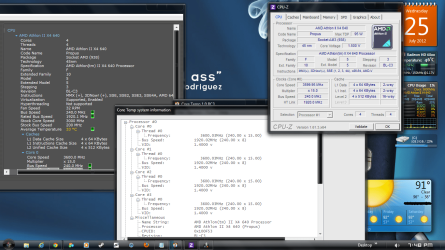
HT Link Speed at 1920Mhz was the closes I could get to 2000MHz from the settings my bios would let me choose from,the other close option was 2160MHz I decided to play safe and go with 1920.Cpu is 2c warmer at idle clocks 34c but it should be since it's day time and was playing Team Fortress 2 about a hour ago and my other temp was at night time with the windows open in my room.Well did a 2nd prime95 test and highest peak i saw was 59c and it jumped around from 57-58 but 58c the most of the time when full load with prime95.Left the test running a bit longer this time.I believe i'm in the safe zone and shouldn't worry.Let it cool down for about 5mins and it's idling at 33c now.Will keep a eye on it and see if it acts up or not,so far seems stable.In my bios it says the clocks are set at 3600MHz but for some reason on cpu-z it likes to jump between3552 and 3600MHz,hmm even windows sees it as 3.60GHz. Anyways one question is it better to leave cool and quiet on or off?Right now I have it off for testing but not sure if I should turn it back on.
 

Attachments

  • test2cpu.png
    test2cpu.png
    528 KB · Views: 33

My Computer

Computer type
PC/Desktop
Computer Manufacturer/Model Number
custom build
OS
Windows 10 64bit
CPU
AMD Phenom II X4 925 (Deneb)(2.8GHz) OC 3.4GHz
Motherboard
M5A78L-MLX Plus
Memory
Corsair Vengeance DDR3 4GBX2 (8192MB)
Graphics Card(s)
XFX HD 6870 1GB (OC)- 940MHz core, mem 1150MHz
Monitor(s) Displays
Vizio 26' 1920x1080 / Acer 1336x768
Screen Resolution
1920x1080 60Hz /1336x768
Hard Drives
Kingston Digital 60GB SSDNow V300/500gb HDD Western Digital 7200rpm (/WD 160GB HDD 7200rpm
PSU
CORSAIR CX600 600w
Case
AZZA Orion 202 EVO
Cooling
cooler master hyper TX3 cpu cooler
Keyboard
Razer DeathStalker
Mouse
Logitech Optical Gaming Mouse G400
Antivirus
Defualt on win 10
Browser
Firefox
Other Info
cpu is overclocked in bios
I would turn it back on if it were mine, should still be stable at that frequency.
 

My Computer

Computer type
PC/Desktop
Computer Manufacturer/Model Number
76~2.0
OS
Windows 7 Ult x64 - SP1/ Windows 8 Pro x64
CPU
Intel Core i5-3570K 4.6GHz
Motherboard
Gigabyte GA-Z77X UD3H, f18
Memory
8GB (2X4GB) DDR3 1600 Corsair Vengeance CL8 1.5v
Graphics Card(s)
Sapphire HD 7770 Vapor-X OC 1GB DDR5
Sound Card
Onboard VIA VT2021
Monitor(s) Displays
22" LCD Dell
Screen Resolution
1680x1050
Hard Drives
Samsung 840Pro 128GB SSD,
Seagate Barracuda 500GB SATA2 7200rpm 32MB cache, Seagate Barracuda 1TB SATA2 7200rpm 32MB cache,
PSU
Corsair HX650W
Case
Cooler Master Storm Scout
Cooling
Corsair H80 2x12cm Noctua NF P12 , 2x14cm case fans
Keyboard
Logitech Wave
Mouse
CM Sentinel
Internet Speed
Dismal
Antivirus
Avast
Browser
Opera Next
Other Info
Haswell laptop: HP Envy 17t-j, i7-4700MQ, GeForce 740M 2GB DDR3, 17.3" Full HD 1920x1080, 16GB RAM, Samsung 840 Pro 128GB, 1TB Hitachi 7200 HDD,
Desktop: eSATA ports,
External eSATA Seagate 500GB SATA2 7200rpm,
External WD USB 500GB
I would turn it back on if it were mine, should still be stable at that frequency.


What Dave said you won't really Gain anything turning it off

Keep it on and adjust your settings you will still hit your target
 

My Computer

Computer type
PC/Desktop
Computer Manufacturer/Model Number
CoreI7-6700K MrFingerIII Special Builds
OS
Windows 10 Home Premium 64bit sp1
CPU
Intel I7-6700K @ 4.6 Ghz 1.344 volts everyday OC
Motherboard
Asrock Fatality K6 Z170 Socket 1151
Memory
32GB G-Skill TridentZ 3200mhz 16-18-18-38 DDR4
Graphics Card(s)
Sli Gigabyte Windforce GTX 980 G1
Sound Card
AC97 Creative Rage Tactic 3D Headphones Bluetooth
Monitor(s) Displays
27" Asus ROG Swift PG278Q G-Sync 48" Vizio Smart HD TV
Screen Resolution
2560x1440p 27"- 48" Currently Gaming at 2560x1440p Res 2K
Hard Drives
250GB Samsung Evo840SSD Seagate baracuda 500 GB WD Mybook 500Gb 1TB Seagate Barracuda
PSU
HX1050w Corsair Silver 80plus certified crosfire/sli
Case
Enthod Pro Full Tower
Cooling
Corsair H110i GT 280 mm High Performance WaterBlock
Keyboard
Logitech wireless keyboard
Mouse
Logitech wireless mouse
Internet Speed
Cox Cable 100+ mb
Antivirus
WebRoot Spysweeper with Antivirus
Browser
IE-10, Chrome, Opera
Other Info
My Other Rig is a AMD FX8320E @4.6Ghz 16GB Ballistic Sport Ram
Mobo Asrock Fatality 990FX 120GB OCZ SSD 1TB Seagate Barracuda Corsair H75 Cooling PSU Corsair CX750
GPU GTX Gigabyte 970G1
Hm I enabled cool and quiet and now my cpu won't clock up above 3000MHz when testing it under prime95 to max it :| and with it off it goes to my OC of 3600MHz
 

My Computer

Computer type
PC/Desktop
Computer Manufacturer/Model Number
custom build
OS
Windows 10 64bit
CPU
AMD Phenom II X4 925 (Deneb)(2.8GHz) OC 3.4GHz
Motherboard
M5A78L-MLX Plus
Memory
Corsair Vengeance DDR3 4GBX2 (8192MB)
Graphics Card(s)
XFX HD 6870 1GB (OC)- 940MHz core, mem 1150MHz
Monitor(s) Displays
Vizio 26' 1920x1080 / Acer 1336x768
Screen Resolution
1920x1080 60Hz /1336x768
Hard Drives
Kingston Digital 60GB SSDNow V300/500gb HDD Western Digital 7200rpm (/WD 160GB HDD 7200rpm
PSU
CORSAIR CX600 600w
Case
AZZA Orion 202 EVO
Cooling
cooler master hyper TX3 cpu cooler
Keyboard
Razer DeathStalker
Mouse
Logitech Optical Gaming Mouse G400
Antivirus
Defualt on win 10
Browser
Firefox
Other Info
cpu is overclocked in bios
Hm I enabled cool and quiet and now my cpu won't clock up above 3000MHz when testing it under prime95 to max it :| and with it off it goes to my OC of 3600MHz


I 've heard of some having it off with no issues but i can look it up for you

I left cool and quiet on becuse it makes no difference with my OC
Matter fact the Pc won't boot with out it on

You on the other hand have a locked Multiplyer and use FSB

I just read an article this guy had his 1.44vcore to reach 3.7 Ghz

but never said anyting about cool and quiet

and then there is this Article by AMD Athlons didn't use cool and quiet according to this
AMD Cool'n'Quiet Technology
Here is some more about Oc'ing your chip
AMD Athlon II X4 640 3.0ghz - Overclockers Forums

I gathered as much info i could searching for a positive answer for you Hope it works out
 

Attachments

  • cool and quiet.PNG
    cool and quiet.PNG
    15.8 KB · Views: 21

My Computer

Computer type
PC/Desktop
Computer Manufacturer/Model Number
CoreI7-6700K MrFingerIII Special Builds
OS
Windows 10 Home Premium 64bit sp1
CPU
Intel I7-6700K @ 4.6 Ghz 1.344 volts everyday OC
Motherboard
Asrock Fatality K6 Z170 Socket 1151
Memory
32GB G-Skill TridentZ 3200mhz 16-18-18-38 DDR4
Graphics Card(s)
Sli Gigabyte Windforce GTX 980 G1
Sound Card
AC97 Creative Rage Tactic 3D Headphones Bluetooth
Monitor(s) Displays
27" Asus ROG Swift PG278Q G-Sync 48" Vizio Smart HD TV
Screen Resolution
2560x1440p 27"- 48" Currently Gaming at 2560x1440p Res 2K
Hard Drives
250GB Samsung Evo840SSD Seagate baracuda 500 GB WD Mybook 500Gb 1TB Seagate Barracuda
PSU
HX1050w Corsair Silver 80plus certified crosfire/sli
Case
Enthod Pro Full Tower
Cooling
Corsair H110i GT 280 mm High Performance WaterBlock
Keyboard
Logitech wireless keyboard
Mouse
Logitech wireless mouse
Internet Speed
Cox Cable 100+ mb
Antivirus
WebRoot Spysweeper with Antivirus
Browser
IE-10, Chrome, Opera
Other Info
My Other Rig is a AMD FX8320E @4.6Ghz 16GB Ballistic Sport Ram
Mobo Asrock Fatality 990FX 120GB OCZ SSD 1TB Seagate Barracuda Corsair H75 Cooling PSU Corsair CX750
GPU GTX Gigabyte 970G1
Back
Top