Post Your Overclock! [2]

Cheers!
I shall carry on with it 2moz, I just wanted to see if it blue screen'd on me in Bf3. i could pass IBT and unigine or other tools but then crash after 10 mins of Battlefield.
No crashes after a few hours BF and Dirt so all good. I'll see what i can come up wit on the morrow :p

@ Bungee, Yeah thats pretty low enit. I don't know why though... Are you using any llc?
 

My Computer

Computer type
PC/Desktop
Computer Manufacturer/Model Number
Custom build
OS
Win7 Home Premium x64 SP1
CPU
i7 4770k
Motherboard
Asus maximus VI Hero
Memory
8Gb Kingston HyperX Beast 2400MHz @2133MHz 11-12-11-30
Graphics Card(s)
MSI GTX 780ti Gaming Oc x2
Sound Card
Onboard ROG SupremeFX
Monitor(s) Displays
Asus VG248QE
Screen Resolution
3840X1080 144Hz
Hard Drives
Samung Evo 256Gb, OCZ Agility4 128Gb
1x1TB hitachi storage
PSU
EVGA Supernova 1000w Platinum
Case
Corsair Air 540
Cooling
Corsair H100i
Keyboard
Coolermaster Quickfire Pro
Mouse
Corsair M65 RGB
Internet Speed
74mb dwn/16up
Antivirus
MSE,Malwarebytes
Browser
Chrome
@Ganjiry, the problem is that the board does not have LLC and has a limited range of vcore, highest is 1.449.
I can do higher through overclocking software provided by MSI (ClickBios II and Control Center). Will try that option, but to get something like 1.43 under load I would probably have to set it way past 1.5. I'm not sure if I dare...
 
Last edited:

My Computer

Computer type
PC/Desktop
Computer Manufacturer/Model Number
Custom built
OS
Windows 7 Ultimate x64 SP1
CPU
AMD FX 8320 4.8GHz, 1.475V
Motherboard
ASUS Crosshair V Formula-Z
Memory
4 x GSkill Ripjaws Z 4GB 1600 CL8
Graphics Card(s)
2 x ASUS HD7870 2GB DirectCu II
Sound Card
M-Audio Firewire 410
Monitor(s) Displays
2 x Samsung Syncmaster SA300
Screen Resolution
1600x900
Hard Drives
1 x Seagate Barracuda 2TB, 7200 rpm, 64 mb cache - Kingston HyperX 3K 120GB (OS) - Corsair FORCE Series 180GB (Games & Apps)
PSU
Corsair TX850M
Case
NZXT Switch 810
Cooling
Custom Water. XSPC Raystorm, Laing DDC 3.2T PWM, 360+120 rad
Keyboard
Corsair Vengeance 650
Mouse
Elephant Leviathan 3200 DPI
Internet Speed
Too slow
@Ganjiry, the problem is that the board does not have LLC and has a limited rage of vcore, highest is 1.449.
I can do higher through overclocking software provided by MSI (ClickBios II and Control Center). Will try that option, but to get something like 1.43 under load I would probably have to set it way past 1.5. I'm not sure if I dare...


That is where i told you APS will kick in you can keep it at 1.43 turn on APS the drop will go down to 1.42-1.41 that is when the APS is on when I turned it off i could only get 4.4 stable at 1.43 anything higher almost needs to be maxed at 1.449 and i think the reason you have that stupid vcore ceiling is because the board supports 125 w socket and when you get a board 140 w socket you have more v core to play with

That is why i switched boards to a 140 w and i have more v core to play with it took me 2 years to get it even though the board says bios can reach up to 1.80 volts in the manual but the new Bios UFEI killed it lol and pretty much stuck you with the voltage but yet they are great overclockers :rolleyes:
 

My Computer

Computer type
PC/Desktop
Computer Manufacturer/Model Number
CoreI7-6700K MrFingerIII Special Builds
OS
Windows 10 Home Premium 64bit sp1
CPU
Intel I7-6700K @ 4.6 Ghz 1.344 volts everyday OC
Motherboard
Asrock Fatality K6 Z170 Socket 1151
Memory
32GB G-Skill TridentZ 3200mhz 16-18-18-38 DDR4
Graphics Card(s)
Sli Gigabyte Windforce GTX 980 G1
Sound Card
AC97 Creative Rage Tactic 3D Headphones Bluetooth
Monitor(s) Displays
27" Asus ROG Swift PG278Q G-Sync 48" Vizio Smart HD TV
Screen Resolution
2560x1440p 27"- 48" Currently Gaming at 2560x1440p Res 2K
Hard Drives
250GB Samsung Evo840SSD Seagate baracuda 500 GB WD Mybook 500Gb 1TB Seagate Barracuda
PSU
HX1050w Corsair Silver 80plus certified crosfire/sli
Case
Enthod Pro Full Tower
Cooling
Corsair H110i GT 280 mm High Performance WaterBlock
Keyboard
Logitech wireless keyboard
Mouse
Logitech wireless mouse
Internet Speed
Cox Cable 100+ mb
Antivirus
WebRoot Spysweeper with Antivirus
Browser
IE-10, Chrome, Opera
Other Info
My Other Rig is a AMD FX8320E @4.6Ghz 16GB Ballistic Sport Ram
Mobo Asrock Fatality 990FX 120GB OCZ SSD 1TB Seagate Barracuda Corsair H75 Cooling PSU Corsair CX750
GPU GTX Gigabyte 970G1
@Ganjiry, the problem is that the board does not have LLC and has a limited rage of vcore, highest is 1.449.
I can do higher through overclocking software provided by MSI (ClickBios II and Control Center). Will try that option, but to get something like 1.43 under load I would probably have to set it way past 1.5. I'm not sure if I dare...


That is where i told you APS will kick in you can keep it at 1.43 turn on APS the drop will go down to 1.42-1.41 that is when the APS is on when I turned it off i could only get 4.4 stable at 1.43 anything higher almost needs to be maxed at 1.449 and i think the reason you have that stupid vcore ceiling is because the board supports 125 w socket and when you get a board 140 w socket you have more v core to play with

That is why i switched boards to a 140 w and i have more v core to play with it took me 2 years to get it even though the board says bios can reach up to 1.80 volts in the manual but the new Bios UFEI killed it lol and pretty much stuck you with the voltage but yet they are great overclockers :rolleyes:

Hi Solar,
I'm already at 1.512 through click bios II. CPUZ shows 1.48 idle 1.44 IBT.
Testing 4.7 right now.
APS is enabled.
Will let you know how it goes.
I was eying a Sabertooth today. A good deal too, but the idea of rebuilding once again is a total turnoff.
More to follow as IBT on 4.7 is done.
Thanks,
J
 

My Computer

Computer type
PC/Desktop
Computer Manufacturer/Model Number
Custom built
OS
Windows 7 Ultimate x64 SP1
CPU
AMD FX 8320 4.8GHz, 1.475V
Motherboard
ASUS Crosshair V Formula-Z
Memory
4 x GSkill Ripjaws Z 4GB 1600 CL8
Graphics Card(s)
2 x ASUS HD7870 2GB DirectCu II
Sound Card
M-Audio Firewire 410
Monitor(s) Displays
2 x Samsung Syncmaster SA300
Screen Resolution
1600x900
Hard Drives
1 x Seagate Barracuda 2TB, 7200 rpm, 64 mb cache - Kingston HyperX 3K 120GB (OS) - Corsair FORCE Series 180GB (Games & Apps)
PSU
Corsair TX850M
Case
NZXT Switch 810
Cooling
Custom Water. XSPC Raystorm, Laing DDC 3.2T PWM, 360+120 rad
Keyboard
Corsair Vengeance 650
Mouse
Elephant Leviathan 3200 DPI
Internet Speed
Too slow
I didn't like using the MSI tuning Program you are alot bolder then me im to much of a scardey cat when it comes to using programs to overclock in windows it always throws something off and almost never accurate readings but hey you got Guts don't ever let anyone tell you otherwise:geek:
 

My Computer

Computer type
PC/Desktop
Computer Manufacturer/Model Number
CoreI7-6700K MrFingerIII Special Builds
OS
Windows 10 Home Premium 64bit sp1
CPU
Intel I7-6700K @ 4.6 Ghz 1.344 volts everyday OC
Motherboard
Asrock Fatality K6 Z170 Socket 1151
Memory
32GB G-Skill TridentZ 3200mhz 16-18-18-38 DDR4
Graphics Card(s)
Sli Gigabyte Windforce GTX 980 G1
Sound Card
AC97 Creative Rage Tactic 3D Headphones Bluetooth
Monitor(s) Displays
27" Asus ROG Swift PG278Q G-Sync 48" Vizio Smart HD TV
Screen Resolution
2560x1440p 27"- 48" Currently Gaming at 2560x1440p Res 2K
Hard Drives
250GB Samsung Evo840SSD Seagate baracuda 500 GB WD Mybook 500Gb 1TB Seagate Barracuda
PSU
HX1050w Corsair Silver 80plus certified crosfire/sli
Case
Enthod Pro Full Tower
Cooling
Corsair H110i GT 280 mm High Performance WaterBlock
Keyboard
Logitech wireless keyboard
Mouse
Logitech wireless mouse
Internet Speed
Cox Cable 100+ mb
Antivirus
WebRoot Spysweeper with Antivirus
Browser
IE-10, Chrome, Opera
Other Info
My Other Rig is a AMD FX8320E @4.6Ghz 16GB Ballistic Sport Ram
Mobo Asrock Fatality 990FX 120GB OCZ SSD 1TB Seagate Barracuda Corsair H75 Cooling PSU Corsair CX750
GPU GTX Gigabyte 970G1
What a smart man (essenbe) told me is that he uses the ASUS AI suite to set some overclocks until he gets BSOD, then goes into BIOS and sets it to just below what caused it.
 

My Computer

Computer type
PC/Desktop
Computer Manufacturer/Model Number
Home Built Desktop By DataTech
OS
Windows 7 Ultimate X64 SP1
CPU
Intel i5-2550K, Differing ~4.4-4.8GHz No built in GPU
Motherboard
ASUS P8Z68-V PRO/GEN3
Memory
16GB G.Skill Sniper 1866MHz @ 2133MHz 2x8GB
Graphics Card(s)
ASUS GTX650TIB-DC2OC-2GD5, (650TI Boost)
Sound Card
Onboard Realtek 5-1
Monitor(s) Displays
Samsung P2570HD
Screen Resolution
1920x1080
Hard Drives
Samsung 840 Pro 256GB SSD for OS, 500GB Seagate Constellation (Enterprise drive) for Data
PSU
Corsair HX650W
Case
Inwin Dragon Rider
Cooling
Hyper 212 EVO w/two Noctua fans, push-pull, @1300 RPM
Keyboard
E-Z Eyes, bright yellow keys with large characters
Mouse
steelseries SENSEI Laser Pro Gaming
Internet Speed
48-51Mbs Mbs down, 11 Mbs up Xfinity Cable
Antivirus
Norton Internet Security 2013
Browser
IE 10, Opera, Pale Moon if needed
Other Info
4 case fans, LG BluRay-RE, ASUS DVD-RW, Mr. Fusion power supply, 1.21 gigawatts.
What a smart man (essenbe) told me is that he uses the ASUS AI suite to set some overclocks until he gets BSOD, then goes into BIOS and sets it to just below what caused it.
yeah but the problem is with that MSI board Bios only allows 1.449 max voltage

using the MSI Control center gives much higher voltages no way to change them in the bios like the control center

It's like they are forcing you to use th at crap instead of the right way but i was always told the best way and stable way is bios that is why i did ask about it I had mixed feelings about it and decided to leave it be
 

My Computer

Computer type
PC/Desktop
Computer Manufacturer/Model Number
CoreI7-6700K MrFingerIII Special Builds
OS
Windows 10 Home Premium 64bit sp1
CPU
Intel I7-6700K @ 4.6 Ghz 1.344 volts everyday OC
Motherboard
Asrock Fatality K6 Z170 Socket 1151
Memory
32GB G-Skill TridentZ 3200mhz 16-18-18-38 DDR4
Graphics Card(s)
Sli Gigabyte Windforce GTX 980 G1
Sound Card
AC97 Creative Rage Tactic 3D Headphones Bluetooth
Monitor(s) Displays
27" Asus ROG Swift PG278Q G-Sync 48" Vizio Smart HD TV
Screen Resolution
2560x1440p 27"- 48" Currently Gaming at 2560x1440p Res 2K
Hard Drives
250GB Samsung Evo840SSD Seagate baracuda 500 GB WD Mybook 500Gb 1TB Seagate Barracuda
PSU
HX1050w Corsair Silver 80plus certified crosfire/sli
Case
Enthod Pro Full Tower
Cooling
Corsair H110i GT 280 mm High Performance WaterBlock
Keyboard
Logitech wireless keyboard
Mouse
Logitech wireless mouse
Internet Speed
Cox Cable 100+ mb
Antivirus
WebRoot Spysweeper with Antivirus
Browser
IE-10, Chrome, Opera
Other Info
My Other Rig is a AMD FX8320E @4.6Ghz 16GB Ballistic Sport Ram
Mobo Asrock Fatality 990FX 120GB OCZ SSD 1TB Seagate Barracuda Corsair H75 Cooling PSU Corsair CX750
GPU GTX Gigabyte 970G1
You're right, BIOS is the best way to do clocking with. I tried the AI Suite once but didn't like it much. I'd never use anything MSI, had bad experiences with the company.
 

My Computer

Computer type
PC/Desktop
Computer Manufacturer/Model Number
Home Built Desktop By DataTech
OS
Windows 7 Ultimate X64 SP1
CPU
Intel i5-2550K, Differing ~4.4-4.8GHz No built in GPU
Motherboard
ASUS P8Z68-V PRO/GEN3
Memory
16GB G.Skill Sniper 1866MHz @ 2133MHz 2x8GB
Graphics Card(s)
ASUS GTX650TIB-DC2OC-2GD5, (650TI Boost)
Sound Card
Onboard Realtek 5-1
Monitor(s) Displays
Samsung P2570HD
Screen Resolution
1920x1080
Hard Drives
Samsung 840 Pro 256GB SSD for OS, 500GB Seagate Constellation (Enterprise drive) for Data
PSU
Corsair HX650W
Case
Inwin Dragon Rider
Cooling
Hyper 212 EVO w/two Noctua fans, push-pull, @1300 RPM
Keyboard
E-Z Eyes, bright yellow keys with large characters
Mouse
steelseries SENSEI Laser Pro Gaming
Internet Speed
48-51Mbs Mbs down, 11 Mbs up Xfinity Cable
Antivirus
Norton Internet Security 2013
Browser
IE 10, Opera, Pale Moon if needed
Other Info
4 case fans, LG BluRay-RE, ASUS DVD-RW, Mr. Fusion power supply, 1.21 gigawatts.
So here it is: 4.7 stable, 10 passes IBT 1 hour p95.
Core temp stayed around 50C, socket 55C.
I only used Click Bios II to up the vcore. It accesses BIOS directly and mods values there and saves them, unlike control center. You have to re-start after any changes for them to take effect.
Now I'll go back to my stable 4.5, with a slight increase in vcore through click bios, which allows for lower temps and quieter rig.
Thanks for the advice Tommy and Gary
Cheers,
J
 

Attachments

  • 4.7.JPG
    4.7.JPG
    186.1 KB · Views: 8

My Computer

Computer type
PC/Desktop
Computer Manufacturer/Model Number
Custom built
OS
Windows 7 Ultimate x64 SP1
CPU
AMD FX 8320 4.8GHz, 1.475V
Motherboard
ASUS Crosshair V Formula-Z
Memory
4 x GSkill Ripjaws Z 4GB 1600 CL8
Graphics Card(s)
2 x ASUS HD7870 2GB DirectCu II
Sound Card
M-Audio Firewire 410
Monitor(s) Displays
2 x Samsung Syncmaster SA300
Screen Resolution
1600x900
Hard Drives
1 x Seagate Barracuda 2TB, 7200 rpm, 64 mb cache - Kingston HyperX 3K 120GB (OS) - Corsair FORCE Series 180GB (Games & Apps)
PSU
Corsair TX850M
Case
NZXT Switch 810
Cooling
Custom Water. XSPC Raystorm, Laing DDC 3.2T PWM, 360+120 rad
Keyboard
Corsair Vengeance 650
Mouse
Elephant Leviathan 3200 DPI
Internet Speed
Too slow
Good job Juan, looking good there. :D
 

My Computer

Computer type
PC/Desktop
Computer Manufacturer/Model Number
Home Built Desktop By DataTech
OS
Windows 7 Ultimate X64 SP1
CPU
Intel i5-2550K, Differing ~4.4-4.8GHz No built in GPU
Motherboard
ASUS P8Z68-V PRO/GEN3
Memory
16GB G.Skill Sniper 1866MHz @ 2133MHz 2x8GB
Graphics Card(s)
ASUS GTX650TIB-DC2OC-2GD5, (650TI Boost)
Sound Card
Onboard Realtek 5-1
Monitor(s) Displays
Samsung P2570HD
Screen Resolution
1920x1080
Hard Drives
Samsung 840 Pro 256GB SSD for OS, 500GB Seagate Constellation (Enterprise drive) for Data
PSU
Corsair HX650W
Case
Inwin Dragon Rider
Cooling
Hyper 212 EVO w/two Noctua fans, push-pull, @1300 RPM
Keyboard
E-Z Eyes, bright yellow keys with large characters
Mouse
steelseries SENSEI Laser Pro Gaming
Internet Speed
48-51Mbs Mbs down, 11 Mbs up Xfinity Cable
Antivirus
Norton Internet Security 2013
Browser
IE 10, Opera, Pale Moon if needed
Other Info
4 case fans, LG BluRay-RE, ASUS DVD-RW, Mr. Fusion power supply, 1.21 gigawatts.
Impressive if it works for you i would leave it but also 1.48 seems kinda high but if it is solid leave it

and enjoy the fruits of your labor ;)
 

My Computer

Computer type
PC/Desktop
Computer Manufacturer/Model Number
CoreI7-6700K MrFingerIII Special Builds
OS
Windows 10 Home Premium 64bit sp1
CPU
Intel I7-6700K @ 4.6 Ghz 1.344 volts everyday OC
Motherboard
Asrock Fatality K6 Z170 Socket 1151
Memory
32GB G-Skill TridentZ 3200mhz 16-18-18-38 DDR4
Graphics Card(s)
Sli Gigabyte Windforce GTX 980 G1
Sound Card
AC97 Creative Rage Tactic 3D Headphones Bluetooth
Monitor(s) Displays
27" Asus ROG Swift PG278Q G-Sync 48" Vizio Smart HD TV
Screen Resolution
2560x1440p 27"- 48" Currently Gaming at 2560x1440p Res 2K
Hard Drives
250GB Samsung Evo840SSD Seagate baracuda 500 GB WD Mybook 500Gb 1TB Seagate Barracuda
PSU
HX1050w Corsair Silver 80plus certified crosfire/sli
Case
Enthod Pro Full Tower
Cooling
Corsair H110i GT 280 mm High Performance WaterBlock
Keyboard
Logitech wireless keyboard
Mouse
Logitech wireless mouse
Internet Speed
Cox Cable 100+ mb
Antivirus
WebRoot Spysweeper with Antivirus
Browser
IE-10, Chrome, Opera
Other Info
My Other Rig is a AMD FX8320E @4.6Ghz 16GB Ballistic Sport Ram
Mobo Asrock Fatality 990FX 120GB OCZ SSD 1TB Seagate Barracuda Corsair H75 Cooling PSU Corsair CX750
GPU GTX Gigabyte 970G1
Nice1 Bungee, You're a braver man than me, Fairplay though you got a nice oc :thumbsup:

llc has come in right handy although my board defaults llc to it's highest level so had to change that. I've not tried to oc my cpu without any llc but i reckon it would take a lot more patients than i have :p
 

My Computer

Computer type
PC/Desktop
Computer Manufacturer/Model Number
Custom build
OS
Win7 Home Premium x64 SP1
CPU
i7 4770k
Motherboard
Asus maximus VI Hero
Memory
8Gb Kingston HyperX Beast 2400MHz @2133MHz 11-12-11-30
Graphics Card(s)
MSI GTX 780ti Gaming Oc x2
Sound Card
Onboard ROG SupremeFX
Monitor(s) Displays
Asus VG248QE
Screen Resolution
3840X1080 144Hz
Hard Drives
Samung Evo 256Gb, OCZ Agility4 128Gb
1x1TB hitachi storage
PSU
EVGA Supernova 1000w Platinum
Case
Corsair Air 540
Cooling
Corsair H100i
Keyboard
Coolermaster Quickfire Pro
Mouse
Corsair M65 RGB
Internet Speed
74mb dwn/16up
Antivirus
MSE,Malwarebytes
Browser
Chrome
What a smart man (essenbe) told me is that he uses the ASUS AI suite to set some overclocks until he gets BSOD, then goes into BIOS and sets it to just below what caused it.

Gary, all I use it for is to adjust voltage in AI Suite. I set it up in bios, but when stress testing I use AI to adjust voltages. When I find the right one, I go to bios and change it there. AI allows you to change it in windows, but does not change bios. You have to do that. I never use it for anything else other than monitoring.
 

My Computers

System One System Two

  • Computer type
    PC/Desktop
    Computer Manufacturer/Model Number
    ALWAYS UNDER CONSTRUCTION
    OS
    Windows 11 Pro
    CPU
    Ryzen 9 5900X
    Motherboard
    Asus X570 Crosshair Viii Hero
    Memory
    32GB G Skill DDR4-3600
    Graphics Card(s)
    EVGA RTX 3080 FTW 3 Ultra
    Sound Card
    On Board/Sennheiser PC37X Headset
    Monitor(s) Displays
    3 X Asus 27"
    Screen Resolution
    2560x1440
    Hard Drives
    2 X 1 TB NVME drives
    PSU
    EVGA 850
    Case
    Phanteks Eclipse P400A
    Cooling
    EVGA 280 AIO
    Keyboard
    Logitech G510s/ Logitech G13
    Mouse
    Logitech G502
    Internet Speed
    24/1
    Antivirus
    ESET/MBAM Pro/SAS Pro
    Browser
    Chrome/ Firefox/ Edge
  • Computer type
    Laptop
    System Manufacturer/Model Number
    Dell 16 Plus
    OS
    Windows 11 Pro
    CPU
    Intel Ultra 9 288V
    Memory
    32 GB LPDDR5X 8533
    Monitor(s) Displays
    16" Mini-LED HDR600 Touch 90 Hz
    Screen Resolution
    2560X1600
    Hard Drives
    1 TB NVME
I never use it for anything else other than monitoring.

Do you get many false readings with AI suite? When i had Ai suite II installed i found it gave quite a few false readings for fan speeds and northbridge voltages among other things.
Is it the newer version III for your board?
It could be a really good monitoring software once all the little bugs are sorted enit.
 

My Computer

Computer type
PC/Desktop
Computer Manufacturer/Model Number
Custom build
OS
Win7 Home Premium x64 SP1
CPU
i7 4770k
Motherboard
Asus maximus VI Hero
Memory
8Gb Kingston HyperX Beast 2400MHz @2133MHz 11-12-11-30
Graphics Card(s)
MSI GTX 780ti Gaming Oc x2
Sound Card
Onboard ROG SupremeFX
Monitor(s) Displays
Asus VG248QE
Screen Resolution
3840X1080 144Hz
Hard Drives
Samung Evo 256Gb, OCZ Agility4 128Gb
1x1TB hitachi storage
PSU
EVGA Supernova 1000w Platinum
Case
Corsair Air 540
Cooling
Corsair H100i
Keyboard
Coolermaster Quickfire Pro
Mouse
Corsair M65 RGB
Internet Speed
74mb dwn/16up
Antivirus
MSE,Malwarebytes
Browser
Chrome
Dropping to 4.4 for 24/7 use. 4.5 and beyond idles at too high a vcore (1.48 or more).
Cinebench only drops from around 7.85 to 7.44. I can live with that...
I can see a Sabertooth in my near future!
Thanks for your comments and advice guys.
Cheers,
J
 

My Computer

Computer type
PC/Desktop
Computer Manufacturer/Model Number
Custom built
OS
Windows 7 Ultimate x64 SP1
CPU
AMD FX 8320 4.8GHz, 1.475V
Motherboard
ASUS Crosshair V Formula-Z
Memory
4 x GSkill Ripjaws Z 4GB 1600 CL8
Graphics Card(s)
2 x ASUS HD7870 2GB DirectCu II
Sound Card
M-Audio Firewire 410
Monitor(s) Displays
2 x Samsung Syncmaster SA300
Screen Resolution
1600x900
Hard Drives
1 x Seagate Barracuda 2TB, 7200 rpm, 64 mb cache - Kingston HyperX 3K 120GB (OS) - Corsair FORCE Series 180GB (Games & Apps)
PSU
Corsair TX850M
Case
NZXT Switch 810
Cooling
Custom Water. XSPC Raystorm, Laing DDC 3.2T PWM, 360+120 rad
Keyboard
Corsair Vengeance 650
Mouse
Elephant Leviathan 3200 DPI
Internet Speed
Too slow
I never use it for anything else other than monitoring.

Do you get many false readings with AI suite? When i had Ai suite II installed i found it gave quite a few false readings for fan speeds and northbridge voltages among other things.
Is it the newer version III for your board?
It could be a really good monitoring software once all the little bugs are sorted enit.


To me it is dead on i use HW monitor and readings in the Bios to compare so far so good they been dead on
 

My Computer

Computer type
PC/Desktop
Computer Manufacturer/Model Number
CoreI7-6700K MrFingerIII Special Builds
OS
Windows 10 Home Premium 64bit sp1
CPU
Intel I7-6700K @ 4.6 Ghz 1.344 volts everyday OC
Motherboard
Asrock Fatality K6 Z170 Socket 1151
Memory
32GB G-Skill TridentZ 3200mhz 16-18-18-38 DDR4
Graphics Card(s)
Sli Gigabyte Windforce GTX 980 G1
Sound Card
AC97 Creative Rage Tactic 3D Headphones Bluetooth
Monitor(s) Displays
27" Asus ROG Swift PG278Q G-Sync 48" Vizio Smart HD TV
Screen Resolution
2560x1440p 27"- 48" Currently Gaming at 2560x1440p Res 2K
Hard Drives
250GB Samsung Evo840SSD Seagate baracuda 500 GB WD Mybook 500Gb 1TB Seagate Barracuda
PSU
HX1050w Corsair Silver 80plus certified crosfire/sli
Case
Enthod Pro Full Tower
Cooling
Corsair H110i GT 280 mm High Performance WaterBlock
Keyboard
Logitech wireless keyboard
Mouse
Logitech wireless mouse
Internet Speed
Cox Cable 100+ mb
Antivirus
WebRoot Spysweeper with Antivirus
Browser
IE-10, Chrome, Opera
Other Info
My Other Rig is a AMD FX8320E @4.6Ghz 16GB Ballistic Sport Ram
Mobo Asrock Fatality 990FX 120GB OCZ SSD 1TB Seagate Barracuda Corsair H75 Cooling PSU Corsair CX750
GPU GTX Gigabyte 970G1
Nice 1, They must have worked some of the bugs out enit.
I may give it a try again as i liked the probe part of it aswell as the fan control.
 

My Computer

Computer type
PC/Desktop
Computer Manufacturer/Model Number
Custom build
OS
Win7 Home Premium x64 SP1
CPU
i7 4770k
Motherboard
Asus maximus VI Hero
Memory
8Gb Kingston HyperX Beast 2400MHz @2133MHz 11-12-11-30
Graphics Card(s)
MSI GTX 780ti Gaming Oc x2
Sound Card
Onboard ROG SupremeFX
Monitor(s) Displays
Asus VG248QE
Screen Resolution
3840X1080 144Hz
Hard Drives
Samung Evo 256Gb, OCZ Agility4 128Gb
1x1TB hitachi storage
PSU
EVGA Supernova 1000w Platinum
Case
Corsair Air 540
Cooling
Corsair H100i
Keyboard
Coolermaster Quickfire Pro
Mouse
Corsair M65 RGB
Internet Speed
74mb dwn/16up
Antivirus
MSE,Malwarebytes
Browser
Chrome
Dropping to 4.4 for 24/7 use. 4.5 and beyond idles at too high a vcore (1.48 or more).
Cinebench only drops from around 7.85 to 7.44. I can live with that...
I can see a Sabertooth in my near future!
Thanks for your comments and advice guys.
Cheers,
J

your cinebench would be higher if you use the FSB @4.7 im hitting 8.10
 

My Computer

Computer type
PC/Desktop
Computer Manufacturer/Model Number
CoreI7-6700K MrFingerIII Special Builds
OS
Windows 10 Home Premium 64bit sp1
CPU
Intel I7-6700K @ 4.6 Ghz 1.344 volts everyday OC
Motherboard
Asrock Fatality K6 Z170 Socket 1151
Memory
32GB G-Skill TridentZ 3200mhz 16-18-18-38 DDR4
Graphics Card(s)
Sli Gigabyte Windforce GTX 980 G1
Sound Card
AC97 Creative Rage Tactic 3D Headphones Bluetooth
Monitor(s) Displays
27" Asus ROG Swift PG278Q G-Sync 48" Vizio Smart HD TV
Screen Resolution
2560x1440p 27"- 48" Currently Gaming at 2560x1440p Res 2K
Hard Drives
250GB Samsung Evo840SSD Seagate baracuda 500 GB WD Mybook 500Gb 1TB Seagate Barracuda
PSU
HX1050w Corsair Silver 80plus certified crosfire/sli
Case
Enthod Pro Full Tower
Cooling
Corsair H110i GT 280 mm High Performance WaterBlock
Keyboard
Logitech wireless keyboard
Mouse
Logitech wireless mouse
Internet Speed
Cox Cable 100+ mb
Antivirus
WebRoot Spysweeper with Antivirus
Browser
IE-10, Chrome, Opera
Other Info
My Other Rig is a AMD FX8320E @4.6Ghz 16GB Ballistic Sport Ram
Mobo Asrock Fatality 990FX 120GB OCZ SSD 1TB Seagate Barracuda Corsair H75 Cooling PSU Corsair CX750
GPU GTX Gigabyte 970G1
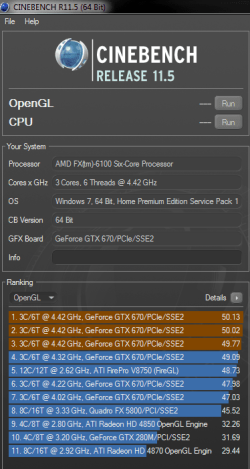
Progress update.
I don't usually have much patience when it comes to overclocking but its stopping me thinking about hospital by keeping my mind busy :D
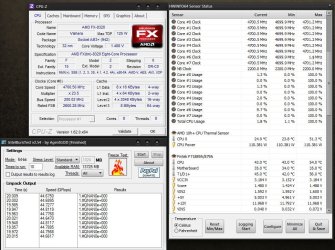
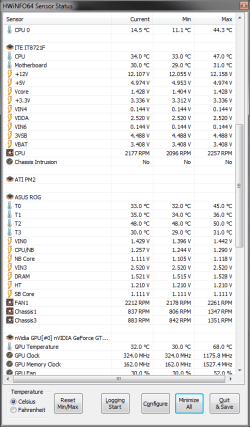
I've been testing different voltage's @ 4.4Ghz but got a stable 4.4Ghz, 200x 22, @1.428v, Drops to 1.416 @ load.
cpu/nb 2400 @ 1.237v
HT Link 2000 auto v
cpu and cpu/nb llc set to high.
Memory still stock xmp.
Everything seemed stable untill it bsod while playing War Thunder.
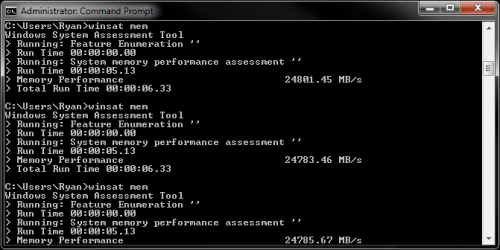
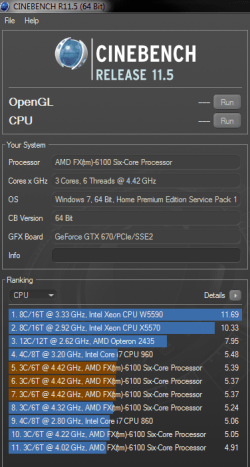
So i upped the cpu/ nb to 1.25v which improved stability aswell as increasing score's in everything i've tried so far.
10 Passes IBT in 428.00, Max temp was 47c but settled @ 45c.
 

Attachments

  • Cpu z 4.4ghz.png
    Cpu z 4.4ghz.png
    36 KB · Views: 3
  • HWINFO.png
    HWINFO.png
    51.5 KB · Views: 1
  • winsat mem 4.4ghz.png
    winsat mem 4.4ghz.png
    32.5 KB · Views: 4
  • Cinebench Cpu 4.4.png
    Cinebench Cpu 4.4.png
    179.4 KB · Views: 3
  • Cinebench Open GL 4.4.png
    Cinebench Open GL 4.4.png
    126.4 KB · Views: 2

My Computer

Computer type
PC/Desktop
Computer Manufacturer/Model Number
Custom build
OS
Win7 Home Premium x64 SP1
CPU
i7 4770k
Motherboard
Asus maximus VI Hero
Memory
8Gb Kingston HyperX Beast 2400MHz @2133MHz 11-12-11-30
Graphics Card(s)
MSI GTX 780ti Gaming Oc x2
Sound Card
Onboard ROG SupremeFX
Monitor(s) Displays
Asus VG248QE
Screen Resolution
3840X1080 144Hz
Hard Drives
Samung Evo 256Gb, OCZ Agility4 128Gb
1x1TB hitachi storage
PSU
EVGA Supernova 1000w Platinum
Case
Corsair Air 540
Cooling
Corsair H100i
Keyboard
Coolermaster Quickfire Pro
Mouse
Corsair M65 RGB
Internet Speed
74mb dwn/16up
Antivirus
MSE,Malwarebytes
Browser
Chrome
Good job tommy and Ryan. you're going to make those AMDs squeal and say "Bob's your uncle".:p
 

My Computer

Computer type
PC/Desktop
Computer Manufacturer/Model Number
Home Built Desktop By DataTech
OS
Windows 7 Ultimate X64 SP1
CPU
Intel i5-2550K, Differing ~4.4-4.8GHz No built in GPU
Motherboard
ASUS P8Z68-V PRO/GEN3
Memory
16GB G.Skill Sniper 1866MHz @ 2133MHz 2x8GB
Graphics Card(s)
ASUS GTX650TIB-DC2OC-2GD5, (650TI Boost)
Sound Card
Onboard Realtek 5-1
Monitor(s) Displays
Samsung P2570HD
Screen Resolution
1920x1080
Hard Drives
Samsung 840 Pro 256GB SSD for OS, 500GB Seagate Constellation (Enterprise drive) for Data
PSU
Corsair HX650W
Case
Inwin Dragon Rider
Cooling
Hyper 212 EVO w/two Noctua fans, push-pull, @1300 RPM
Keyboard
E-Z Eyes, bright yellow keys with large characters
Mouse
steelseries SENSEI Laser Pro Gaming
Internet Speed
48-51Mbs Mbs down, 11 Mbs up Xfinity Cable
Antivirus
Norton Internet Security 2013
Browser
IE 10, Opera, Pale Moon if needed
Other Info
4 case fans, LG BluRay-RE, ASUS DVD-RW, Mr. Fusion power supply, 1.21 gigawatts.
Back
Top