Post Your Overclock! [2]

My Computer

Computer type
PC/Desktop
Computer Manufacturer/Model Number
Home Built Desktop By DataTech
OS
Windows 7 Ultimate X64 SP1
CPU
Intel i5-2550K, Differing ~4.4-4.8GHz No built in GPU
Motherboard
ASUS P8Z68-V PRO/GEN3
Memory
16GB G.Skill Sniper 1866MHz @ 2133MHz 2x8GB
Graphics Card(s)
ASUS GTX650TIB-DC2OC-2GD5, (650TI Boost)
Sound Card
Onboard Realtek 5-1
Monitor(s) Displays
Samsung P2570HD
Screen Resolution
1920x1080
Hard Drives
Samsung 840 Pro 256GB SSD for OS, 500GB Seagate Constellation (Enterprise drive) for Data
PSU
Corsair HX650W
Case
Inwin Dragon Rider
Cooling
Hyper 212 EVO w/two Noctua fans, push-pull, @1300 RPM
Keyboard
E-Z Eyes, bright yellow keys with large characters
Mouse
steelseries SENSEI Laser Pro Gaming
Internet Speed
48-51Mbs Mbs down, 11 Mbs up Xfinity Cable
Antivirus
Norton Internet Security 2013
Browser
IE 10, Opera, Pale Moon if needed
Other Info
4 case fans, LG BluRay-RE, ASUS DVD-RW, Mr. Fusion power supply, 1.21 gigawatts.
Haven't been around for a few days.
Very nice OC's Alan, Ryan, Paul and Tommy!!!

@Tommy, tried doing FSB OC, but IBT crashes even with 205. Memory is set to default speed and timings. Should I lower the speed?

Cheers guys and congrats on the great OCs recently posted!

J
 

My Computer

Computer type
PC/Desktop
Computer Manufacturer/Model Number
Custom built
OS
Windows 7 Ultimate x64 SP1
CPU
AMD FX 8320 4.8GHz, 1.475V
Motherboard
ASUS Crosshair V Formula-Z
Memory
4 x GSkill Ripjaws Z 4GB 1600 CL8
Graphics Card(s)
2 x ASUS HD7870 2GB DirectCu II
Sound Card
M-Audio Firewire 410
Monitor(s) Displays
2 x Samsung Syncmaster SA300
Screen Resolution
1600x900
Hard Drives
1 x Seagate Barracuda 2TB, 7200 rpm, 64 mb cache - Kingston HyperX 3K 120GB (OS) - Corsair FORCE Series 180GB (Games & Apps)
PSU
Corsair TX850M
Case
NZXT Switch 810
Cooling
Custom Water. XSPC Raystorm, Laing DDC 3.2T PWM, 360+120 rad
Keyboard
Corsair Vengeance 650
Mouse
Elephant Leviathan 3200 DPI
Internet Speed
Too slow
@Ganjiry

Hey Ryan, how's it going?
I had set up my H100i the same way you have, pulling air from inside the case and using the rear exhaust fan as an intake.
I tried switching the rear fan off (the temp probes on the rad were reporting very fast temp rises the second the PSU and video cards got stressed) and, to my surprise, idle temps dropped 2C and load 3-4C.
I t looks like it was sucking the hot air exhausted by the PSU and video cards.
The back of my case is almost against a wall and there is a wide shelf 30cm above it, so that may be a factor too.
Give it a try and let me know what happens,
Cheers,

J
 

My Computer

Computer type
PC/Desktop
Computer Manufacturer/Model Number
Custom built
OS
Windows 7 Ultimate x64 SP1
CPU
AMD FX 8320 4.8GHz, 1.475V
Motherboard
ASUS Crosshair V Formula-Z
Memory
4 x GSkill Ripjaws Z 4GB 1600 CL8
Graphics Card(s)
2 x ASUS HD7870 2GB DirectCu II
Sound Card
M-Audio Firewire 410
Monitor(s) Displays
2 x Samsung Syncmaster SA300
Screen Resolution
1600x900
Hard Drives
1 x Seagate Barracuda 2TB, 7200 rpm, 64 mb cache - Kingston HyperX 3K 120GB (OS) - Corsair FORCE Series 180GB (Games & Apps)
PSU
Corsair TX850M
Case
NZXT Switch 810
Cooling
Custom Water. XSPC Raystorm, Laing DDC 3.2T PWM, 360+120 rad
Keyboard
Corsair Vengeance 650
Mouse
Elephant Leviathan 3200 DPI
Internet Speed
Too slow
Haven't been around for a few days.
Very nice OC's Alan, Ryan, Paul and Tommy!!!

@Tommy, tried doing FSB OC, but IBT crashes even with 205. Memory is set to default speed and timings. Should I lower the speed?

Cheers guys and congrats on the great OCs recently posted!

J
when you work with the FSB you have to start from the begining again

but take in mind when starting that way you need to read what results others had with oc that ram and what they did to get it stable because some ram when over clocked needs more juice say if you are 1.5v you would have to bump to 1.6 if it is an extreme memory oc but if you can do it without bumping the voltage you need to find the sweet spot that your ram can opperate with out increasing voltage

Im sure that with it crashing you need to bring down the multi and bring the fsb by 2 you can go by 1s as well but first bring everything to stock and start bring up the FSB slowly and keep testing it for stability just remember anything that is 4.5 ghz plus will need over 1.45 v core to be stable period anything lower will cause instability

Only other way if to drop it down to 4.4ghz with multi 20x with a fsb 220 that will be 4.4 ghz @ 1.44vcore stable with APS you know anything higher will result in busting out your MSI control center that is the only way i can explain your crashing unless you use the control center you are stuck there because of the crap bios toned down any extreme style oc

PS saw in your specs you are running 1.43 try throwing the full 1.449 with the same speed from before and see if it stables itself
 

My Computer

Computer type
PC/Desktop
Computer Manufacturer/Model Number
CoreI7-6700K MrFingerIII Special Builds
OS
Windows 10 Home Premium 64bit sp1
CPU
Intel I7-6700K @ 4.6 Ghz 1.344 volts everyday OC
Motherboard
Asrock Fatality K6 Z170 Socket 1151
Memory
32GB G-Skill TridentZ 3200mhz 16-18-18-38 DDR4
Graphics Card(s)
Sli Gigabyte Windforce GTX 980 G1
Sound Card
AC97 Creative Rage Tactic 3D Headphones Bluetooth
Monitor(s) Displays
27" Asus ROG Swift PG278Q G-Sync 48" Vizio Smart HD TV
Screen Resolution
2560x1440p 27"- 48" Currently Gaming at 2560x1440p Res 2K
Hard Drives
250GB Samsung Evo840SSD Seagate baracuda 500 GB WD Mybook 500Gb 1TB Seagate Barracuda
PSU
HX1050w Corsair Silver 80plus certified crosfire/sli
Case
Enthod Pro Full Tower
Cooling
Corsair H110i GT 280 mm High Performance WaterBlock
Keyboard
Logitech wireless keyboard
Mouse
Logitech wireless mouse
Internet Speed
Cox Cable 100+ mb
Antivirus
WebRoot Spysweeper with Antivirus
Browser
IE-10, Chrome, Opera
Other Info
My Other Rig is a AMD FX8320E @4.6Ghz 16GB Ballistic Sport Ram
Mobo Asrock Fatality 990FX 120GB OCZ SSD 1TB Seagate Barracuda Corsair H75 Cooling PSU Corsair CX750
GPU GTX Gigabyte 970G1
Thanks Tommy, I will start from scratch during the weekend and report back.
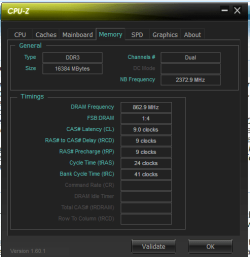
Memory is OC'ed right now. It is running at 1866 (10,10,10,27) with 1.605V. No issues. How can I tell if a crash is mem related?
What about CPU NB Ratio and HT Link Speed? I read in several places that having them set at the exact same values helps stability and that they should be be kept below 2500. Is this so? I'm now running at 2400 and 2600 with no issues, but when I set them to the same value, say 2400, stability suffers.
Any advice on CPU NB Voltage? Rising it to 1.265 helped a lot with stability, but on several threads in overclocking sites regarding OC'ing the Visheras I read that this is as high as I should go, although AMD's FX performance tuning guide says you can go a lot higher. Your experience?
Again, thanks a lot,

J
 

My Computer

Computer type
PC/Desktop
Computer Manufacturer/Model Number
Custom built
OS
Windows 7 Ultimate x64 SP1
CPU
AMD FX 8320 4.8GHz, 1.475V
Motherboard
ASUS Crosshair V Formula-Z
Memory
4 x GSkill Ripjaws Z 4GB 1600 CL8
Graphics Card(s)
2 x ASUS HD7870 2GB DirectCu II
Sound Card
M-Audio Firewire 410
Monitor(s) Displays
2 x Samsung Syncmaster SA300
Screen Resolution
1600x900
Hard Drives
1 x Seagate Barracuda 2TB, 7200 rpm, 64 mb cache - Kingston HyperX 3K 120GB (OS) - Corsair FORCE Series 180GB (Games & Apps)
PSU
Corsair TX850M
Case
NZXT Switch 810
Cooling
Custom Water. XSPC Raystorm, Laing DDC 3.2T PWM, 360+120 rad
Keyboard
Corsair Vengeance 650
Mouse
Elephant Leviathan 3200 DPI
Internet Speed
Too slow
Thanks Tommy, I will start from scratch during the weekend and report back.
Memory is OC'ed right now. It is running at 1866 (10,10,10,27) with 1.605V. No issues. How can I tell if a crash is mem related?
What about CPU NB Ratio and HT Link Speed? I read in several places that having them set at the exact same values helps stability and that they should be be kept below 2500. Is this so? I'm now running at 2400 and 2600 with no issues, but when I set them to the same value, say 2400, stability suffers.
Any advice on CPU NB Voltage? Rising it to 1.265 helped a lot with stability, but on several threads in overclocking sites regarding OC'ing the Visheras I read that this is as high as I should go, although AMD's FX performance tuning guide says you can go a lot higher. Your experience?
Again, thanks a lot,

J
mine is somewhere like 2600 max is 3200 but i don't mess with it too much i link the memory together HT i increased it by 1 nothing more and i used the MSI control center to judge where i should correct it

It will adjust itself if you put the proper settings in place i do think when it is linked the HT goes along with it i think i 've gotten as high as 2800 but if it is that high sometimes it will have stability issues that is why it's better to stay under 2600 then above because it makes no diffence it will be the same no real gains
 

My Computer

Computer type
PC/Desktop
Computer Manufacturer/Model Number
CoreI7-6700K MrFingerIII Special Builds
OS
Windows 10 Home Premium 64bit sp1
CPU
Intel I7-6700K @ 4.6 Ghz 1.344 volts everyday OC
Motherboard
Asrock Fatality K6 Z170 Socket 1151
Memory
32GB G-Skill TridentZ 3200mhz 16-18-18-38 DDR4
Graphics Card(s)
Sli Gigabyte Windforce GTX 980 G1
Sound Card
AC97 Creative Rage Tactic 3D Headphones Bluetooth
Monitor(s) Displays
27" Asus ROG Swift PG278Q G-Sync 48" Vizio Smart HD TV
Screen Resolution
2560x1440p 27"- 48" Currently Gaming at 2560x1440p Res 2K
Hard Drives
250GB Samsung Evo840SSD Seagate baracuda 500 GB WD Mybook 500Gb 1TB Seagate Barracuda
PSU
HX1050w Corsair Silver 80plus certified crosfire/sli
Case
Enthod Pro Full Tower
Cooling
Corsair H110i GT 280 mm High Performance WaterBlock
Keyboard
Logitech wireless keyboard
Mouse
Logitech wireless mouse
Internet Speed
Cox Cable 100+ mb
Antivirus
WebRoot Spysweeper with Antivirus
Browser
IE-10, Chrome, Opera
Other Info
My Other Rig is a AMD FX8320E @4.6Ghz 16GB Ballistic Sport Ram
Mobo Asrock Fatality 990FX 120GB OCZ SSD 1TB Seagate Barracuda Corsair H75 Cooling PSU Corsair CX750
GPU GTX Gigabyte 970G1
I made a screen shot im under 2400

I didn't do alot of FSB with this one i have it at 215 multi 21.5

so this is proof when it is higher it behaves pretty badly if you are stable with that though i would keep it and keep testing you might be able to squeeze some more juice out of it
 

Attachments

  • nb.PNG
    nb.PNG
    35 KB · Views: 4

My Computer

Computer type
PC/Desktop
Computer Manufacturer/Model Number
CoreI7-6700K MrFingerIII Special Builds
OS
Windows 10 Home Premium 64bit sp1
CPU
Intel I7-6700K @ 4.6 Ghz 1.344 volts everyday OC
Motherboard
Asrock Fatality K6 Z170 Socket 1151
Memory
32GB G-Skill TridentZ 3200mhz 16-18-18-38 DDR4
Graphics Card(s)
Sli Gigabyte Windforce GTX 980 G1
Sound Card
AC97 Creative Rage Tactic 3D Headphones Bluetooth
Monitor(s) Displays
27" Asus ROG Swift PG278Q G-Sync 48" Vizio Smart HD TV
Screen Resolution
2560x1440p 27"- 48" Currently Gaming at 2560x1440p Res 2K
Hard Drives
250GB Samsung Evo840SSD Seagate baracuda 500 GB WD Mybook 500Gb 1TB Seagate Barracuda
PSU
HX1050w Corsair Silver 80plus certified crosfire/sli
Case
Enthod Pro Full Tower
Cooling
Corsair H110i GT 280 mm High Performance WaterBlock
Keyboard
Logitech wireless keyboard
Mouse
Logitech wireless mouse
Internet Speed
Cox Cable 100+ mb
Antivirus
WebRoot Spysweeper with Antivirus
Browser
IE-10, Chrome, Opera
Other Info
My Other Rig is a AMD FX8320E @4.6Ghz 16GB Ballistic Sport Ram
Mobo Asrock Fatality 990FX 120GB OCZ SSD 1TB Seagate Barracuda Corsair H75 Cooling PSU Corsair CX750
GPU GTX Gigabyte 970G1
Thanks a lot. I will give it a shot during the weekend. :geek:
 

My Computer

Computer type
PC/Desktop
Computer Manufacturer/Model Number
Custom built
OS
Windows 7 Ultimate x64 SP1
CPU
AMD FX 8320 4.8GHz, 1.475V
Motherboard
ASUS Crosshair V Formula-Z
Memory
4 x GSkill Ripjaws Z 4GB 1600 CL8
Graphics Card(s)
2 x ASUS HD7870 2GB DirectCu II
Sound Card
M-Audio Firewire 410
Monitor(s) Displays
2 x Samsung Syncmaster SA300
Screen Resolution
1600x900
Hard Drives
1 x Seagate Barracuda 2TB, 7200 rpm, 64 mb cache - Kingston HyperX 3K 120GB (OS) - Corsair FORCE Series 180GB (Games & Apps)
PSU
Corsair TX850M
Case
NZXT Switch 810
Cooling
Custom Water. XSPC Raystorm, Laing DDC 3.2T PWM, 360+120 rad
Keyboard
Corsair Vengeance 650
Mouse
Elephant Leviathan 3200 DPI
Internet Speed
Too slow
@Ganjiry

Hey Ryan, how's it going?
I had set up my H100i the same way you have, pulling air from inside the case and using the rear exhaust fan as an intake.
I tried switching the rear fan off (the temp probes on the rad were reporting very fast temp rises the second the PSU and video cards got stressed) and, to my surprise, idle temps dropped 2C and load 3-4C.
I t looks like it was sucking the hot air exhausted by the PSU and video cards.
The back of my case is almost against a wall and there is a wide shelf 30cm above it, so that may be a factor too.
Give it a try and let me know what happens,
Cheers,

J

Thanks for the suggestion chap but i found no real difference in temps whichever way i have it. So i just have it that way to get a postitive air flow. My case temps stay pretty cool and those cougars move a tonne of air through the H100's rad. My case is in an open area so plenty of cool air gets sucked in from the rear cooling down the air from the gpu's. Thats the idea anyway :p
It just shows that every systme is different enit ;)
 

My Computer

Computer type
PC/Desktop
Computer Manufacturer/Model Number
Custom build
OS
Win7 Home Premium x64 SP1
CPU
i7 4770k
Motherboard
Asus maximus VI Hero
Memory
8Gb Kingston HyperX Beast 2400MHz @2133MHz 11-12-11-30
Graphics Card(s)
MSI GTX 780ti Gaming Oc x2
Sound Card
Onboard ROG SupremeFX
Monitor(s) Displays
Asus VG248QE
Screen Resolution
3840X1080 144Hz
Hard Drives
Samung Evo 256Gb, OCZ Agility4 128Gb
1x1TB hitachi storage
PSU
EVGA Supernova 1000w Platinum
Case
Corsair Air 540
Cooling
Corsair H100i
Keyboard
Coolermaster Quickfire Pro
Mouse
Corsair M65 RGB
Internet Speed
74mb dwn/16up
Antivirus
MSE,Malwarebytes
Browser
Chrome
@ Tommy
Thanks for your help chap its very much apreciated :D
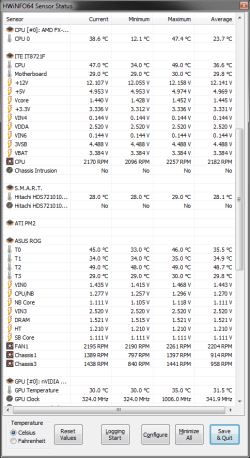
As you know i'm pretty much stable but not quite. if it was you what kind of voltage would you be aiming for on the cpu/nb?
I'm using multi of 12 = 2400...
I'm seeing alsorts online. some peeps are going 1.3 - 1.4v and others a lot lower. I've always kept it below 1.3v. not knowing safe levels for this is what's pickled me a tad lol
In my bios the color of the digits changes to yellow once u get to a highish level for the vcore and cpu/nb. The cpu/nb has quite a way to go before it turns yellow.
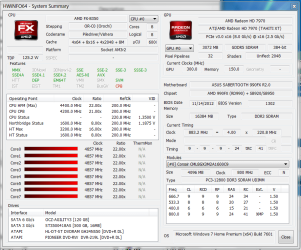
The screenshot was taken during pass 9 IBT.
 

Attachments

  • HWINFO.png
    HWINFO.png
    56 KB · Views: 2

My Computer

Computer type
PC/Desktop
Computer Manufacturer/Model Number
Custom build
OS
Win7 Home Premium x64 SP1
CPU
i7 4770k
Motherboard
Asus maximus VI Hero
Memory
8Gb Kingston HyperX Beast 2400MHz @2133MHz 11-12-11-30
Graphics Card(s)
MSI GTX 780ti Gaming Oc x2
Sound Card
Onboard ROG SupremeFX
Monitor(s) Displays
Asus VG248QE
Screen Resolution
3840X1080 144Hz
Hard Drives
Samung Evo 256Gb, OCZ Agility4 128Gb
1x1TB hitachi storage
PSU
EVGA Supernova 1000w Platinum
Case
Corsair Air 540
Cooling
Corsair H100i
Keyboard
Coolermaster Quickfire Pro
Mouse
Corsair M65 RGB
Internet Speed
74mb dwn/16up
Antivirus
MSE,Malwarebytes
Browser
Chrome
My northbridge i only increased by .1 didn't do more then that i used the tweek tool to do it
 

My Computer

Computer type
PC/Desktop
Computer Manufacturer/Model Number
CoreI7-6700K MrFingerIII Special Builds
OS
Windows 10 Home Premium 64bit sp1
CPU
Intel I7-6700K @ 4.6 Ghz 1.344 volts everyday OC
Motherboard
Asrock Fatality K6 Z170 Socket 1151
Memory
32GB G-Skill TridentZ 3200mhz 16-18-18-38 DDR4
Graphics Card(s)
Sli Gigabyte Windforce GTX 980 G1
Sound Card
AC97 Creative Rage Tactic 3D Headphones Bluetooth
Monitor(s) Displays
27" Asus ROG Swift PG278Q G-Sync 48" Vizio Smart HD TV
Screen Resolution
2560x1440p 27"- 48" Currently Gaming at 2560x1440p Res 2K
Hard Drives
250GB Samsung Evo840SSD Seagate baracuda 500 GB WD Mybook 500Gb 1TB Seagate Barracuda
PSU
HX1050w Corsair Silver 80plus certified crosfire/sli
Case
Enthod Pro Full Tower
Cooling
Corsair H110i GT 280 mm High Performance WaterBlock
Keyboard
Logitech wireless keyboard
Mouse
Logitech wireless mouse
Internet Speed
Cox Cable 100+ mb
Antivirus
WebRoot Spysweeper with Antivirus
Browser
IE-10, Chrome, Opera
Other Info
My Other Rig is a AMD FX8320E @4.6Ghz 16GB Ballistic Sport Ram
Mobo Asrock Fatality 990FX 120GB OCZ SSD 1TB Seagate Barracuda Corsair H75 Cooling PSU Corsair CX750
GPU GTX Gigabyte 970G1
Okey dokey chap cheers. I'll up that v-core another notch and see where that gets me. Then i'll move onto testing lower cpu/nb v's.
 

My Computer

Computer type
PC/Desktop
Computer Manufacturer/Model Number
Custom build
OS
Win7 Home Premium x64 SP1
CPU
i7 4770k
Motherboard
Asus maximus VI Hero
Memory
8Gb Kingston HyperX Beast 2400MHz @2133MHz 11-12-11-30
Graphics Card(s)
MSI GTX 780ti Gaming Oc x2
Sound Card
Onboard ROG SupremeFX
Monitor(s) Displays
Asus VG248QE
Screen Resolution
3840X1080 144Hz
Hard Drives
Samung Evo 256Gb, OCZ Agility4 128Gb
1x1TB hitachi storage
PSU
EVGA Supernova 1000w Platinum
Case
Corsair Air 540
Cooling
Corsair H100i
Keyboard
Coolermaster Quickfire Pro
Mouse
Corsair M65 RGB
Internet Speed
74mb dwn/16up
Antivirus
MSE,Malwarebytes
Browser
Chrome
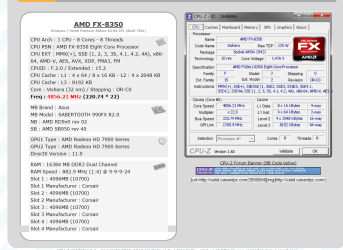
I'm going to test these settings all of you got me wanting to fiddle around now hahaha
never gotten it stable at this high but we shall see
 

Attachments

  • oc.PNG
    oc.PNG
    374.5 KB · Views: 12
  • volts.PNG
    volts.PNG
    81.3 KB · Views: 4
  • test.PNG
    test.PNG
    164.1 KB · Views: 5

My Computer

Computer type
PC/Desktop
Computer Manufacturer/Model Number
CoreI7-6700K MrFingerIII Special Builds
OS
Windows 10 Home Premium 64bit sp1
CPU
Intel I7-6700K @ 4.6 Ghz 1.344 volts everyday OC
Motherboard
Asrock Fatality K6 Z170 Socket 1151
Memory
32GB G-Skill TridentZ 3200mhz 16-18-18-38 DDR4
Graphics Card(s)
Sli Gigabyte Windforce GTX 980 G1
Sound Card
AC97 Creative Rage Tactic 3D Headphones Bluetooth
Monitor(s) Displays
27" Asus ROG Swift PG278Q G-Sync 48" Vizio Smart HD TV
Screen Resolution
2560x1440p 27"- 48" Currently Gaming at 2560x1440p Res 2K
Hard Drives
250GB Samsung Evo840SSD Seagate baracuda 500 GB WD Mybook 500Gb 1TB Seagate Barracuda
PSU
HX1050w Corsair Silver 80plus certified crosfire/sli
Case
Enthod Pro Full Tower
Cooling
Corsair H110i GT 280 mm High Performance WaterBlock
Keyboard
Logitech wireless keyboard
Mouse
Logitech wireless mouse
Internet Speed
Cox Cable 100+ mb
Antivirus
WebRoot Spysweeper with Antivirus
Browser
IE-10, Chrome, Opera
Other Info
My Other Rig is a AMD FX8320E @4.6Ghz 16GB Ballistic Sport Ram
Mobo Asrock Fatality 990FX 120GB OCZ SSD 1TB Seagate Barracuda Corsair H75 Cooling PSU Corsair CX750
GPU GTX Gigabyte 970G1
Hehe :D gotta play ent ya Good luck

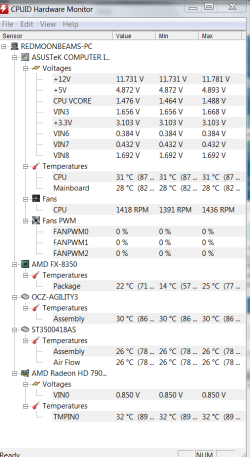
Vcore set in bios @ 1.468
Idle 1.452
Droop @ load 1.428 but can jump to 1.464v
Am i right in thinking that if i give it even more vcore that it will stop the vdroop aswell as stop it jumping higher? ie a steady voltage.

Edit: what is the QPI Link in your cpuz for? I've not seen it before.
 

My Computer

Computer type
PC/Desktop
Computer Manufacturer/Model Number
Custom build
OS
Win7 Home Premium x64 SP1
CPU
i7 4770k
Motherboard
Asus maximus VI Hero
Memory
8Gb Kingston HyperX Beast 2400MHz @2133MHz 11-12-11-30
Graphics Card(s)
MSI GTX 780ti Gaming Oc x2
Sound Card
Onboard ROG SupremeFX
Monitor(s) Displays
Asus VG248QE
Screen Resolution
3840X1080 144Hz
Hard Drives
Samung Evo 256Gb, OCZ Agility4 128Gb
1x1TB hitachi storage
PSU
EVGA Supernova 1000w Platinum
Case
Corsair Air 540
Cooling
Corsair H100i
Keyboard
Coolermaster Quickfire Pro
Mouse
Corsair M65 RGB
Internet Speed
74mb dwn/16up
Antivirus
MSE,Malwarebytes
Browser
Chrome
Hehe :D gotta play ent ya Good luck

Vcore set in bios @ 1.468
Idle 1.452
Droop @ load 1.428 but can jump to 1.464v
Am i right in thinking that if i give it even more vcore that it will stop the vdroop aswell as stop it jumping higher? ie a steady voltage.

Edit: what is the QPI Link in your cpuz for? I've not seen it before.
you should be using the load line if it is drooping im afraid you might need to take a look on what is causing it because when the llc is on it shouldn't drop at all or by 1 if any
 

My Computer

Computer type
PC/Desktop
Computer Manufacturer/Model Number
CoreI7-6700K MrFingerIII Special Builds
OS
Windows 10 Home Premium 64bit sp1
CPU
Intel I7-6700K @ 4.6 Ghz 1.344 volts everyday OC
Motherboard
Asrock Fatality K6 Z170 Socket 1151
Memory
32GB G-Skill TridentZ 3200mhz 16-18-18-38 DDR4
Graphics Card(s)
Sli Gigabyte Windforce GTX 980 G1
Sound Card
AC97 Creative Rage Tactic 3D Headphones Bluetooth
Monitor(s) Displays
27" Asus ROG Swift PG278Q G-Sync 48" Vizio Smart HD TV
Screen Resolution
2560x1440p 27"- 48" Currently Gaming at 2560x1440p Res 2K
Hard Drives
250GB Samsung Evo840SSD Seagate baracuda 500 GB WD Mybook 500Gb 1TB Seagate Barracuda
PSU
HX1050w Corsair Silver 80plus certified crosfire/sli
Case
Enthod Pro Full Tower
Cooling
Corsair H110i GT 280 mm High Performance WaterBlock
Keyboard
Logitech wireless keyboard
Mouse
Logitech wireless mouse
Internet Speed
Cox Cable 100+ mb
Antivirus
WebRoot Spysweeper with Antivirus
Browser
IE-10, Chrome, Opera
Other Info
My Other Rig is a AMD FX8320E @4.6Ghz 16GB Ballistic Sport Ram
Mobo Asrock Fatality 990FX 120GB OCZ SSD 1TB Seagate Barracuda Corsair H75 Cooling PSU Corsair CX750
GPU GTX Gigabyte 970G1
I am chap. Cpu llc high and cpu/nb llc is regular. I shall try n figure it out though but am at a bit of a loss now lol.
Cheers chap
 

My Computer

Computer type
PC/Desktop
Computer Manufacturer/Model Number
Custom build
OS
Win7 Home Premium x64 SP1
CPU
i7 4770k
Motherboard
Asus maximus VI Hero
Memory
8Gb Kingston HyperX Beast 2400MHz @2133MHz 11-12-11-30
Graphics Card(s)
MSI GTX 780ti Gaming Oc x2
Sound Card
Onboard ROG SupremeFX
Monitor(s) Displays
Asus VG248QE
Screen Resolution
3840X1080 144Hz
Hard Drives
Samung Evo 256Gb, OCZ Agility4 128Gb
1x1TB hitachi storage
PSU
EVGA Supernova 1000w Platinum
Case
Corsair Air 540
Cooling
Corsair H100i
Keyboard
Coolermaster Quickfire Pro
Mouse
Corsair M65 RGB
Internet Speed
74mb dwn/16up
Antivirus
MSE,Malwarebytes
Browser
Chrome
I am chap. Cpu llc high and cpu/nb llc is regular. I shall try n figure it out though but am at a bit of a loss now lol.
Cheers chap
I have both LLC on high so i don't know if that makes a difference or not
 

My Computer

Computer type
PC/Desktop
Computer Manufacturer/Model Number
CoreI7-6700K MrFingerIII Special Builds
OS
Windows 10 Home Premium 64bit sp1
CPU
Intel I7-6700K @ 4.6 Ghz 1.344 volts everyday OC
Motherboard
Asrock Fatality K6 Z170 Socket 1151
Memory
32GB G-Skill TridentZ 3200mhz 16-18-18-38 DDR4
Graphics Card(s)
Sli Gigabyte Windforce GTX 980 G1
Sound Card
AC97 Creative Rage Tactic 3D Headphones Bluetooth
Monitor(s) Displays
27" Asus ROG Swift PG278Q G-Sync 48" Vizio Smart HD TV
Screen Resolution
2560x1440p 27"- 48" Currently Gaming at 2560x1440p Res 2K
Hard Drives
250GB Samsung Evo840SSD Seagate baracuda 500 GB WD Mybook 500Gb 1TB Seagate Barracuda
PSU
HX1050w Corsair Silver 80plus certified crosfire/sli
Case
Enthod Pro Full Tower
Cooling
Corsair H110i GT 280 mm High Performance WaterBlock
Keyboard
Logitech wireless keyboard
Mouse
Logitech wireless mouse
Internet Speed
Cox Cable 100+ mb
Antivirus
WebRoot Spysweeper with Antivirus
Browser
IE-10, Chrome, Opera
Other Info
My Other Rig is a AMD FX8320E @4.6Ghz 16GB Ballistic Sport Ram
Mobo Asrock Fatality 990FX 120GB OCZ SSD 1TB Seagate Barracuda Corsair H75 Cooling PSU Corsair CX750
GPU GTX Gigabyte 970G1
I did have the cpu/nb llc on high but it was letting the voltage rise to 1.310 at times and i didn't really want it that high.
I've been scouring google on the issue. It's not actually v droop as its just random drops but it's common on this boards llc. Going by other posts around the net other people found that both regular and high llc allow these little drops but ultra high stops them.
I'm too tired to think straight now but will check it out later. Thinking back before i ever changed the llc from default i never got this problem.
I also came across a post refering to the bios chip on this board. On some of the earlier boards with a bios version before 07## the bios chip was alegedly faulty and had problems with the llc. Mine did have a very early bios version 03## but how much truth there is to it i don't know.
Rage3D.com : AMD Bulldozer - FX 8150 Performance Review [ Overclocking ]

How did your 4.8 work out chap?
 

My Computer

Computer type
PC/Desktop
Computer Manufacturer/Model Number
Custom build
OS
Win7 Home Premium x64 SP1
CPU
i7 4770k
Motherboard
Asus maximus VI Hero
Memory
8Gb Kingston HyperX Beast 2400MHz @2133MHz 11-12-11-30
Graphics Card(s)
MSI GTX 780ti Gaming Oc x2
Sound Card
Onboard ROG SupremeFX
Monitor(s) Displays
Asus VG248QE
Screen Resolution
3840X1080 144Hz
Hard Drives
Samung Evo 256Gb, OCZ Agility4 128Gb
1x1TB hitachi storage
PSU
EVGA Supernova 1000w Platinum
Case
Corsair Air 540
Cooling
Corsair H100i
Keyboard
Coolermaster Quickfire Pro
Mouse
Corsair M65 RGB
Internet Speed
74mb dwn/16up
Antivirus
MSE,Malwarebytes
Browser
Chrome
I did have the cpu/nb llc on high but it was letting the voltage rise to 1.310 at times and i didn't really want it that high.
I've been scouring google on the issue. It's not actually v droop as its just random drops but it's common on this boards llc. Going by other posts around the net other people found that both regular and high llc allow these little drops but ultra high stops them.
I'm too tired to think straight now but will check it out later. Thinking back before i ever changed the llc from default i never got this problem.
I also came across a post refering to the bios chip on this board. On some of the earlier boards with a bios version before 07## the bios chip was alegedly faulty and had problems with the llc. Mine did have a very early bios version 03## but how much truth there is to it i don't know.
Rage3D.com : AMD Bulldozer - FX 8150 Performance Review [ Overclocking ]

How did your 4.8 work out chap?
It wasn';t stable and i don't want to start going extreme settings i think one of the reasons is my PSU might be almost at max because i have 2x 7970's that are clocked pretty darn high 1125/1575 and a normal oc of 4.7 im sure im drawing close to that 800 w i was debating should i bet a higher psu like a 1200w corsair and see if it can shoot to the magic 5 Ghz
 

My Computer

Computer type
PC/Desktop
Computer Manufacturer/Model Number
CoreI7-6700K MrFingerIII Special Builds
OS
Windows 10 Home Premium 64bit sp1
CPU
Intel I7-6700K @ 4.6 Ghz 1.344 volts everyday OC
Motherboard
Asrock Fatality K6 Z170 Socket 1151
Memory
32GB G-Skill TridentZ 3200mhz 16-18-18-38 DDR4
Graphics Card(s)
Sli Gigabyte Windforce GTX 980 G1
Sound Card
AC97 Creative Rage Tactic 3D Headphones Bluetooth
Monitor(s) Displays
27" Asus ROG Swift PG278Q G-Sync 48" Vizio Smart HD TV
Screen Resolution
2560x1440p 27"- 48" Currently Gaming at 2560x1440p Res 2K
Hard Drives
250GB Samsung Evo840SSD Seagate baracuda 500 GB WD Mybook 500Gb 1TB Seagate Barracuda
PSU
HX1050w Corsair Silver 80plus certified crosfire/sli
Case
Enthod Pro Full Tower
Cooling
Corsair H110i GT 280 mm High Performance WaterBlock
Keyboard
Logitech wireless keyboard
Mouse
Logitech wireless mouse
Internet Speed
Cox Cable 100+ mb
Antivirus
WebRoot Spysweeper with Antivirus
Browser
IE-10, Chrome, Opera
Other Info
My Other Rig is a AMD FX8320E @4.6Ghz 16GB Ballistic Sport Ram
Mobo Asrock Fatality 990FX 120GB OCZ SSD 1TB Seagate Barracuda Corsair H75 Cooling PSU Corsair CX750
GPU GTX Gigabyte 970G1
Better luck next time aye. Yeah that is asking quite a bit from an 850w psu enit chap. I doubt you'll ever need 1200w unless you add more gpu's. Saying that though, better safe than sorry ;)
I'll suss my llc today and see what i can do to stop those drops now i've had some sleep.
 

My Computer

Computer type
PC/Desktop
Computer Manufacturer/Model Number
Custom build
OS
Win7 Home Premium x64 SP1
CPU
i7 4770k
Motherboard
Asus maximus VI Hero
Memory
8Gb Kingston HyperX Beast 2400MHz @2133MHz 11-12-11-30
Graphics Card(s)
MSI GTX 780ti Gaming Oc x2
Sound Card
Onboard ROG SupremeFX
Monitor(s) Displays
Asus VG248QE
Screen Resolution
3840X1080 144Hz
Hard Drives
Samung Evo 256Gb, OCZ Agility4 128Gb
1x1TB hitachi storage
PSU
EVGA Supernova 1000w Platinum
Case
Corsair Air 540
Cooling
Corsair H100i
Keyboard
Coolermaster Quickfire Pro
Mouse
Corsair M65 RGB
Internet Speed
74mb dwn/16up
Antivirus
MSE,Malwarebytes
Browser
Chrome
Back
Top