

- Local time
- 1:47 AM
- Messages
- 114
Hi everyone.
I know that this is not really entirely related to a Windows 7 computer and especially to these forums, but I really need some advice on this and it would be great if anyone who has experience in voltage, amps and safety for laptop power adapters would be perfect.
My friend has just traveled down to my house for a week but has foolishly forgot his plug for the power socket on his power adapter. He uses this for his computer. Again unrelated becuase it is an Apple 45W MagSafe2 adapter.
So I was wondering if he could simply use a cord like this one below to plug into the adapter?
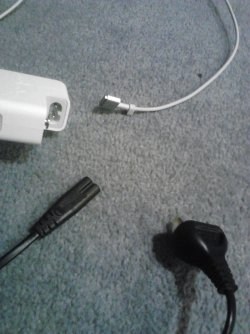
The black cord is 2.5A 250V~
The adapter is 100-240V~ 1A
These are both for input.
Any help would be greatly appreciated .
.
I know that this is not really entirely related to a Windows 7 computer and especially to these forums, but I really need some advice on this and it would be great if anyone who has experience in voltage, amps and safety for laptop power adapters would be perfect.
My friend has just traveled down to my house for a week but has foolishly forgot his plug for the power socket on his power adapter. He uses this for his computer. Again unrelated becuase it is an Apple 45W MagSafe2 adapter.
So I was wondering if he could simply use a cord like this one below to plug into the adapter?
The black cord is 2.5A 250V~
The adapter is 100-240V~ 1A
These are both for input.
Any help would be greatly appreciated
.My Computer
- Computer type
- Laptop
- Computer Manufacturer/Model Number
- Toshiba, Satellite L750/0T1
- OS
- Windows 7 64-bit SP1 (VM)
- CPU
- Intel(R) Core(TM) i7-2670QM CPU @ 2.20GHz (8 CPUs), ~2.2GHz
- Motherboard
- Intel Corp, PSK2YA-0T102S, Sandy Bridge - 09
- Memory
- 4 GB (Expandable to 8 GB)
- Graphics Card(s)
- NVIDIA GeForce GT 525M
- Sound Card
- Conexant SmartAudio HD & NVIDIA High Definition Audio
- Monitor(s) Displays
- 2 (Mobile PC Display, Dell E2009W)
- Screen Resolution
- 1366 x 768 & 1680 x 1050
- Hard Drives
- TOSHIBA MK7575GSX - 698GB (Main Hard Drive)
WD Elements - 1TB (External Hard Drive)
- Keyboard
- Standard PS/2 Keyboard & Dell SK-8165
- Mouse
- Synaptics PS/2 Port TouchPad, Logitech Wireless Mouse M185
- Internet Speed
- Download: 49 Mb/s, Upload: 2 Mb/s 'via Ethernet' (OOKLA)
- Antivirus
- AVG AntiVirus Free Edition (Outside VM)
- Browser
- Internet Explorer, Google Chrome
- Other Info
- Main OS:Windows 10 64-bit
