Power Save/Backlight problem

count23

New member
Local time
2:50 AM
Messages
10
I have a problem with multiple windows 7 systems that i need a resolution for if possible.

Apparently there is a known fault with windows 7 where if you go to a powersave mode to turn the screen off, when the timer is reached and the screen should shutdown, the backlight for the screen remains on. I'm seeing this on 6 different systems all running the same version of Ultimate (Different CD keys, installed from a USB key after making a copy from an original Ultimate disc i bought, tho one machine used a different copy and still has the same problem).

I've looked around and apparently it's a known issue on Windows 7 that the backlight wont turn off when powersave is activated, has anyone got an actual fix for this? I've seen a few utilities around that turn the screen off properly for you, but they need to be manually turned on which defeats the purpose of a timer.
 

My Computer My Computer

OS
Windows 7 x64
CPU
Q9550
Motherboard
GA-EP45-DS3L
Memory
4gz Corsair DDR2 1066mhz
Graphics Card(s)
Geforce 8800GTS 320mb
Sound Card
Onboard Intel Azalia HD AC97
Monitor(s) Displays
BENQ 24" HD Wide
Hard Drives
Seagate
Noone's seen this problem? Blimey.

I have exactly the same issue. Unfortunately I have not yet found a fix though. :(

The screen was shutting down properly, backlight off fully etc, until I upgraded my graphics card about a week or so back. I had been running an nVidia 8800GT and with that card I never had an issue. Screensaver ran, then after the prescribed period the screen shut off completely.

I upgraded my GFX card to an ATI 5850, and also changed my Antec PSU for a beefier Nexus 630W item, and since then I have been having this problem. Screensaver runs, but instead of the screen fully powering down after the relevant time, it just goes black and the backlight remains lit.

I can only assume that the change of GFX card has somehow brought about the change, as it was fine up until then.

What kind/make of card are you running in your machine count123?
 

My Computer My Computer

OS
Windows 7 Ultimate (x64)
CPU
E8400
Motherboard
ASUS P5B
Memory
4GB
Graphics Card(s)
ATi 5850
Screen Resolution
1680x1050
PSU
Nexus 630W
Case
Antec Sonata
Keyboard
Logitech G15
Mouse
Logitech MX1000
It's my laptop, running a Geforce 9500M. I have a desktop with an 8800GTS that seems to shut off properly however.
 

My Computer My Computer

OS
Windows 7 x64
CPU
Q9550
Motherboard
GA-EP45-DS3L
Memory
4gz Corsair DDR2 1066mhz
Graphics Card(s)
Geforce 8800GTS 320mb
Sound Card
Onboard Intel Azalia HD AC97
Monitor(s) Displays
BENQ 24" HD Wide
Hard Drives
Seagate
I doubt my PSU being changed made the difference, so I can't help but want to blame the ATi drivers and/or card. Hopefully it is something that will be remedied soon, or a workaround found, as I really don't like the backlight on the screen burning the whole time needlessly.

If I find out anything new, I'll report back.
 

My Computer My Computer

OS
Windows 7 Ultimate (x64)
CPU
E8400
Motherboard
ASUS P5B
Memory
4GB
Graphics Card(s)
ATi 5850
Screen Resolution
1680x1050
PSU
Nexus 630W
Case
Antec Sonata
Keyboard
Logitech G15
Mouse
Logitech MX1000
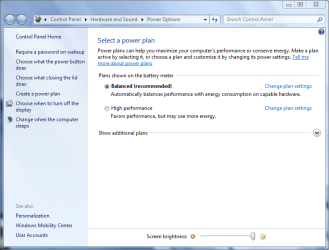
Might check you power settings. My laptop did this when I was using "High Performance" and quit when I switched back to "Balanced"
 

Attachments

  • power.PNG
    power.PNG
    41.3 KB · Views: 164

My Computer My Computer

Computer Manufacturer/Model Number
Toshiba Satellite A135S4487
OS
Windows 7 Ultimate (32-bit)
CPU
Intel Mobile Core 2 Duo T5500 @ 1.66 GHz
Motherboard
Intel i945GM Chipset
Memory
2.0GB Dual Channel DDR2 @ 266 MHz 4-4-4-12
Graphics Card(s)
Mobile Intel 945 Express Chipset Family
Sound Card
Realtek High Definition Audio
Monitor(s) Displays
Generic PnP Monitor, Samsung 46" LCD
Screen Resolution
1280 x 800, 1920 x 1080
Hard Drives
100GB Hitachi ATA Device (IDE)
120GB Western Digital USB
250GB External USB
Keyboard
Microsoft Wireless Comfort Keyboard 5000
Mouse
Microsoft Wireless Mouse 5000
Internet Speed
DSL
Hi Guntmeister.

I have the machine using the performance settings at present, but have then used the advanced settings within that to tweak some of settings to my own liking. The screen is definately set to power down, and with my previous GFX card, it was doing it perfectly.

However, out of interest, I'll change the machine to the balanced settings tonight and leave them absolutely "stock" and see what happens. Thanks for the suggestion, it can't hurt to try.
 

My Computer My Computer

OS
Windows 7 Ultimate (x64)
CPU
E8400
Motherboard
ASUS P5B
Memory
4GB
Graphics Card(s)
ATi 5850
Screen Resolution
1680x1050
PSU
Nexus 630W
Case
Antec Sonata
Keyboard
Logitech G15
Mouse
Logitech MX1000
Hi Guntmeister.

I have the machine using the performance settings at present, but have then used the advanced settings within that to tweak some of settings to my own liking. The screen is definately set to power down, and with my previous GFX card, it was doing it perfectly.

However, out of interest, I'll change the machine to the balanced settings tonight and leave them absolutely "stock" and see what happens. Thanks for the suggestion, it can't hurt to try.

Hope it works for you. :geek:
 

My Computer My Computer

Computer Manufacturer/Model Number
Toshiba Satellite A135S4487
OS
Windows 7 Ultimate (32-bit)
CPU
Intel Mobile Core 2 Duo T5500 @ 1.66 GHz
Motherboard
Intel i945GM Chipset
Memory
2.0GB Dual Channel DDR2 @ 266 MHz 4-4-4-12
Graphics Card(s)
Mobile Intel 945 Express Chipset Family
Sound Card
Realtek High Definition Audio
Monitor(s) Displays
Generic PnP Monitor, Samsung 46" LCD
Screen Resolution
1280 x 800, 1920 x 1080
Hard Drives
100GB Hitachi ATA Device (IDE)
120GB Western Digital USB
250GB External USB
Keyboard
Microsoft Wireless Comfort Keyboard 5000
Mouse
Microsoft Wireless Mouse 5000
Internet Speed
DSL
Was worth a try, but unfortunately just the same.

:(
 

My Computer My Computer

OS
Windows 7 Ultimate (x64)
CPU
E8400
Motherboard
ASUS P5B
Memory
4GB
Graphics Card(s)
ATi 5850
Screen Resolution
1680x1050
PSU
Nexus 630W
Case
Antec Sonata
Keyboard
Logitech G15
Mouse
Logitech MX1000
Might check you power settings. My laptop did this when I was using "High Performance" and quit when I switched back to "Balanced"

Sorry man, was first thing i tried, performance, balanced and power saver all do the same thing. It's not a power profile issue.
 

My Computer My Computer

OS
Windows 7 x64
CPU
Q9550
Motherboard
GA-EP45-DS3L
Memory
4gz Corsair DDR2 1066mhz
Graphics Card(s)
Geforce 8800GTS 320mb
Sound Card
Onboard Intel Azalia HD AC97
Monitor(s) Displays
BENQ 24" HD Wide
Hard Drives
Seagate
Finally, it's working! :)

Updated to the latest ATi drivers yesterday (version 10.2). I restarted, and left the machine till the backight should have gone off, but it was still the same. However, today it has been consistently performing exactly as it should. 5 mins, screen saver kicks in, 10 mins and the display shuts off completely. Perfect.

Certainly points towards the ATi drivers being the culprit at the moment.
 

My Computer My Computer

OS
Windows 7 Ultimate (x64)
CPU
E8400
Motherboard
ASUS P5B
Memory
4GB
Graphics Card(s)
ATi 5850
Screen Resolution
1680x1050
PSU
Nexus 630W
Case
Antec Sonata
Keyboard
Logitech G15
Mouse
Logitech MX1000
Nope, cause.. and again, Ill say that the machines having issues on my end are GTS8800 and 9500GM NVIDIA cards, which are still having this problem.
 

My Computer My Computer

OS
Windows 7 x64
CPU
Q9550
Motherboard
GA-EP45-DS3L
Memory
4gz Corsair DDR2 1066mhz
Graphics Card(s)
Geforce 8800GTS 320mb
Sound Card
Onboard Intel Azalia HD AC97
Monitor(s) Displays
BENQ 24" HD Wide
Hard Drives
Seagate
Yes, I hadn't forgotten that, and I know what I have said doesn't help you much.

I just thought it would be worth mentioning that in my particulalr case, it looks like it could well have been the ATi drivers that were to blame. I haven't changed any other power management settings, so it seems more than coincidence. There are very few articles about giving any positive solutions to this issue, so thought it would be worth mentioning in case it helped somebody else in the same predicament.

:)
 

My Computer My Computer

OS
Windows 7 Ultimate (x64)
CPU
E8400
Motherboard
ASUS P5B
Memory
4GB
Graphics Card(s)
ATi 5850
Screen Resolution
1680x1050
PSU
Nexus 630W
Case
Antec Sonata
Keyboard
Logitech G15
Mouse
Logitech MX1000
Back
Top