Solved Print Screen error

Roderunner

Exterminator
Guru
Gold Member
VIP
Local time
6:41 AM
Messages
2,362
Location
Scotland
Hi Folks,
When I pressed PrtSc (Print Screen) on the keyboard, open Paint, paste and save as... the pictures are shrunk for some reason. View attachment Images.zip
 

My Computer

Computer Manufacturer/Model Number
Look in my Signature.
OS
Win7 H.Prem. 32bit+SP1
You have got the paint window extremely large :D Nothing serious ! You may fix it using two of the alternatives !!
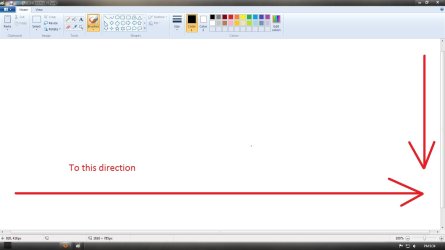
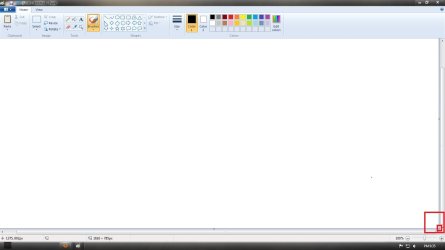
First, slide the both horizontal and vertical sliders of the paint window to to bottom right ...
1.jpg
Until you see the small white dot at the bottom right corner
2.jpg
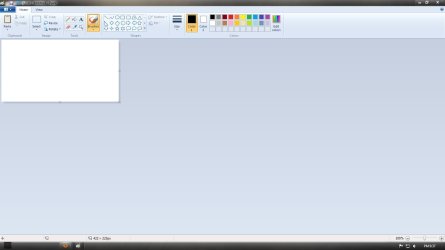
Click on the white dot, drag insige towards top left, until it is small enough like this one ...
3.jpg

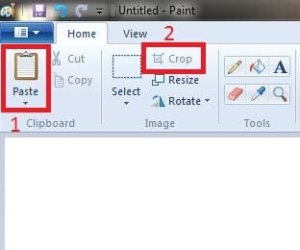
Alternatively, after pasting the screen in the paint window, just press the crop button
4.JPG

Hope it works :)
 

My Computer

Computer type
PC/Desktop
Computer Manufacturer/Model Number
Self Assembled
OS
Microsoft Windows 10 Pro Insider Preview 64-bit
CPU
Intel(R) Core(TM) i3-4130 CPU @ 3.40GHz
Motherboard
Gigabyte Technology Co., Ltd. B85M-D3H
Memory
Corsair Vengence 4GB x2 (8.00GB Dual-Channel DDR3 @ 798MHz)
Graphics Card(s)
2047MB GeForce GTS 450 (ZOTAC International)
Sound Card
Onboard (Realtek High Definition Audio)
Monitor(s) Displays
LG Flatron E2040T
Screen Resolution
1600x900
Hard Drives
Western Digital 1 TB
Seagate 500 GB
PSU
Corsair VS550
Case
Cooler Master K380
Cooling
Cooler Master Seidon 120V Plus
Keyboard
Logitech MK260r
Mouse
Logitech MK260r
Internet Speed
PMPL Broadband
Antivirus
Windows Defender + MBAM
Browser
Firefox
Other Info
Dell Studio 15" Laptop
You have got the paint window extremely large :D Nothing serious ! You may fix it using two of the alternatives !!
First, slide the both horizontal and vertical sliders of the paint window to to bottom right ...
View attachment 191642
Until you see the small white dot at the bottom right corner
View attachment 191643
Click on the white dot, drag insige towards top left, until it is small enough like this one ...
View attachment 191644

Alternatively, after pasting the screen in the paint window, just press the crop button

Hope it works :)
This is what it does on my 'Desktop' PC. View attachment Desktop.zip
 

My Computer

Computer Manufacturer/Model Number
Look in my Signature.
OS
Win7 H.Prem. 32bit+SP1

My Computer

Computer type
PC/Desktop
Computer Manufacturer/Model Number
Self Assembled
OS
Microsoft Windows 10 Pro Insider Preview 64-bit
CPU
Intel(R) Core(TM) i3-4130 CPU @ 3.40GHz
Motherboard
Gigabyte Technology Co., Ltd. B85M-D3H
Memory
Corsair Vengence 4GB x2 (8.00GB Dual-Channel DDR3 @ 798MHz)
Graphics Card(s)
2047MB GeForce GTS 450 (ZOTAC International)
Sound Card
Onboard (Realtek High Definition Audio)
Monitor(s) Displays
LG Flatron E2040T
Screen Resolution
1600x900
Hard Drives
Western Digital 1 TB
Seagate 500 GB
PSU
Corsair VS550
Case
Cooler Master K380
Cooling
Cooler Master Seidon 120V Plus
Keyboard
Logitech MK260r
Mouse
Logitech MK260r
Internet Speed
PMPL Broadband
Antivirus
Windows Defender + MBAM
Browser
Firefox
Other Info
Dell Studio 15" Laptop
Since your screen resolution is 1600 x 900 and your 'desktop' screenshot is 1360 x 768 are you sure you haven't mixed up your desktop capture with a netbook/laptop capture? Or are you also pressing Alt at the same time as you hit PrtSc perhaps? :confused:
 

My Computer

Computer Manufacturer/Model Number
Custom built machine
OS
W7 x64
CPU
Intel Q9300 2.5Ghz Quad LGA775 (Would like Q9650)
Motherboard
Gigabyte GA-EP45T-UD3R (F6 Bios)
Memory
4Gb OCZ Gold 1,333Mhz
Graphics Card(s)
Palit HD4850 O/C Sonic 512Mb DDR3, Dual DViD's
Sound Card
Azalia to twin Samson 50w Studio Monitors
Monitor(s) Displays
Twin Dell (E-IPS) U2311H 23.6" Screens
Screen Resolution
1920 x 1080 @ 60Hz
Hard Drives
Crucial M4 SSD, archives on twin Western Digital Caviar Black WD2002FAEX, 2TB, 7200rpm HDD's, Samsung Ritemaster CD/DVD Burner...
PSU
OCZ 600w
Case
Lian-Li PC8 acoustifoamed' aluminium tower
Cooling
Scythe 140mm Zipang
Keyboard
Cherry PS/2 custom model
Mouse
Lenovo USB laser "Thinkpad" Mouse
Internet Speed
ADSL2+ @14Mbps downstream & Cat6 Gigabit Ethernet
Antivirus
NOD32
Browser
Opera
Other Info
Silicon Dust HD Homerun Dual FTA (Ethernet) TV Tuners, Dray Tek Vigor 2850Vn router and 8x HP Gigabit Switch. Lian-Li CR26 Card Reader, Canon MF4430 iSensys laser printer/scanner.
After you posted this,
Wrong. The first ones were on my Laptop second one on my desktop pc.
I tried myself a few times with increasing the canvas area, the crop button removed the white extra space everytime. Dont know why it is not working for you.

I'd suggest you to do it again. Press printscreen button, open paint and click on paste, and then click crop, while the selection around the paste area is active.
 

My Computer

Computer type
PC/Desktop
Computer Manufacturer/Model Number
Self Assembled
OS
Microsoft Windows 10 Pro Insider Preview 64-bit
CPU
Intel(R) Core(TM) i3-4130 CPU @ 3.40GHz
Motherboard
Gigabyte Technology Co., Ltd. B85M-D3H
Memory
Corsair Vengence 4GB x2 (8.00GB Dual-Channel DDR3 @ 798MHz)
Graphics Card(s)
2047MB GeForce GTS 450 (ZOTAC International)
Sound Card
Onboard (Realtek High Definition Audio)
Monitor(s) Displays
LG Flatron E2040T
Screen Resolution
1600x900
Hard Drives
Western Digital 1 TB
Seagate 500 GB
PSU
Corsair VS550
Case
Cooler Master K380
Cooling
Cooler Master Seidon 120V Plus
Keyboard
Logitech MK260r
Mouse
Logitech MK260r
Internet Speed
PMPL Broadband
Antivirus
Windows Defender + MBAM
Browser
Firefox
Other Info
Dell Studio 15" Laptop
...or, as a workaround, use the snipping tool instead for screenies.
 

My Computer

Computer Manufacturer/Model Number
mickey megabyte 1234
OS
ultimate 64 sp1
CPU
i5 2500K [email protected]
Motherboard
MSI P67A-GD53
Memory
8 gigs GSkill Ripjaws 1600
Graphics Card(s)
amd hd6950
Sound Card
creative x-fi gamer
Monitor(s) Displays
samsung 24"
Screen Resolution
1920x1080
Hard Drives
ocz vertex 2e 60 gig, samsung f3 1tb, buffalo 2tb ext
PSU
antec 550
Case
antec three hundred
Cooling
i'm a cooling fan
Keyboard
saitek eclipse ii
Mouse
logitech g3
Internet Speed
about 4 Mbps
Other Info
i love win7
Thanks for all replies. I still don't know what caused my problem, but managed to fix it by opening 'Paint' without anything showing then clicked File > properties and default button.

3.jpg

Case closed.
 

My Computer

Computer Manufacturer/Model Number
Look in my Signature.
OS
Win7 H.Prem. 32bit+SP1
Back
Top