Problem using 4gb in 64 bits

DANG!

Enzo.
 

My Computer My Computer

At a glance

W7 RTM Ultimate x64Intel Q8400 @ 2.66GHZ4GB DDR2-800Gainward GTS 450 GLH 1GB Edition
Computer Manufacturer/Model Number
Custom Build
OS
W7 RTM Ultimate x64
CPU
Intel Q8400 @ 2.66GHZ
Motherboard
Gigabyte GA-EG45M-UD2H
Memory
4GB DDR2-800
Graphics Card(s)
Gainward GTS 450 GLH 1GB Edition
Sound Card
Integrated 8 Channel
Monitor(s) Displays
AOC 23.6 Inch Widescreen LCD
Screen Resolution
1920x1080
Hard Drives
Seagate 500GB Internal
Western Digital 1TB Internal

Hitachi 1TB External
PSU
Apevia Java Power 500W
Case
Cooler Master HAF 922 Black
Cooling
Stock Intel CPU Fan
Keyboard
HP SK-2960 Multimedia Keyboard
Mouse
Logitech M350 Wireless Gaming Mouse
Internet Speed
1.5MB
i too had the same problem with my pc,
earlier had 4 gb of ram but vista 32 bits used and showed only 3 gb...
i asked my friends and they said try using vista service pack 1...
i downloaded n installed it.... it worked....
its started showing 4 gb but still task manager showed the usage of 3 gb of ram....

then windows 7 came after a lot of research on net.... i found it out...
everyone suggested me to use 64-bit windows seven...
and i installed it...
its perfect...
pic1.png

pic2.png
 

My Computer My Computer

At a glance

windows 7 ultimate x64Intel Quad Core 2.83Ghz4 GB DDR3Nvidia 9800GT
OS
windows 7 ultimate x64
CPU
Intel Quad Core 2.83Ghz
Motherboard
Intel P45SG
Memory
4 GB DDR3
Graphics Card(s)
Nvidia 9800GT
Monitor(s) Displays
Dell 19"
Screen Resolution
1440x900
Hard Drives
WD 1TB
SAMSUNG 500 GB
Internet Speed
512 KBPS
wth, this is ridiculus, ayandelhi, what graphics card are you running,a nd how many mbs?

Enzo.
 

My Computer My Computer

At a glance

W7 RTM Ultimate x64Intel Q8400 @ 2.66GHZ4GB DDR2-800Gainward GTS 450 GLH 1GB Edition
Computer Manufacturer/Model Number
Custom Build
OS
W7 RTM Ultimate x64
CPU
Intel Q8400 @ 2.66GHZ
Motherboard
Gigabyte GA-EG45M-UD2H
Memory
4GB DDR2-800
Graphics Card(s)
Gainward GTS 450 GLH 1GB Edition
Sound Card
Integrated 8 Channel
Monitor(s) Displays
AOC 23.6 Inch Widescreen LCD
Screen Resolution
1920x1080
Hard Drives
Seagate 500GB Internal
Western Digital 1TB Internal

Hitachi 1TB External
PSU
Apevia Java Power 500W
Case
Cooler Master HAF 922 Black
Cooling
Stock Intel CPU Fan
Keyboard
HP SK-2960 Multimedia Keyboard
Mouse
Logitech M350 Wireless Gaming Mouse
Internet Speed
1.5MB
I wonder if it matters which Video card you have....

Or how many cores your CPU has?

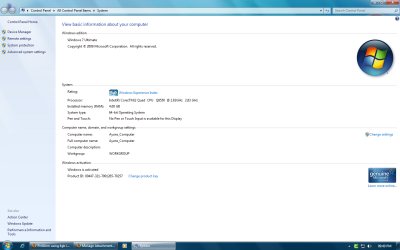
System properties.PNG

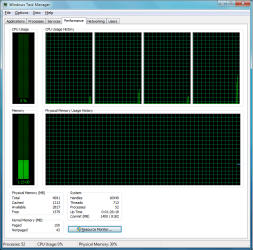
Task Manager.PNG
 

My Computers My Computers

  • At a glance

    Windows 11 21H2 Current buildAMD Ryzen 9 3950X4 * 32 GB - Corsair Vengeance 3600 MHzEVGA GeForce RTX 3080 Ti XC3 ULTRA GAMING (12...
    Computer type
    PC/Desktop
    Computer Manufacturer/Model Number
    The Beast Model A (homebrew)
    OS
    Windows 11 21H2 Current build
    CPU
    AMD Ryzen 9 3950X
    Motherboard
    MSI MEG X570 GODLIKE
    Memory
    4 * 32 GB - Corsair Vengeance 3600 MHz
    Graphics Card(s)
    EVGA GeForce RTX 3080 Ti XC3 ULTRA GAMING (12G-P5-3955-KR)
    Sound Card
    Realtek® ALC1220 Codec
    Monitor(s) Displays
    2x Eve Spectrum ES07D03 4K Gaming Monitor (Matte) | Eve Spec
    Screen Resolution
    3x 3840 x 2160
    Hard Drives
    3x Samsung 980 Pro NVMe PCIe 4 M.2 2 TB SSD (MZ-V8P2T0B/AM) } 3x Sabrent Rocket NVMe 4.0 1 TB SSD
    PSU
    PC Power & Cooling’s Silencer Series 1050 Watt, 80 Plus Plat
    Case
    Fractal Design Define 7 XL Dark ATX Full Tower Case
    Cooling
    SteelSeries Apex Pro Wired Gaming Keyboard
    Keyboard
    SteelSeries Apex Pro
    Mouse
    Logitech MX Master 3S | MX Master 3 for business
    Internet Speed
    AT&T LightSpeed Gigabit Duplex Ftth
    Antivirus
    Windows Defender + MB 3
    Browser
    Nightly (default) + Firefox (stable),Chrome, Edge
  • At a glance

    ChromeOS Flex Dev Channel (current)Intel(R) Core(TM) i5-6300U CPU @ 2.40GHz, 250...16 GBIntel(R) HD Graphics 520
    Computer type
    PC/Desktop
    System Manufacturer/Model Number
    Dell Latitude E5470
    OS
    ChromeOS Flex Dev Channel (current)
    CPU
    Intel(R) Core(TM) i5-6300U CPU @ 2.40GHz, 2501 Mhz, 2 Core(s), 4 Logical Processor(s)
    Motherboard
    Dell
    Memory
    16 GB
    Graphics Card(s)
    Intel(R) HD Graphics 520
    Sound Card
    Intel(R) HD Graphics 520 + RealTek Audio
    Monitor(s) Displays
    Dell laptop display 15"
    Screen Resolution
    1920 * 1080
    Hard Drives
    Toshiba 128GB M.2 22300 drive
    INTEL Cherryville 520 Series SSDSC2CW180A 180 GB SATA III SSD
    PSU
    Dell
    Case
    Dell
    Cooling
    Dell
    Keyboard
    Dell
    Mouse
    Logitech MX Master 3S (shared w. Sys 1) | Dell TouchPad
    Internet Speed
    AT&T LightSpeed Gigabit Duplex Ftth
i'm using nvidia 9800gt 512 mb.... n my processor u can easily see in the properties window.... its quad core Q9550... i dont think so dat processor n graphics card matter in the case of ram....
 

My Computer My Computer

At a glance

windows 7 ultimate x64Intel Quad Core 2.83Ghz4 GB DDR3Nvidia 9800GT
OS
windows 7 ultimate x64
CPU
Intel Quad Core 2.83Ghz
Motherboard
Intel P45SG
Memory
4 GB DDR3
Graphics Card(s)
Nvidia 9800GT
Monitor(s) Displays
Dell 19"
Screen Resolution
1440x900
Hard Drives
WD 1TB
SAMSUNG 500 GB
Internet Speed
512 KBPS
Au contraire, mon ami I think it might very well be your GPU....

I am using a pair o' 260s and I don't see that - but ISTR Vista playing stupid on my machine when I first started playing with 64bit OSs and had a measly 8800GTS....

Or else it is something about how your BIOS is configured on that board, or the drivers that are installed for your motherboard....
 

My Computers My Computers

  • At a glance

    Windows 11 21H2 Current buildAMD Ryzen 9 3950X4 * 32 GB - Corsair Vengeance 3600 MHzEVGA GeForce RTX 3080 Ti XC3 ULTRA GAMING (12...
    Computer type
    PC/Desktop
    Computer Manufacturer/Model Number
    The Beast Model A (homebrew)
    OS
    Windows 11 21H2 Current build
    CPU
    AMD Ryzen 9 3950X
    Motherboard
    MSI MEG X570 GODLIKE
    Memory
    4 * 32 GB - Corsair Vengeance 3600 MHz
    Graphics Card(s)
    EVGA GeForce RTX 3080 Ti XC3 ULTRA GAMING (12G-P5-3955-KR)
    Sound Card
    Realtek® ALC1220 Codec
    Monitor(s) Displays
    2x Eve Spectrum ES07D03 4K Gaming Monitor (Matte) | Eve Spec
    Screen Resolution
    3x 3840 x 2160
    Hard Drives
    3x Samsung 980 Pro NVMe PCIe 4 M.2 2 TB SSD (MZ-V8P2T0B/AM) } 3x Sabrent Rocket NVMe 4.0 1 TB SSD
    PSU
    PC Power & Cooling’s Silencer Series 1050 Watt, 80 Plus Plat
    Case
    Fractal Design Define 7 XL Dark ATX Full Tower Case
    Cooling
    SteelSeries Apex Pro Wired Gaming Keyboard
    Keyboard
    SteelSeries Apex Pro
    Mouse
    Logitech MX Master 3S | MX Master 3 for business
    Internet Speed
    AT&T LightSpeed Gigabit Duplex Ftth
    Antivirus
    Windows Defender + MB 3
    Browser
    Nightly (default) + Firefox (stable),Chrome, Edge
  • At a glance

    ChromeOS Flex Dev Channel (current)Intel(R) Core(TM) i5-6300U CPU @ 2.40GHz, 250...16 GBIntel(R) HD Graphics 520
    Computer type
    PC/Desktop
    System Manufacturer/Model Number
    Dell Latitude E5470
    OS
    ChromeOS Flex Dev Channel (current)
    CPU
    Intel(R) Core(TM) i5-6300U CPU @ 2.40GHz, 2501 Mhz, 2 Core(s), 4 Logical Processor(s)
    Motherboard
    Dell
    Memory
    16 GB
    Graphics Card(s)
    Intel(R) HD Graphics 520
    Sound Card
    Intel(R) HD Graphics 520 + RealTek Audio
    Monitor(s) Displays
    Dell laptop display 15"
    Screen Resolution
    1920 * 1080
    Hard Drives
    Toshiba 128GB M.2 22300 drive
    INTEL Cherryville 520 Series SSDSC2CW180A 180 GB SATA III SSD
    PSU
    Dell
    Case
    Dell
    Cooling
    Dell
    Keyboard
    Dell
    Mouse
    Logitech MX Master 3S (shared w. Sys 1) | Dell TouchPad
    Internet Speed
    AT&T LightSpeed Gigabit Duplex Ftth
sorry for the cross post (technet MS forum)

but here are my findings, on my P5W DH deluxe mobo.

""UPDATE: Freeze during Windows 7x64 Install

Test:
1. - Memory remap enabled, 2 x 2gig sticks, 2 x 3870x2's = freeze at startup/install language menu.
2. - Memory remap enabled, 1 x 2gig sticks, " " = Installs great
(after OS install if i put back the other ram stick, it loads/boots very slow, 2-3mins, normally 30sec)

3. - Memory Remap enabled, 2 x 2gig sticks & 2 x 1gig sticks, " " = Install starts up as it should.
4. - Memory Remap disabled = Any memory configuration works great

In test 2. the only way i can get 4gig's to work properly, is by entering MSconfig and ticking off Memory = 4096mb
After reboot Window7 states i only have 1663mb usable all though i have 4gigs. LCD smartie also states this.

as soon as i put in 2 more sticks Windows detects all of my memory just fine = 6000mb
msconfig tweak is not needed when 6gigs are installed (Normal Startup, selected within msconfig).


Ive been reading all over that this is the way "Windows Vista/7 allocates memory with video cards etc".
This is not true i had no issues of this nature in Vistax64,

If i remove the 2x 1gig sticks, Windows7 instantly goes into a 3min boot time and once booted it is only reporting 1663mb plus i need to do the MSconfig tweak.


this is not a bios fix, my system was fine in Vistax64....
there is definilty a BUG.
 

My Computer My Computer

At a glance

Window 7 x64
OS
Window 7 x64
There were quite a few boards that had issues with 4 GB of RAM installed, but I never heard of the issues disappearing with the addition of more RAM....

That is indeed good sleuth work - perhaps you should be reporting this to your mobo manufacturer as well, as this could indeed still be a hardware issue and not a Windows issue.
 

My Computers My Computers

  • At a glance

    Windows 11 21H2 Current buildAMD Ryzen 9 3950X4 * 32 GB - Corsair Vengeance 3600 MHzEVGA GeForce RTX 3080 Ti XC3 ULTRA GAMING (12...
    Computer type
    PC/Desktop
    Computer Manufacturer/Model Number
    The Beast Model A (homebrew)
    OS
    Windows 11 21H2 Current build
    CPU
    AMD Ryzen 9 3950X
    Motherboard
    MSI MEG X570 GODLIKE
    Memory
    4 * 32 GB - Corsair Vengeance 3600 MHz
    Graphics Card(s)
    EVGA GeForce RTX 3080 Ti XC3 ULTRA GAMING (12G-P5-3955-KR)
    Sound Card
    Realtek® ALC1220 Codec
    Monitor(s) Displays
    2x Eve Spectrum ES07D03 4K Gaming Monitor (Matte) | Eve Spec
    Screen Resolution
    3x 3840 x 2160
    Hard Drives
    3x Samsung 980 Pro NVMe PCIe 4 M.2 2 TB SSD (MZ-V8P2T0B/AM) } 3x Sabrent Rocket NVMe 4.0 1 TB SSD
    PSU
    PC Power & Cooling’s Silencer Series 1050 Watt, 80 Plus Plat
    Case
    Fractal Design Define 7 XL Dark ATX Full Tower Case
    Cooling
    SteelSeries Apex Pro Wired Gaming Keyboard
    Keyboard
    SteelSeries Apex Pro
    Mouse
    Logitech MX Master 3S | MX Master 3 for business
    Internet Speed
    AT&T LightSpeed Gigabit Duplex Ftth
    Antivirus
    Windows Defender + MB 3
    Browser
    Nightly (default) + Firefox (stable),Chrome, Edge
  • At a glance

    ChromeOS Flex Dev Channel (current)Intel(R) Core(TM) i5-6300U CPU @ 2.40GHz, 250...16 GBIntel(R) HD Graphics 520
    Computer type
    PC/Desktop
    System Manufacturer/Model Number
    Dell Latitude E5470
    OS
    ChromeOS Flex Dev Channel (current)
    CPU
    Intel(R) Core(TM) i5-6300U CPU @ 2.40GHz, 2501 Mhz, 2 Core(s), 4 Logical Processor(s)
    Motherboard
    Dell
    Memory
    16 GB
    Graphics Card(s)
    Intel(R) HD Graphics 520
    Sound Card
    Intel(R) HD Graphics 520 + RealTek Audio
    Monitor(s) Displays
    Dell laptop display 15"
    Screen Resolution
    1920 * 1080
    Hard Drives
    Toshiba 128GB M.2 22300 drive
    INTEL Cherryville 520 Series SSDSC2CW180A 180 GB SATA III SSD
    PSU
    Dell
    Case
    Dell
    Cooling
    Dell
    Keyboard
    Dell
    Mouse
    Logitech MX Master 3S (shared w. Sys 1) | Dell TouchPad
    Internet Speed
    AT&T LightSpeed Gigabit Duplex Ftth
There were quite a few boards that had issues with 4 GB of RAM installed, but I never heard of the issues disappearing with the addition of more RAM....

That is indeed good sleuth work - perhaps you should be reporting this to your mobo manufacturer as well, as this could indeed still be a hardware issue and not a Windows issue.

The issue reported above is a memory remapping implementation problem. The BIOS is probably doing something very slow and hacky to implement remapping support. This is definitely something that the BIOS vendor (aka motherboard vendor) needs to fix for you. No, this is not a Windows bug!

The reason for the problem accessing all memory with the remapping enabled and the msconfig "maximum memory" setting is as follows:

1. You've got memory remapping enabled in the BIOS. This causes the BIOS to effectively move the physical addresses of some of your memory to new addresses above 4GB. (Addresses greater than or equal to 0x1'0000'0000)

2. Using msconfig's max memory setting adds "truncatememory" to your boot configuration data. TruncateMemory instructs the boot loader to hide all physical addresses above some value. When you specify 4096 as that value, you will see truncatememory set to 0x1'0000'0000.

3. In your case, only about 1.6 GB of memory is mapped to addresses below 0x1'0000'0000. The rest is above that address, and you've specifically asked Windows not to use it!

I hope that helps you to understand your issue a little more. Please contact your motherboard vendor.
 
Last edited:

My Computer My Computer

At a glance

Windows 7 Ultimate x64A fast one.Lots.
OS
Windows 7 Ultimate x64
CPU
A fast one.
Memory
Lots.
Monitor(s) Displays
3
thanks for the reply's...i will too go to my Mobo Manu, and report the issue.

whats especially wierd..Windows v7000 x64 is fine(4gigs PC8500 seen as it should) , It's the RC+ versions in which give the issue.

now i can tell my wifey ,We need to buy more matching ram. LOL

thanks again
sk
 

My Computer My Computer

At a glance

Window 7 x64
OS
Window 7 x64
thanks for the reply's...i will too go to my Mobo Manu, and report the issue.

whats especially wierd..Windows v7000 x64 is fine(4gigs PC8500 seen as it should) , It's the RC+ versions in which give the issue.

now i can tell my wifey ,We need to buy more matching ram. LOL

thanks again
sk

Yes, you should report it to your motherboard manufacturer and ask for a BIOS update. I wonder if you're refering to the amount of memory displayed on the system properties page (installed memory), rather than the amount of memory that was actually usable on the 7000 build. That would explain why you think that it was working. In reality, you probably never had 4GB of usable memory with that build - you just thought you did. :)
 

My Computer My Computer

At a glance

Windows 7 Ultimate x64A fast one.Lots.
OS
Windows 7 Ultimate x64
CPU
A fast one.
Memory
Lots.
Monitor(s) Displays
3
i dont no, i use to Timeshift (DVB-S program) 2-2.5 gigs of my systems ram that a SAT-TV program used, My Matrix Orbital VFD always stated how much was used/available. ANd Photoshop gladly used 1-1.6 gigs of my ram developing skins so...

Things are different, and it's post Vistax64/v7000 , now i need to try to convince Asus of this.

edit: if not, ill just buy more matching ram..
 
Last edited:

My Computer My Computer

At a glance

Window 7 x64
OS
Window 7 x64
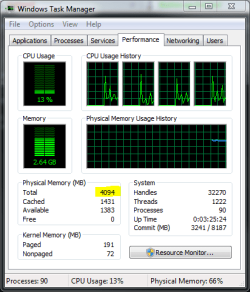
I thought i should disclose this with you guys/gals, but i did a fresh install, and for some reason, its displaying it properly :S, both task manager, and computer details, both display 4.00GB ram, and nothing in brackets...

Odd much?

Enzo.
 

My Computer My Computer

At a glance

W7 RTM Ultimate x64Intel Q8400 @ 2.66GHZ4GB DDR2-800Gainward GTS 450 GLH 1GB Edition
Computer Manufacturer/Model Number
Custom Build
OS
W7 RTM Ultimate x64
CPU
Intel Q8400 @ 2.66GHZ
Motherboard
Gigabyte GA-EG45M-UD2H
Memory
4GB DDR2-800
Graphics Card(s)
Gainward GTS 450 GLH 1GB Edition
Sound Card
Integrated 8 Channel
Monitor(s) Displays
AOC 23.6 Inch Widescreen LCD
Screen Resolution
1920x1080
Hard Drives
Seagate 500GB Internal
Western Digital 1TB Internal

Hitachi 1TB External
PSU
Apevia Java Power 500W
Case
Cooler Master HAF 922 Black
Cooling
Stock Intel CPU Fan
Keyboard
HP SK-2960 Multimedia Keyboard
Mouse
Logitech M350 Wireless Gaming Mouse
Internet Speed
1.5MB
I thought i should disclose this with you guys/gals, but i did a fresh install, and for some reason, its displaying it properly :S, both task manager, and computer details, both display 4.00GB ram, and nothing in brackets...

Odd much?

Enzo.

Congratz Renzo !
can u post a screenshot?
if any1 could explain why this happen i'll be hapy to do the same thing here xD
1 want my 1gb ram T_T
 

My Computer My Computer

At a glance

Windows 7 Ultimate 64 BITSQuad core Q6600 2,4GHZ8 GB DDR2Geforce GT 8600 ddr3
OS
Windows 7 Ultimate 64 BITS
CPU
Quad core Q6600 2,4GHZ
Motherboard
Asus P5N-D
Memory
8 GB DDR2
Graphics Card(s)
Geforce GT 8600 ddr3
Monitor(s) Displays
1 -22 LCD Samsung, 1-19 LCD Samsung
Screen Resolution
1920x1080, 1440x900
Hard Drives
1 - Barracuda 750 GB
Internet Speed
4mb/s
Other Info
1 home theater 7.1 - 180 RMS
...
if any1 could explain why this happen i'll be hapy to do the same thing here xD
1 want my 1gb ram T_T

I don't know what else you'd like to have explained to you. I've already explained the situation you're in several times in this thread. Read the MS KB article again and see if that helps. Then email your motherboard manufacturer. No one in this forum can give you a better solution than that.
 

My Computer My Computer

At a glance

Windows 7 Ultimate x64A fast one.Lots.
OS
Windows 7 Ultimate x64
CPU
A fast one.
Memory
Lots.
Monitor(s) Displays
3
A. Its enzo and
B. yes, yes i can :)

4GBram.png
 

My Computer My Computer

At a glance

W7 RTM Ultimate x64Intel Q8400 @ 2.66GHZ4GB DDR2-800Gainward GTS 450 GLH 1GB Edition
Computer Manufacturer/Model Number
Custom Build
OS
W7 RTM Ultimate x64
CPU
Intel Q8400 @ 2.66GHZ
Motherboard
Gigabyte GA-EG45M-UD2H
Memory
4GB DDR2-800
Graphics Card(s)
Gainward GTS 450 GLH 1GB Edition
Sound Card
Integrated 8 Channel
Monitor(s) Displays
AOC 23.6 Inch Widescreen LCD
Screen Resolution
1920x1080
Hard Drives
Seagate 500GB Internal
Western Digital 1TB Internal

Hitachi 1TB External
PSU
Apevia Java Power 500W
Case
Cooler Master HAF 922 Black
Cooling
Stock Intel CPU Fan
Keyboard
HP SK-2960 Multimedia Keyboard
Mouse
Logitech M350 Wireless Gaming Mouse
Internet Speed
1.5MB
Back
Top