Problem viewing pictures/images on Windows 7

rfe777

New member
Member
VIP
Local time
7:17 PM
Messages
103
Location
Israel
I have this weird problem when I want to look at pictures/images with Windows 7 - when I double-click a picture, the background of the picture and the empty area around the picture's frame become dark yellow/beige as if the picture was printed on an old newspaper. I am sure that when I started using Windows 7 there was the normal white background, but something was changed, and now viewing pictures has become extremely uncomfortable because of this problem.

What is this and how can it be fixed?

TIA
 

My Computer My Computer

Computer type
PC/Desktop
OS
Windows 7 Home Premium 64 bit
CPU
Intel core i5 2400 quad 6mb 3.1 GHz
Motherboard
Gigabyte H67M-D2-B3
Memory
KVR Kingston 4GB DDR3 1333MHZ
Graphics Card(s)
ATI Radeon R7 200
Sound Card
5.1 on-board
Monitor(s) Displays
Dell U2410
Screen Resolution
1900 x 1200
Hard Drives
Internal HD Western Digital 1 terabyte 7200 SATA3
Samsung SSD 850 EVO 250 GB
PSU
INWIN power man 450W A.PFC
Internet Speed
100 mb
Hi rfe777,

What program(s) are you experiencing this problem with? Windows Live Photo Gallery? Windows Photo Viewer? Microsoft Office Picture Manager?

Cheers,

Walker
Windows Outreach Team
 

My Computer My Computer

Computer Manufacturer/Model Number
HP Pavilion dm3 (netbook) *** 27" iMac (Dual-Boot)
OS
Windows 7 Home Premium (64-bit) *** Windows XP SP3 (32-bit), OSX 10.6
CPU
AMD Athlon Neo X2 1.6GHz *** Intel Core i7 Quad Core 2.8GHz
Memory
4.00 GB *** 4.00 GB
Graphics Card(s)
ATI Radeon HD 3200, 384MB *** ATI Radeon HD 4850, 1GB
Sound Card
ATI High Definition Audio *** ATI High Definition Audio
Monitor(s) Displays
LG Flatron W2053TX
Screen Resolution
1600 x 900 (monitor), 1266 x 768 (laptop) *** 2560 x 1440
Hard Drives
300 GB SATA (internal), 500 GB HP SimpleSave (external) *** 1 TB SATA (internal), 160 GB LaCie (external)
Mouse
Logitech Cordless Optical Mouse for Notebooks
Internet Speed
Broadband
this has been a problem since beta days.

i had this problem with my samsung monitor after windows update downloaded an updated monitor profile.

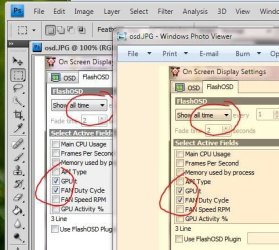
first picture below is an example of the same image viewed in photoshop and windows photo viewer.

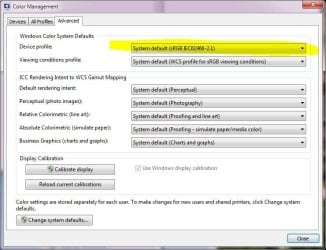
type color into the startmenu searchbox , find color management >> advanced >> change profile back to default, as per second picture.

you may have to reboot to get the right colours back - and hide the update in windows update, so it doesn't get downloaded again.
 

Attachments

  • live_or_dead.JPG
    live_or_dead.JPG
    50.7 KB · Views: 30
  • coloman.JPG
    coloman.JPG
    63.6 KB · Views: 46
Last edited:

My Computer My Computer

Computer Manufacturer/Model Number
mickey megabyte 1234
OS
ultimate 64 sp1
CPU
i5 2500K [email protected]
Motherboard
MSI P67A-GD53
Memory
8 gigs GSkill Ripjaws 1600
Graphics Card(s)
amd hd6950
Sound Card
creative x-fi gamer
Monitor(s) Displays
samsung 24"
Screen Resolution
1920x1080
Hard Drives
ocz vertex 2e 60 gig, samsung f3 1tb, buffalo 2tb ext
PSU
antec 550
Case
antec three hundred
Cooling
i'm a cooling fan
Keyboard
saitek eclipse ii
Mouse
logitech g3
Internet Speed
about 4 Mbps
Other Info
i love win7
Sorry wrong thread!
 

My Computer My Computer

Computer type
PC/Desktop
OS
Microsoft Windows 7 Home Premium 64-bit 7601 Multiprocessor Free Service Pack 1
CPU
Intel(R) Core(TM) i7-3770 CPU @ 3.40GHz
Motherboard
ASUSTeK COMPUTER INC. P8H77-M
Memory
8.00 GB
Graphics Card(s)
Intel(R) HD Graphics 4000
Sound Card
On Board
Monitor(s) Displays
Dell 24"
Screen Resolution
1920 x 1080
Hard Drives
(1) INTEL SSDSC2CT180A3 ATA Device (2) ST500DM002-1BD142 ATA Device (3) WDC WD3200AAKS-75L9A0 ATA Device (4) Generic- Compact Flash USB Device (5) Generic- MS/MS-Pro USB Device (6) Generic- SD/MMC USB Device (7) Generic- SM/xD-Picture USB
PSU
500w Corsair
Case
Cooler Master
Cooling
3 Fans
Keyboard
Logitech MK300
Mouse
Logitech WOM
Internet Speed
75Mb
Antivirus
Norton 360
Browser
Firefox, Opera, IE
Thanks for the solution & screens mickey! rf77, please post back when you get a chance to let us know if that worked for you.

Cheers,

Walker
Windows Outreach Team
 

My Computer My Computer

Computer Manufacturer/Model Number
HP Pavilion dm3 (netbook) *** 27" iMac (Dual-Boot)
OS
Windows 7 Home Premium (64-bit) *** Windows XP SP3 (32-bit), OSX 10.6
CPU
AMD Athlon Neo X2 1.6GHz *** Intel Core i7 Quad Core 2.8GHz
Memory
4.00 GB *** 4.00 GB
Graphics Card(s)
ATI Radeon HD 3200, 384MB *** ATI Radeon HD 4850, 1GB
Sound Card
ATI High Definition Audio *** ATI High Definition Audio
Monitor(s) Displays
LG Flatron W2053TX
Screen Resolution
1600 x 900 (monitor), 1266 x 768 (laptop) *** 2560 x 1440
Hard Drives
300 GB SATA (internal), 500 GB HP SimpleSave (external) *** 1 TB SATA (internal), 160 GB LaCie (external)
Mouse
Logitech Cordless Optical Mouse for Notebooks
Internet Speed
Broadband
Back
Top