Problem with OS load

ICIT2LOL

Confusion Therapist
Guru
Gold Member
VIP
Local time
1:34 AM
Messages
20,778
Location
Central West NSW
Have installed an SSD and have along the line done something wrong.

Now the problem with the SSD may be close to being solved but it has left me with a boot that takes forever off the HDD's.

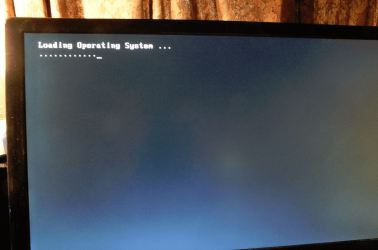
I get the usual posts which eventually lead to the screen in the pic - which I have no idea why has suddenly started happening on all three drives.

Could this be a BIOS problem and if so will setting to default settings be the answer please?.
 

Attachments
  • OS1.PNG
    OS1.PNG
    344 KB · Views: 6

My Computer

Computer type
PC/Desktop
Computer Manufacturer/Model Number
Own build (new) Desk1 / Asus ROG Win 7 / Desk2 1st build
OS
Desk1 7 Home Prem / Desk2 10 Pro / Main lap Asus ROG 10 Pro 2 laptop Toshiba 7 Pro Asus P2520 7 & 10
CPU
Desk1 i5 3750K / Laptop i7 GTX 860M / Desk2 i5 2500
Motherboard
Desk1 Asus P877-V / Desk2 Gigabyte H67 UD3H / Laptop ?
Memory
Desk1 8GB (1866) / Desk2 16GB (1333) / Laptop 8Gb DDR3
Graphics Card(s)
Desk 1& 2NVidia GTX 650 & Laptops on board Intel
Sound Card
Desk 1 & 2 -XONAR DG Realtek High Def audio Laptop
Monitor(s) Displays
Desk 1 Benq HD 2450 / Desk2 Philips 24" / Laptop 17.5"
Screen Resolution
1920x1080 D1 & D2 & Laptop 1
Hard Drives
Desk1 Samsung 120GB 830 SSD
Asus ROG 256GB 850 Pro SSD
Desk2 Samsung 840 256 SSD
Toshiba 120GB EVO
PSU
Desk 1 Corsair HX 1050/ Laptop ? / Desk 2 Corsair HX 650
Case
Desk 1 Cooler HAF XM ? Toshiba laptop / Desk2 Coolermaster
Cooling
Fans on all Desk1 -2 Desk2 - all Coolermasters 5 Laptop ?
Keyboard
Desk 1 MS Sidewinder X6 Desk 2 MS Sidewinder X 4
Mouse
Desk 1&2 - Gigabyte MS 900 gamer - laptop - Logitec wireless
Internet Speed
ADSL2+
Other Info
One other Desktop (tester) and spare Toshba laptop both with SSD's
Running Kaspersky 2016 ISS on all machines config'd identically
Logitec audio stereo systems on each machine (x3)
Canon MG5250MFC
Router/modem TP-Link running WPA2SK
Of the computers listed in your specs, this computer is which one of those?

Did you install Win 7 to the SSD?

If yes, disconnect all other drives and boot up the system.

The result is ?
 

My Computer

Computer Manufacturer/Model Number
Toshiba Satellite S875D-S7239 laptop
OS
MS Windows 7 Ultimate SP1 64-bit
CPU
AMD A10-4600M
Motherboard
AMD Pumori (Socket FT1)
Memory
6.00 GB Dual-Channel DDR3 @ 798MHz (11-11-12-28)
Graphics Card(s)
AMD Radeon HD 7660G
Sound Card
High Definition Audio Device
Monitor(s) Displays
Generic PnP Monitor (1600x900@60Hz)
Screen Resolution
1600x900@60Hz
Hard Drives
SSD 119GB Corsair CSSD-V128GB2 ATA Device
Keyboard
Standard PS/2 Keyboard
Mouse
HP Wireless Optical Mobile Mouse Model FHA-3410
Internet Speed
What the local pub, local coffee shop offers.
Other Info
Optical Drive:MATSHITA BD-CMB UJ160B ATA Device


Also have an Asus ha1002xp netbook with Win 7 Ultimate installed.
Of the computers listed in your specs, this computer is which one of those?

Did you install Win 7 to the SSD?

If yes, disconnect all other drives and boot up the system.

The result is ?
Hiyya Karl the machine is my Desk2 and yes I installed the 7 to the SSD (which I think I have got to redo), and when I boot to that SSD it comes up a very basic system with very few feature and no net connectibiltiy and no ability to adjust the monitor screen resolution.

The first install went fine and I have only reinstalled the 7 the second time because it seems a few files and folders have migrated over form the HDD. Now I know it was probably something I did so I did a second reinstall. But to make sure I am going to do a fresh start with the SS again (3rd time) .

The thing is why am I suddenly getting this Load up screen even with the HDD's which takes so long.

The only thing I can think of is that I have a dual boot 7 & 8 but it is set to boot 7 as the first option if 8 is not selected.
 

My Computer

Computer type
PC/Desktop
Computer Manufacturer/Model Number
Own build (new) Desk1 / Asus ROG Win 7 / Desk2 1st build
OS
Desk1 7 Home Prem / Desk2 10 Pro / Main lap Asus ROG 10 Pro 2 laptop Toshiba 7 Pro Asus P2520 7 & 10
CPU
Desk1 i5 3750K / Laptop i7 GTX 860M / Desk2 i5 2500
Motherboard
Desk1 Asus P877-V / Desk2 Gigabyte H67 UD3H / Laptop ?
Memory
Desk1 8GB (1866) / Desk2 16GB (1333) / Laptop 8Gb DDR3
Graphics Card(s)
Desk 1& 2NVidia GTX 650 & Laptops on board Intel
Sound Card
Desk 1 & 2 -XONAR DG Realtek High Def audio Laptop
Monitor(s) Displays
Desk 1 Benq HD 2450 / Desk2 Philips 24" / Laptop 17.5"
Screen Resolution
1920x1080 D1 & D2 & Laptop 1
Hard Drives
Desk1 Samsung 120GB 830 SSD
Asus ROG 256GB 850 Pro SSD
Desk2 Samsung 840 256 SSD
Toshiba 120GB EVO
PSU
Desk 1 Corsair HX 1050/ Laptop ? / Desk 2 Corsair HX 650
Case
Desk 1 Cooler HAF XM ? Toshiba laptop / Desk2 Coolermaster
Cooling
Fans on all Desk1 -2 Desk2 - all Coolermasters 5 Laptop ?
Keyboard
Desk 1 MS Sidewinder X6 Desk 2 MS Sidewinder X 4
Mouse
Desk 1&2 - Gigabyte MS 900 gamer - laptop - Logitec wireless
Internet Speed
ADSL2+
Other Info
One other Desktop (tester) and spare Toshba laptop both with SSD's
Running Kaspersky 2016 ISS on all machines config'd identically
Logitec audio stereo systems on each machine (x3)
Canon MG5250MFC
Router/modem TP-Link running WPA2SK
I recommend first, without any dual boot, getting Win 7 correct.

After your Win 7 is solid AND after you have 100% updated your Win 7 AND after you have made a system image backup, then you can move on to a dual boot.

When you get ready to install Win 7 to to the SSD, then no other drives connected and use the clean install tutorial to wipe the disk clean. At least use:
At first dialog, shift+ F11
that gets you to a command prompt.
enter following commands
diskpart
list disk
select disk 0
detail disk (just to make sure)
CLEAN (this will overwrite the first couple of sectore with zeros)
exit
exit

now go ahead with the normal Win 7 install procedure.
 

My Computer

Computer Manufacturer/Model Number
Toshiba Satellite S875D-S7239 laptop
OS
MS Windows 7 Ultimate SP1 64-bit
CPU
AMD A10-4600M
Motherboard
AMD Pumori (Socket FT1)
Memory
6.00 GB Dual-Channel DDR3 @ 798MHz (11-11-12-28)
Graphics Card(s)
AMD Radeon HD 7660G
Sound Card
High Definition Audio Device
Monitor(s) Displays
Generic PnP Monitor (1600x900@60Hz)
Screen Resolution
1600x900@60Hz
Hard Drives
SSD 119GB Corsair CSSD-V128GB2 ATA Device
Keyboard
Standard PS/2 Keyboard
Mouse
HP Wireless Optical Mobile Mouse Model FHA-3410
Internet Speed
What the local pub, local coffee shop offers.
Other Info
Optical Drive:MATSHITA BD-CMB UJ160B ATA Device


Also have an Asus ha1002xp netbook with Win 7 Ultimate installed.
I recommend first, without any dual boot, getting Win 7 correct.

After your Win 7 is solid AND after you have 100% updated your Win 7 AND after you have made a system image backup, then you can move on to a dual boot.

When you get ready to install Win 7 to to the SSD, then no other drives connected and use the clean install tutorial to wipe the disk clean. At least use:
At first dialog, shift+ F11
that gets you to a command prompt.
enter following commands
diskpart
list disk
select disk 0
detail disk (just to make sure)
CLEAN (this will overwrite the first couple of sectore with zeros)
exit
exit

now go ahead with the normal Win 7 install procedure.
Ok Karl I am going to set things in motion if I have the time right no as I have to work this pm and might not quite make the complete course.

Thanks for the time and patience mate.:D
 

My Computer

Computer type
PC/Desktop
Computer Manufacturer/Model Number
Own build (new) Desk1 / Asus ROG Win 7 / Desk2 1st build
OS
Desk1 7 Home Prem / Desk2 10 Pro / Main lap Asus ROG 10 Pro 2 laptop Toshiba 7 Pro Asus P2520 7 & 10
CPU
Desk1 i5 3750K / Laptop i7 GTX 860M / Desk2 i5 2500
Motherboard
Desk1 Asus P877-V / Desk2 Gigabyte H67 UD3H / Laptop ?
Memory
Desk1 8GB (1866) / Desk2 16GB (1333) / Laptop 8Gb DDR3
Graphics Card(s)
Desk 1& 2NVidia GTX 650 & Laptops on board Intel
Sound Card
Desk 1 & 2 -XONAR DG Realtek High Def audio Laptop
Monitor(s) Displays
Desk 1 Benq HD 2450 / Desk2 Philips 24" / Laptop 17.5"
Screen Resolution
1920x1080 D1 & D2 & Laptop 1
Hard Drives
Desk1 Samsung 120GB 830 SSD
Asus ROG 256GB 850 Pro SSD
Desk2 Samsung 840 256 SSD
Toshiba 120GB EVO
PSU
Desk 1 Corsair HX 1050/ Laptop ? / Desk 2 Corsair HX 650
Case
Desk 1 Cooler HAF XM ? Toshiba laptop / Desk2 Coolermaster
Cooling
Fans on all Desk1 -2 Desk2 - all Coolermasters 5 Laptop ?
Keyboard
Desk 1 MS Sidewinder X6 Desk 2 MS Sidewinder X 4
Mouse
Desk 1&2 - Gigabyte MS 900 gamer - laptop - Logitec wireless
Internet Speed
ADSL2+
Other Info
One other Desktop (tester) and spare Toshba laptop both with SSD's
Running Kaspersky 2016 ISS on all machines config'd identically
Logitec audio stereo systems on each machine (x3)
Canon MG5250MFC
Router/modem TP-Link running WPA2SK
No go Karl have done secure erase, diskpart and OS install three times and the thing will not load any more than a very basic OS.

I cannot get it connect to the net or even get the monitor resolution up to a full 24" screen even though I have installed the catalyst drivers app etc.

So am completely bamboozled as to what the problem is.

The only things I can think of is the OS disk is corrupted somehow, the SSD is not performing to scratch or my mobo has had it.

Plus I still have that annoying Loading operating system screen wit the dots.
 

My Computer

Computer type
PC/Desktop
Computer Manufacturer/Model Number
Own build (new) Desk1 / Asus ROG Win 7 / Desk2 1st build
OS
Desk1 7 Home Prem / Desk2 10 Pro / Main lap Asus ROG 10 Pro 2 laptop Toshiba 7 Pro Asus P2520 7 & 10
CPU
Desk1 i5 3750K / Laptop i7 GTX 860M / Desk2 i5 2500
Motherboard
Desk1 Asus P877-V / Desk2 Gigabyte H67 UD3H / Laptop ?
Memory
Desk1 8GB (1866) / Desk2 16GB (1333) / Laptop 8Gb DDR3
Graphics Card(s)
Desk 1& 2NVidia GTX 650 & Laptops on board Intel
Sound Card
Desk 1 & 2 -XONAR DG Realtek High Def audio Laptop
Monitor(s) Displays
Desk 1 Benq HD 2450 / Desk2 Philips 24" / Laptop 17.5"
Screen Resolution
1920x1080 D1 & D2 & Laptop 1
Hard Drives
Desk1 Samsung 120GB 830 SSD
Asus ROG 256GB 850 Pro SSD
Desk2 Samsung 840 256 SSD
Toshiba 120GB EVO
PSU
Desk 1 Corsair HX 1050/ Laptop ? / Desk 2 Corsair HX 650
Case
Desk 1 Cooler HAF XM ? Toshiba laptop / Desk2 Coolermaster
Cooling
Fans on all Desk1 -2 Desk2 - all Coolermasters 5 Laptop ?
Keyboard
Desk 1 MS Sidewinder X6 Desk 2 MS Sidewinder X 4
Mouse
Desk 1&2 - Gigabyte MS 900 gamer - laptop - Logitec wireless
Internet Speed
ADSL2+
Other Info
One other Desktop (tester) and spare Toshba laptop both with SSD's
Running Kaspersky 2016 ISS on all machines config'd identically
Logitec audio stereo systems on each machine (x3)
Canon MG5250MFC
Router/modem TP-Link running WPA2SK
how did you run DiskPart?
From within a system, using a System Repair Disc, or using a Win 7 DVD?
 

My Computer

Computer Manufacturer/Model Number
Toshiba Satellite S875D-S7239 laptop
OS
MS Windows 7 Ultimate SP1 64-bit
CPU
AMD A10-4600M
Motherboard
AMD Pumori (Socket FT1)
Memory
6.00 GB Dual-Channel DDR3 @ 798MHz (11-11-12-28)
Graphics Card(s)
AMD Radeon HD 7660G
Sound Card
High Definition Audio Device
Monitor(s) Displays
Generic PnP Monitor (1600x900@60Hz)
Screen Resolution
1600x900@60Hz
Hard Drives
SSD 119GB Corsair CSSD-V128GB2 ATA Device
Keyboard
Standard PS/2 Keyboard
Mouse
HP Wireless Optical Mobile Mouse Model FHA-3410
Internet Speed
What the local pub, local coffee shop offers.
Other Info
Optical Drive:MATSHITA BD-CMB UJ160B ATA Device


Also have an Asus ha1002xp netbook with Win 7 Ultimate installed.
Try burning or writing the latest official Win7 installer for your licensed version to DVD or stick then following these steps to Clean Reinstall - Factory OEM Windows 7 which are the same for retail.

Confirm you have unplugged all other HD's and peripherals.

Reset the BIOS to defaults: Clear CMOS - 3 Ways to Clear the CMOS - Reset BIOS

Next test the RAM for 5-6 passes: RAM - Test with Memtest86+. Try removing a stick to see what happens, then swap it.

If these fail then test the SSD to confirm it's good, if necessary contacting the maker.

Use the drivers in the installer and quickly updated via optional Windows Updates - only importing those which are missing in Device Manager after all updates are done. If these performance problems continue after doing it this way, then import the chipset from computer or Mobo maker's Support Downloads webpage.
 
Last edited:

My Computer

Computer Manufacturer/Model Number
Home Made
OS
Windows 7 Home Premium x64
CPU
Intel 2500k @4.5ghz 66deg max P95/IBT
Motherboard
Gigabyte Z68A-D3-B3
Memory
8 Gigs Patriot Viper 2 Extreme @1600
Graphics Card(s)
EVGA GTX 580 3 GIG 35degrees idle
Sound Card
Nvidia HD audio via HDMI to 7.1 Receiver
Monitor(s) Displays
32" Olevia hdtv
Screen Resolution
1080p
Hard Drives
64gig SSD(OS/Apps)
250gig (Files and Dox)
1tb (imaging and backup)
PSU
Corsair vx550w
Case
Thermaltake V3 black
Cooling
CM 212+(push n pull) 4 case fans
Keyboard
Logitech wireless Combo, G13
Mouse
G300
Internet Speed
40mps
Other Info
Two others up and running; C2D E5200/MSI G41M-P26/Corsair XMS3 8gb/GTS 250 1gb and C2D E8200/xFx 750sli/8gb Corsair Dominator/2x EVGA 550ti
Working on; i2600 Build...
HP DV6
@Work I use a Lenovo 5536B8U + Lenovo U300s
Ah yes have the OS installed it again and used the Gigabyte disk to get back online and the screen size fixed with the catalyst centre rescale but the boot is still extremely slow with that "Loading operating system" followed by the dots.

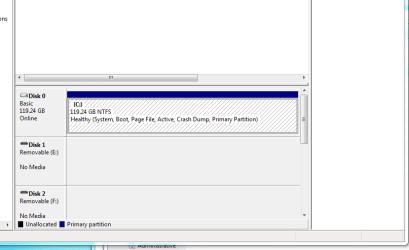
I even though I haven't loaded it "speckie" is running (in email) and I haven't downloaded it plus the diskpart I don't know if the partitioning has worked properly or not as I don't have that 1024 partition showing in in Control panel > storage. But it does show in diskpart:confused:

But I'll do it all over again until it comes right.
 

Attachments

  • SSD1.PNG
    SSD1.PNG
    9.6 KB · Views: 13

My Computer

Computer type
PC/Desktop
Computer Manufacturer/Model Number
Own build (new) Desk1 / Asus ROG Win 7 / Desk2 1st build
OS
Desk1 7 Home Prem / Desk2 10 Pro / Main lap Asus ROG 10 Pro 2 laptop Toshiba 7 Pro Asus P2520 7 & 10
CPU
Desk1 i5 3750K / Laptop i7 GTX 860M / Desk2 i5 2500
Motherboard
Desk1 Asus P877-V / Desk2 Gigabyte H67 UD3H / Laptop ?
Memory
Desk1 8GB (1866) / Desk2 16GB (1333) / Laptop 8Gb DDR3
Graphics Card(s)
Desk 1& 2NVidia GTX 650 & Laptops on board Intel
Sound Card
Desk 1 & 2 -XONAR DG Realtek High Def audio Laptop
Monitor(s) Displays
Desk 1 Benq HD 2450 / Desk2 Philips 24" / Laptop 17.5"
Screen Resolution
1920x1080 D1 & D2 & Laptop 1
Hard Drives
Desk1 Samsung 120GB 830 SSD
Asus ROG 256GB 850 Pro SSD
Desk2 Samsung 840 256 SSD
Toshiba 120GB EVO
PSU
Desk 1 Corsair HX 1050/ Laptop ? / Desk 2 Corsair HX 650
Case
Desk 1 Cooler HAF XM ? Toshiba laptop / Desk2 Coolermaster
Cooling
Fans on all Desk1 -2 Desk2 - all Coolermasters 5 Laptop ?
Keyboard
Desk 1 MS Sidewinder X6 Desk 2 MS Sidewinder X 4
Mouse
Desk 1&2 - Gigabyte MS 900 gamer - laptop - Logitec wireless
Internet Speed
ADSL2+
Other Info
One other Desktop (tester) and spare Toshba laptop both with SSD's
Running Kaspersky 2016 ISS on all machines config'd identically
Logitec audio stereo systems on each machine (x3)
Canon MG5250MFC
Router/modem TP-Link running WPA2SK
John, do you have "quick boot" enabled in the BIOS?
 

My Computer

Computer Manufacturer/Model Number
Home Made
OS
Windows 7 Home Premium x64
CPU
Intel 2500k @4.5ghz 66deg max P95/IBT
Motherboard
Gigabyte Z68A-D3-B3
Memory
8 Gigs Patriot Viper 2 Extreme @1600
Graphics Card(s)
EVGA GTX 580 3 GIG 35degrees idle
Sound Card
Nvidia HD audio via HDMI to 7.1 Receiver
Monitor(s) Displays
32" Olevia hdtv
Screen Resolution
1080p
Hard Drives
64gig SSD(OS/Apps)
250gig (Files and Dox)
1tb (imaging and backup)
PSU
Corsair vx550w
Case
Thermaltake V3 black
Cooling
CM 212+(push n pull) 4 case fans
Keyboard
Logitech wireless Combo, G13
Mouse
G300
Internet Speed
40mps
Other Info
Two others up and running; C2D E5200/MSI G41M-P26/Corsair XMS3 8gb/GTS 250 1gb and C2D E8200/xFx 750sli/8gb Corsair Dominator/2x EVGA 550ti
Working on; i2600 Build...
HP DV6
@Work I use a Lenovo 5536B8U + Lenovo U300s
Just thought about something else here. You said that you are having slow loads on ALL of your drives now, correct? So are you just reconnecting the SATA cable from port 1 to the different Drives? If so, you may have a bad SATA cable. May be nothing, just a thought.
 

My Computer

Computer Manufacturer/Model Number
Home Made
OS
Windows 7 Home Premium x64
CPU
Intel 2500k @4.5ghz 66deg max P95/IBT
Motherboard
Gigabyte Z68A-D3-B3
Memory
8 Gigs Patriot Viper 2 Extreme @1600
Graphics Card(s)
EVGA GTX 580 3 GIG 35degrees idle
Sound Card
Nvidia HD audio via HDMI to 7.1 Receiver
Monitor(s) Displays
32" Olevia hdtv
Screen Resolution
1080p
Hard Drives
64gig SSD(OS/Apps)
250gig (Files and Dox)
1tb (imaging and backup)
PSU
Corsair vx550w
Case
Thermaltake V3 black
Cooling
CM 212+(push n pull) 4 case fans
Keyboard
Logitech wireless Combo, G13
Mouse
G300
Internet Speed
40mps
Other Info
Two others up and running; C2D E5200/MSI G41M-P26/Corsair XMS3 8gb/GTS 250 1gb and C2D E8200/xFx 750sli/8gb Corsair Dominator/2x EVGA 550ti
Working on; i2600 Build...
HP DV6
@Work I use a Lenovo 5536B8U + Lenovo U300s
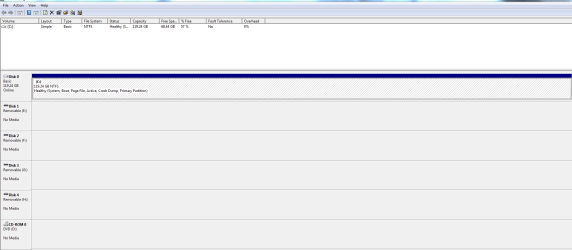
New disk management pic please:
HOW TO POST A SNAPSHOT OF DISK MANAGEMENT DISPLAY
Run disk management:
WIN |
type DISKMGMT.MSC | ENTER
WIN=
key with Microsoft logo on top.


Maximize the output of Disk Management:
ALT-Spacebar
key combo | X key (selects Maximize) |
Drag the field separators (such as between Status and Capacity) to show entire field.


Make a snapshot:
WIN |
type SNIPPING | ENTER | New
Drag the cursor around the area you want to snip.
File | Save as | select save location and name | Save


Post the snapshot:
Post a File or Screenshot in Seven Forums

===========================
thanks, karl
 

My Computer

Computer Manufacturer/Model Number
Toshiba Satellite S875D-S7239 laptop
OS
MS Windows 7 Ultimate SP1 64-bit
CPU
AMD A10-4600M
Motherboard
AMD Pumori (Socket FT1)
Memory
6.00 GB Dual-Channel DDR3 @ 798MHz (11-11-12-28)
Graphics Card(s)
AMD Radeon HD 7660G
Sound Card
High Definition Audio Device
Monitor(s) Displays
Generic PnP Monitor (1600x900@60Hz)
Screen Resolution
1600x900@60Hz
Hard Drives
SSD 119GB Corsair CSSD-V128GB2 ATA Device
Keyboard
Standard PS/2 Keyboard
Mouse
HP Wireless Optical Mobile Mouse Model FHA-3410
Internet Speed
What the local pub, local coffee shop offers.
Other Info
Optical Drive:MATSHITA BD-CMB UJ160B ATA Device


Also have an Asus ha1002xp netbook with Win 7 Ultimate installed.
Here is the shot Karl and James I might even try renewing the cables too.

In any case I think I am going t have to start fron ground 0 again but no probelm as long as I can get the darn thing right.
 

Attachments

  • SSD2.PNG
    SSD2.PNG
    17 KB · Views: 17

My Computer

Computer type
PC/Desktop
Computer Manufacturer/Model Number
Own build (new) Desk1 / Asus ROG Win 7 / Desk2 1st build
OS
Desk1 7 Home Prem / Desk2 10 Pro / Main lap Asus ROG 10 Pro 2 laptop Toshiba 7 Pro Asus P2520 7 & 10
CPU
Desk1 i5 3750K / Laptop i7 GTX 860M / Desk2 i5 2500
Motherboard
Desk1 Asus P877-V / Desk2 Gigabyte H67 UD3H / Laptop ?
Memory
Desk1 8GB (1866) / Desk2 16GB (1333) / Laptop 8Gb DDR3
Graphics Card(s)
Desk 1& 2NVidia GTX 650 & Laptops on board Intel
Sound Card
Desk 1 & 2 -XONAR DG Realtek High Def audio Laptop
Monitor(s) Displays
Desk 1 Benq HD 2450 / Desk2 Philips 24" / Laptop 17.5"
Screen Resolution
1920x1080 D1 & D2 & Laptop 1
Hard Drives
Desk1 Samsung 120GB 830 SSD
Asus ROG 256GB 850 Pro SSD
Desk2 Samsung 840 256 SSD
Toshiba 120GB EVO
PSU
Desk 1 Corsair HX 1050/ Laptop ? / Desk 2 Corsair HX 650
Case
Desk 1 Cooler HAF XM ? Toshiba laptop / Desk2 Coolermaster
Cooling
Fans on all Desk1 -2 Desk2 - all Coolermasters 5 Laptop ?
Keyboard
Desk 1 MS Sidewinder X6 Desk 2 MS Sidewinder X 4
Mouse
Desk 1&2 - Gigabyte MS 900 gamer - laptop - Logitec wireless
Internet Speed
ADSL2+
Other Info
One other Desktop (tester) and spare Toshba laptop both with SSD's
Running Kaspersky 2016 ISS on all machines config'd identically
Logitec audio stereo systems on each machine (x3)
Canon MG5250MFC
Router/modem TP-Link running WPA2SK
I agree with you.

A fresh start is a good idea.

Let us know, before you install other programs, if all is working correctly.

thanks,
karl
 

My Computer

Computer Manufacturer/Model Number
Toshiba Satellite S875D-S7239 laptop
OS
MS Windows 7 Ultimate SP1 64-bit
CPU
AMD A10-4600M
Motherboard
AMD Pumori (Socket FT1)
Memory
6.00 GB Dual-Channel DDR3 @ 798MHz (11-11-12-28)
Graphics Card(s)
AMD Radeon HD 7660G
Sound Card
High Definition Audio Device
Monitor(s) Displays
Generic PnP Monitor (1600x900@60Hz)
Screen Resolution
1600x900@60Hz
Hard Drives
SSD 119GB Corsair CSSD-V128GB2 ATA Device
Keyboard
Standard PS/2 Keyboard
Mouse
HP Wireless Optical Mobile Mouse Model FHA-3410
Internet Speed
What the local pub, local coffee shop offers.
Other Info
Optical Drive:MATSHITA BD-CMB UJ160B ATA Device


Also have an Asus ha1002xp netbook with Win 7 Ultimate installed.
No folks all going horribly wrong and the machine is getting slower and slower to boot up to three to four minutes.

Have changed cables checked the BIOS - quick boot enabled done the procedure four times now and am going to try and install back on a 500GB HDD as at least it will boot is a reasonable time:confused:

The only good thing is the drive is showing in Computer > storage now.:(
 

My Computer

Computer type
PC/Desktop
Computer Manufacturer/Model Number
Own build (new) Desk1 / Asus ROG Win 7 / Desk2 1st build
OS
Desk1 7 Home Prem / Desk2 10 Pro / Main lap Asus ROG 10 Pro 2 laptop Toshiba 7 Pro Asus P2520 7 & 10
CPU
Desk1 i5 3750K / Laptop i7 GTX 860M / Desk2 i5 2500
Motherboard
Desk1 Asus P877-V / Desk2 Gigabyte H67 UD3H / Laptop ?
Memory
Desk1 8GB (1866) / Desk2 16GB (1333) / Laptop 8Gb DDR3
Graphics Card(s)
Desk 1& 2NVidia GTX 650 & Laptops on board Intel
Sound Card
Desk 1 & 2 -XONAR DG Realtek High Def audio Laptop
Monitor(s) Displays
Desk 1 Benq HD 2450 / Desk2 Philips 24" / Laptop 17.5"
Screen Resolution
1920x1080 D1 & D2 & Laptop 1
Hard Drives
Desk1 Samsung 120GB 830 SSD
Asus ROG 256GB 850 Pro SSD
Desk2 Samsung 840 256 SSD
Toshiba 120GB EVO
PSU
Desk 1 Corsair HX 1050/ Laptop ? / Desk 2 Corsair HX 650
Case
Desk 1 Cooler HAF XM ? Toshiba laptop / Desk2 Coolermaster
Cooling
Fans on all Desk1 -2 Desk2 - all Coolermasters 5 Laptop ?
Keyboard
Desk 1 MS Sidewinder X6 Desk 2 MS Sidewinder X 4
Mouse
Desk 1&2 - Gigabyte MS 900 gamer - laptop - Logitec wireless
Internet Speed
ADSL2+
Other Info
One other Desktop (tester) and spare Toshba laptop both with SSD's
Running Kaspersky 2016 ISS on all machines config'd identically
Logitec audio stereo systems on each machine (x3)
Canon MG5250MFC
Router/modem TP-Link running WPA2SK

My Computer

Computer Manufacturer/Model Number
Toshiba Satellite S875D-S7239 laptop
OS
MS Windows 7 Ultimate SP1 64-bit
CPU
AMD A10-4600M
Motherboard
AMD Pumori (Socket FT1)
Memory
6.00 GB Dual-Channel DDR3 @ 798MHz (11-11-12-28)
Graphics Card(s)
AMD Radeon HD 7660G
Sound Card
High Definition Audio Device
Monitor(s) Displays
Generic PnP Monitor (1600x900@60Hz)
Screen Resolution
1600x900@60Hz
Hard Drives
SSD 119GB Corsair CSSD-V128GB2 ATA Device
Keyboard
Standard PS/2 Keyboard
Mouse
HP Wireless Optical Mobile Mouse Model FHA-3410
Internet Speed
What the local pub, local coffee shop offers.
Other Info
Optical Drive:MATSHITA BD-CMB UJ160B ATA Device


Also have an Asus ha1002xp netbook with Win 7 Ultimate installed.
John, what's the make and model of your SSD?
 

My Computer

Computer Manufacturer/Model Number
Home Made
OS
Windows 7 Home Premium x64
CPU
Intel 2500k @4.5ghz 66deg max P95/IBT
Motherboard
Gigabyte Z68A-D3-B3
Memory
8 Gigs Patriot Viper 2 Extreme @1600
Graphics Card(s)
EVGA GTX 580 3 GIG 35degrees idle
Sound Card
Nvidia HD audio via HDMI to 7.1 Receiver
Monitor(s) Displays
32" Olevia hdtv
Screen Resolution
1080p
Hard Drives
64gig SSD(OS/Apps)
250gig (Files and Dox)
1tb (imaging and backup)
PSU
Corsair vx550w
Case
Thermaltake V3 black
Cooling
CM 212+(push n pull) 4 case fans
Keyboard
Logitech wireless Combo, G13
Mouse
G300
Internet Speed
40mps
Other Info
Two others up and running; C2D E5200/MSI G41M-P26/Corsair XMS3 8gb/GTS 250 1gb and C2D E8200/xFx 750sli/8gb Corsair Dominator/2x EVGA 550ti
Working on; i2600 Build...
HP DV6
@Work I use a Lenovo 5536B8U + Lenovo U300s
Crucial M$ 128GB James and karl yeah mate I have clean installed it four times now and each time I secure erased the lot and diskparted it with ever increasingly disastrous results.

Am just secure erasing a 500GB Samsung as the secure erase killed the Seagate - dead as. :(
 

My Computer

Computer type
PC/Desktop
Computer Manufacturer/Model Number
Own build (new) Desk1 / Asus ROG Win 7 / Desk2 1st build
OS
Desk1 7 Home Prem / Desk2 10 Pro / Main lap Asus ROG 10 Pro 2 laptop Toshiba 7 Pro Asus P2520 7 & 10
CPU
Desk1 i5 3750K / Laptop i7 GTX 860M / Desk2 i5 2500
Motherboard
Desk1 Asus P877-V / Desk2 Gigabyte H67 UD3H / Laptop ?
Memory
Desk1 8GB (1866) / Desk2 16GB (1333) / Laptop 8Gb DDR3
Graphics Card(s)
Desk 1& 2NVidia GTX 650 & Laptops on board Intel
Sound Card
Desk 1 & 2 -XONAR DG Realtek High Def audio Laptop
Monitor(s) Displays
Desk 1 Benq HD 2450 / Desk2 Philips 24" / Laptop 17.5"
Screen Resolution
1920x1080 D1 & D2 & Laptop 1
Hard Drives
Desk1 Samsung 120GB 830 SSD
Asus ROG 256GB 850 Pro SSD
Desk2 Samsung 840 256 SSD
Toshiba 120GB EVO
PSU
Desk 1 Corsair HX 1050/ Laptop ? / Desk 2 Corsair HX 650
Case
Desk 1 Cooler HAF XM ? Toshiba laptop / Desk2 Coolermaster
Cooling
Fans on all Desk1 -2 Desk2 - all Coolermasters 5 Laptop ?
Keyboard
Desk 1 MS Sidewinder X6 Desk 2 MS Sidewinder X 4
Mouse
Desk 1&2 - Gigabyte MS 900 gamer - laptop - Logitec wireless
Internet Speed
ADSL2+
Other Info
One other Desktop (tester) and spare Toshba laptop both with SSD's
Running Kaspersky 2016 ISS on all machines config'd identically
Logitec audio stereo systems on each machine (x3)
Canon MG5250MFC
Router/modem TP-Link running WPA2SK
A secure erase is never going to kill a disk. You may have had a problem, but the cause was not a secure erase.

Secure erase is not a part of the instructions in the link for a clean install.
 

My Computer

Computer Manufacturer/Model Number
Toshiba Satellite S875D-S7239 laptop
OS
MS Windows 7 Ultimate SP1 64-bit
CPU
AMD A10-4600M
Motherboard
AMD Pumori (Socket FT1)
Memory
6.00 GB Dual-Channel DDR3 @ 798MHz (11-11-12-28)
Graphics Card(s)
AMD Radeon HD 7660G
Sound Card
High Definition Audio Device
Monitor(s) Displays
Generic PnP Monitor (1600x900@60Hz)
Screen Resolution
1600x900@60Hz
Hard Drives
SSD 119GB Corsair CSSD-V128GB2 ATA Device
Keyboard
Standard PS/2 Keyboard
Mouse
HP Wireless Optical Mobile Mouse Model FHA-3410
Internet Speed
What the local pub, local coffee shop offers.
Other Info
Optical Drive:MATSHITA BD-CMB UJ160B ATA Device


Also have an Asus ha1002xp netbook with Win 7 Ultimate installed.
Back
Top