Problem with software

Dutchcoffee

New member
Member
Local time
3:28 PM
Messages
34
Hi,

I've been having problems with software on Windows 7 Home Premium (64-bit). I just recently re-installed Windows completely with a fresh install too.

I installed CCleaner, but every time I try run it, I get this error: http://i54.tinypic.com/21aygpc.png

Also, when I pin programs to my start menu, it always adds a (2) after the name of the program, like this: http://i56.tinypic.com/2ntem21.png How can I pin items to my start menu without it adding the (2)? I was able to do this before re-installing Windows.

How can I fix these issues?

Thanks.
 

My Computer

Computer Manufacturer/Model Number
Compaq Presario CQ61
OS
Windows 7 Home Premium 64bit
CPU
AMD Athlon II Dual-Core M320 2.10 GHz
Motherboard
Hewlett-Packard 363F
Memory
DDR2
Graphics Card(s)
AMD M880G w/ ATI Mobility Radeon HD 4200
Sound Card
IDT High Definition Audio CODEC
Monitor(s) Displays
1366x768 LCD
Did you copy an existing user account (from the former installation) onto the new installation?
-DG
 

My Computer

Computer Manufacturer/Model Number
HP m8000n
OS
Windows 7 Ultimate x86
CPU
DualCore AMD Athlon 64 X2, 2600 MHz 5200+
Motherboard
Asus M2N68-LA (Narra)
Memory
Samsung 2GB DDR2
Graphics Card(s)
Onboard NVIDIA GeForce 6150SE nForce 430
Sound Card
Onboard nVIDIA nForce 6100-430 (MCP61P)
Monitor(s) Displays
Westinghouse 19" LED
Screen Resolution
1280x1024
Hard Drives
SATA II Seagate Barracuda 500GB
USB II WD Elements 500GB
USB II WD My Book 1TB
USB II WD My Book 2TB
PSU
Stock (HP)
Case
Stock (HP)
Cooling
Stock
Keyboard
Logitech Classic KB 200
Mouse
Standard HP opticle USB mouse
No, I did a fresh install of everything...

The only things I backed up were my documents.
 

My Computer

Computer Manufacturer/Model Number
Compaq Presario CQ61
OS
Windows 7 Home Premium 64bit
CPU
AMD Athlon II Dual-Core M320 2.10 GHz
Motherboard
Hewlett-Packard 363F
Memory
DDR2
Graphics Card(s)
AMD M880G w/ ATI Mobility Radeon HD 4200
Sound Card
IDT High Definition Audio CODEC
Monitor(s) Displays
1366x768 LCD
Odd...because that can cause those doubled shortcuts.
Try a search for FileZilla.lnk
you probably find more than one. In that case delete the older one. That way you should be able to remove the "(2)" in your pinned one.

If that's settled we'll have to find out, where the system looks for CCleaner64.exe and correct that path.

-DG
 

My Computer

Computer Manufacturer/Model Number
HP m8000n
OS
Windows 7 Ultimate x86
CPU
DualCore AMD Athlon 64 X2, 2600 MHz 5200+
Motherboard
Asus M2N68-LA (Narra)
Memory
Samsung 2GB DDR2
Graphics Card(s)
Onboard NVIDIA GeForce 6150SE nForce 430
Sound Card
Onboard nVIDIA nForce 6100-430 (MCP61P)
Monitor(s) Displays
Westinghouse 19" LED
Screen Resolution
1280x1024
Hard Drives
SATA II Seagate Barracuda 500GB
USB II WD Elements 500GB
USB II WD My Book 1TB
USB II WD My Book 2TB
PSU
Stock (HP)
Case
Stock (HP)
Cooling
Stock
Keyboard
Logitech Classic KB 200
Mouse
Standard HP opticle USB mouse
I can only find one FileZilla.Ink
 

My Computer

Computer Manufacturer/Model Number
Compaq Presario CQ61
OS
Windows 7 Home Premium 64bit
CPU
AMD Athlon II Dual-Core M320 2.10 GHz
Motherboard
Hewlett-Packard 363F
Memory
DDR2
Graphics Card(s)
AMD M880G w/ ATI Mobility Radeon HD 4200
Sound Card
IDT High Definition Audio CODEC
Monitor(s) Displays
1366x768 LCD
Something is messed up but I can't quite put my finger on it yet....like I said I only saw this behavior before with copied user accounts due to links restored the unusual way.
What puzzles me ...why do you have such huge gaps between your taskbar entries
Look at mine
Capture.JPG
If you unlock the taskbar and go to properties/Toolbars Do you have anything checked there?

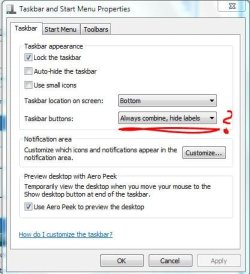
And what do you have under Taskbar/Taskbar Buttons?
Capture1.JPG

-DG
 

My Computer

Computer Manufacturer/Model Number
HP m8000n
OS
Windows 7 Ultimate x86
CPU
DualCore AMD Athlon 64 X2, 2600 MHz 5200+
Motherboard
Asus M2N68-LA (Narra)
Memory
Samsung 2GB DDR2
Graphics Card(s)
Onboard NVIDIA GeForce 6150SE nForce 430
Sound Card
Onboard nVIDIA nForce 6100-430 (MCP61P)
Monitor(s) Displays
Westinghouse 19" LED
Screen Resolution
1280x1024
Hard Drives
SATA II Seagate Barracuda 500GB
USB II WD Elements 500GB
USB II WD My Book 1TB
USB II WD My Book 2TB
PSU
Stock (HP)
Case
Stock (HP)
Cooling
Stock
Keyboard
Logitech Classic KB 200
Mouse
Standard HP opticle USB mouse

My Computer

Computer Manufacturer/Model Number
Compaq Presario CQ61
OS
Windows 7 Home Premium 64bit
CPU
AMD Athlon II Dual-Core M320 2.10 GHz
Motherboard
Hewlett-Packard 363F
Memory
DDR2
Graphics Card(s)
AMD M880G w/ ATI Mobility Radeon HD 4200
Sound Card
IDT High Definition Audio CODEC
Monitor(s) Displays
1366x768 LCD
I see...my bad.. That's why the gap :D
OK right click on those links, go to properties and check the location in the GENERAL Tab.
Go into that directory (probably c:\Users\Public\Desktop )
(you might need to switch your folder options to show hidden files if you haven't already)
http://www.sevenforums.com/tutorials/394-hidden-files-folders-show-hide.html

and check there for the duplicates. If you find them, delete the one without number and rename the ones with the (2)

-DG
I can only find one FileZilla.Ink
My fault , too..I didn't tell you to seek with admin privileges...those shortcuts are in a hidden folder, a "normal" search wouldn't find them.
 

My Computer

Computer Manufacturer/Model Number
HP m8000n
OS
Windows 7 Ultimate x86
CPU
DualCore AMD Athlon 64 X2, 2600 MHz 5200+
Motherboard
Asus M2N68-LA (Narra)
Memory
Samsung 2GB DDR2
Graphics Card(s)
Onboard NVIDIA GeForce 6150SE nForce 430
Sound Card
Onboard nVIDIA nForce 6100-430 (MCP61P)
Monitor(s) Displays
Westinghouse 19" LED
Screen Resolution
1280x1024
Hard Drives
SATA II Seagate Barracuda 500GB
USB II WD Elements 500GB
USB II WD My Book 1TB
USB II WD My Book 2TB
PSU
Stock (HP)
Case
Stock (HP)
Cooling
Stock
Keyboard
Logitech Classic KB 200
Mouse
Standard HP opticle USB mouse
Awesome, thank you so much! :D

That's what the problem was. There were duplicates (in the AppData folder though).
 

My Computer

Computer Manufacturer/Model Number
Compaq Presario CQ61
OS
Windows 7 Home Premium 64bit
CPU
AMD Athlon II Dual-Core M320 2.10 GHz
Motherboard
Hewlett-Packard 363F
Memory
DDR2
Graphics Card(s)
AMD M880G w/ ATI Mobility Radeon HD 4200
Sound Card
IDT High Definition Audio CODEC
Monitor(s) Displays
1366x768 LCD
You're very welcome. Yeah, Start menu shortcuts can come from different folders in W7...most of mine reside in said c:\Users\Public\Desktop
Glad that's sorted out.
Thanks for the feedback.

-DG
 

My Computer

Computer Manufacturer/Model Number
HP m8000n
OS
Windows 7 Ultimate x86
CPU
DualCore AMD Athlon 64 X2, 2600 MHz 5200+
Motherboard
Asus M2N68-LA (Narra)
Memory
Samsung 2GB DDR2
Graphics Card(s)
Onboard NVIDIA GeForce 6150SE nForce 430
Sound Card
Onboard nVIDIA nForce 6100-430 (MCP61P)
Monitor(s) Displays
Westinghouse 19" LED
Screen Resolution
1280x1024
Hard Drives
SATA II Seagate Barracuda 500GB
USB II WD Elements 500GB
USB II WD My Book 1TB
USB II WD My Book 2TB
PSU
Stock (HP)
Case
Stock (HP)
Cooling
Stock
Keyboard
Logitech Classic KB 200
Mouse
Standard HP opticle USB mouse
Back
Top