Solved Problems after windows update

Everett

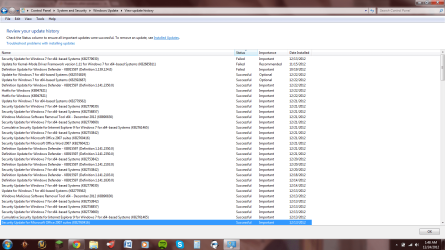
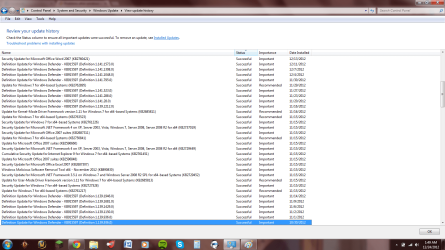
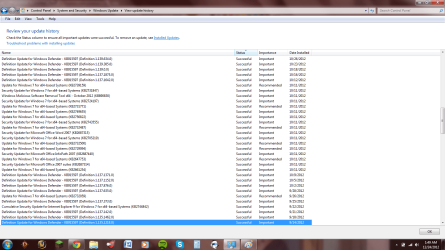
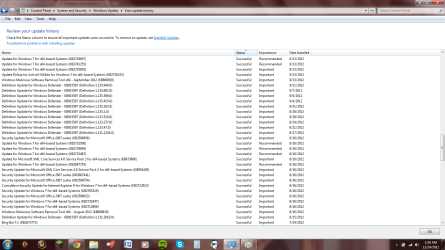
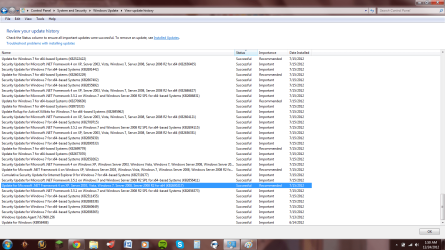
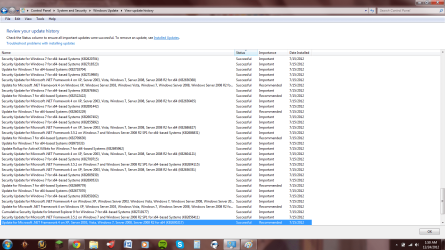
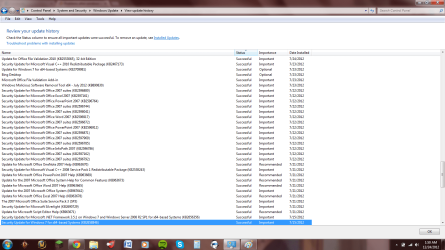
We are all shooting in the dark ... until you let us know what updates has been installed... To do that.. simply go to Control Panel > Windows Update > You can see a link that says "View update history"..once there.... take a snapshot and post here ..This would let us know what updates were installed.

Secondly again it would really be helpful if you can use the SF diag tools and post all the file here.
 

My Computer

Computer Manufacturer/Model Number
Nothing specific....what ever the clients provide for Repair
OS
Windows 7 ultimate x64
Okay the SF diag tools should hopefully be posted, as well as the update snapshots.
 

Attachments

  • EverettC16.zip
    EverettC16.zip
    1.4 MB · Views: 4
  • updates 1.png
    updates 1.png
    67.6 KB · Views: 1
  • update 2.png
    update 2.png
    70.7 KB · Views: 1
  • updates 3.png
    updates 3.png
    69 KB · Views: 0
  • updates 4.png
    updates 4.png
    65.6 KB · Views: 0
  • updates 7.png
    updates 7.png
    72.4 KB · Views: 1
  • updates 6.png
    updates 6.png
    71.3 KB · Views: 1
  • updates 5.png
    updates 5.png
    68.6 KB · Views: 0

My Computer

OS
Virginia
Well thats all the updates.......

Could you post only the latest updates... sort by Date installed... and the first few will be the one thats we need.
 

My Computer

Computer Manufacturer/Model Number
Nothing specific....what ever the clients provide for Repair
OS
Windows 7 ultimate x64

My Computer

Computer type
PC/Desktop
Computer Manufacturer/Model Number
Own build (new) Desk1 / Asus ROG Win 7 / Desk2 1st build
OS
Desk1 7 Home Prem / Desk2 10 Pro / Main lap Asus ROG 10 Pro 2 laptop Toshiba 7 Pro Asus P2520 7 & 10
CPU
Desk1 i5 3750K / Laptop i7 GTX 860M / Desk2 i5 2500
Motherboard
Desk1 Asus P877-V / Desk2 Gigabyte H67 UD3H / Laptop ?
Memory
Desk1 8GB (1866) / Desk2 16GB (1333) / Laptop 8Gb DDR3
Graphics Card(s)
Desk 1& 2NVidia GTX 650 & Laptops on board Intel
Sound Card
Desk 1 & 2 -XONAR DG Realtek High Def audio Laptop
Monitor(s) Displays
Desk 1 Benq HD 2450 / Desk2 Philips 24" / Laptop 17.5"
Screen Resolution
1920x1080 D1 & D2 & Laptop 1
Hard Drives
Desk1 Samsung 120GB 830 SSD
Asus ROG 256GB 850 Pro SSD
Desk2 Samsung 840 256 SSD
Toshiba 120GB EVO
PSU
Desk 1 Corsair HX 1050/ Laptop ? / Desk 2 Corsair HX 650
Case
Desk 1 Cooler HAF XM ? Toshiba laptop / Desk2 Coolermaster
Cooling
Fans on all Desk1 -2 Desk2 - all Coolermasters 5 Laptop ?
Keyboard
Desk 1 MS Sidewinder X6 Desk 2 MS Sidewinder X 4
Mouse
Desk 1&2 - Gigabyte MS 900 gamer - laptop - Logitec wireless
Internet Speed
ADSL2+
Other Info
One other Desktop (tester) and spare Toshba laptop both with SSD's
Running Kaspersky 2016 ISS on all machines config'd identically
Logitec audio stereo systems on each machine (x3)
Canon MG5250MFC
Router/modem TP-Link running WPA2SK

My Computer

Computer Manufacturer/Model Number
Nothing specific....what ever the clients provide for Repair
OS
Windows 7 ultimate x64
Sorry about that lol. Got a bit too anxious. Is this enough or would you like a little further?
 

Attachments

  • recent updates.png
    recent updates.png
    66.6 KB · Views: 4

My Computer

OS
Virginia
Something like this?
 

Attachments

  • 0.png
    0.png
    66.1 KB · Views: 3

My Computer

OS
Virginia
Also, I posted the SF diag tools results in the Zip file with all of my in my post with all of my updates. If that is not what you need just let me know and I will work towards getting it done for you all.
 

My Computer

OS
Virginia
Everett

Are you using Internet Connection Sharing (ICS) on your system... is it enabled ?? I can see a high usage of svchost.exe from your snapshot and few errors in the logs on this
 

My Computer

Computer Manufacturer/Model Number
Nothing specific....what ever the clients provide for Repair
OS
Windows 7 ultimate x64
Also disable the following services...

1.AMD External Events Utility
2.BBUpdate (Bing Bar update... remove Bing desktop if possible)
3.Bing Desktop Update service (same as above)
4. TMachInfo
5.TOSHIBA Optical Disc Drive Service
6. TOSHIBA Power Saver
7.TOSHIBA eco Utility Service
8.BingBar Service (same as #2)

And oh Disable your Internet connection sharing (ICS) service if you are not sharing your laptop connection with other..

And restart the system... let me know how the system performs now..
 

My Computer

Computer Manufacturer/Model Number
Nothing specific....what ever the clients provide for Repair
OS
Windows 7 ultimate x64
I have currently turned off all serviced other than Microsoft and Toshiba programs. .

It says nothing about leaving all of the Toshiba crapware running when establishing a Clean Boot.

At least follow the steps to Clean Up Factory Bloatware if you aren't going to get the recommended Clean Reinstall - Factory OEM Windows 7 or even acknowledge the advice from which thousands of others have benefitted.

Otherwise trying to troubleshoot issues caused by the inherent corruption of a factory preinstall is like doing open heart surgery on a 1000 pound patient without asking him to lose any weight and while he keeps stuffing pies and cakes in his face.

Can I make it any more clear? This is the :busted: Worst Possible Install :busted: you can have.
 
I am not ignoring your advice greg, I just want to see if it can be fixed in any other way. If not I was going to send it in because it is on warranty for fixes like this and there is no sense in me trying to do it myself and screwing even more things up if I can get a professional to do it instead. And centaur should I not disable if I am running on a network but am not connected to the other computer in anyway?
 

My Computer

OS
Virginia
its safe to disable ICS.... if you are not sharing your internet connection from your laptop with other... there is usually a router or modem to do that most of the cases. Moreover looking at your logs.. there were lot of SharedAccess NAT errors which is related to ICS.... and latest updates where Network related... Hence my advice
 

My Computer

Computer Manufacturer/Model Number
Nothing specific....what ever the clients provide for Repair
OS
Windows 7 ultimate x64
If you send it in under warranty for anything other than hardware, they will just reinstall the factory image which is the cause of most of this corruption to begin with. So carry on with attempting repairs then we'll be here to help you if you decide to get clean.
 
Well even with all of the services other than my Anti-Virus disabled my computer still ran at >30% RAM usage when idle for about 20 minutes.
 

My Computer

OS
Virginia
Well even with all of the services other than my Anti-Virus disabled my computer still ran at >30% RAM usage when idle for about 20 minutes.

What is your CPU usage in relation to that ??
 

My Computer

Computer Manufacturer/Model Number
Nothing specific....what ever the clients provide for Repair
OS
Windows 7 ultimate x64
How's that RAM apportioned as shown in Memory Tab in Resource Monitor? CPU tab too.

Then double check that nothing but Microsoft Security Essentials is checked in msconfig>Startup and msconfig>Services after hiding all MS services.

If it's Chrome try uninstalling it to see if it changes. There's also a boatload of spyware that accompanies any google program which is why I don't recommend installing any no matter how hooked on it. At least uninstall Google updater which is pernicious spyware.
 
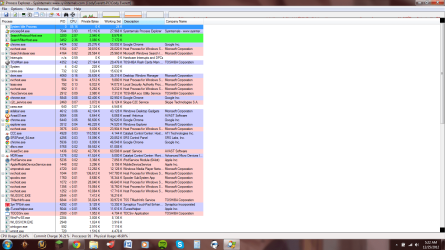
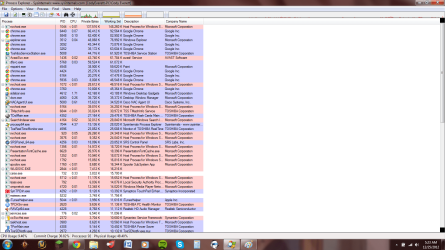
Could you use this and post a snapshot with first sorting by CPU and second snapshot with Working Set (which is for RAM)... This will let us know whats taking up all the CPU and RAM... and oh while you are doing it...if you see service like svchost.exe take up higher resources... just move your mouse pointer to it and a popup will show you the services thats piggybacking on svchost.exe...
 

My Computer

Computer Manufacturer/Model Number
Nothing specific....what ever the clients provide for Repair
OS
Windows 7 ultimate x64
Alright so I uninstalled anything Google related and re-installed Chrome. Seems a little better, but RAM is still up. When my RAM was still in the 30% range my usage was down <10%. It seems like this is a issue with distribution of RAM and not CPU usage. With that being said you guys know a whole heck of a lot more about this subject than I do. Also, here are the two screenshots you requested.
 

Attachments

  • usage.png
    usage.png
    88.2 KB · Views: 4
  • usage 2.png
    usage 2.png
    90.3 KB · Views: 4

My Computer

OS
Virginia
You will need to uninstall Google Updater and other spyware again if you reinstalled Chrome since. Check your msconfig tabs too.
 
Back
Top