Problems with GFWL

silent785

New member
Local time
10:11 PM
Messages
5
Location
Belgium
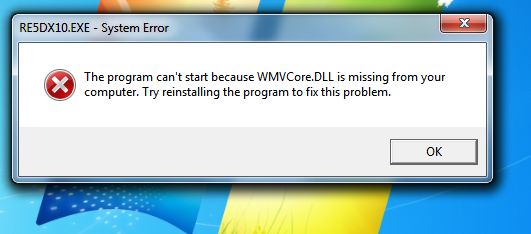
WMVCore.dll is missing

I get this error when starting some games(specifically GFWL games such as GTA IV and Resident Evil 5), can anyone help me?

I'm running Windows 7 x64 Ultimate RTM.
 
Last edited:

My Computer

OS
Windows 7 x64
CPU
AMD Phenom 9550
Motherboard
Gigabyte GA-78-S2H
Memory
Buffalo Firestix 4GB DDR2 RAM
Graphics Card(s)
Sapphire Radeon HD4850 dual slot
Sound Card
Realtek HD Audio
Monitor(s) Displays
Samsung Syncmaster T220 22"
Screen Resolution
1680*1050
Hard Drives
Samsung Spinpoint 500GB SATA-2
PSU
Tronje 500WATT
Case
Advance Gaming case
Cooling
3 casefans
Keyboard
Medion wireless
Mouse
Sweex 5 buttons
Internet Speed
750kb/s
which error? use the snip tool and post a screen shot if possible.
 

My Computer

Computer Manufacturer/Model Number
eMachines W3502
OS
Windows 7 Ultimate x32
CPU
Intel Celeron D 3.2 Ghz 533 fsb (LGA 775)
Motherboard
Intel D101GGC
Memory
1 GB (2x512MB) PC-3200 DDR @ 200Mhz
Graphics Card(s)
Nvidia GeForce 9400GT- 1GB
Sound Card
Sound Blaster X-Fi Xtreame Gamer
Monitor(s) Displays
19" LCD HDtv
Screen Resolution
1360x768 @ 60Htz
Hard Drives
SeaGate Barracuda 750GB
SeaGate Barracuda 100GB
Toshiba CD/DVDW/ TS-H552D [DVD+R, DL]
PSU
stock (idk)
Case
The busted remains of the stock case
Cooling
Dust cooled, waitwut?
Keyboard
Stock. Missing a few keys.
Mouse
Logitech LX8 5-btn mouse (wireless)
Internet Speed
TWC 10Mb
Other Info
Keeps going, and going, and going.......
1253439159-clip-21kb.jpg
 

My Computer

OS
Windows 7 x64
CPU
AMD Phenom 9550
Motherboard
Gigabyte GA-78-S2H
Memory
Buffalo Firestix 4GB DDR2 RAM
Graphics Card(s)
Sapphire Radeon HD4850 dual slot
Sound Card
Realtek HD Audio
Monitor(s) Displays
Samsung Syncmaster T220 22"
Screen Resolution
1680*1050
Hard Drives
Samsung Spinpoint 500GB SATA-2
PSU
Tronje 500WATT
Case
Advance Gaming case
Cooling
3 casefans
Keyboard
Medion wireless
Mouse
Sweex 5 buttons
Internet Speed
750kb/s
I've done step 2 and 3 and still not fixed. Step 1 doesn't apply to me.
I'm unsure which program it came with so step 4 is unavailable.
I'll update my drivers and see what happens...
 

My Computer

OS
Windows 7 x64
CPU
AMD Phenom 9550
Motherboard
Gigabyte GA-78-S2H
Memory
Buffalo Firestix 4GB DDR2 RAM
Graphics Card(s)
Sapphire Radeon HD4850 dual slot
Sound Card
Realtek HD Audio
Monitor(s) Displays
Samsung Syncmaster T220 22"
Screen Resolution
1680*1050
Hard Drives
Samsung Spinpoint 500GB SATA-2
PSU
Tronje 500WATT
Case
Advance Gaming case
Cooling
3 casefans
Keyboard
Medion wireless
Mouse
Sweex 5 buttons
Internet Speed
750kb/s
7. Run the sfc /scannow System File Checker command to replace a missing or corrupt copy of the wmvcore.dll file. If this DLL file is provided my Microsoft, the System File Checker tool should restore it.
 
Never mind I think I've got it, I have the N-edition of Windows 7 so it lacks Windows Media Player. I guess I'll have to wait until Microsoft offers WMP through Windows Update...
 

My Computer

OS
Windows 7 x64
CPU
AMD Phenom 9550
Motherboard
Gigabyte GA-78-S2H
Memory
Buffalo Firestix 4GB DDR2 RAM
Graphics Card(s)
Sapphire Radeon HD4850 dual slot
Sound Card
Realtek HD Audio
Monitor(s) Displays
Samsung Syncmaster T220 22"
Screen Resolution
1680*1050
Hard Drives
Samsung Spinpoint 500GB SATA-2
PSU
Tronje 500WATT
Case
Advance Gaming case
Cooling
3 casefans
Keyboard
Medion wireless
Mouse
Sweex 5 buttons
Internet Speed
750kb/s
Never mind I think I've got it, I have the N-edition of Windows 7 so it lacks Windows Media Player. I guess I'll have to wait until Microsoft offers WMP through Windows Update...
WMVCore.dll is missing

I get this error when starting some games(specifically GFWL games such as GTA IV and Resident Evil 5), can anyone help me?

I'm running Windows 7 x64 Ultimate RTM.
You owe me $75 for wasting my time.

You owe everybody here an apology for misrepresenting the truth in your original post.
 
Back
Top