
Hello everyone, this is my first time posting here so please bear with me.
Lately I seem to be having problems with my WD 1TB external hard drive. I noticed the problem about 2-3 weeks ago when I went to play some music from Windows Media Player. Windows Media Player took a very long time to open and when I went to play some music files it would freeze up and I would have to end the Windows Media Player process through the Task Manager. After that I tried going directly into my external hard drive to play the music, but Windows Media Player would not play any file I chose. I noticed as I was opening the external hard drive through Windows Explorer it took a very long time for all the files to load and there is only 48GB worth of data on the external hard drive. I then started looking around online and found that it may be some type of security issue or that I should run CHKDSK. I tried to change the security settings so I could gain access for my files, but it kept coming up as Access Denied. Then I decided to run CHKDSK, which was somewhat of a mistake/problem because it took about 4 or 5 days to finish (I checked both boxes in CHKDSK). After CHKDSK finished it said that some problems were found and fixed, but as of now I am still having problems trying to access my files.
Regardless of what CHKDSK accomplished, I still think that there is a security issue and I cannot figure out how to fix it. The only way that I can get everything to work is to go file by file and add a permission of "Full Control" for the group "Everyone". If I try and add this permission to a folder it tells me that Access is Denied. Here is an example of one of the many folders and what happens when I try to open it.
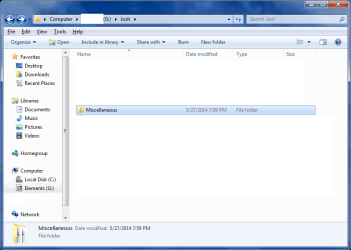
I double click on this folder to open it:
Then this message pops up:
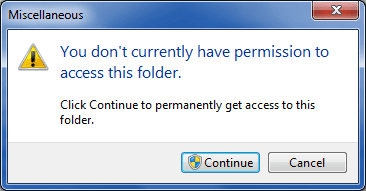
I click Continue and this message pops up:
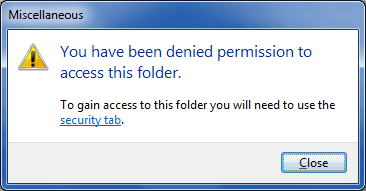
I then go into the security tab:

I click Continue and this pops up:

After taking ownwership on the "Administrators (Josh-PC\Administrators)" I go back into the security tab and find that the "System" is the only one with permission to access these files:
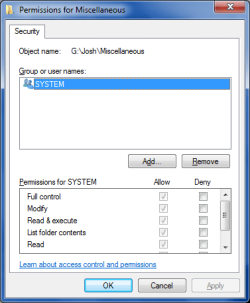
When I try to add the group "Everyone" and set the permissions to "Full Control" I get this message:

When I click "Continue" it moves on to the next file and says the same thing as the picture above. The only way for me to gain access to all the files is to go through each one by one and add the group "Everyone" to each file.
So my question is, how do I gain access to all of my files again? I don't want to sit here going through each file one by one. I have even tried to copy all of my files to my internal hard drive, but that does not even work. I have also tried plugging in the external hard drive to my HP laptop which runs Windows 7 64bit as well, but the same security stuff keeps popping up. I hope I have been clear with my explanation and if there is anything I have missed please let me know. If you need anymore information please let me know that as well. My system specs should be in my profile.
Any help with this matter is greatly appreciated. Thank you very much.
Lately I seem to be having problems with my WD 1TB external hard drive. I noticed the problem about 2-3 weeks ago when I went to play some music from Windows Media Player. Windows Media Player took a very long time to open and when I went to play some music files it would freeze up and I would have to end the Windows Media Player process through the Task Manager. After that I tried going directly into my external hard drive to play the music, but Windows Media Player would not play any file I chose. I noticed as I was opening the external hard drive through Windows Explorer it took a very long time for all the files to load and there is only 48GB worth of data on the external hard drive. I then started looking around online and found that it may be some type of security issue or that I should run CHKDSK. I tried to change the security settings so I could gain access for my files, but it kept coming up as Access Denied. Then I decided to run CHKDSK, which was somewhat of a mistake/problem because it took about 4 or 5 days to finish (I checked both boxes in CHKDSK). After CHKDSK finished it said that some problems were found and fixed, but as of now I am still having problems trying to access my files.
Regardless of what CHKDSK accomplished, I still think that there is a security issue and I cannot figure out how to fix it. The only way that I can get everything to work is to go file by file and add a permission of "Full Control" for the group "Everyone". If I try and add this permission to a folder it tells me that Access is Denied. Here is an example of one of the many folders and what happens when I try to open it.
I double click on this folder to open it:
Then this message pops up:
I click Continue and this message pops up:
I then go into the security tab:
I click Continue and this pops up:
After taking ownwership on the "Administrators (Josh-PC\Administrators)" I go back into the security tab and find that the "System" is the only one with permission to access these files:
When I try to add the group "Everyone" and set the permissions to "Full Control" I get this message:
When I click "Continue" it moves on to the next file and says the same thing as the picture above. The only way for me to gain access to all the files is to go through each one by one and add the group "Everyone" to each file.
So my question is, how do I gain access to all of my files again? I don't want to sit here going through each file one by one. I have even tried to copy all of my files to my internal hard drive, but that does not even work. I have also tried plugging in the external hard drive to my HP laptop which runs Windows 7 64bit as well, but the same security stuff keeps popping up. I hope I have been clear with my explanation and if there is anything I have missed please let me know. If you need anymore information please let me know that as well. My system specs should be in my profile.
Any help with this matter is greatly appreciated. Thank you very much.
My Computer
- Computer type
- PC/Desktop
- Computer Manufacturer/Model Number
- Custom build
- OS
- Windows 7 Home Premium 64bit
- CPU
- AMD A10-5800K Trinity Quad-Core 3.8GHz
- Motherboard
- ASRock FM2A88X Extreme6+ FM2+ / FM2 AMD A88X
- Memory
- G.SKILL Ripjaws X Series 8GB (2 x 4GB) 240-Pin DDR3 SDRAM
- Hard Drives
- Western Digital WD Blue WD10EZEX 1TB 7200 RPM 64MB Cache SATA 6.0Gb/s 3.5" Internal Hard Drive Bare Drive
WD 1TB External Hard Drive
- Antivirus
- Avast
- Browser
- Firefox, Chrome, IE11

