Problems with Window Installer and Itunes?

bigharge

New member
Local time
7:47 AM
Messages
2
Ok, Ive been dealing with this all day. I purchased a new iphone and have been trying to install itunes all day. Everytime I have tried to intall it I get this message

"The Windows installer service could not be accessed, This can occur if you are running windows in safe more or if the windows installer is not correctly installed. contact your support personnel for assistance."

I have googled and searched all over the internet and tried every solution ive seen. Ive switched it to manual, unregistered and re registered it, system restore, clean up mode, and a few others. Nothing seems to work, please let me know what I can do, thanks
 

My Computer

OS
windows 7 64 bit
Ok, Ive been dealing with this all day. I purchased a new iphone and have been trying to install itunes all day. Everytime I have tried to intall it I get this message

"The Windows installer service could not be accessed, This can occur if you are running windows in safe more or if the windows installer is not correctly installed. contact your support personnel for assistance."

I have googled and searched all over the internet and tried every solution ive seen. Ive switched it to manual, unregistered and re registered it, system restore, clean up mode, and a few others. Nothing seems to work, please let me know what I can do, thanks

It's really very simple. You just purchased a new iPhone and with that purchase you also purchased Apple support. See how good it is and if they care about Microsoft Windows or their customers that prefer to use it with their hardware. Perhaps you already have and are coming here for the support they denied you. There is a recourse -- return the hardware and never look back.

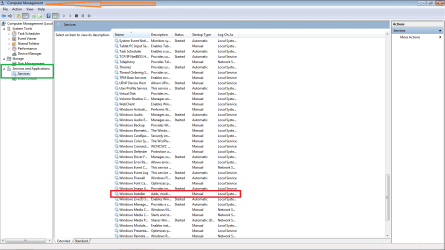
With that out of the way I'll try to help you. Open the Start menu and right click Computer, select Manage. Expand services and applications and then select services. Find Windows Installer service in the middle pane, right click it and select Start. If that works then any properly written Windows application can start it too. If it doesn't start then my apologies and I'll do my damnedest to help you with it! There is one other thing you could try but the chances you could install anything are slim -- maybe the interfaces are not properly registered -- you can try to re-register like this:

Open Start, type "cmd" and look for the icon. Right click and select Run as administrator accepting the prompts to run it. In the command window type

msiexec /regserver

and press enter.

You may need to reboot after that.


it will all start working again

Another thing -- it's absolutely imperative that you install the 64-bit version of iTunes. Most people miss that Apple can't determine 32/64 and present you with the proper choice by default.
 

My Computer

Computer type
Laptop
Computer Manufacturer/Model Number
Apple
OS
El Capitan / Windows 10
CPU
i7-4980HQ
Memory
16GB
Graphics Card(s)
Iris 5200

My Computer

Computer Manufacturer/Model Number
Custom Build
OS
Windows 7 7600 1 X64
CPU
AMD PHENOM II X 550 PROCESSOR 3.1 ghz
Motherboard
ASUS M4A78-TE
Memory
Corsair 4 gig ddr 3
Graphics Card(s)
ati radeon 3300
Sound Card
ati hd
Monitor(s) Displays
syncmaster 2033sw
Screen Resolution
1600X900 60 hz refresh
Hard Drives
twin_seagates SATA's 1 TB & 500 Gig, hitachi_slimline 160 gig
PSU
antec_550 watt
Case
cooler master GLite
Cooling
stock_heat sink
Internet Speed
20mbs up/ 1.5mbs down
Other Info
favorite child "stewie"
favorite dog "brian"
Pc Services

Attached is the PC Manager function for you to review.
 

Attachments

  • pcmgr.png
    pcmgr.png
    37.6 KB · Views: 255

My Computer

Computer Manufacturer/Model Number
Custom Build
OS
Windows 7 7600 1 X64
CPU
AMD PHENOM II X 550 PROCESSOR 3.1 ghz
Motherboard
ASUS M4A78-TE
Memory
Corsair 4 gig ddr 3
Graphics Card(s)
ati radeon 3300
Sound Card
ati hd
Monitor(s) Displays
syncmaster 2033sw
Screen Resolution
1600X900 60 hz refresh
Hard Drives
twin_seagates SATA's 1 TB & 500 Gig, hitachi_slimline 160 gig
PSU
antec_550 watt
Case
cooler master GLite
Cooling
stock_heat sink
Internet Speed
20mbs up/ 1.5mbs down
Other Info
favorite child "stewie"
favorite dog "brian"
Thanks for the respones. I have made sure it was the 64 bit install, ive gone through all the suggested steps here and still nothing, just the same message. I dont believe it to be a itunes problem but a windows installer problem, any other ideas? thanks again
 

My Computer

OS
windows 7 64 bit
Thanks for the respones. I have made sure it was the 64 bit install, ive gone through all the suggested steps here and still nothing, just the same message. I dont believe it to be a itunes problem but a windows installer problem, any other ideas? thanks again
Bigharg, may we see a screen from your event log?
 

My Computer

Computer Manufacturer/Model Number
Custom Build
OS
Windows 7 7600 1 X64
CPU
AMD PHENOM II X 550 PROCESSOR 3.1 ghz
Motherboard
ASUS M4A78-TE
Memory
Corsair 4 gig ddr 3
Graphics Card(s)
ati radeon 3300
Sound Card
ati hd
Monitor(s) Displays
syncmaster 2033sw
Screen Resolution
1600X900 60 hz refresh
Hard Drives
twin_seagates SATA's 1 TB & 500 Gig, hitachi_slimline 160 gig
PSU
antec_550 watt
Case
cooler master GLite
Cooling
stock_heat sink
Internet Speed
20mbs up/ 1.5mbs down
Other Info
favorite child "stewie"
favorite dog "brian"
Back
Top