
Hello, new to the forum.
First of all, I want to apologize in advance if this has been asked and possibly solved earlier, I tried performing a search but couldn't find anything. If there already is a solution to my problem on the forum, I would be grateful if someone can provide a link.
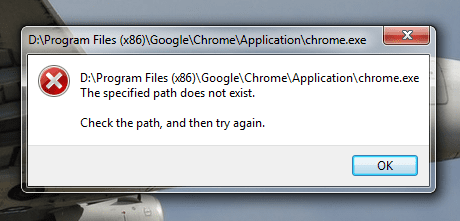
So basically, my problem is that start menu and desktop shortcuts for all programs I install point to the wrong locations.
This problem started happening after I recently reinstalled Windows, and as always, modified the registry to change the default "Program files" to the D:\ partition (My C:\ partition is reserved for Windows only)
I have made that change on earlier Windows installations, without any issues, but this time, shortcuts for all programs I install point to: D:\Program Files(x86)\, when in reality, most of these programs are 64 bit, and are located in the D:\Program Files\ directory.
The problem seems to only apply to 64 bit applications. If I install a 32 bit program, it will install in the x86 folder, and the shortcut will work properly.
I would greatly appreciate if anyone can come up with a solution to this problem as it is really annoying, because it basically renders all my start menu and desktop shortcuts useless.
Thank you in advance for any replies.
First of all, I want to apologize in advance if this has been asked and possibly solved earlier, I tried performing a search but couldn't find anything. If there already is a solution to my problem on the forum, I would be grateful if someone can provide a link.
So basically, my problem is that start menu and desktop shortcuts for all programs I install point to the wrong locations.
This problem started happening after I recently reinstalled Windows, and as always, modified the registry to change the default "Program files" to the D:\ partition (My C:\ partition is reserved for Windows only)
I have made that change on earlier Windows installations, without any issues, but this time, shortcuts for all programs I install point to: D:\Program Files(x86)\, when in reality, most of these programs are 64 bit, and are located in the D:\Program Files\ directory.
The problem seems to only apply to 64 bit applications. If I install a 32 bit program, it will install in the x86 folder, and the shortcut will work properly.
I would greatly appreciate if anyone can come up with a solution to this problem as it is really annoying, because it basically renders all my start menu and desktop shortcuts useless.
Thank you in advance for any replies.
Attachments
Last edited:
My Computer
At a glance
Windows 7 Ultimate x64Intel Core i5-4670K24 GBNvidia GeForce GTX 770
- Computer type
- PC/Desktop
- Computer Manufacturer/Model Number
- MSI
- OS
- Windows 7 Ultimate x64
- CPU
- Intel Core i5-4670K
- Motherboard
- MSI Z87M-G43, Socket-1150
- Memory
- 24 GB
- Graphics Card(s)
- Nvidia GeForce GTX 770
- Hard Drives
- 500 GB HDD
2 x 250 GB SSD
- Antivirus
- Norton Internet Security
- Browser
- Mozilla Firefox


