Puh-leeze Some Vista help -

zapp22

New member
Power User
VIP
Local time
9:27 PM
Messages
730
Location
Tejas, northern Mexico
this site has been huge help to me, but I fear the Vista crowd are hiding some dark secret ..:sarc:
with the right google search I find NUMEROUS posts about this, but its like a problem with an Apple product: people give flaky responses then duck in the sand.... "it doesn't exist".

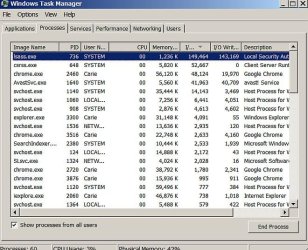
lsass.exe on a project thinkpad T61 running 32-bit vista. ... I have scrubbed this system so clean it squeaks, and the one remaining issue is that lsass.exe on it, unlike on my windows 7 systems, consumes resources like mad. the main symptom is that it is always and forever the leader in I/O reads/writes. it never stops pinging the HDD. when I compare to either my windows home premium x64 or Ultimate x64, the number of reads/writes in a given timeframe is 10x. and it never stops.

there was/is a malware worm out that looks/smells like lsass. I"ve checked for that and none found. this is the real deal, but something in the system causes it to constantly check authentication/s. there is only one user account.

answers I've gotten elsewhere imply to me that this is one of those mystic furtive dark secrets of vista that may not be discussed. it can't be fixed? the "fix" is 7? I dunno.

help if you can please. :geek:
 

My Computer My Computer

Computer Manufacturer/Model Number
HP DC7600, HP DC7600[2], HP DC7100, Samsung NC10
OS
Windows XP Pro SP3, Windows 7 Pro 32-bit, Windows 7 Ultimate 64bit, Windows XP Home SP3
CPU
Pentium 4 3.2GHz, Pentium 4 3.4GHz 64bit, Atom,
Motherboard
Dunno
Memory
4GB matched, 1GB, 2.5GB, 4.0 GB
Graphics Card(s)
Geforce 8400 GS and others
Sound Card
RealteK ALC260 and others
Monitor(s) Displays
Asus HD
Screen Resolution
1920x1080
Hard Drives
WD Caviar 640gb SATA
Cooling
We Be Cool
Have you looked all through here? I see you've also asked the same question on different forums :(
Google
 

My Computer My Computer

Computer type
PC/Desktop
Computer Manufacturer/Model Number
Bruce ... somewhere in his 40's
OS
Windows 7 Ultimate 32bit SP1
CPU
Intel(R) Core(TM)2 Quad CPU @ 2.40GHz, 2400 MHz
Motherboard
INTEL/D975XBX2
Memory
4 GB
Graphics Card(s)
ATI Radeon HD 2600 Pro
Monitor(s) Displays
Samsung SyncMaster 914v
Screen Resolution
1280 x 1024
Hard Drives
2/500GB each ... ST3500630AS ATA Device.
One is not connected
PSU
Rocketfish 700 W
Case
G.Skill Gigabyte Chassis
Keyboard
Standard PS/2 Keyboard
Mouse
Microsoft PS/2 Mouse
Internet Speed
DSL
Antivirus
Avira Internet Security
Browser
IE 11
Other Info
ATI HDMI Audio
yep, its like I've stumbled onto some dark family secret and once folks understand the issue I'm onto, they just step way back. mum's the word. as I type this on my very nice win7 notebook, the ill one is sitting on the workbench, doing what it does best: accumulating a huge snowball of I/O's ad infinitum.... tick-tick-tick tick-tick-tick. it will be 100,000 by end of day. I wonder if the lsass.exe in 7 is identical to the one in vista? i may pull the drive and do a delete/replace
 

My Computer My Computer

Computer Manufacturer/Model Number
HP DC7600, HP DC7600[2], HP DC7100, Samsung NC10
OS
Windows XP Pro SP3, Windows 7 Pro 32-bit, Windows 7 Ultimate 64bit, Windows XP Home SP3
CPU
Pentium 4 3.2GHz, Pentium 4 3.4GHz 64bit, Atom,
Motherboard
Dunno
Memory
4GB matched, 1GB, 2.5GB, 4.0 GB
Graphics Card(s)
Geforce 8400 GS and others
Sound Card
RealteK ALC260 and others
Monitor(s) Displays
Asus HD
Screen Resolution
1920x1080
Hard Drives
WD Caviar 640gb SATA
Cooling
We Be Cool
I think an xperf log is in order here. Install the tools themselves as per my tutorial, but don't take any of the traces specified there. Instead, run the following command from an elevated cmd prompt (this is all one line - watch the word wrap!):
Code:
xperf -on LATENCY+DISPATCHER+DRIVERS+DISK_IO_INIT+NETWORKTRACE+MEMINFO+POWER+PERF_COUNTER+PRIORITY+REGISTRY+FILE_IO+FILE_IO_INIT -stackWalk Profile+ProcessCreate+CSwitch+ReadyThread+Mark+ThreadCreate+DiskReadInit+DiskWriteInit+DiskFlushInit+RegSetValue+RegCreateKey+RegSetInformation
This should start a trace - assuming the issue is ongoing, letting it run for only a minute or two should be sufficient (please don't use the system in any other way at this point than what it takes to reproduce the issue, which I would assume is simply letting it sit idle...). Once a minute or two has passed, run this command to stop the trace and save the .etl file:
Code:
xperf -d lsass.etl
That will save a file called lsass.etl in the path that the elevated cmd prompt is pointed to (usually C:\windows\system32, but check the path on the cmd to be sure). That file needs to be compressed and uploaded somewhere we can download it for analysis.
 

My Computer My Computer

Computer type
PC/Desktop
Computer Manufacturer/Model Number
Custom
OS
Windows 10 Pro x64
CPU
Intel Core i7 4790K @ 4.5GHz
Motherboard
Asus Maximus Hero VII
Memory
32GB DDR3
Graphics Card(s)
Nvidia GeForce GTX970
Sound Card
Realtek HD Audio
Screen Resolution
1920x1200
Hard Drives
1x Samsung 250GB SSD
4x WD RE 2TB (RAIDZ)
PSU
Corsair AX760i
Case
Fractal Design Define R4
Cooling
Noctua NH-D15
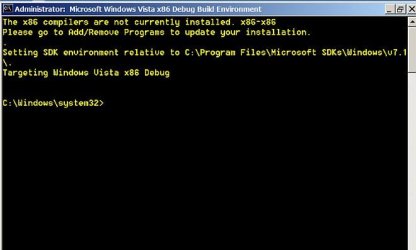
thank you much for your help. did as per instructions but after typing in [couldn't paste it] the string I got an error "xperf is not recognized as an internal or external command" etc.
apparently I'm missing some package/utility or something.
also prior to installing the sdk I tried to prep by installing .NET 4 but the install failed.
pls advise
 

My Computer My Computer

Computer Manufacturer/Model Number
HP DC7600, HP DC7600[2], HP DC7100, Samsung NC10
OS
Windows XP Pro SP3, Windows 7 Pro 32-bit, Windows 7 Ultimate 64bit, Windows XP Home SP3
CPU
Pentium 4 3.2GHz, Pentium 4 3.4GHz 64bit, Atom,
Motherboard
Dunno
Memory
4GB matched, 1GB, 2.5GB, 4.0 GB
Graphics Card(s)
Geforce 8400 GS and others
Sound Card
RealteK ALC260 and others
Monitor(s) Displays
Asus HD
Screen Resolution
1920x1080
Hard Drives
WD Caviar 640gb SATA
Cooling
We Be Cool
error msg re: .NET attached
 

Attachments

  • fail.jpg
    fail.jpg
    53.6 KB · Views: 2

My Computer My Computer

Computer Manufacturer/Model Number
HP DC7600, HP DC7600[2], HP DC7100, Samsung NC10
OS
Windows XP Pro SP3, Windows 7 Pro 32-bit, Windows 7 Ultimate 64bit, Windows XP Home SP3
CPU
Pentium 4 3.2GHz, Pentium 4 3.4GHz 64bit, Atom,
Motherboard
Dunno
Memory
4GB matched, 1GB, 2.5GB, 4.0 GB
Graphics Card(s)
Geforce 8400 GS and others
Sound Card
RealteK ALC260 and others
Monitor(s) Displays
Asus HD
Screen Resolution
1920x1080
Hard Drives
WD Caviar 640gb SATA
Cooling
We Be Cool
showing the activity in lsass after fresh boot this a.m. around 8'ish
 

Attachments

  • lsass.jpg
    lsass.jpg
    75.2 KB · Views: 8

My Computer My Computer

Computer Manufacturer/Model Number
HP DC7600, HP DC7600[2], HP DC7100, Samsung NC10
OS
Windows XP Pro SP3, Windows 7 Pro 32-bit, Windows 7 Ultimate 64bit, Windows XP Home SP3
CPU
Pentium 4 3.2GHz, Pentium 4 3.4GHz 64bit, Atom,
Motherboard
Dunno
Memory
4GB matched, 1GB, 2.5GB, 4.0 GB
Graphics Card(s)
Geforce 8400 GS and others
Sound Card
RealteK ALC260 and others
Monitor(s) Displays
Asus HD
Screen Resolution
1920x1080
Hard Drives
WD Caviar 640gb SATA
Cooling
We Be Cool
Did you download and install the toolset itself as per my instructions? Ignore the .net 4 errors and continue with the instructions in my guide, btw - the tool you're going to end up using does not need it in any way.
 

My Computer My Computer

Computer type
PC/Desktop
Computer Manufacturer/Model Number
Custom
OS
Windows 10 Pro x64
CPU
Intel Core i7 4790K @ 4.5GHz
Motherboard
Asus Maximus Hero VII
Memory
32GB DDR3
Graphics Card(s)
Nvidia GeForce GTX970
Sound Card
Realtek HD Audio
Screen Resolution
1920x1200
Hard Drives
1x Samsung 250GB SSD
4x WD RE 2TB (RAIDZ)
PSU
Corsair AX760i
Case
Fractal Design Define R4
Cooling
Noctua NH-D15
Did you download and install the toolset itself as per my instructions? Ignore the .net 4 errors and continue with the instructions in my guide, btw - the tool you're going to end up using does not need it in any way.

yep. installed the toolkit, picked only that one selection per your tut, and it installed with no errors. is there anything I should check? does it require a reboot? nothing flagged me about that.
 

My Computer My Computer

Computer Manufacturer/Model Number
HP DC7600, HP DC7600[2], HP DC7100, Samsung NC10
OS
Windows XP Pro SP3, Windows 7 Pro 32-bit, Windows 7 Ultimate 64bit, Windows XP Home SP3
CPU
Pentium 4 3.2GHz, Pentium 4 3.4GHz 64bit, Atom,
Motherboard
Dunno
Memory
4GB matched, 1GB, 2.5GB, 4.0 GB
Graphics Card(s)
Geforce 8400 GS and others
Sound Card
RealteK ALC260 and others
Monitor(s) Displays
Asus HD
Screen Resolution
1920x1080
Hard Drives
WD Caviar 640gb SATA
Cooling
We Be Cool
is this the reason?

check this error : what do I need?
 

Attachments

  • error.jpg
    error.jpg
    22.1 KB · Views: 9

My Computer My Computer

Computer Manufacturer/Model Number
HP DC7600, HP DC7600[2], HP DC7100, Samsung NC10
OS
Windows XP Pro SP3, Windows 7 Pro 32-bit, Windows 7 Ultimate 64bit, Windows XP Home SP3
CPU
Pentium 4 3.2GHz, Pentium 4 3.4GHz 64bit, Atom,
Motherboard
Dunno
Memory
4GB matched, 1GB, 2.5GB, 4.0 GB
Graphics Card(s)
Geforce 8400 GS and others
Sound Card
RealteK ALC260 and others
Monitor(s) Displays
Asus HD
Screen Resolution
1920x1080
Hard Drives
WD Caviar 640gb SATA
Cooling
We Be Cool
just fwiw. when I "create" a .dmp file for lsass.exe - it returns a message that the file has been created and gives the default path of the file. I go there to find it and its not there :sarc:
 

My Computer My Computer

Computer Manufacturer/Model Number
HP DC7600, HP DC7600[2], HP DC7100, Samsung NC10
OS
Windows XP Pro SP3, Windows 7 Pro 32-bit, Windows 7 Ultimate 64bit, Windows XP Home SP3
CPU
Pentium 4 3.2GHz, Pentium 4 3.4GHz 64bit, Atom,
Motherboard
Dunno
Memory
4GB matched, 1GB, 2.5GB, 4.0 GB
Graphics Card(s)
Geforce 8400 GS and others
Sound Card
RealteK ALC260 and others
Monitor(s) Displays
Asus HD
Screen Resolution
1920x1080
Hard Drives
WD Caviar 640gb SATA
Cooling
We Be Cool
Back
Top