You do t follow any advice so I don't know why I bother.
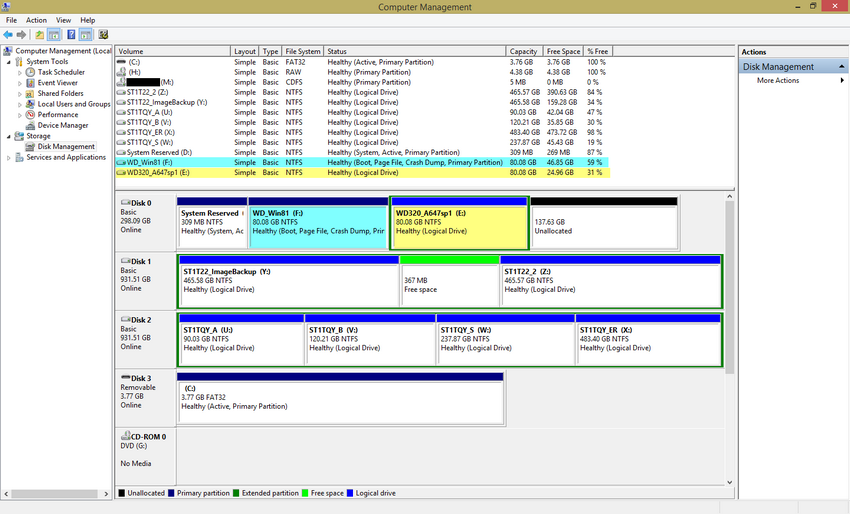
Why are all your OS partitions Logical.
Why were the other hard drives not unplugged during install as you were told?
You appear to have deliberately put 8 OS behind every data partition on the slowest end of the drive.
Use Partition Wizard to convert 8 partition to Primary then unplug the other drives to run Automatic RepAir from 8 disk until it starts and is independently bootable via the BIOS.
Links are all in previous posts ignored.
Thank you for the reply. Kindly see below

As mentioned I am not a techy and again am asking for patience from you guys.
Why were the other hard drives not unplugged during install as you were told?
-- Pardon sir but I did unplugged the other hard drives during the install. The system has 3 hard drives. The ones starting with "ST" (--which is Disk 1 and Disk 2) are Seagate drives. I did unplugged them when I installed the Windows 8.1 the first time.
I just plugged them back after I formatted the partition intended with Windows 8.1.
The Windows 8.1 format I did was done with only Disk 0 plugged in with the ReadyBoost / Multiboot USB with the DVDROM drives. Nothing else was plugged.
The Windows 8.1 format was "raw format" I call it (for the Windows 8.1 install). That raw format I backed-up via Acronis (--via multiboot usb) so if there are any issues I'll just have to recover that raw image and not re-format if warranted. That was just an idea so I 'll save time perhaps.
Is that good? Or if I have issues I just need to format again and again?
During the format I did not have any issues. Actually it went great. A bit slow but booted fine (--though it was very slow).
The first location intended was the last partition which was WD_T in Disk 0 (formerly WD_V). I did format Windows 8.1 there but since I experienced a very very slow boot that I think may be attributed to a small space. I deleted that and transferred it to the new location WD_V in Disk 1. I do not know if it is one of the reasons why I have this slow boot or not but the bigger size I wish have helped. But I think if there was any improvement to the boot time it was not significant.
Why are all your OS partitions Logical.
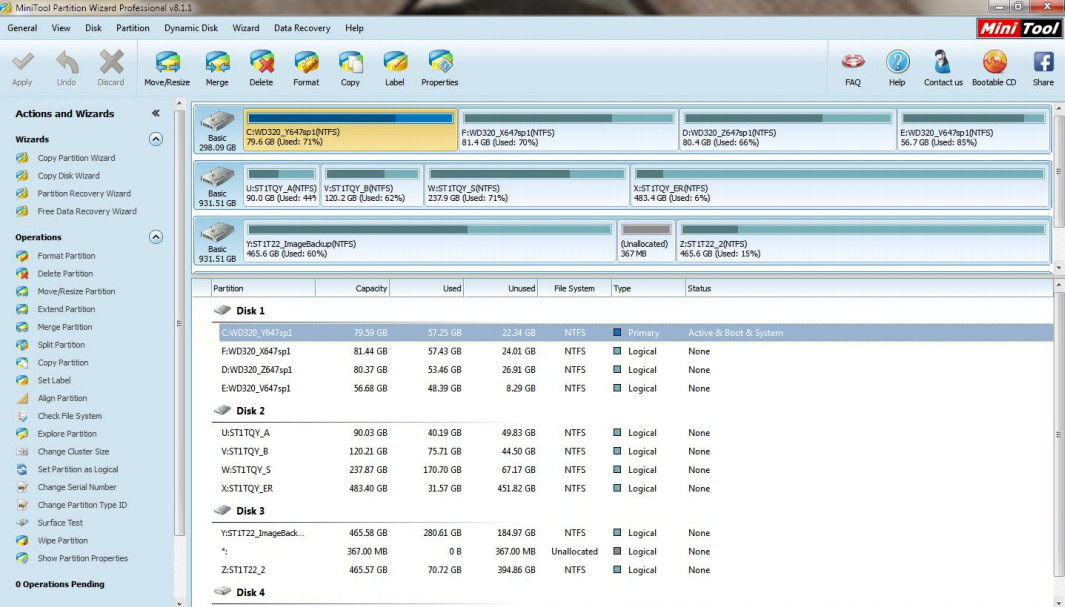
-- Pardon again for that. As I mentioned I am not an expert. Kindly see the image of Minitool prior doing this endeavor. This was how I got this desktop from the office. I had the tech set it up so I can use it at home and not be bothered or have some issues if and ever someone at home uses the desktop. As mentioned each partition has its own purpose there. There is shows that all are "Logical".
Now if that is bad
please have patience with me for this setup. My work is mechanical in nature (semiconductor manufacturing) my forte is not geared towards pc systems but in manufacturing -- assembly/testing of IC and semiconductors. I try to learn here and have learned some but not all have the learning curve as a computer experts. Asking techs at work isn't worthwhile also because they only try to do something for you and make it work just to not have you bother them again. Here at this forum there is true learning here. I just ask for more patience for the help you and the guys are giving.
Please tell me what should I do and again am asking for pardon and patience.
I think I can correct these with Minitool. I just may have missed that part in the links given.
You appear to have deliberately put 8 OS behind every data partition on the slowest end of the drive.
-- I mentioned that in the first post. I intended to place it there thinking that it may affect the Win 7 partitions that I use especially the ones I use for work.
If I have missed that I should have placed it at the very first partition then pardon me again.
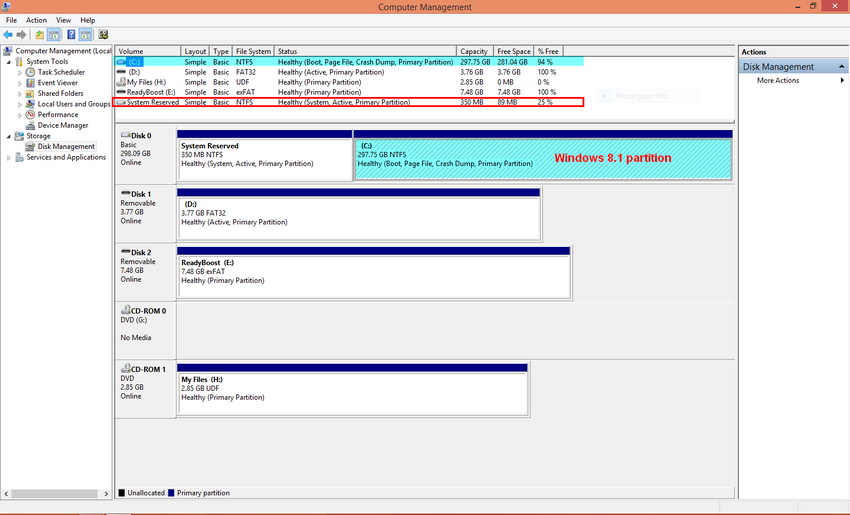
One thing I have to mention is that formerly the first partition(main partition) has the System Reserved inside it. You will see in the former image of the setup there is no System Reserved seen there in the Computer Management image. That was the reluctance before. If I format it there I may loose the System Reserved there because I need to delete that and create a new one for Windows 8.1. I may have boot issues. Or that the other partitions in Disk 0 may not boot either especially the work partition I use. But I may be wrong there also. If I was please pardon me again for that.
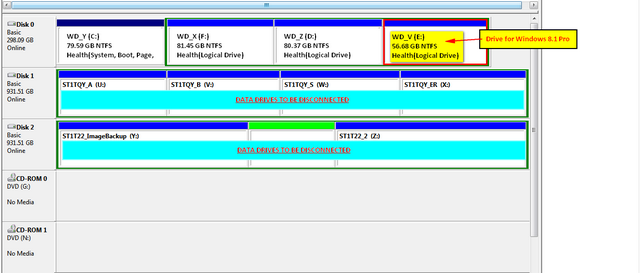
See image below of Computer Management prior the endeavor.
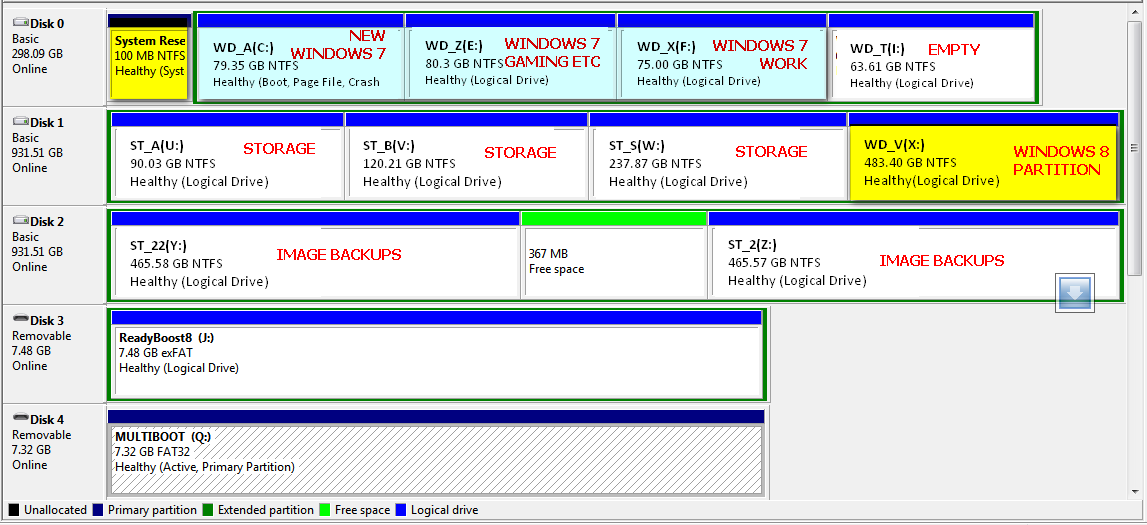
The new setup image of Computer Management is below after I encountered issues and have to format a new Windows 7 partition just to have the System Reserved back.
The second format (see image above again) I did because I did have issues(or accidentally did something wrong and was not able to even recover the former setup with the Acronis image backup--even when it was validated good) now shows a System Reserved there.
Use Partition Wizard to convert 8 partition to Primary then unplug the other drives to run Automatic RepAir from 8 disk until it starts and is independently bootable via the BIOS.
-- Will do that and be back here.
You must have missed my explanation that during installation 8.1 should configure a multi-boot with the other OS's. If not you can add them using EasyBCD from 8.1. If any other OS's show up on the EasyBCD boot menu but they will not boot or do not offer a Boot Menu, then delete them first before adding again. This is how you reset listings on EasyBCD, simply delete ones not working and add them again.
-- If I erase and delete all partitions in Disk 0 and format Windows 8.1 there, can I partition it (add 2 more partitions) and recover via Acronis my Win 7 partitions after the format..? So I'l have:
Partition 1: Windows 8.1 Partition
Partition 2: Windows 7 partition -- work
Partition 3: Windows 7 partition -- casual use
Scenario is sound but am no expert here and again may have missed/misunderstood something. Will there be boot issues with the Win 7 recovered partitions?
You mentioned that 8.1 "should configure a multi-boot with the other OS's".
Will it be more easier to leave the Win 7 partitions alone and just delete the first partition (which is now WD_A) format Windows 8.1 there?
Or a clean HDD Disk 0 is better then afterwards recover the Win 7 partitions I desire via Acronis?
Which do you think is better?
Also since Windows 8.1 boots slower than Win 7 I plan to use Win 7 as the main partition. Set it in EasyBCD as the boot partition, second is the Windows 8.1 and so on and so forth.
I really appreciate the help that you guys give here. There were delays in doing this endeavor (as mentioned we also had a death in the family --my Dad, work absences and work delays). But I try to cope up and am really decided in doing this endeavor and making it work. I just do not have the technical capability to do it.
Now is the time to use a new OS. Late but that is why I try to endeavor this. The tech's at work do not help so I try to look for other options. It this was work (semiconductor manufacturing) that will be a piece of cake for me but this is not work and that is why I come here to learn and seek help from you guys. I hope you and the guys understand and may you have more patience with me.