I customized my system so that it shows me what files and folders are hardlinks or symlinks. It's harmless. Hardlinks and symlinks (aka symbolic links) basically works the same way as shortcuts, but they are more complex in that the OS recognize them as individual file or folder and not just shortcuts. So if for example I dropped a hardlink on my desktop, my OS will think that it is actually in the desktop although it's original location is different and amazingly enough they don't consume disk space. Those are the basics.
My Computer
At a glance
Windows 7 Professional x64 | Windows ME | Win...Intel Mobile Core 2 Duo SU7300 @ 1.30GHz3 GB HDDR3 411MHzMobile Intel 4 Series Express Chipset Family
Computer Manufacturer/Model Number
ASUS UL80A
OS
Windows 7 Professional x64 | Windows ME | Windows 8 Dev Preview
This is an update. UxStyle Core is giving me a lot of problems so I switched to Universal Theme Patcher. I'm worried that if I run sfc scan, the patched file will revert to the original and my themes will break. Can you confirm on this?
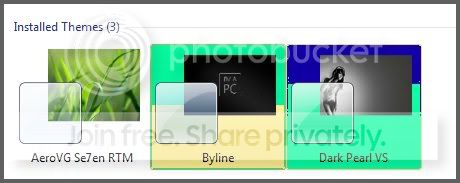
Anyway, I made some progress on my theme but I have a problem with this:
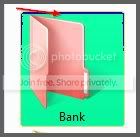
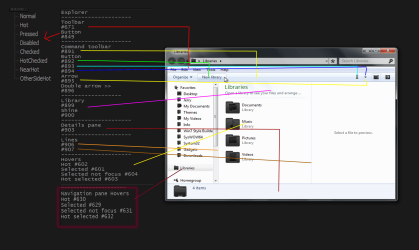
It's the color of the item-hover/selection. I'm certain that I didn't use those colors (blue and mint green) so I have no idea why it appeared like that. The folder/file select background images are nos. 629-632 and the Themes selection background color are nos. 601-604.
My Computer
At a glance
Windows 7 Professional x64 | Windows ME | Win...Intel Mobile Core 2 Duo SU7300 @ 1.30GHz3 GB HDDR3 411MHzMobile Intel 4 Series Express Chipset Family
Computer Manufacturer/Model Number
ASUS UL80A
OS
Windows 7 Professional x64 | Windows ME | Windows 8 Dev Preview
When you run sfc /scannow it checks and repairs system files so any .dll that have been modified by you or Universal Theme Patcher will revert back to the default.
When UxStyle does not work right you need to switch to the default Aero theme and do the following.
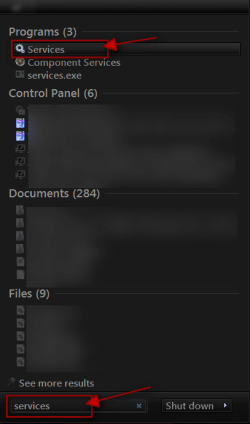
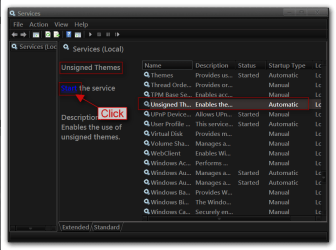
Click on the Start Button type in Services In the search box and then click on Services
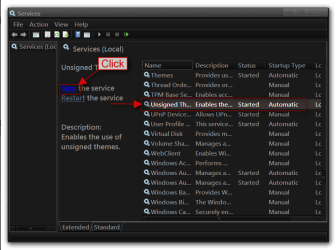
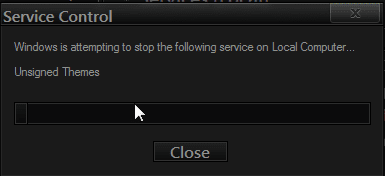
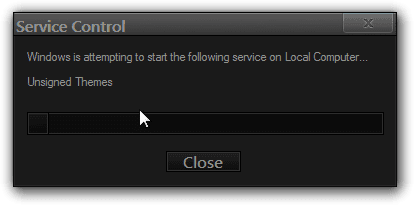
Scroll down until you see unsigned themes select it in click on the Stop text and let it stop after that click on Start text and see if that works. Your screen may blink when you do this.
As for the problems you are having with the hover images it must be the way you are editing them that is causing the problem. I am not sure why you are getting a different color either. If you zip up your .msstyles and post it here I will look at it.
Jerry
My Computer
At a glance
Win 7 Pro x64 / Win 10 ProIntel(R) Core(TM) i7-3630QM CPU @ 2.40GHz12 GB(1) Intel(R) HD Graphics 4000 (2) NVIDIA GeFo...
Computer type
Laptop
Computer Manufacturer/Model Number
Sager NP9170
OS
Win 7 Pro x64 / Win 10 Pro
CPU
Intel(R) Core(TM) i7-3630QM CPU @ 2.40GHz
Motherboard
CLEVO P170EM
Memory
12 GB
Graphics Card(s)
(1) Intel(R) HD Graphics 4000 (2) NVIDIA GeForce GTX 675M
Sound Card
(1) Realtek High Definition Audio (2) Intel(R) Display Aud
Monitor(s) Displays
17.3
Screen Resolution
1920x1080
Hard Drives
(1) Samsung 860 EVO 500GB(OS) (1) Samsung 860 EVO 500GB(Data)
Keyboard
Backlite
Antivirus
MSE, Malwarebytes Pro
Browser
Firefox
Other Info
DESKTOP: Custom-built.
OS: Win 10 Pro x64.
CASE: Rosewill R5.
CPU: Intel I5 4670K CPU @ 3.40GHz.
CPU COOLER: Cool Master Hyper 212 EVO.
MOTHERBOARD: Asus Z87-A.
MEMORY: Kingston HyperX 2x4 GB.
GPU: Nvidia Geforce 650 TI.
PSU: Corsair TX750.
DRIVES: (1) Samsung 840 120 GB SSD (2) Western Digital blue 500 GB 7200 RPM.
Jerry,
Yup, I checked if the service is running but no matter what, my custom theme keeps reverting back to classic so I gave up and switched to Universal Theme Patcher. It delayed my theme testing so much so I'll stick with Universal Theme Patcher for a while until I'm finished building my theme.
Anyway, here's my .msstyle file: https://www.dropbox.com/sh/5i4jttxkm2x0xxw/OR7kcdVv6O/Byline.7z
It's still in early phase so there's not much difference yet from the original Aero. I don't want to modify a lot of images without fixing the problems first, so right now I'm stuck. Please take a look at it and tell me what needs to be fixed.
My Computer
At a glance
Windows 7 Professional x64 | Windows ME | Win...Intel Mobile Core 2 Duo SU7300 @ 1.30GHz3 GB HDDR3 411MHzMobile Intel 4 Series Express Chipset Family
Computer Manufacturer/Model Number
ASUS UL80A
OS
Windows 7 Professional x64 | Windows ME | Windows 8 Dev Preview
I just looked at your .msstyles and I cannot find what is causing the problem(When testing mine looks the same as your screenshot), those image numbers you listed above I looked at and they look fine, I am going to guess you have a corrupt .msstyles my suggestion would be to start with a new .msstyles and try again.
Jerry
My Computer
At a glance
Win 7 Pro x64 / Win 10 ProIntel(R) Core(TM) i7-3630QM CPU @ 2.40GHz12 GB(1) Intel(R) HD Graphics 4000 (2) NVIDIA GeFo...
Computer type
Laptop
Computer Manufacturer/Model Number
Sager NP9170
OS
Win 7 Pro x64 / Win 10 Pro
CPU
Intel(R) Core(TM) i7-3630QM CPU @ 2.40GHz
Motherboard
CLEVO P170EM
Memory
12 GB
Graphics Card(s)
(1) Intel(R) HD Graphics 4000 (2) NVIDIA GeForce GTX 675M
Sound Card
(1) Realtek High Definition Audio (2) Intel(R) Display Aud
Monitor(s) Displays
17.3
Screen Resolution
1920x1080
Hard Drives
(1) Samsung 860 EVO 500GB(OS) (1) Samsung 860 EVO 500GB(Data)
Keyboard
Backlite
Antivirus
MSE, Malwarebytes Pro
Browser
Firefox
Other Info
DESKTOP: Custom-built.
OS: Win 10 Pro x64.
CASE: Rosewill R5.
CPU: Intel I5 4670K CPU @ 3.40GHz.
CPU COOLER: Cool Master Hyper 212 EVO.
MOTHERBOARD: Asus Z87-A.
MEMORY: Kingston HyperX 2x4 GB.
GPU: Nvidia Geforce 650 TI.
PSU: Corsair TX750.
DRIVES: (1) Samsung 840 120 GB SSD (2) Western Digital blue 500 GB 7200 RPM.
I guess that's okay. Good thing I only have to drag-n-drop the images.
Anyway, here's image nos. 516 (buttons) & 517 (radio buttons)
Could you tell which one is "hot", "disabled", "normal", etc.? I numbered them for our convenience.
My Computer
At a glance
Windows 7 Professional x64 | Windows ME | Win...Intel Mobile Core 2 Duo SU7300 @ 1.30GHz3 GB HDDR3 411MHzMobile Intel 4 Series Express Chipset Family
Computer Manufacturer/Model Number
ASUS UL80A
OS
Windows 7 Professional x64 | Windows ME | Windows 8 Dev Preview
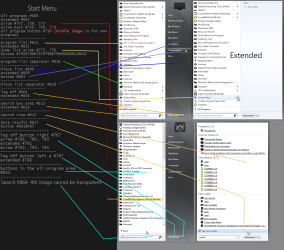
Here is the start menu.
I will start next week on the Explorer window there are so many elements to it I will probably do it in stages (a few areas at a time).
Jerry
My Computer
At a glance
Win 7 Pro x64 / Win 10 ProIntel(R) Core(TM) i7-3630QM CPU @ 2.40GHz12 GB(1) Intel(R) HD Graphics 4000 (2) NVIDIA GeFo...
Computer type
Laptop
Computer Manufacturer/Model Number
Sager NP9170
OS
Win 7 Pro x64 / Win 10 Pro
CPU
Intel(R) Core(TM) i7-3630QM CPU @ 2.40GHz
Motherboard
CLEVO P170EM
Memory
12 GB
Graphics Card(s)
(1) Intel(R) HD Graphics 4000 (2) NVIDIA GeForce GTX 675M
Sound Card
(1) Realtek High Definition Audio (2) Intel(R) Display Aud
Monitor(s) Displays
17.3
Screen Resolution
1920x1080
Hard Drives
(1) Samsung 860 EVO 500GB(OS) (1) Samsung 860 EVO 500GB(Data)
Keyboard
Backlite
Antivirus
MSE, Malwarebytes Pro
Browser
Firefox
Other Info
DESKTOP: Custom-built.
OS: Win 10 Pro x64.
CASE: Rosewill R5.
CPU: Intel I5 4670K CPU @ 3.40GHz.
CPU COOLER: Cool Master Hyper 212 EVO.
MOTHERBOARD: Asus Z87-A.
MEMORY: Kingston HyperX 2x4 GB.
GPU: Nvidia Geforce 650 TI.
PSU: Corsair TX750.
DRIVES: (1) Samsung 840 120 GB SSD (2) Western Digital blue 500 GB 7200 RPM.
Hot and hover are just about the same, hot can be if something is active or if you move the mouse over it where hover is just a hover. I make hot and hover the same image when making a theme.
Jerry
My Computer
At a glance
Win 7 Pro x64 / Win 10 ProIntel(R) Core(TM) i7-3630QM CPU @ 2.40GHz12 GB(1) Intel(R) HD Graphics 4000 (2) NVIDIA GeFo...
Computer type
Laptop
Computer Manufacturer/Model Number
Sager NP9170
OS
Win 7 Pro x64 / Win 10 Pro
CPU
Intel(R) Core(TM) i7-3630QM CPU @ 2.40GHz
Motherboard
CLEVO P170EM
Memory
12 GB
Graphics Card(s)
(1) Intel(R) HD Graphics 4000 (2) NVIDIA GeForce GTX 675M
Sound Card
(1) Realtek High Definition Audio (2) Intel(R) Display Aud
Monitor(s) Displays
17.3
Screen Resolution
1920x1080
Hard Drives
(1) Samsung 860 EVO 500GB(OS) (1) Samsung 860 EVO 500GB(Data)
Keyboard
Backlite
Antivirus
MSE, Malwarebytes Pro
Browser
Firefox
Other Info
DESKTOP: Custom-built.
OS: Win 10 Pro x64.
CASE: Rosewill R5.
CPU: Intel I5 4670K CPU @ 3.40GHz.
CPU COOLER: Cool Master Hyper 212 EVO.
MOTHERBOARD: Asus Z87-A.
MEMORY: Kingston HyperX 2x4 GB.
GPU: Nvidia Geforce 650 TI.
PSU: Corsair TX750.
DRIVES: (1) Samsung 840 120 GB SSD (2) Western Digital blue 500 GB 7200 RPM.
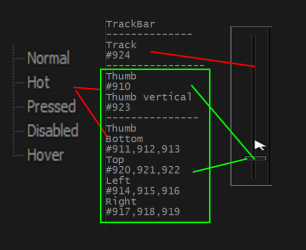
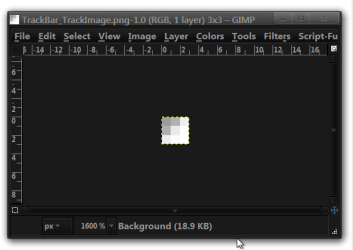
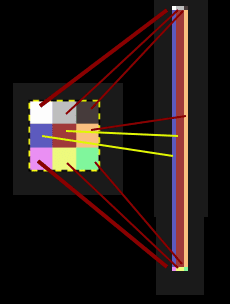
Here is a another hint on the trackbar track the image is 3 by 3 pixels in each pixel controls that track the very middle pixel is the center of the track all the outside pixels control the outside of the track and each pixel is relative to his position in the track if you would color one corner different than the others just a corner would be that color.
Jerry
My Computer
At a glance
Win 7 Pro x64 / Win 10 ProIntel(R) Core(TM) i7-3630QM CPU @ 2.40GHz12 GB(1) Intel(R) HD Graphics 4000 (2) NVIDIA GeFo...
Computer type
Laptop
Computer Manufacturer/Model Number
Sager NP9170
OS
Win 7 Pro x64 / Win 10 Pro
CPU
Intel(R) Core(TM) i7-3630QM CPU @ 2.40GHz
Motherboard
CLEVO P170EM
Memory
12 GB
Graphics Card(s)
(1) Intel(R) HD Graphics 4000 (2) NVIDIA GeForce GTX 675M
Sound Card
(1) Realtek High Definition Audio (2) Intel(R) Display Aud
Monitor(s) Displays
17.3
Screen Resolution
1920x1080
Hard Drives
(1) Samsung 860 EVO 500GB(OS) (1) Samsung 860 EVO 500GB(Data)
Keyboard
Backlite
Antivirus
MSE, Malwarebytes Pro
Browser
Firefox
Other Info
DESKTOP: Custom-built.
OS: Win 10 Pro x64.
CASE: Rosewill R5.
CPU: Intel I5 4670K CPU @ 3.40GHz.
CPU COOLER: Cool Master Hyper 212 EVO.
MOTHERBOARD: Asus Z87-A.
MEMORY: Kingston HyperX 2x4 GB.
GPU: Nvidia Geforce 650 TI.
PSU: Corsair TX750.
DRIVES: (1) Samsung 840 120 GB SSD (2) Western Digital blue 500 GB 7200 RPM.
Here is a another hint on the trackbar track the image is 3 by 3 pixels in each pixel controls that track the very middle pixel is the center of the track all the outside pixels control the outside of the track and each pixel is relative to his position in the track if you would color one corner different than the others just a corner would be that color.
Jerry View attachment 207120
Here is a another hint on the trackbar track the image is 3 by 3 pixels in each pixel controls that track the very middle pixel is the center of the track all the outside pixels control the outside of the track and each pixel is relative to his position in the track if you would color one corner different than the others just a corner would be that color.
Jerry View attachment 207120