Solved Questions: Changing start menu & Explorer

M10000

New member
Local time
7:38 PM
Messages
25
Hi,

I bought new computer yesterday and I don`t like the start menu so I changed it to the XP version (after looking it up on the Internet).

But when I should've left well enough alone, the menu was changed, and several hours later, I'm trying to see what I did wrong.


1. My first question is how do I change start menu to the XP version?

2. How do you change the arrows in Windows Explorer to the + sign?

3. How to change their rotating circle back (that took the place of the hour glass)?

4. I don't like Windows live Mail. Is there an alternative besides using a web based e-mail like Yahoo!? [I used to use Outlook express]


Thank you in advance for the help. I have looked up these things online but I've been on the computer too much in the last 24 hours.

Bye,
Mark
 

My Computer

Computer type
PC/Desktop
Computer Manufacturer/Model Number
HP Pavilion Media Center a1328x Desktop PC
OS
windows 7, 64 bit
CPU
Pentium4 524 (P) HT 3.06 GHz
Motherboard
HP/Compaq motherboard name: Agena-GL8E
Memory
2 GB
Graphics Card(s)
ATI Radeon Xpress 200 for Intel Processors
Mouse
Logitech m325
Internet Speed
ADSL
Antivirus
Telus Security Service
Browser
Google
Hi,

I bought new computer yesterday and I don`t like the start menu so I changed it to the XP version (after looking it up on the Internet).

But when I should've left well enough alone, the menu was changed, and several hours later, I'm trying to see what I did wrong.


1. My first question is how do I change start menu to the XP version?

2. How do you change the arrows in Windows Explorer to the + sign?

3. How to change their rotating circle back (that took the place of the hour glass)?

4. I don't like Windows live Mail. Is there an alternative besides using a web based e-mail like Yahoo!? [I used to use Outlook express]


Thank you in advance for the help. I have looked up these things online but I've been on the computer too much in the last 24 hours.

Bye,
Mark
Welcome to the Seven Forums
#1
Have a look at this
http://www.sevenforums.com/customization/142724-ann-classic-shell-2-9-3-out-now-search.html
Classic Shell: Gallery
#2
We need more of an explanation on what you mean by changing the arrows to + sign maybe a screenshot would help.
How to Use the Snipping Tool in Vista - Vista Forums
http://www.sevenforums.com/tutorials/9733-screenshots-files-upload-post-seven-forums.html
http://www.sevenforums.com/tutorials/9717-screenshot-paint.html

#3
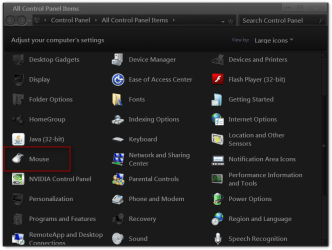
Open the control panel click on Mouse
All Control Panel Items.png

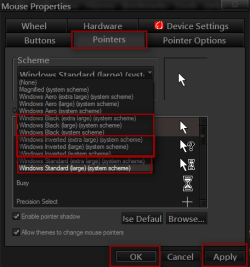
Click on Pointers and choose one of the three highlighted in red and you should have the hourglass back be sure to click Apply then OK.
2.png

#4
I use Thunderbird. Mozilla Thunderbird

Jerry
 

My Computer

Computer type
Laptop
Computer Manufacturer/Model Number
Sager NP9170
OS
Win 7 Pro x64 / Win 10 Pro
CPU
Intel(R) Core(TM) i7-3630QM CPU @ 2.40GHz
Motherboard
CLEVO P170EM
Memory
12 GB
Graphics Card(s)
(1) Intel(R) HD Graphics 4000 (2) NVIDIA GeForce GTX 675M
Sound Card
(1) Realtek High Definition Audio (2) Intel(R) Display Aud
Monitor(s) Displays
17.3
Screen Resolution
1920x1080
Hard Drives
(1) Samsung 860 EVO 500GB(OS) (1) Samsung 860 EVO 500GB(Data)
Keyboard
Backlite
Antivirus
MSE, Malwarebytes Pro
Browser
Firefox
Other Info
DESKTOP: Custom-built.
OS: Win 10 Pro x64.
CASE: Rosewill R5.
CPU: Intel I5 4670K CPU @ 3.40GHz.
CPU COOLER: Cool Master Hyper 212 EVO.
MOTHERBOARD: Asus Z87-A.
MEMORY: Kingston HyperX 2x4 GB.
GPU: Nvidia Geforce 650 TI.
PSU: Corsair TX750.
DRIVES: (1) Samsung 840 120 GB SSD (2) Western Digital blue 500 GB 7200 RPM.
Hi Jerry,
I tried Classic Shell but it didnt work for me. (Even though it worked for me yesterday, but then I didnt leave it alone when I should have.

I made a video. You can see there is no change when I choose "Window key opens":

- Classic Start Menu
- Windows Start Menu


#2 Checkmarks
- resolved. See the end of video. Thank you.

#3 Mouse
- resolved. Thank you

#4 Thunderbird.
- Im going to look into next.
I imported Outlook Express into Windows Live Mail but it didnt work. I tried again. (Ive imported mail settings before on Win XP)

Thank you again
Mark
;-)
 

My Computer

Computer type
PC/Desktop
Computer Manufacturer/Model Number
HP Pavilion Media Center a1328x Desktop PC
OS
windows 7, 64 bit
CPU
Pentium4 524 (P) HT 3.06 GHz
Motherboard
HP/Compaq motherboard name: Agena-GL8E
Memory
2 GB
Graphics Card(s)
ATI Radeon Xpress 200 for Intel Processors
Mouse
Logitech m325
Internet Speed
ADSL
Antivirus
Telus Security Service
Browser
Google

My Computer

Computer type
Laptop
Computer Manufacturer/Model Number
Sager NP9170
OS
Win 7 Pro x64 / Win 10 Pro
CPU
Intel(R) Core(TM) i7-3630QM CPU @ 2.40GHz
Motherboard
CLEVO P170EM
Memory
12 GB
Graphics Card(s)
(1) Intel(R) HD Graphics 4000 (2) NVIDIA GeForce GTX 675M
Sound Card
(1) Realtek High Definition Audio (2) Intel(R) Display Aud
Monitor(s) Displays
17.3
Screen Resolution
1920x1080
Hard Drives
(1) Samsung 860 EVO 500GB(OS) (1) Samsung 860 EVO 500GB(Data)
Keyboard
Backlite
Antivirus
MSE, Malwarebytes Pro
Browser
Firefox
Other Info
DESKTOP: Custom-built.
OS: Win 10 Pro x64.
CASE: Rosewill R5.
CPU: Intel I5 4670K CPU @ 3.40GHz.
CPU COOLER: Cool Master Hyper 212 EVO.
MOTHERBOARD: Asus Z87-A.
MEMORY: Kingston HyperX 2x4 GB.
GPU: Nvidia Geforce 650 TI.
PSU: Corsair TX750.
DRIVES: (1) Samsung 840 120 GB SSD (2) Western Digital blue 500 GB 7200 RPM.
M10000: From the video it looks like you are changing the "Windows key opens" setting, but then you are using the mouse to click on the start button. The setting is for the "Windows" key on the keyboard. If you want to change what the mouse button does, change the setting "Left Click opens".


Few more observations:
  • You select the “Classic Start Menu” option, but when you get the classic start menu on the next frame you say “Nope”. Is that because you get the XP Luna menu and not the XP Classic menu? If so, there is a misunderstanding. You are getting the “Classic Start Menu”, in a sense that you are getting a menu from the “Classic Start Menu” software (instead of the built-in Windows menu). But you have selected the Luna skin (BTW, the Luna skin is not by default, so you must have changed it yourself). If you want to get the real classic menu, simply select another skin.
  • When you right-click on the start button you get the “Classic Start Menu” help menu. You can select things like Settings and Help. The first item is just a label and doesn’t do anything. It just means that this menu belongs to the Classic Start Menu software.
  • You don't have to close the settings dialog when you change something. Most settings (particularly the ones in the Controls tab) can be tested immediately.
  • You can hover over each setting to see a description about what it does
 

My Computer

Computer Manufacturer/Model Number
Me :) I build all my PCs
OS
Windows 7 Home 64, Vista Ultimate 64
#2,3,4 :cool:
#1 post in that thread and Ivo should help you
http://www.sevenforums.com/customization/142724-ann-classic-shell-2-9-3-out-now-search.html I have never used it.
Jerry

Thanks Jerry.
Im confused. Post in what thread. Is Ivo a member? I thought it might be a program.

I feel like I have bought Windows 7 when it just came out. It's being glitchy.

I can live with this start menu, but I like Windows 98 start menu.

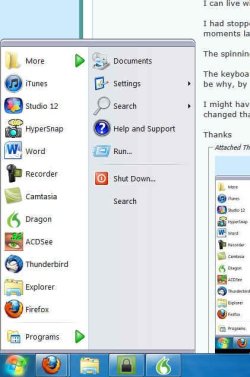
I had stopped making tweaks and the start menu has changed its look. One moment it looks one way and moments later, the start menu has changed appearance.

The spinning circle came back. I know how to fix that thanks to you, but it shouldn't have come back.

The keyboard is switching to French-Canadian bilingual on its own. It's happened twice today. Guess that might be why, by default, the keyboard is by the system tray.

I might have some other questions. I looked up how to change the default location of Windows Explorer and changed that.

Thanks
Mark
 

Attachments

  • start menu 2225.jpg
    start menu 2225.jpg
    34.2 KB · Views: 3

My Computer

Computer type
PC/Desktop
Computer Manufacturer/Model Number
HP Pavilion Media Center a1328x Desktop PC
OS
windows 7, 64 bit
CPU
Pentium4 524 (P) HT 3.06 GHz
Motherboard
HP/Compaq motherboard name: Agena-GL8E
Memory
2 GB
Graphics Card(s)
ATI Radeon Xpress 200 for Intel Processors
Mouse
Logitech m325
Internet Speed
ADSL
Antivirus
Telus Security Service
Browser
Google
M10000: From the video it looks like you are changing the "Windows key opens" setting, but then you are using the mouse to click on the start button. The setting is for the "Windows" key on the keyboard. If you want to change what the mouse button does, change the setting "Left Click opens".


Few more observations:
  • You select the “Classic Start Menu” option, but when you get the classic start menu on the next frame you say “Nope”. Is that because you get the XP Luna menu and not the XP Classic menu? If so, there is a misunderstanding. You are getting the “Classic Start Menu”, in a sense that you are getting a menu from the “Classic Start Menu” software (instead of the built-in Windows menu). But you have selected the Luna skin (BTW, the Luna skin is not by default, so you must have changed it yourself). If you want to get the real classic menu, simply select another skin.
  • When you right-click on the start button you get the “Classic Start Menu” help menu. You can select things like Settings and Help. The first item is just a label and doesn’t do anything. It just means that this menu belongs to the Classic Start Menu software.
  • You don't have to close the settings dialog when you change something. Most settings (particularly the ones in the Controls tab) can be tested immediately.
  • You can hover over each setting to see a description about what it does

Hi Ivo,
Now I know that you are a person and not a program ;-) [read post above]

I had an a-ha moment after reading your comment about the fact that I was using the mouse on the start button, which is not what it says. It says to use the Windows button. So thank you for that.

Thank you for the other pieces of advice that I have placed in bold text.

Regarding Luna, I have not used it.

When you right-click on the start button you get the “Classic Start Menu” help menu. You can select things like Settings and Help."
- One would hope that most people know this regarding right clicking on the start button ;-)


Thank you,
Mark


My Computer

Computer type
PC/Desktop
Computer Manufacturer/Model Number
HP Pavilion Media Center a1328x Desktop PC
OS
windows 7, 64 bit
CPU
Pentium4 524 (P) HT 3.06 GHz
Motherboard
HP/Compaq motherboard name: Agena-GL8E
Memory
2 GB
Graphics Card(s)
ATI Radeon Xpress 200 for Intel Processors
Mouse
Logitech m325
Internet Speed
ADSL
Antivirus
Telus Security Service
Browser
Google
M10000 - your screenshot shows the "Windows XP Luna" skin with the "Silver" variation. If you want Windows 98-style menu go to the Skin tab in the settings and select "Classic Skin" from the dropdown.
The skin simply changes the look of the menu. The contents and the functionality stay the same.
 

My Computer

Computer Manufacturer/Model Number
Me :) I build all my PCs
OS
Windows 7 Home 64, Vista Ultimate 64
Back
Top