Solved Raid 5 became unallocated.

Not to worry.

You said you have recovered all the files but the folder structure is not maintained - they are all just files files everywhere which you perhaps cannot rearrange.

I am curious to know how you made that recovery. Oho! we have to learn a lot from users.:) This will help other users who have only jpgs and docs.

You did not post the screenshot of how the drive looks in Windows Disk Management. Does it still show as RAW?

My second question is did you double click on the selected highlighted partition? And it didn't show any folders?

My third question How long did the quick scan take? Just approximate

Is the Partition window still open? Or you have already closed the PW?

I will be online waiting for your answers.

I have much more to say but all that after I get the answers.
 

My Computer My Computer

At a glance

Windows 7 Home Premium 32 bit
OS
Windows 7 Home Premium 32 bit
The screen capture was in #3.
I double clicked and nothing happened. No matter how many times I did it. I even ran a full scan and tried double clicking.
Quick scan took about 2 or 3 hours.
I closed it and am running a surface scan which will finish in about 2 hours and 11 minutes.
I used Data Rescue PC3 to recover the files.
 

My Computer My Computer

At a glance

Windows 7 64 Professionalamd FX-8320 3.5 GHz16 GBRadeon HD 6800
Computer type
PC/Desktop
Computer Manufacturer/Model Number
custom build
OS
Windows 7 64 Professional
CPU
amd FX-8320 3.5 GHz
Motherboard
Asus M5A99X EVO
Memory
16 GB
Graphics Card(s)
Radeon HD 6800
Hard Drives
Samsung SSD 830 128 GB
AMD 2+1 Raid 5 with Samsung 2 TB drives
Antivirus
Norton's 360
Browser
Internet Explorer 11

My Computer My Computer

At a glance

Windows 7 Ultimate 64-bit, Windows 8.1 64-bit...
Computer type
PC/Desktop
Computer Manufacturer/Model Number
Customs, Dell, Gateway, HP, Toshiba, Acer, ASUS
OS
Windows 7 Ultimate 64-bit, Windows 8.1 64-bit, Mac OS X 10.10, Linux Mint 17, Windows 10 Pro TP
Keyboard
Microsoft
Mouse
Microsoft
The screen capture was in #3.
I double clicked and nothing happened. No matter how many times I did it. I even ran a full scan and tried double clicking.
Quick scan took about 2 or 3 hours.
I closed it and am running a surface scan which will finish in about 2 hours and 11 minutes.
I used Data Rescue PC3 to recover the files.

OK, thanks for the info.

On Data Rescue PC3, I note that it is a paid software. Did you buy it? That's just a query you may choose not to answer if you don't want to.:)

I was about to suggest Getdataback Simple https://www.runtime.org/data-recovery-software.htm if all else fails. It can recover data complete with the folder structure unlike Data Rescue PC3. it is also a paid software but you can try it for free and check whether it can recover your data complete with the original folder structure. I had tried the trial version on an intentionally corrupted GPT drive and it did do the job admirably. Surely I was impressed with it. I had also posted the screenshots in one post - just that right now I am not able to locate it.

I would just advise you to try it before you try any other program such as Easeus Data Recovery etc., as suggested by Berton.

EDIT: OK, after a search I found my GetdataBack Simple post http://www.sevenforums.com/hardware...nclosure-suddenly-became-raw.html#post3034678

Here I had turned a simple GPT drive - not a RAID - into RAW and ran the GetDataback Simple and it found all the folders with the files inside intact.

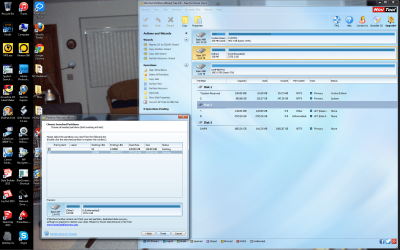
Now to continue with what we have been trying, run Quick Scan in Partition Wizard again but this time put a tick mark against both the found partitions namely both the 128MB MSR partition and the 3725.16MB main partition and then double click on the main partition. Does it show the folders? (the 128MB MSR partition is intended for any software that may need to store any data for future use and I am hoping against hope that the raid configuration data may be residing there . Ticking that also and activating it may show the folders in the raided main partition.If it does not we shall atleast know the attempt failed for sure.:) )
 
Last edited:

My Computer My Computer

At a glance

Windows 7 Home Premium 32 bit
OS
Windows 7 Home Premium 32 bit
I wish I had heard of it before. Yes I paid for Data Rescue PC3. I am doing the Quick Scan again. I'll send you a screen shot once I get back home and it is done.
 

My Computer My Computer

At a glance

Windows 7 64 Professionalamd FX-8320 3.5 GHz16 GBRadeon HD 6800
Computer type
PC/Desktop
Computer Manufacturer/Model Number
custom build
OS
Windows 7 64 Professional
CPU
amd FX-8320 3.5 GHz
Motherboard
Asus M5A99X EVO
Memory
16 GB
Graphics Card(s)
Radeon HD 6800
Hard Drives
Samsung SSD 830 128 GB
AMD 2+1 Raid 5 with Samsung 2 TB drives
Antivirus
Norton's 360
Browser
Internet Explorer 11
Double clicked on both with no results. Left and right mouse keys.
 

Attachments

  • Partitions04162015.png
    Partitions04162015.png
    564.1 KB · Views: 3

My Computer My Computer

At a glance

Windows 7 64 Professionalamd FX-8320 3.5 GHz16 GBRadeon HD 6800
Computer type
PC/Desktop
Computer Manufacturer/Model Number
custom build
OS
Windows 7 64 Professional
CPU
amd FX-8320 3.5 GHz
Motherboard
Asus M5A99X EVO
Memory
16 GB
Graphics Card(s)
Radeon HD 6800
Hard Drives
Samsung SSD 830 128 GB
AMD 2+1 Raid 5 with Samsung 2 TB drives
Antivirus
Norton's 360
Browser
Internet Explorer 11
OK, Try Getdataback simple. I would think that is the only easy solution. If you are happy if it shows all your folders right, to buy it or not is a decision only you can make.( You have already wasted your Dollars on the other software. Didn't it have a trial version? Won't they refund the money if you tell them that it didn't help you and meet your requirements.)

If Partition Wizard cannot show your files I doubt whether Test Disk also will.

Even if you have no intention to buy Getdataback simple, try it and post the results.
 

My Computer My Computer

At a glance

Windows 7 Home Premium 32 bit
OS
Windows 7 Home Premium 32 bit
That is a good idea. My worry is what caused this problem in the first place. The first time it happened I thought that it was because I turned on my computer with an external harddrive that I had been using with my laptop. This is the second time it has happened in two months. Nothing was plugged into a USB port when I turned it on and the Raid 5 was missing a letter and unallocated again.
 

My Computer My Computer

At a glance

Windows 7 64 Professionalamd FX-8320 3.5 GHz16 GBRadeon HD 6800
Computer type
PC/Desktop
Computer Manufacturer/Model Number
custom build
OS
Windows 7 64 Professional
CPU
amd FX-8320 3.5 GHz
Motherboard
Asus M5A99X EVO
Memory
16 GB
Graphics Card(s)
Radeon HD 6800
Hard Drives
Samsung SSD 830 128 GB
AMD 2+1 Raid 5 with Samsung 2 TB drives
Antivirus
Norton's 360
Browser
Internet Explorer 11
As it is a Raid 5, Getdataback is to be used on an image file made by Raid Reconstructor per the site. I am running the demo now.
 

My Computer My Computer

At a glance

Windows 7 64 Professionalamd FX-8320 3.5 GHz16 GBRadeon HD 6800
Computer type
PC/Desktop
Computer Manufacturer/Model Number
custom build
OS
Windows 7 64 Professional
CPU
amd FX-8320 3.5 GHz
Motherboard
Asus M5A99X EVO
Memory
16 GB
Graphics Card(s)
Radeon HD 6800
Hard Drives
Samsung SSD 830 128 GB
AMD 2+1 Raid 5 with Samsung 2 TB drives
Antivirus
Norton's 360
Browser
Internet Explorer 11
Raid Reconstructor was not needed as the Raid 5 was seen a one large drive (not broken). Getdataback was everything you said. I truly wish I had known about it the first time this happened. Any clue as to why it happened the second time????
 

My Computer My Computer

At a glance

Windows 7 64 Professionalamd FX-8320 3.5 GHz16 GBRadeon HD 6800
Computer type
PC/Desktop
Computer Manufacturer/Model Number
custom build
OS
Windows 7 64 Professional
CPU
amd FX-8320 3.5 GHz
Motherboard
Asus M5A99X EVO
Memory
16 GB
Graphics Card(s)
Radeon HD 6800
Hard Drives
Samsung SSD 830 128 GB
AMD 2+1 Raid 5 with Samsung 2 TB drives
Antivirus
Norton's 360
Browser
Internet Explorer 11
Good news! You've been able to recover your data, correct?

There may be several reasons for the issue, but I think it likely that one of the disks in the RAID is bad. If it was the RAID controller itself, then it would have broken the RAID.

A suggested solution is to break the RAID in the BIOS (after backing up the data elsewhere), assign 3 driver letters to each of the disks, then run this to test each of those 3 disks:
http://www.sevenforums.com/tutorials/313457-seatools-dos-windows-how-use.html
 

My Computer My Computer

At a glance

Windows 10 Pro x64 ; Xubuntu x64Intel i7 860 @ 2.80 GHz O/C'ed to 4.0GHz16GB Corsair Vengance DDR3 @ 661 MHz Dual Cha...EVGA NVidia GTX 560 1024MB
Computer type
PC/Desktop
Computer Manufacturer/Model Number
Golden Mk. I.4
OS
Windows 10 Pro x64 ; Xubuntu x64
CPU
Intel i7 860 @ 2.80 GHz O/C'ed to 4.0GHz
Motherboard
Gigabyte P55A-UD3R Rev.1. Award BIOS F13
Memory
16GB Corsair Vengance DDR3 @ 661 MHz Dual Channel (9-9-9-24)
Graphics Card(s)
EVGA NVidia GTX 560 1024MB
Sound Card
Realtek Integrated
Monitor(s) Displays
Dual Samsung SyncMaster 2494HS
Screen Resolution
1920*1080 and 1920*1080
Hard Drives
1*Samsung 840 EVO 120GB SSD;
1*OCZ Vertex 2 60GB SSD;
2*Samsung F3 SpinPoint 1TB in RAID0;
1*Samsung F1 SpinPoint 1TB;
2*Western Digital 1TB External USB 3.0
1*Western Digital 500GB External USB 3.0
1*Seagate 500GB External USB 2.0
PSU
Thermaltake ToughPower QFan 750W
Case
Thermaltake Element S VK60001W2Z
Cooling
Corsair H60 Water Cooling, 2*230mm and 2*80mm case fans
Keyboard
Logitech G110
Mouse
Logitech MX518
^ That was indeed a good suggestion by Golden. But I shall only add this. I don't think it is necessary to undo the RAID to test the drives individually. Just download the latest version of Seatools for DOS SeaToolsDOS223ALL.ISO (8.45MB) SeaTools for DOS | Seagate burn it to a CD or CD-RW and boot from it. I am almost sure it is going to show your three RAID drives as individual drives. ( As I had mentioned earlier injection of the raid driver is necessary if the DOS has to see it as a single drive.) Simply select the drives and test.

In case the drive tests pass,the other two possible reasons I could think of is a buggy raid driver and a buggy bios. Updating the BIOS and RAID driver to the latest from the motherboard website may resolve the issue. As for as BIOS update is concerned look into what bugs are removed by a particular update by inspecting all BIOS updates release notes and if it mentions raid then the update is imperative.

I am also happy to see the resolved tick mark on this thread.:)
 
Last edited:

My Computer My Computer

At a glance

Windows 7 Home Premium 32 bit
OS
Windows 7 Home Premium 32 bit
As always I have been lurking and watching this thread.

Glad you folks got things fixed.

I would suggest that Raid is not a replacement for proper backups.
Of course that is just my opinion.

Good work folks.

Happy computing!
 

My Computer My Computer

At a glance

Windows 10 Pro. 64/ version 1709 Windows 7 Pr...Intel i7-6800K @ 4.3Corsair Platinum 16 gig @2400EVGA GTX 1070 OC
Computer type
PC/Desktop
Computer Manufacturer/Model Number
Home made Desktop
OS
Windows 10 Pro. 64/ version 1709 Windows 7 Pro/64
CPU
Intel i7-6800K @ 4.3
Motherboard
ASUS X-99 Deluxe II
Memory
Corsair Platinum 16 gig @2400
Graphics Card(s)
EVGA GTX 1070 OC
Monitor(s) Displays
Asus 27" LED LCD/VE278Q
Screen Resolution
1920-1080 or 1280-720 HDMI
Hard Drives
INTEL SSD 730-240 Gb Sata 3.0/
PSU
EVGA Platium 1200W
Case
Phanteks Luxe Tempered Glass 8 fans/ one radiator
Cooling
XSPC/ Water Cooled CPU
Keyboard
Das 4 Professional
Mouse
Logitech M705/MX Anywhere 2-S
Internet Speed
100 mbits
Antivirus
Microsoft Security Essentials/ Malwarebytes Premium 3.0/ SAS
Browser
I.E. 11 default/Firefox/ ISP Time Warner Cable/Spectrum
Other Info
LG BluRay Burner/
Sound system-KLipsch-THX/
Icy Dock ssd Hot Swap bays.
Back
Top