
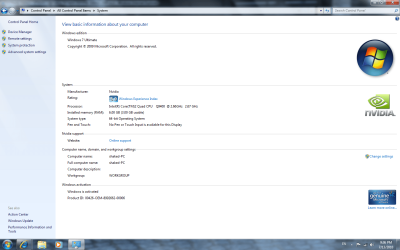
hello im new user here well i have got problem with my computer about ram i have installed 6gb and i can usable only 3gb my motherboard p45 NEO-F 7.1 1GLAN MSI
pls need help what the intresting at that this that i have win 7 ultimate 64bit!
Try using just two slots and make sure they are the right pair for dual-channel mode. If that results in 4GB being displayed then we are on the right track.
(I know you've probably already thought of this, but make sure they are seated securely in the slots, too.)
According to MSI your board can handle up to 16GB of ram (4x4GB). What I'm wondering is if you are running into a dual-channel problem due to only using three of the four available slots.
Your answer wasn't clear to me. Did you try it with just two sticks?
3. Under the Boot tab in System Configuration, click on the Advanced options button. (see screenshot below)
4. To Have Windows 7 Use All Installed Memory -
A) Uncheck the Maximum memory box, and click on OK. (see screenshot below) NOTE:If the box is not checked, then it does not matter what the selected number is since Windows 7 will use all available RAM by default and ignore whatever value is in the box underneath.
B) Go to step 6.
5. To Have Windows 7 Use a Specified Maximum Amount of Memory - NOTE:Only when the box is checked, can you specify how much installed RAM you want to allow Windows 7 to be able to use in the drop down box.
A) Check the Maximum memory box, then type in how many MB of your installed Memory that you want Windows 7 to only be able to use up to and click on OK. (see screenshot below)
6. Check the Make all boot settings permanent box, and click on OK. (see screenshot below) NOTE:You will still be able to come back and make changes again if you like.
7. Click on Yes. (see screenshot below) NOTE:You will still be able to come back and make changes again if you like.
8. Click on the Restart button. (see screenshot below) WARNING:This will restart the computer immediately. Make sure you save and close anything open that you do not want to lose first.
9. When Windows 7 is finished restarting, it will now be using only the maximum amount of memory that you specified. NOTE:You can look in Task Manager (CTRL+SHIFT+ESC) to confirm this amount of memory.
1) Start> In search box type msconfig.exe Click on msconfig.exe