RAM Upgrade Help

BashirSabeel

New member
Member
Local time
10:28 PM
Messages
83
Location
England
Hi, I want to upgrade my PC, right now I have 2GB RAM (DDR2 SDRAM PC2-5000) and want to upgrade it to 4GB for gaming (GTA IV cannot run properly:(). The problem is can I buy any DDR2 RAM or does it have to be a certain speed, for example, using Speccy it says 2.0GB Dual-Channel DDR2 @ 200MHz 5-5-5-15 so do I need to get the same? Thanks in advanced for the help:)
 

My Computer

Computer type
PC/Desktop
Computer Manufacturer/Model Number
Custom
OS
Windows 7 Professional 64 bit
CPU
Intel Core i7 2600K OC @ 4.00GHz
Motherboard
Gigabyte Technology Z77X-UD5H
Memory
Corsair Vengance 16.0GB DDR3 (1600MHz)
Graphics Card(s)
Gigabyte AMD Radeon HD 7970
Sound Card
ASUS Xonar DG PCI Card
Monitor(s) Displays
AOC I2369VM 23 inch 1080p LED Monitors X2
Screen Resolution
1920X1080
Hard Drives
250GB Samsung SSD 840 EVO - Windows 7 and Software
2TB SATA Drive - Games
4TB SATA Drive - Personal Files
PSU
Corsair AX760
Case
Corsair 600T (Black with side mesh)
Cooling
120mm Exaust Fan, 2 120mm Exaust Fans (CPU),200mm Intake Fan
Keyboard
Corsair Vengeance K90
Mouse
Corsair Vengeance M60
Internet Speed
30MB Fiber Optic (Virgin Media)
Antivirus
Avast (Free)
Browser
Firefox
Other Info
AVerMedia Freeview TV Tuner Card and HD Capture Card (PCI)
Hi, I want to upgrade my PC, right now I have 2GB RAM (DDR2 SDRAM PC2-5000) and want to upgrade it to 4GB for gaming (GTA IV cannot run properly:(). The problem is can I buy any DDR2 RAM or does it have to be a certain speed, for example, using Speccy it says 2.0GB Dual-Channel DDR2 @ 200MHz 5-5-5-15 so do I need to get the same? Thanks in advanced for the help:)
According to what I can find on your motherboard, your machine can support up to 8 GB of DDR2-800 (PC2-6400) RAM.

I would check with a tool like CPU-Z to get the manufacturer's model of the RAM you have now and post that information. PC2-5000 is not a standard RAM designation.

But in short, for best performance, dual channel RAM should all be the same type and speed. :)
 

My Computer

Computer type
PC/Desktop
Computer Manufacturer/Model Number
Mellon Labs (custom build)
OS
Win 7 Pro x64/Win 10 Pro x64 dual boot
CPU
AMD FX 8350 Vishera @ 4200
Motherboard
ASUS M5A97 R2.0
Memory
16 GB Mushkin Blackline DDR3-2400 @ 1866 (9-10-10-10-31)
Graphics Card(s)
XFX Radeon R9 280 Double D Black Edition
Sound Card
Realtek HD Audio on MB. Sounds great.
Monitor(s) Displays
Acer 24", Acer 22"
Screen Resolution
3840 x 1080
Hard Drives
1 x Mushkin Chronos 120 GB SSD (Win 10)
1 x Samsung 850 EVO 250 GB SSD (Win 7)
1 x WD 1TB SATA Blue
1 x WD 1TB SATA Green
PSU
Corsair TX-750
Case
CoolerMaster HAF 912+
Cooling
Coolermaster Seidon 240M Liquid AIO. 6 case fans
Keyboard
Logitech G710+
Mouse
Logitech G500s
Internet Speed
Much better since I got fiber, but still way overpriced.
Antivirus
MSE, Malware Bytes for scanning
Browser
Firefox
Other Info
Corsair VOID USB headphones.

A Mellon Labs X-1 - LCD Smartie driven system status display.

Brought to you by the letter E
Go to the Crucial website. Then click on the blue coloured "Scan my system" link. That will install an addon and tell you what memory you already have as well as recommended upgrades.

On the same page you'll find the "Crucial memory advisor tool". There you can manually enter your motherboard details and find compatible ram.

In case crucial is not able to find upgrades for you, you can download and run Everest free edition. That'll give you very detailed info about your RAM, you can then buy additional compatible memory.
 

My Computer

Computer Manufacturer/Model Number
Too many to describe...
OS
Windows 7 x64 pro/ Windows 7 x86 Pro/ XP SP3 x86
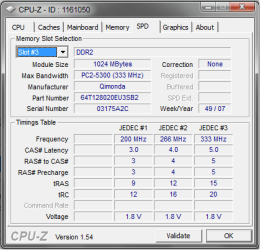
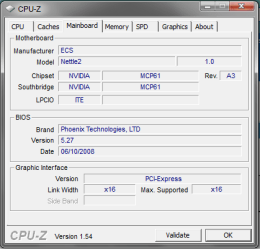
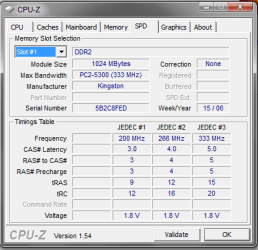
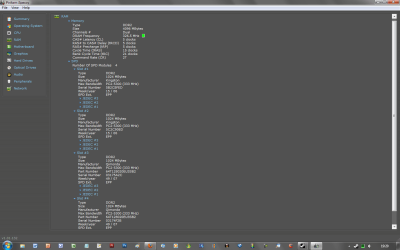
Thanks for replying, well Iv used CPU-Z , I have attached a screen shot my RAMs details I have also attached a screen shot of Speccys details. I know my motherboards manufacturer is ECS and the model is Nettle2 (CPU-Z) but thats it. Is there any RAM manufacturer you would recommended? Right now I am looking at 2x 1 GB Kingston HyperX DDR2 240 RAM from eBay.
moz-screenshot-1.png
moz-screenshot.png
 

Attachments

  • Speccy.png
    Speccy.png
    37.8 KB · Views: 22
  • CPU-Z.png
    CPU-Z.png
    12.8 KB · Views: 11

My Computer

Computer type
PC/Desktop
Computer Manufacturer/Model Number
Custom
OS
Windows 7 Professional 64 bit
CPU
Intel Core i7 2600K OC @ 4.00GHz
Motherboard
Gigabyte Technology Z77X-UD5H
Memory
Corsair Vengance 16.0GB DDR3 (1600MHz)
Graphics Card(s)
Gigabyte AMD Radeon HD 7970
Sound Card
ASUS Xonar DG PCI Card
Monitor(s) Displays
AOC I2369VM 23 inch 1080p LED Monitors X2
Screen Resolution
1920X1080
Hard Drives
250GB Samsung SSD 840 EVO - Windows 7 and Software
2TB SATA Drive - Games
4TB SATA Drive - Personal Files
PSU
Corsair AX760
Case
Corsair 600T (Black with side mesh)
Cooling
120mm Exaust Fan, 2 120mm Exaust Fans (CPU),200mm Intake Fan
Keyboard
Corsair Vengeance K90
Mouse
Corsair Vengeance M60
Internet Speed
30MB Fiber Optic (Virgin Media)
Antivirus
Avast (Free)
Browser
Firefox
Other Info
AVerMedia Freeview TV Tuner Card and HD Capture Card (PCI)
I haven't had much luck with Kingston products myself, but others may feel differently.

Since you're currently running PC2-5300 RAM at 667 MHz, the best thing would be to get a couple of sticks of 667 RAM to match the ones that you have. It doesn't really matter what brand you buy, just make sure that you get a set with timings as good as, or better, than you have right now. That way there's no performance hit by adding RAM with slower timings.

The good thing is, if you're on a budget, PC-5300 isn't that expensive right now. You should still look at getting some good quality memory, though. Crucial, OCZ, and Mushkin are all pretty good, and I would recommend that you buy from a reputable retailer, rather than second hand. RAM can be easily damaged by static electricity, and if it isn't handled right, may not work it's best, or at all, when you get it.

If you really want some better performance, and it isn't out of your budget, you might consider picking up some DDR2-6400. About 4 GB will do nicely, and runs about $100 to $130 CDN for decent quality dual channel here in Canada. It's food for thought, no?
 

My Computer

Computer type
PC/Desktop
Computer Manufacturer/Model Number
Mellon Labs (custom build)
OS
Win 7 Pro x64/Win 10 Pro x64 dual boot
CPU
AMD FX 8350 Vishera @ 4200
Motherboard
ASUS M5A97 R2.0
Memory
16 GB Mushkin Blackline DDR3-2400 @ 1866 (9-10-10-10-31)
Graphics Card(s)
XFX Radeon R9 280 Double D Black Edition
Sound Card
Realtek HD Audio on MB. Sounds great.
Monitor(s) Displays
Acer 24", Acer 22"
Screen Resolution
3840 x 1080
Hard Drives
1 x Mushkin Chronos 120 GB SSD (Win 10)
1 x Samsung 850 EVO 250 GB SSD (Win 7)
1 x WD 1TB SATA Blue
1 x WD 1TB SATA Green
PSU
Corsair TX-750
Case
CoolerMaster HAF 912+
Cooling
Coolermaster Seidon 240M Liquid AIO. 6 case fans
Keyboard
Logitech G710+
Mouse
Logitech G500s
Internet Speed
Much better since I got fiber, but still way overpriced.
Antivirus
MSE, Malware Bytes for scanning
Browser
Firefox
Other Info
Corsair VOID USB headphones.

A Mellon Labs X-1 - LCD Smartie driven system status display.

Brought to you by the letter E
Are you using 32bit or 64bit win7?

There is a 4GB limitation on 32bit OS adress, this includes all addresses, and will limit your max RAM to approximately 3.2 - 3.5 GB depending on your system and Graphics card RAM. This will allow you less than 4GB RAM, but close, at the price if RAM today I would use 4GB anyway.

The important thing is to match your existing RAM exactly, DDR2 PC2 5300 1.8 volts 5-5-5-15, if your going to keep the old RAM.

Mellon Head gave a good suggestion to buy 4GB of new DDR2 PC2 6400, still should be 1.8 volts, the timings can be a little different from your old RAM. Matched pairs of RAM are alway preferable.

Many people will say to only match your existing RAM exactly, speed, voltage, timing and brand.
Due to the age of your RAM, the manufacturer may have changed the basic design of the sticks, the new sticks may not work with your old ones. This is a possibility no matter what you buy.

I have had good luck in mixing RAM, there is no guarantee that it will work. Just be very careful to match as closely as possible.

If you get different speed and timings and they are compatible but different in any way, they will default to the lower settings and may go to single channel mode.

Crucial will give you a recommendation from their website, but they won't tell you the timings of the RAM they suggest. This is irritating to me, I even called them and they wouldn't tell me anything. All other brands that I have ever seen will tell you the timings.

Corsair is also a good brand.

Let us know how it turns out.
 

My Computer

Computer type
PC/Desktop
Computer Manufacturer/Model Number
76~2.0
OS
Windows 7 Ult x64 - SP1/ Windows 8 Pro x64
CPU
Intel Core i5-3570K 4.6GHz
Motherboard
Gigabyte GA-Z77X UD3H, f18
Memory
8GB (2X4GB) DDR3 1600 Corsair Vengeance CL8 1.5v
Graphics Card(s)
Sapphire HD 7770 Vapor-X OC 1GB DDR5
Sound Card
Onboard VIA VT2021
Monitor(s) Displays
22" LCD Dell
Screen Resolution
1680x1050
Hard Drives
Samsung 840Pro 128GB SSD,
Seagate Barracuda 500GB SATA2 7200rpm 32MB cache, Seagate Barracuda 1TB SATA2 7200rpm 32MB cache,
PSU
Corsair HX650W
Case
Cooler Master Storm Scout
Cooling
Corsair H80 2x12cm Noctua NF P12 , 2x14cm case fans
Keyboard
Logitech Wave
Mouse
CM Sentinel
Internet Speed
Dismal
Antivirus
Avast
Browser
Opera Next
Other Info
Haswell laptop: HP Envy 17t-j, i7-4700MQ, GeForce 740M 2GB DDR3, 17.3" Full HD 1920x1080, 16GB RAM, Samsung 840 Pro 128GB, 1TB Hitachi 7200 HDD,
Desktop: eSATA ports,
External eSATA Seagate 500GB SATA2 7200rpm,
External WD USB 500GB

My Computer

Computer type
PC/Desktop
Computer Manufacturer/Model Number
Custom
OS
Windows 7 Professional 64 bit
CPU
Intel Core i7 2600K OC @ 4.00GHz
Motherboard
Gigabyte Technology Z77X-UD5H
Memory
Corsair Vengance 16.0GB DDR3 (1600MHz)
Graphics Card(s)
Gigabyte AMD Radeon HD 7970
Sound Card
ASUS Xonar DG PCI Card
Monitor(s) Displays
AOC I2369VM 23 inch 1080p LED Monitors X2
Screen Resolution
1920X1080
Hard Drives
250GB Samsung SSD 840 EVO - Windows 7 and Software
2TB SATA Drive - Games
4TB SATA Drive - Personal Files
PSU
Corsair AX760
Case
Corsair 600T (Black with side mesh)
Cooling
120mm Exaust Fan, 2 120mm Exaust Fans (CPU),200mm Intake Fan
Keyboard
Corsair Vengeance K90
Mouse
Corsair Vengeance M60
Internet Speed
30MB Fiber Optic (Virgin Media)
Antivirus
Avast (Free)
Browser
Firefox
Other Info
AVerMedia Freeview TV Tuner Card and HD Capture Card (PCI)
Looked at the link above and couldn't find any specs or a manufacturer part number, went to the PNY site and couldn't find any specs listed.

All they say at the link is "Case latency: 5" which means one of the timing numbers is 5. Doesn't mean the others are 5-5-15.

When trying to match existing RAM I wouldn't feel comfortable buying anything that I couldn't confirm to have the same timings and voltage as my old RAM.

You need to match at minimum all of these specs: DDR2 PC2 5300 1.8 volts 5-5-5-15.
As far as I can tell from the link, it's DDR2 PC2 5300 Case latency: 5.
If it is 1.5 volt or 1.9 volt, it might not work, which means function poorly, not at all or BSOD.
If the timing is 5-6-5-18 or 5-7-7-20 or 5-9-7-15, you can get the same results mentioned above.

This is why they have the disclaimer on their website:
"To work with the Dual Channel System, the machine must be upgraded with a matched pair of modules (add 2GB = 2x1GB) and not with a single module or two different modules, otherwise it will work on a single channel."
And I'll add, might not work at all.

This does happen a lot, you may match brand, speed, timings, voltage, and it may not work due to different build specs.

You need to match the old RAM as near perfectly as possible to make sure they are compatible.

Try to call them and see if they can tell you these specs.

At the very least make sure they have a 100% return policy.

Good luck.
 

My Computer

Computer type
PC/Desktop
Computer Manufacturer/Model Number
76~2.0
OS
Windows 7 Ult x64 - SP1/ Windows 8 Pro x64
CPU
Intel Core i5-3570K 4.6GHz
Motherboard
Gigabyte GA-Z77X UD3H, f18
Memory
8GB (2X4GB) DDR3 1600 Corsair Vengeance CL8 1.5v
Graphics Card(s)
Sapphire HD 7770 Vapor-X OC 1GB DDR5
Sound Card
Onboard VIA VT2021
Monitor(s) Displays
22" LCD Dell
Screen Resolution
1680x1050
Hard Drives
Samsung 840Pro 128GB SSD,
Seagate Barracuda 500GB SATA2 7200rpm 32MB cache, Seagate Barracuda 1TB SATA2 7200rpm 32MB cache,
PSU
Corsair HX650W
Case
Cooler Master Storm Scout
Cooling
Corsair H80 2x12cm Noctua NF P12 , 2x14cm case fans
Keyboard
Logitech Wave
Mouse
CM Sentinel
Internet Speed
Dismal
Antivirus
Avast
Browser
Opera Next
Other Info
Haswell laptop: HP Envy 17t-j, i7-4700MQ, GeForce 740M 2GB DDR3, 17.3" Full HD 1920x1080, 16GB RAM, Samsung 840 Pro 128GB, 1TB Hitachi 7200 HDD,
Desktop: eSATA ports,
External eSATA Seagate 500GB SATA2 7200rpm,
External WD USB 500GB
G'day Bashir,
May I ask for a screenshot of your CPU-Z Motherboard tab?, I'd like to get as much as I can about your board, so I can do a bit of digging on what it can support...
Also, on the subjects of matching RAM, and chosing brands, matching RAM can be a difficult affair most of the time, as Dave said, you need everything to be a near perfect match for it to work, and unfortunately the more time between when your current RAM was purchased and when you decide to upgrade, the less likely it is for it all to co-operate. With regards to brands, I've no experience with other brands, but Corsair and Kingston have proven to be pretty reliable to myself and a few of my mates.
Anyway, good luck to you, and I hope it all goes well.

Cheers,
~Hillbilly
 

My Computer

Computer Manufacturer/Model Number
Myself/Model 006, Mk.1, Revision 1.5
OS
Windows 7 Professional x64
CPU
Intel Core i7 3930K
Motherboard
ASUS Rampage IV Extreme
Memory
4GB Corsair DOMINATOR DDR2 1066
Graphics Card(s)
eVGA GeForce GTX 680 2GB, SLi
Sound Card
Realtek HD audio
Monitor(s) Displays
LG E2351, 23.5" LED
Screen Resolution
1920x1080p 32bit colour @60Hz
Hard Drives
Western Digital 1TB SATA3 Caviar Blue
PSU
Coolermaster 1050w Silent Pro Hybrid
Case
Coolermaster Cosmos II
Cooling
Coolermaster 212 Evo, 3x 120mm, 1x 140mm, 1x 200mm
Keyboard
Logitech G510
Mouse
CM Storm Sentinel Advance II
Internet Speed
can hardly call it speed...
Other Info
Hyundai HY-Z-2700 2.1 Gaming speakers,
Razer Carcharias Headset,
'Storm Tactics' Gaming mouse mat.
9000 cable ties.
Thanks for your help:) I have looked around and found some PNY 2GB RAM from play.com (url: Play.com (UK) : PNY 2GB (2x1GB) DIMM DDR2 667MHz (PC5300) Dual Channel Computer Memory Kit : Computing - Free Delivery) price is good and matches my old ones (PC5300). If you have any other suggestions please post before Sat 8 May 2010 I plan on ordering around then, thanks again.
@Bashir:

Dave76 has a very good point about matching memory, and I'd like to add a suggestion. You are looking to upgrade to 4 GB, but if you can't match the sticks properly, you're going to have timing issues. It may not work, as Dave says, and if it does, the RAM will run at the timings of the worst pair. And they may not run in dual channel mode if they aren't compatible.

That being said, it might be a better idea to pick up a 4 GB dual channel kit, and sell your current 2 x 1 GB sticks to someone. There are a few good reasons for this:

1. Dual channel memory will yield better performance
2. The pairs will definitely be a matched set, resolving the potential timing issues.
3. If you pop for a PC2-6400 dual channel set, you'll get far better performance than you will get from adding to your existing set, since the 6400 set will have a higher speed than your current ones.

You've got a pretty good CPU in your machine. With the right memory in it, you should get more than acceptable performance for a modest cash outlay.

And that's my suggestion. I hope it works out for you. :)
 

My Computer

Computer type
PC/Desktop
Computer Manufacturer/Model Number
Mellon Labs (custom build)
OS
Win 7 Pro x64/Win 10 Pro x64 dual boot
CPU
AMD FX 8350 Vishera @ 4200
Motherboard
ASUS M5A97 R2.0
Memory
16 GB Mushkin Blackline DDR3-2400 @ 1866 (9-10-10-10-31)
Graphics Card(s)
XFX Radeon R9 280 Double D Black Edition
Sound Card
Realtek HD Audio on MB. Sounds great.
Monitor(s) Displays
Acer 24", Acer 22"
Screen Resolution
3840 x 1080
Hard Drives
1 x Mushkin Chronos 120 GB SSD (Win 10)
1 x Samsung 850 EVO 250 GB SSD (Win 7)
1 x WD 1TB SATA Blue
1 x WD 1TB SATA Green
PSU
Corsair TX-750
Case
CoolerMaster HAF 912+
Cooling
Coolermaster Seidon 240M Liquid AIO. 6 case fans
Keyboard
Logitech G710+
Mouse
Logitech G500s
Internet Speed
Much better since I got fiber, but still way overpriced.
Antivirus
MSE, Malware Bytes for scanning
Browser
Firefox
Other Info
Corsair VOID USB headphones.

A Mellon Labs X-1 - LCD Smartie driven system status display.

Brought to you by the letter E
Thanks for all the help, well before making this thread I made a bid on RAM via eBay and found out that I won yesterday:shock:, it is 2x 1 GB Kingston HyperX DDR2 240 DIMM modules, my friend has these modules and tells me they are very good and I have read a number of reviews on them, so when I get them (5-7 days) I will install them into my PC and then see the results using CPUZ, Speccy and Windows Rating, if the preformance improves greatly (play GTA IV on highest settings) then I may leave them, if not, I will then remove my old ones and get another pair of the ones I purchased on eBay. I will let you know my results when I get them. Thanks again.
 

Attachments

  • MainboardCPUZ.png
    MainboardCPUZ.png
    10.4 KB · Views: 1

My Computer

Computer type
PC/Desktop
Computer Manufacturer/Model Number
Custom
OS
Windows 7 Professional 64 bit
CPU
Intel Core i7 2600K OC @ 4.00GHz
Motherboard
Gigabyte Technology Z77X-UD5H
Memory
Corsair Vengance 16.0GB DDR3 (1600MHz)
Graphics Card(s)
Gigabyte AMD Radeon HD 7970
Sound Card
ASUS Xonar DG PCI Card
Monitor(s) Displays
AOC I2369VM 23 inch 1080p LED Monitors X2
Screen Resolution
1920X1080
Hard Drives
250GB Samsung SSD 840 EVO - Windows 7 and Software
2TB SATA Drive - Games
4TB SATA Drive - Personal Files
PSU
Corsair AX760
Case
Corsair 600T (Black with side mesh)
Cooling
120mm Exaust Fan, 2 120mm Exaust Fans (CPU),200mm Intake Fan
Keyboard
Corsair Vengeance K90
Mouse
Corsair Vengeance M60
Internet Speed
30MB Fiber Optic (Virgin Media)
Antivirus
Avast (Free)
Browser
Firefox
Other Info
AVerMedia Freeview TV Tuner Card and HD Capture Card (PCI)
Sounds good, let us know how it works out.

You can also do a Memory assessment test, it's explained how to run the test on the first page of the thread.

Good luck with the new RAM.
 
Last edited:

My Computer

Computer type
PC/Desktop
Computer Manufacturer/Model Number
76~2.0
OS
Windows 7 Ult x64 - SP1/ Windows 8 Pro x64
CPU
Intel Core i5-3570K 4.6GHz
Motherboard
Gigabyte GA-Z77X UD3H, f18
Memory
8GB (2X4GB) DDR3 1600 Corsair Vengeance CL8 1.5v
Graphics Card(s)
Sapphire HD 7770 Vapor-X OC 1GB DDR5
Sound Card
Onboard VIA VT2021
Monitor(s) Displays
22" LCD Dell
Screen Resolution
1680x1050
Hard Drives
Samsung 840Pro 128GB SSD,
Seagate Barracuda 500GB SATA2 7200rpm 32MB cache, Seagate Barracuda 1TB SATA2 7200rpm 32MB cache,
PSU
Corsair HX650W
Case
Cooler Master Storm Scout
Cooling
Corsair H80 2x12cm Noctua NF P12 , 2x14cm case fans
Keyboard
Logitech Wave
Mouse
CM Sentinel
Internet Speed
Dismal
Antivirus
Avast
Browser
Opera Next
Other Info
Haswell laptop: HP Envy 17t-j, i7-4700MQ, GeForce 740M 2GB DDR3, 17.3" Full HD 1920x1080, 16GB RAM, Samsung 840 Pro 128GB, 1TB Hitachi 7200 HDD,
Desktop: eSATA ports,
External eSATA Seagate 500GB SATA2 7200rpm,
External WD USB 500GB
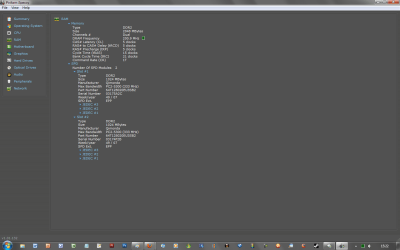
Hi people, I have received my Kingston RAM today and can happily say it works perfectly:) They have the same spec has my old ones and I can play GTA IV perfectly (not on high settings but still good). Thanks again for all the help.
 

Attachments

  • RAM CPU-Z Kingston.png
    RAM CPU-Z Kingston.png
    12.3 KB · Views: 0
  • Speccy RAM.png
    Speccy RAM.png
    44.1 KB · Views: 4
  • Winsat2GB.png
    Winsat2GB.png
    9.8 KB · Views: 2
  • Winsat4GB.png
    Winsat4GB.png
    9.8 KB · Views: 2

My Computer

Computer type
PC/Desktop
Computer Manufacturer/Model Number
Custom
OS
Windows 7 Professional 64 bit
CPU
Intel Core i7 2600K OC @ 4.00GHz
Motherboard
Gigabyte Technology Z77X-UD5H
Memory
Corsair Vengance 16.0GB DDR3 (1600MHz)
Graphics Card(s)
Gigabyte AMD Radeon HD 7970
Sound Card
ASUS Xonar DG PCI Card
Monitor(s) Displays
AOC I2369VM 23 inch 1080p LED Monitors X2
Screen Resolution
1920X1080
Hard Drives
250GB Samsung SSD 840 EVO - Windows 7 and Software
2TB SATA Drive - Games
4TB SATA Drive - Personal Files
PSU
Corsair AX760
Case
Corsair 600T (Black with side mesh)
Cooling
120mm Exaust Fan, 2 120mm Exaust Fans (CPU),200mm Intake Fan
Keyboard
Corsair Vengeance K90
Mouse
Corsair Vengeance M60
Internet Speed
30MB Fiber Optic (Virgin Media)
Antivirus
Avast (Free)
Browser
Firefox
Other Info
AVerMedia Freeview TV Tuner Card and HD Capture Card (PCI)
Excellent. Glad it worked out. :)
 

My Computer

Computer type
PC/Desktop
Computer Manufacturer/Model Number
Mellon Labs (custom build)
OS
Win 7 Pro x64/Win 10 Pro x64 dual boot
CPU
AMD FX 8350 Vishera @ 4200
Motherboard
ASUS M5A97 R2.0
Memory
16 GB Mushkin Blackline DDR3-2400 @ 1866 (9-10-10-10-31)
Graphics Card(s)
XFX Radeon R9 280 Double D Black Edition
Sound Card
Realtek HD Audio on MB. Sounds great.
Monitor(s) Displays
Acer 24", Acer 22"
Screen Resolution
3840 x 1080
Hard Drives
1 x Mushkin Chronos 120 GB SSD (Win 10)
1 x Samsung 850 EVO 250 GB SSD (Win 7)
1 x WD 1TB SATA Blue
1 x WD 1TB SATA Green
PSU
Corsair TX-750
Case
CoolerMaster HAF 912+
Cooling
Coolermaster Seidon 240M Liquid AIO. 6 case fans
Keyboard
Logitech G710+
Mouse
Logitech G500s
Internet Speed
Much better since I got fiber, but still way overpriced.
Antivirus
MSE, Malware Bytes for scanning
Browser
Firefox
Other Info
Corsair VOID USB headphones.

A Mellon Labs X-1 - LCD Smartie driven system status display.

Brought to you by the letter E
That's good news.

Glad it worked out for you.

RAM matching can be difficult sometimes, matching as close as possible gives you the best chance.
 

My Computer

Computer type
PC/Desktop
Computer Manufacturer/Model Number
76~2.0
OS
Windows 7 Ult x64 - SP1/ Windows 8 Pro x64
CPU
Intel Core i5-3570K 4.6GHz
Motherboard
Gigabyte GA-Z77X UD3H, f18
Memory
8GB (2X4GB) DDR3 1600 Corsair Vengeance CL8 1.5v
Graphics Card(s)
Sapphire HD 7770 Vapor-X OC 1GB DDR5
Sound Card
Onboard VIA VT2021
Monitor(s) Displays
22" LCD Dell
Screen Resolution
1680x1050
Hard Drives
Samsung 840Pro 128GB SSD,
Seagate Barracuda 500GB SATA2 7200rpm 32MB cache, Seagate Barracuda 1TB SATA2 7200rpm 32MB cache,
PSU
Corsair HX650W
Case
Cooler Master Storm Scout
Cooling
Corsair H80 2x12cm Noctua NF P12 , 2x14cm case fans
Keyboard
Logitech Wave
Mouse
CM Sentinel
Internet Speed
Dismal
Antivirus
Avast
Browser
Opera Next
Other Info
Haswell laptop: HP Envy 17t-j, i7-4700MQ, GeForce 740M 2GB DDR3, 17.3" Full HD 1920x1080, 16GB RAM, Samsung 840 Pro 128GB, 1TB Hitachi 7200 HDD,
Desktop: eSATA ports,
External eSATA Seagate 500GB SATA2 7200rpm,
External WD USB 500GB
Back
Top