Check the items in the NOTE box in the tutorial below to see if that may be the cause, and double check to make sure that you have the Maximum memory box is unchecked as in the tutorial as well.
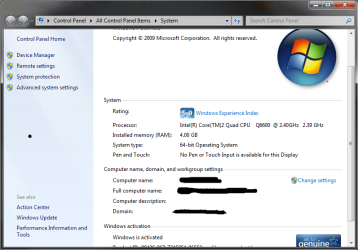
Also you seem to be running a 32-bit operating system, which only allows as much as 3 gigs of RAM to be allocated for use. That means that having 4gb is pretty pointless if you don't have 64-bit Windows.
Jam,
With you having a 32 bit operating system the max memory you can have is 4gb. This includes your video and system memory(PCI and onboard device). So you will never have the full 4GB available under a 32 bit operating system.
Dehrd,
your current memory usage doesnt show up under the system page which the op is referring to.
It does however show up under the task manager and resource monitor.
Please type Resource Monitor in your search to invoke the resource monitor, then select the memory tab and snip that screen and post it here. That will show any hardware reserved space, etc. This always gives a complete and accurate view of how your memory is being used.
Samsung 850 Pro 256GB (OS), Samsung 2x 128GB 840 Pro SSD in RAID0, 3x WD Blue 6Gb/s 1TB RAID0, WD 2TB Black external USB 3.0, 2TB WD20EARS Green external USB 3.0, 2x 500GB Seagate and 1 750 GB external USB, 1x 350GB external USB3