Solved Random BSODs

Yes, I can uninstall the device's driver under HID devices in Device Manager. I also tried updating the driver for it via device manager. It was uninstalled for about 5 minutes before it crashed again:


On Tue 1/15/2013 11:02:22 PM GMT your computer crashed
crash dump file: C:\Windows\Minidump\011513-29437-01.dmp
This was probably caused by the following module: ntoskrnl.exe (nt+0x7EFC0)
Bugcheck code: 0x19 (0x3, 0xFFFFFA800E7E2950, 0xFFFFFA800E7E2950, 0x86000000)
Error: BAD_POOL_HEADER
file path: C:\Windows\system32\ntoskrnl.exe
product: Microsoft® Windows® Operating System
company: Microsoft Corporation
description: NT Kernel & System
Bug check description: This indicates that a pool header is corrupt.
This appears to be a typical software driver bug and is not likely to be caused by a hardware problem. This might be a case of memory corruption. More often memory corruption happens because of software errors in buggy drivers, not because of faulty RAM modules.
The crash took place in the Windows kernel. Possibly this problem is caused by another driver that cannot be identified at this time.


On Tue 1/15/2013 11:02:22 PM GMT your computer crashed
crash dump file: C:\Windows\memory.dmp
This was probably caused by the following module: btmhsf.sys (btmhsf+0x26785)
Bugcheck code: 0x19 (0x3, 0xFFFFFA800E7E2950, 0xFFFFFA800E7E2950, 0x86000000)
Error: BAD_POOL_HEADER
file path: C:\Windows\system32\drivers\btmhsf.sys
product: Intel PROSet\Wireless Bluetooth
company: Intel Corporation
description: Bluetooth HighSpeed Filter Driver
Bug check description: This indicates that a pool header is corrupt.
This appears to be a typical software driver bug and is not likely to be caused by a hardware problem. This might be a case of memory corruption. More often memory corruption happens because of software errors in buggy drivers, not because of faulty RAM modules.
A third party driver was identified as the probable root cause of this system error. It is suggested you look for an update for the following driver: btmhsf.sys (Bluetooth HighSpeed Filter Driver, Intel Corporation).
Google query: Intel Corporation BAD_POOL_HEADER


It gave two dumps, what would you make of those?
 

My Computer

Computer type
PC/Desktop
Computer Manufacturer/Model Number
Custom Build
OS
Windows 7 64-bit Enterprise
CPU
Intel Core i7-3770 3.4GHz
Motherboard
Intel BOXDZ77GA70K
Memory
32GB G.Skill Ripjaws X Series (4x8GB)
Graphics Card(s)
EVGA Geforce GTX 680 2GB GDDR5
Sound Card
Creative SoundBlaster-Z
Monitor(s) Displays
3x Acer 21.5 inch VS228H-P
Screen Resolution
1920x1080 x3
Hard Drives
Internal 120GB Intel 520 SSD
Internal 180GB Intel SSD
Internal 2TB Seagate Barracuda 7200 RPM
2x Internal 3TB Seagate Barracuda 7200RPM
External Seagate 1TB USB 3.0
PSU
Corsair HX Series 650W
Case
Antec 1200 V3 Black Steel ATX Full Tower
Keyboard
Razer DeathStalker
Mouse
Logitech G500s
Internet Speed
25/5mbits
Antivirus
Microsoft Security Essentials
Browser
Safari
Run the tool again and upload the files if you want us to take a look although it does still seem to be pointing towards the bluetooth
 

My Computer

Computer type
PC/Desktop
Computer Manufacturer/Model Number
Pauly Special
OS
Win7 Ultimate X64
CPU
Intel i5 3570K
Motherboard
Gigabyte Z77X-DS3H
Memory
8GB DDR3 1600
Graphics Card(s)
Onboard
Sound Card
Onboard
Screen Resolution
1280x1024
Hard Drives
Samsung 840 Evo SSD (OS)
1TB Spinner (Data)
PSU
800W Arctic
Case
Cooler Master
Cooling
3x120mm Fans
Keyboard
MS Wireless
Mouse
MS Wireless
Internet Speed
20M
Here are is the updated SF tool .zip

Attempted using the Verifier and it got me stuck in a boot loop :eek:
 

My Computer

Computer type
PC/Desktop
Computer Manufacturer/Model Number
Custom Build
OS
Windows 7 64-bit Enterprise
CPU
Intel Core i7-3770 3.4GHz
Motherboard
Intel BOXDZ77GA70K
Memory
32GB G.Skill Ripjaws X Series (4x8GB)
Graphics Card(s)
EVGA Geforce GTX 680 2GB GDDR5
Sound Card
Creative SoundBlaster-Z
Monitor(s) Displays
3x Acer 21.5 inch VS228H-P
Screen Resolution
1920x1080 x3
Hard Drives
Internal 120GB Intel 520 SSD
Internal 180GB Intel SSD
Internal 2TB Seagate Barracuda 7200 RPM
2x Internal 3TB Seagate Barracuda 7200RPM
External Seagate 1TB USB 3.0
PSU
Corsair HX Series 650W
Case
Antec 1200 V3 Black Steel ATX Full Tower
Keyboard
Razer DeathStalker
Mouse
Logitech G500s
Internet Speed
25/5mbits
Antivirus
Microsoft Security Essentials
Browser
Safari

My Computer

Computer type
PC/Desktop
Computer Manufacturer/Model Number
Pauly Special
OS
Win7 Ultimate X64
CPU
Intel i5 3570K
Motherboard
Gigabyte Z77X-DS3H
Memory
8GB DDR3 1600
Graphics Card(s)
Onboard
Sound Card
Onboard
Screen Resolution
1280x1024
Hard Drives
Samsung 840 Evo SSD (OS)
1TB Spinner (Data)
PSU
800W Arctic
Case
Cooler Master
Cooling
3x120mm Fans
Keyboard
MS Wireless
Mouse
MS Wireless
Internet Speed
20M
Both HDD's were tested.

They both passed the Short DST, Long DST (found out why they call it long :shock: ), generic test, and whatever else it tested for. No errors were found.

Any other suggestions? :[
 

My Computer

Computer type
PC/Desktop
Computer Manufacturer/Model Number
Custom Build
OS
Windows 7 64-bit Enterprise
CPU
Intel Core i7-3770 3.4GHz
Motherboard
Intel BOXDZ77GA70K
Memory
32GB G.Skill Ripjaws X Series (4x8GB)
Graphics Card(s)
EVGA Geforce GTX 680 2GB GDDR5
Sound Card
Creative SoundBlaster-Z
Monitor(s) Displays
3x Acer 21.5 inch VS228H-P
Screen Resolution
1920x1080 x3
Hard Drives
Internal 120GB Intel 520 SSD
Internal 180GB Intel SSD
Internal 2TB Seagate Barracuda 7200 RPM
2x Internal 3TB Seagate Barracuda 7200RPM
External Seagate 1TB USB 3.0
PSU
Corsair HX Series 650W
Case
Antec 1200 V3 Black Steel ATX Full Tower
Keyboard
Razer DeathStalker
Mouse
Logitech G500s
Internet Speed
25/5mbits
Antivirus
Microsoft Security Essentials
Browser
Safari
Whats the situation with your bluetooth and wireless mouse, are you still using it, did you uninstall as discussed before
I may be tempted to remove mouse and disable bluetooth to see how it goes.
How about safemode is it running ok in safemode, any crashes
 

My Computer

Computer type
PC/Desktop
Computer Manufacturer/Model Number
Pauly Special
OS
Win7 Ultimate X64
CPU
Intel i5 3570K
Motherboard
Gigabyte Z77X-DS3H
Memory
8GB DDR3 1600
Graphics Card(s)
Onboard
Sound Card
Onboard
Screen Resolution
1280x1024
Hard Drives
Samsung 840 Evo SSD (OS)
1TB Spinner (Data)
PSU
800W Arctic
Case
Cooler Master
Cooling
3x120mm Fans
Keyboard
MS Wireless
Mouse
MS Wireless
Internet Speed
20M
Yes, and I haven't used the mouse in over a week. And no there aren't any crashes in safe mode(was in safe mode for about 4 hours)
 

My Computer

Computer type
PC/Desktop
Computer Manufacturer/Model Number
Custom Build
OS
Windows 7 64-bit Enterprise
CPU
Intel Core i7-3770 3.4GHz
Motherboard
Intel BOXDZ77GA70K
Memory
32GB G.Skill Ripjaws X Series (4x8GB)
Graphics Card(s)
EVGA Geforce GTX 680 2GB GDDR5
Sound Card
Creative SoundBlaster-Z
Monitor(s) Displays
3x Acer 21.5 inch VS228H-P
Screen Resolution
1920x1080 x3
Hard Drives
Internal 120GB Intel 520 SSD
Internal 180GB Intel SSD
Internal 2TB Seagate Barracuda 7200 RPM
2x Internal 3TB Seagate Barracuda 7200RPM
External Seagate 1TB USB 3.0
PSU
Corsair HX Series 650W
Case
Antec 1200 V3 Black Steel ATX Full Tower
Keyboard
Razer DeathStalker
Mouse
Logitech G500s
Internet Speed
25/5mbits
Antivirus
Microsoft Security Essentials
Browser
Safari
This might be related, but I can't tell if it is a crash due to it not producing an error report.
When I shut my computer down via the start menu, and occasionally when I put it to sleep via the power button or the start menu option, it reboots back into Windows rather than performing the desired function.
 

My Computer

Computer type
PC/Desktop
Computer Manufacturer/Model Number
Custom Build
OS
Windows 7 64-bit Enterprise
CPU
Intel Core i7-3770 3.4GHz
Motherboard
Intel BOXDZ77GA70K
Memory
32GB G.Skill Ripjaws X Series (4x8GB)
Graphics Card(s)
EVGA Geforce GTX 680 2GB GDDR5
Sound Card
Creative SoundBlaster-Z
Monitor(s) Displays
3x Acer 21.5 inch VS228H-P
Screen Resolution
1920x1080 x3
Hard Drives
Internal 120GB Intel 520 SSD
Internal 180GB Intel SSD
Internal 2TB Seagate Barracuda 7200 RPM
2x Internal 3TB Seagate Barracuda 7200RPM
External Seagate 1TB USB 3.0
PSU
Corsair HX Series 650W
Case
Antec 1200 V3 Black Steel ATX Full Tower
Keyboard
Razer DeathStalker
Mouse
Logitech G500s
Internet Speed
25/5mbits
Antivirus
Microsoft Security Essentials
Browser
Safari
Use the warranty :(
 

My Computer

Computer type
PC/Desktop
Computer Manufacturer/Model Number
Self assembled
OS
Windows 10 Home 64Bit
CPU
Intel Core i5 10400 @ 2.90GHz
Motherboard
Intel Corporation DG41WV (PROCESSOR)
Memory
8.00GB Single-Channel Unknown @ 1329MHz (16-20-20-38)
Sound Card
Realtek High Definition Audio
Monitor(s) Displays
DELL E170S
Screen Resolution
1280x1024 pixels
Hard Drives
931GB TOSHIBA DT01ACA100 (SATA)
238GB TEAM TM8PS7256G (SATA SSD)
Case
Nothing Fancy
Cooling
Fans
Keyboard
A4 Tech Co LTD
Mouse
A4 Tech Co Ltd/Logitech
Internet Speed
25 Mbps
LOL. I have done that 3 times already :[
The process goes as follows:
RMA for repair, they send it back with new RAM, maybe a new HDD.
RMA second time for repair, they send it back with a new MOBO.
RMA third time, they just reinstall the OS (which was done each other time too)
Fourth time it gets replaced with similar product.
End result however is the same problem on a new laptop and about a month and a half of wasted time. :[

So there's nothing in the .dmp's that suggests anything?

Edit: Well, second time for this specific laptop. The first time was for a different make(second generation i7 and a Radeon GPU), but same model.
 

My Computer

Computer type
PC/Desktop
Computer Manufacturer/Model Number
Custom Build
OS
Windows 7 64-bit Enterprise
CPU
Intel Core i7-3770 3.4GHz
Motherboard
Intel BOXDZ77GA70K
Memory
32GB G.Skill Ripjaws X Series (4x8GB)
Graphics Card(s)
EVGA Geforce GTX 680 2GB GDDR5
Sound Card
Creative SoundBlaster-Z
Monitor(s) Displays
3x Acer 21.5 inch VS228H-P
Screen Resolution
1920x1080 x3
Hard Drives
Internal 120GB Intel 520 SSD
Internal 180GB Intel SSD
Internal 2TB Seagate Barracuda 7200 RPM
2x Internal 3TB Seagate Barracuda 7200RPM
External Seagate 1TB USB 3.0
PSU
Corsair HX Series 650W
Case
Antec 1200 V3 Black Steel ATX Full Tower
Keyboard
Razer DeathStalker
Mouse
Logitech G500s
Internet Speed
25/5mbits
Antivirus
Microsoft Security Essentials
Browser
Safari
You should claim for a complete replacement.
 

My Computer

Computer type
PC/Desktop
Computer Manufacturer/Model Number
Self assembled
OS
Windows 10 Home 64Bit
CPU
Intel Core i5 10400 @ 2.90GHz
Motherboard
Intel Corporation DG41WV (PROCESSOR)
Memory
8.00GB Single-Channel Unknown @ 1329MHz (16-20-20-38)
Sound Card
Realtek High Definition Audio
Monitor(s) Displays
DELL E170S
Screen Resolution
1280x1024 pixels
Hard Drives
931GB TOSHIBA DT01ACA100 (SATA)
238GB TEAM TM8PS7256G (SATA SSD)
Case
Nothing Fancy
Cooling
Fans
Keyboard
A4 Tech Co LTD
Mouse
A4 Tech Co Ltd/Logitech
Internet Speed
25 Mbps
I talked to HP, and they said they can't do that.
They offered a replacement product which would be the EXACT same model/specs, but they wanted to throw in a Bluray writer/DVD combo for the issues I've been having.

So, I tried using Driver Verifier once again. This time, I only had one crashes in ~6 hours.

I was monitoring the Driver Verifier Manager's global counters and just before it crashed the Pool allocations without tag jumped to 109. Is it normal for this to go up, or could this be what is causing the BSODs?
 

My Computer

Computer type
PC/Desktop
Computer Manufacturer/Model Number
Custom Build
OS
Windows 7 64-bit Enterprise
CPU
Intel Core i7-3770 3.4GHz
Motherboard
Intel BOXDZ77GA70K
Memory
32GB G.Skill Ripjaws X Series (4x8GB)
Graphics Card(s)
EVGA Geforce GTX 680 2GB GDDR5
Sound Card
Creative SoundBlaster-Z
Monitor(s) Displays
3x Acer 21.5 inch VS228H-P
Screen Resolution
1920x1080 x3
Hard Drives
Internal 120GB Intel 520 SSD
Internal 180GB Intel SSD
Internal 2TB Seagate Barracuda 7200 RPM
2x Internal 3TB Seagate Barracuda 7200RPM
External Seagate 1TB USB 3.0
PSU
Corsair HX Series 650W
Case
Antec 1200 V3 Black Steel ATX Full Tower
Keyboard
Razer DeathStalker
Mouse
Logitech G500s
Internet Speed
25/5mbits
Antivirus
Microsoft Security Essentials
Browser
Safari
Well..can you upload the dump.
 

My Computer

Computer type
PC/Desktop
Computer Manufacturer/Model Number
Self assembled
OS
Windows 10 Home 64Bit
CPU
Intel Core i5 10400 @ 2.90GHz
Motherboard
Intel Corporation DG41WV (PROCESSOR)
Memory
8.00GB Single-Channel Unknown @ 1329MHz (16-20-20-38)
Sound Card
Realtek High Definition Audio
Monitor(s) Displays
DELL E170S
Screen Resolution
1280x1024 pixels
Hard Drives
931GB TOSHIBA DT01ACA100 (SATA)
238GB TEAM TM8PS7256G (SATA SSD)
Case
Nothing Fancy
Cooling
Fans
Keyboard
A4 Tech Co LTD
Mouse
A4 Tech Co Ltd/Logitech
Internet Speed
25 Mbps
Here is the .dmp
It crashed again, while I was trying to compile the .dmp

Sorry for the unsolvable computer issues. I tend to have the worst luck.
 

My Computer

Computer type
PC/Desktop
Computer Manufacturer/Model Number
Custom Build
OS
Windows 7 64-bit Enterprise
CPU
Intel Core i7-3770 3.4GHz
Motherboard
Intel BOXDZ77GA70K
Memory
32GB G.Skill Ripjaws X Series (4x8GB)
Graphics Card(s)
EVGA Geforce GTX 680 2GB GDDR5
Sound Card
Creative SoundBlaster-Z
Monitor(s) Displays
3x Acer 21.5 inch VS228H-P
Screen Resolution
1920x1080 x3
Hard Drives
Internal 120GB Intel 520 SSD
Internal 180GB Intel SSD
Internal 2TB Seagate Barracuda 7200 RPM
2x Internal 3TB Seagate Barracuda 7200RPM
External Seagate 1TB USB 3.0
PSU
Corsair HX Series 650W
Case
Antec 1200 V3 Black Steel ATX Full Tower
Keyboard
Razer DeathStalker
Mouse
Logitech G500s
Internet Speed
25/5mbits
Antivirus
Microsoft Security Essentials
Browser
Safari
The dumps are silent about anything :(

I'm requesting a friend to take a look. It'll take a while for him to reply.
 

My Computer

Computer type
PC/Desktop
Computer Manufacturer/Model Number
Self assembled
OS
Windows 10 Home 64Bit
CPU
Intel Core i5 10400 @ 2.90GHz
Motherboard
Intel Corporation DG41WV (PROCESSOR)
Memory
8.00GB Single-Channel Unknown @ 1329MHz (16-20-20-38)
Sound Card
Realtek High Definition Audio
Monitor(s) Displays
DELL E170S
Screen Resolution
1280x1024 pixels
Hard Drives
931GB TOSHIBA DT01ACA100 (SATA)
238GB TEAM TM8PS7256G (SATA SSD)
Case
Nothing Fancy
Cooling
Fans
Keyboard
A4 Tech Co LTD
Mouse
A4 Tech Co Ltd/Logitech
Internet Speed
25 Mbps
Thank you, and currently I'm unable to boot into windows or safe mode :(
Keep getting Wd.sys error on boot. Verifier is still on, trying to turn it off.
 

My Computer

Computer type
PC/Desktop
Computer Manufacturer/Model Number
Custom Build
OS
Windows 7 64-bit Enterprise
CPU
Intel Core i7-3770 3.4GHz
Motherboard
Intel BOXDZ77GA70K
Memory
32GB G.Skill Ripjaws X Series (4x8GB)
Graphics Card(s)
EVGA Geforce GTX 680 2GB GDDR5
Sound Card
Creative SoundBlaster-Z
Monitor(s) Displays
3x Acer 21.5 inch VS228H-P
Screen Resolution
1920x1080 x3
Hard Drives
Internal 120GB Intel 520 SSD
Internal 180GB Intel SSD
Internal 2TB Seagate Barracuda 7200 RPM
2x Internal 3TB Seagate Barracuda 7200RPM
External Seagate 1TB USB 3.0
PSU
Corsair HX Series 650W
Case
Antec 1200 V3 Black Steel ATX Full Tower
Keyboard
Razer DeathStalker
Mouse
Logitech G500s
Internet Speed
25/5mbits
Antivirus
Microsoft Security Essentials
Browser
Safari
Try loading to last known good configuration
 

My Computer

Computer type
PC/Desktop
Computer Manufacturer/Model Number
Self assembled
OS
Windows 10 Home 64Bit
CPU
Intel Core i5 10400 @ 2.90GHz
Motherboard
Intel Corporation DG41WV (PROCESSOR)
Memory
8.00GB Single-Channel Unknown @ 1329MHz (16-20-20-38)
Sound Card
Realtek High Definition Audio
Monitor(s) Displays
DELL E170S
Screen Resolution
1280x1024 pixels
Hard Drives
931GB TOSHIBA DT01ACA100 (SATA)
238GB TEAM TM8PS7256G (SATA SSD)
Case
Nothing Fancy
Cooling
Fans
Keyboard
A4 Tech Co LTD
Mouse
A4 Tech Co Ltd/Logitech
Internet Speed
25 Mbps
Ah, back in -- thanks.

Was trying to work on compiling a C program before class today.
 

My Computer

Computer type
PC/Desktop
Computer Manufacturer/Model Number
Custom Build
OS
Windows 7 64-bit Enterprise
CPU
Intel Core i7-3770 3.4GHz
Motherboard
Intel BOXDZ77GA70K
Memory
32GB G.Skill Ripjaws X Series (4x8GB)
Graphics Card(s)
EVGA Geforce GTX 680 2GB GDDR5
Sound Card
Creative SoundBlaster-Z
Monitor(s) Displays
3x Acer 21.5 inch VS228H-P
Screen Resolution
1920x1080 x3
Hard Drives
Internal 120GB Intel 520 SSD
Internal 180GB Intel SSD
Internal 2TB Seagate Barracuda 7200 RPM
2x Internal 3TB Seagate Barracuda 7200RPM
External Seagate 1TB USB 3.0
PSU
Corsair HX Series 650W
Case
Antec 1200 V3 Black Steel ATX Full Tower
Keyboard
Razer DeathStalker
Mouse
Logitech G500s
Internet Speed
25/5mbits
Antivirus
Microsoft Security Essentials
Browser
Safari
Perhaps you have selected some of microsoft provided drivers while enabling DV. wd.sys is Microsoft Watchdog Timer Driver.

If it continue to crash, enable DV again, and make it sure that you are not selecting any "microsoft" or "unknown" provided drivers. And, before enabling DV, create a System Restore Point manually.

Edit: See this list: pxHelp20.sys programs
if you have any of these programs, uninstall it.

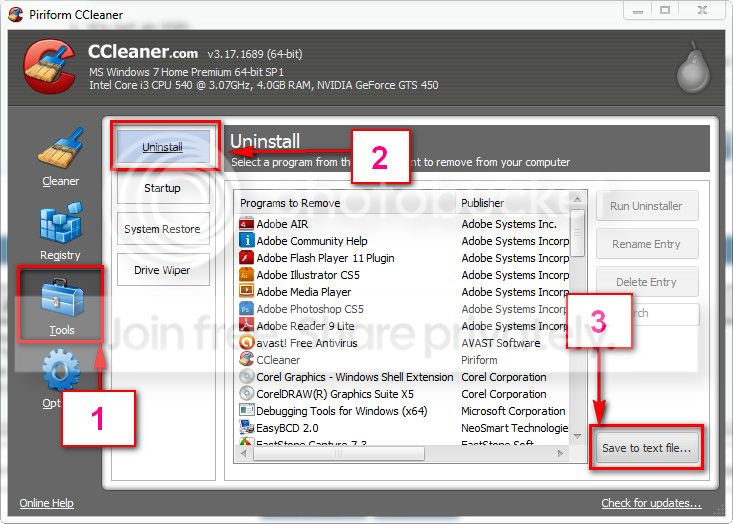
If you dont have any of them installed, download and install CCleaner. Then run it.
Go to "Tools" .... by default it will open the "uninstall" tab.
Click on save as text file. Save it on your desktop.
Upload the text file for us.
2012-11-02_224417.jpg
 

My Computer

Computer type
PC/Desktop
Computer Manufacturer/Model Number
Self Assembled
OS
Microsoft Windows 10 Pro Insider Preview 64-bit
CPU
Intel(R) Core(TM) i3-4130 CPU @ 3.40GHz
Motherboard
Gigabyte Technology Co., Ltd. B85M-D3H
Memory
Corsair Vengence 4GB x2 (8.00GB Dual-Channel DDR3 @ 798MHz)
Graphics Card(s)
2047MB GeForce GTS 450 (ZOTAC International)
Sound Card
Onboard (Realtek High Definition Audio)
Monitor(s) Displays
LG Flatron E2040T
Screen Resolution
1600x900
Hard Drives
Western Digital 1 TB
Seagate 500 GB
PSU
Corsair VS550
Case
Cooler Master K380
Cooling
Cooler Master Seidon 120V Plus
Keyboard
Logitech MK260r
Mouse
Logitech MK260r
Internet Speed
PMPL Broadband
Antivirus
Windows Defender + MBAM
Browser
Firefox
Other Info
Dell Studio 15" Laptop
I don't believe I have any of the programs installed associated with pxHelp20.sys

The .txt file is attached as requested.
 

My Computer

Computer type
PC/Desktop
Computer Manufacturer/Model Number
Custom Build
OS
Windows 7 64-bit Enterprise
CPU
Intel Core i7-3770 3.4GHz
Motherboard
Intel BOXDZ77GA70K
Memory
32GB G.Skill Ripjaws X Series (4x8GB)
Graphics Card(s)
EVGA Geforce GTX 680 2GB GDDR5
Sound Card
Creative SoundBlaster-Z
Monitor(s) Displays
3x Acer 21.5 inch VS228H-P
Screen Resolution
1920x1080 x3
Hard Drives
Internal 120GB Intel 520 SSD
Internal 180GB Intel SSD
Internal 2TB Seagate Barracuda 7200 RPM
2x Internal 3TB Seagate Barracuda 7200RPM
External Seagate 1TB USB 3.0
PSU
Corsair HX Series 650W
Case
Antec 1200 V3 Black Steel ATX Full Tower
Keyboard
Razer DeathStalker
Mouse
Logitech G500s
Internet Speed
25/5mbits
Antivirus
Microsoft Security Essentials
Browser
Safari
Back
Top