Random free HDD space

jaypels

New member
Power User
Local time
6:24 PM
Messages
162
Good day! I've been trying to find a fix for this one but the answer seems to elude me for weeks. Here's my question. My drive C is set to 50Gb and after I reinstalled all my programs, I was only left with around 8 to 11Gb. Why I'm not sure you ask? Well, at times when I view my free space, it gives me 8Gb at times and 11Gb at times. Now, I get 4Gb free space. I set My Documents folder to be saved on my D drive and my backups at my portable HDD. I did a disk cleanup and nothing was found in the recycle bin. Did a full scan just in case (Kaspersky, Malwarebytes & SuperAntispyware) and found nothing. And also, did a defragmentation (even if it was at 1%) just to be sure. Any ideas? Thanks!
 

My Computer

Computer Manufacturer/Model Number
Desktop is a DIY and laptop is an Acer Aspire 4745
OS
7 all the way!
CPU
core 2 duo (desktop) i5 (laptop)
Motherboard
asus for desktop
Memory
2gb for both machines
Graphics Card(s)
nvidia 512mb GS for desktop; hd 5470 for laptop
Monitor(s) Displays
19" AOC 913fw
Welcome
I would guess it is your restore points, maybe they are being deleted, by your software or defrags, which is not good
Download windirstat and you can look at your entire hard drive and know what is on it
http://windirstat.info/
 

My Computer

Computer type
PC/Desktop
Computer Manufacturer/Model Number
Dell XPS 420
OS
Windows 10, Home Clean Install
CPU
Intel Core2 processsor Q8200(2.33Ghz 1333FSB) Quad Core Tech
Motherboard
Dell
Memory
6 gb
Graphics Card(s)
ATI Radeon 256MB HD3650
Sound Card
Intergrated 7.1 Channel Audio
Monitor(s) Displays
Dell SP2009W 20"
Hard Drives
640 GB Serial ATA Hard drive
Cooling
Fan
Keyboard
Dell USB Keyboard
Mouse
Dell Premium Optical USB
Internet Speed
DSL 2.85
JayPels,

Run CCleaner (link in my sig).

Move your Music, your video, and your pictures to D.

Example:
In Windows Explorer:
Rt-clk on My Music |
Select Properties |
Select Location tab |
In the box showing the curreint location, enter D:\Music |
click on MOVE button |
confirm any prompts.
 

My Computer

Computer Manufacturer/Model Number
Toshiba Satellite S875D-S7239 laptop
OS
MS Windows 7 Ultimate SP1 64-bit
CPU
AMD A10-4600M
Motherboard
AMD Pumori (Socket FT1)
Memory
6.00 GB Dual-Channel DDR3 @ 798MHz (11-11-12-28)
Graphics Card(s)
AMD Radeon HD 7660G
Sound Card
High Definition Audio Device
Monitor(s) Displays
Generic PnP Monitor (1600x900@60Hz)
Screen Resolution
1600x900@60Hz
Hard Drives
SSD 119GB Corsair CSSD-V128GB2 ATA Device
Keyboard
Standard PS/2 Keyboard
Mouse
HP Wireless Optical Mobile Mouse Model FHA-3410
Internet Speed
What the local pub, local coffee shop offers.
Other Info
Optical Drive:MATSHITA BD-CMB UJ160B ATA Device


Also have an Asus ha1002xp netbook with Win 7 Ultimate installed.
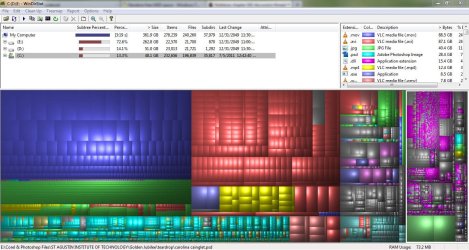
Sorry for the delayed reply. Here's the snip of the drives. I believe drive C is on the far right side. And to karlsnooks, I do not save my downloads or music or anything on C. I save them on D or E. I want C to be free of anything except from the programs I installed so nothing could slow it down. And as for CCleaner, I used to have TuneUp Utilities when I had Xp and when I first transfered to 7 but many advised not to use it because 7 is already good at maintaining it self. Compared a 7 machine with TuneUp and with no TuneUp, the latter was more responsive. This is nothing against you by the way. But if CCleaner would solve my space problems, I would install it right away. :D
 

Attachments

  • snip.JPG
    snip.JPG
    170.1 KB · Views: 16

My Computer

Computer Manufacturer/Model Number
Desktop is a DIY and laptop is an Acer Aspire 4745
OS
7 all the way!
CPU
core 2 duo (desktop) i5 (laptop)
Motherboard
asus for desktop
Memory
2gb for both machines
Graphics Card(s)
nvidia 512mb GS for desktop; hd 5470 for laptop
Monitor(s) Displays
19" AOC 913fw
Scroll the c drive. Any large items that you do not recognize. If so, research and then delete if not necessary. You can ask here for help, too.
 

My Computer

Computer type
PC/Desktop
Computer Manufacturer/Model Number
Dell XPS 420
OS
Windows 10, Home Clean Install
CPU
Intel Core2 processsor Q8200(2.33Ghz 1333FSB) Quad Core Tech
Motherboard
Dell
Memory
6 gb
Graphics Card(s)
ATI Radeon 256MB HD3650
Sound Card
Intergrated 7.1 Channel Audio
Monitor(s) Displays
Dell SP2009W 20"
Hard Drives
640 GB Serial ATA Hard drive
Cooling
Fan
Keyboard
Dell USB Keyboard
Mouse
Dell Premium Optical USB
Internet Speed
DSL 2.85
I do not know that file to delete so I made another snip showing only drive C. I'm hoping you could help me sir. :D As you can see, the biggest share goes to application extension. But I'm betting that is important so it would be better not to delete that. Same goes for the second largest chuck ;)
 

Attachments

  • Capture2.JPG
    Capture2.JPG
    216.2 KB · Views: 9

My Computer

Computer Manufacturer/Model Number
Desktop is a DIY and laptop is an Acer Aspire 4745
OS
7 all the way!
CPU
core 2 duo (desktop) i5 (laptop)
Motherboard
asus for desktop
Memory
2gb for both machines
Graphics Card(s)
nvidia 512mb GS for desktop; hd 5470 for laptop
Monitor(s) Displays
19" AOC 913fw
Those two files are essential for the operation of Windows, you cannot delete those.
 

My Computer

Computer type
PC/Desktop
Computer Manufacturer/Model Number
Dell XPS 420
OS
Windows 10, Home Clean Install
CPU
Intel Core2 processsor Q8200(2.33Ghz 1333FSB) Quad Core Tech
Motherboard
Dell
Memory
6 gb
Graphics Card(s)
ATI Radeon 256MB HD3650
Sound Card
Intergrated 7.1 Channel Audio
Monitor(s) Displays
Dell SP2009W 20"
Hard Drives
640 GB Serial ATA Hard drive
Cooling
Fan
Keyboard
Dell USB Keyboard
Mouse
Dell Premium Optical USB
Internet Speed
DSL 2.85
Since you want to not use the number 1, in all categories, free sofware, namely CCleaner, then please run DISK CLEANUP.

WIN | type Disk Cleanup | ENTER

I believe there is even a tutorial here on using Disk Cleanup.

When that is finished, post a snapshot of the output of Disk Management.
 

My Computer

Computer Manufacturer/Model Number
Toshiba Satellite S875D-S7239 laptop
OS
MS Windows 7 Ultimate SP1 64-bit
CPU
AMD A10-4600M
Motherboard
AMD Pumori (Socket FT1)
Memory
6.00 GB Dual-Channel DDR3 @ 798MHz (11-11-12-28)
Graphics Card(s)
AMD Radeon HD 7660G
Sound Card
High Definition Audio Device
Monitor(s) Displays
Generic PnP Monitor (1600x900@60Hz)
Screen Resolution
1600x900@60Hz
Hard Drives
SSD 119GB Corsair CSSD-V128GB2 ATA Device
Keyboard
Standard PS/2 Keyboard
Mouse
HP Wireless Optical Mobile Mouse Model FHA-3410
Internet Speed
What the local pub, local coffee shop offers.
Other Info
Optical Drive:MATSHITA BD-CMB UJ160B ATA Device


Also have an Asus ha1002xp netbook with Win 7 Ultimate installed.
Back
Top