Solved Re Edge

wither 2

I just added to my previous post, after reboot, I had updates to install, rebooted, enabled IPv6, rebooted, Office Starter 2010 working now. :D

Still the installer won't install without IPv6 being disabled, network error, but that is the workaround! No big deal.

Snick
 

My Computer

Computer type
PC/Desktop
Computer Manufacturer/Model Number
HP Desktop & Compaq Laptop
OS
Win 10 x64, Linux Lite, Win 7 x64, BlackArch, & Kali
Hard Drives
Samsung 850 Pro 256Gb,
Hitachi HDD 1Tb,
Crucial MX SSD 250Gb
Segate 3Tb USB 3.0 Ext. Backup HDD
Internet Speed
150Mbps dn, 20Mbps up
Antivirus
Avast Free, Malwarebytes Anti-Exploit & Anti-Ransomware
Browser
Firefox, Chrome, Opera, & VPN
On my Vista system connection, it shows IPV6 is Local and it's enabled in the Properties.

My Win 7 is connected to my Vista network via Wi-Fi. The connection shows that IPV4 is Internet and, for IPV6, it shows No Internet Access.

In both cases, IPV6 is check marked in the Properties.
 

My Computer

Computer type
Laptop
Computer Manufacturer/Model Number
Dell M6500 Precision Work Station
OS
Windows 7 Pro SP1 64 bit
Memory
8 GB
Screen Resolution
1920x
Internet Speed
30 Mbps
Antivirus
Norton Security
Browser
IE 11
wither 2

Thank you for the information. Did you try or have you installed Office Starter 2010 on your Win7 machine?
I had to temporarily disable IPv6 in properties to install it on my Win10 SSD, then restart, enable IPv6, restart and OS 2010 works on both Win7 SSD & Win10 SSD.
Apparently Microsoft had a patch available a while back, but the links I found aren't working any more. Irregardless, the workaround is disable IPv6, reboot, install OS 2010, reboot, enable IPv6, reboot, and OS 2010 is working. The no internet access when trying to install OS 2010 appears to be compatibility with IPv6, and throws error message when it attempts to access and download the install files from M$ servers.

Don't you just love Microsoft, how they do things sometimes! :sarc:

Snick
 

My Computer

Computer type
PC/Desktop
Computer Manufacturer/Model Number
HP Desktop & Compaq Laptop
OS
Win 10 x64, Linux Lite, Win 7 x64, BlackArch, & Kali
Hard Drives
Samsung 850 Pro 256Gb,
Hitachi HDD 1Tb,
Crucial MX SSD 250Gb
Segate 3Tb USB 3.0 Ext. Backup HDD
Internet Speed
150Mbps dn, 20Mbps up
Antivirus
Avast Free, Malwarebytes Anti-Exploit & Anti-Ransomware
Browser
Firefox, Chrome, Opera, & VPN
Regarding installation on Win 7, the answer is yes (see post 18). Since I didn't know anything about the IPV6 issues you mentioned, the settings were as I noted in post 22.

I didn't get any errors during downloads. I mentioned the downloads earlier because I thought the author and you were possibly getting the error messages as a result of the browser being used. I didn't pursue it because you were able to install.

Based on our discussion, Pkpetr should be able to install it. Hopefully he's still with us in the forum.
 

My Computer

Computer type
Laptop
Computer Manufacturer/Model Number
Dell M6500 Precision Work Station
OS
Windows 7 Pro SP1 64 bit
Memory
8 GB
Screen Resolution
1920x
Internet Speed
30 Mbps
Antivirus
Norton Security
Browser
IE 11
wither 2
You stated in an earlier post IPv6 no internet connection, that may be why you can install Office Starter 2010, mine states internet connection for both IPv4 and IPv6 & in properties. As I said, the error appears when trying to install, the installer errors with network connection because it is attempting to use IPv6. Disabling it temporarily permits connection via IPv4 and success. Microsoft had a link to a patch that corrects the error but the page has been removed/disabled by Microsoft. Figures right!

Snick
 

My Computer

Computer type
PC/Desktop
Computer Manufacturer/Model Number
HP Desktop & Compaq Laptop
OS
Win 10 x64, Linux Lite, Win 7 x64, BlackArch, & Kali
Hard Drives
Samsung 850 Pro 256Gb,
Hitachi HDD 1Tb,
Crucial MX SSD 250Gb
Segate 3Tb USB 3.0 Ext. Backup HDD
Internet Speed
150Mbps dn, 20Mbps up
Antivirus
Avast Free, Malwarebytes Anti-Exploit & Anti-Ransomware
Browser
Firefox, Chrome, Opera, & VPN
As I mentioned, my Win 7 computer is connected to the internet via a router connected to my Vista system. In the General section of the LAN connection on my Vista system, it says IPV6 is local, IPV4 is internet and the Properties has both IPV4 and IPV6 checked. On the Win7 system, the General section says IPV6 connectivity is No Internet Connection. It's using IPV4 for the internet. In the Properties section both the IPV4 and IPV6 are also checked. I don't know the technical part of how all this works but I'm guessing that IPV4 is used on the Win 7 for internet because of the way it's getting the internet signal from Vista. I guess that's why I didn't need to be concerned about IPV6 for the installation.
 

My Computer

Computer type
Laptop
Computer Manufacturer/Model Number
Dell M6500 Precision Work Station
OS
Windows 7 Pro SP1 64 bit
Memory
8 GB
Screen Resolution
1920x
Internet Speed
30 Mbps
Antivirus
Norton Security
Browser
IE 11
Where's Pkpetr?
 

My Computer

Computer type
Laptop
Computer Manufacturer/Model Number
Dell M6500 Precision Work Station
OS
Windows 7 Pro SP1 64 bit
Memory
8 GB
Screen Resolution
1920x
Internet Speed
30 Mbps
Antivirus
Norton Security
Browser
IE 11

My Computer

Computer type
PC/Desktop
Computer Manufacturer/Model Number
HP Desktop & Compaq Laptop
OS
Win 10 x64, Linux Lite, Win 7 x64, BlackArch, & Kali
Hard Drives
Samsung 850 Pro 256Gb,
Hitachi HDD 1Tb,
Crucial MX SSD 250Gb
Segate 3Tb USB 3.0 Ext. Backup HDD
Internet Speed
150Mbps dn, 20Mbps up
Antivirus
Avast Free, Malwarebytes Anti-Exploit & Anti-Ransomware
Browser
Firefox, Chrome, Opera, & VPN
As I have said I have Windows 7 64-bit. I am still looking for a way to download and reinstall a free Word (Word Starter 2010 is the one I lost, when I unistalled it hoping I could reinstall it), in order to be able to read and/or print my Word docs. Don't be misled by several websites saying "download". It does not work. If you are sure and have tried one that works please let me know. All other Msft Office etc are not free.

I then tried System Restore, but it will only go back a few days, not 2-3 months which is what I need. Even when I click and ask it to do so.

I haven't tried LibreOffice yet, because I am not sure it would open all my Word docs.

IPv6 I don't know what it is or what would do to my PC if I enable or disable it, and anyway when I click Network Connections it is not there.

Only way I have found so far in order to read and/or print my Word docs is -thank God- to convert them to Pdfs.

Thank you all for your help so far, even though my problem of installing a free Word is not yet sold.
 

My Computer

Computer type
PC/Desktop
Computer Manufacturer/Model Number
HP
OS
Windows 7 64 bit
Antivirus
Norton
Pkpetr

Office Starter has compatibility issue with IPv6 therefore it has to be disabled temporarily.
Office Starter 2010 -> setupconsumerc2rolw.exe
Softpedia Download Office Starter 2010

I downloaded Office Starter 2010 from both sites on this post, both work.
Don't know why you are having trouble.

To install Office Starter 2010, worked on my Win7 & Win10 SSDs that had error message about internet connection
Network & Sharing Center
Next to Connections, click on WiFi or Ethernet
General Tab click Properties
Disable Internet Protocol Version 6 (IPv6)
click OK
Restart Computer
Install Office Starter 2010
Reboot
Enable Internet Protocol Version 6 (IPv6)
Reboot
Office Starter 2010 now working on my Win7 & Win10 SSDs

Snick
 

My Computer

Computer type
PC/Desktop
Computer Manufacturer/Model Number
HP Desktop & Compaq Laptop
OS
Win 10 x64, Linux Lite, Win 7 x64, BlackArch, & Kali
Hard Drives
Samsung 850 Pro 256Gb,
Hitachi HDD 1Tb,
Crucial MX SSD 250Gb
Segate 3Tb USB 3.0 Ext. Backup HDD
Internet Speed
150Mbps dn, 20Mbps up
Antivirus
Avast Free, Malwarebytes Anti-Exploit & Anti-Ransomware
Browser
Firefox, Chrome, Opera, & VPN
As I have said I have Windows 7 64-bit. I am still looking for a way to download and reinstall a free Word (Word Starter 2010 is the one I lost, when I uninstalled it hoping I could reinstall it), in order to be able to read and/or print my Word docs. Don't be misled by several websites saying "download". It does not work. If you are sure and have tried one that works please let me know. All other Msft Office etc are not free.

I then tried System Restore, but it will only go back a few days, not 2-3 months which is what I need. Even when I click and ask it to do so.

I haven't tried LibreOffice yet, because I am not sure it would open all my Word docs.

IPv6 I don't know what it is or what would do to my PC if I enable or disable it, and anyway when I click Network Connections it is not there.

Only way I have found so far in order to read and/or print my Word docs is -thank God- to convert them to Pdfs.

Thank you all for your help so far, even though my problem of installing a free Word is not yet sold.

Why do you ask for help then not trust us when we try to help you, go to other websites, validate your mistrust then post it here? We provide free help! We are not here to cause you further problems with your computer, but to attempt to resolve your issue, which I have provided a solution for, on more than one of the threads you started regarding this issue.

As to your distrust about temporarily disabling IPv6, it doesn't affect your security. The problem with Office Starter 2010 is this, the install process attempts to access the internet, it is designed to work through IPv4, when IPv6 is enabled, it attempts to use that and it won't work thus the internet connection error.

Therefore, you have to temporarily disable IPv6 so that Office Starter 2010 uses what it was written/designed to use which IPv4. You disable IPv6, reboot to apply the changes, install Office Starter 2010, reboot, enable IPv6, reboot, and Office Starter 2010 is installed, working, and your computer is as it was. Simple!!

Why do you remain pessimistic?

IPv4 & IPv6 are Internet Protocol version 4 & 6 respectively.

IPv4 uses a 32-bit address for its Internet addresses. ... IPv6 utilizes 128-bit Internet addresses. Therefore, it can support 2^128 Internet addresses—340,282,366,920,938,463,463,374,607,431,768,211,456 of them to be exact. The number of IPv6 addresses is 1028 times larger than the number of IPv4 addresses.

IPv4 is a 32-Bit IP Address. IPv6 is 128 Bit IP Address. IPv4 is a numeric address, and its binary bits are separated by a dot (.) IPv6 is an alphanumeric address whose binary bits are separated by a colon (:).

With all the IP addresses we now have, it was not considered at the time, we would run out of IPv4 addresses, therefore, IPv6 was rolled out and implemented so that many, many more websites could be added

Snick

 

My Computer

Computer type
PC/Desktop
Computer Manufacturer/Model Number
HP Desktop & Compaq Laptop
OS
Win 10 x64, Linux Lite, Win 7 x64, BlackArch, & Kali
Hard Drives
Samsung 850 Pro 256Gb,
Hitachi HDD 1Tb,
Crucial MX SSD 250Gb
Segate 3Tb USB 3.0 Ext. Backup HDD
Internet Speed
150Mbps dn, 20Mbps up
Antivirus
Avast Free, Malwarebytes Anti-Exploit & Anti-Ransomware
Browser
Firefox, Chrome, Opera, & VPN
I haven't tried LibreOffice yet, because I am not sure it would open all my Word docs.

IPv6 I don't know what it is or what would do to my PC if I enable or disable it, and anyway when I click Network Connections it is not there./QUOTE]


I have well over 100 Word documents, .docx formats. Each and every one opens with LibreOffice Writer.
As I stated, if you have extensive formatting which you do not as Office Starter is a basic, bare bones word processing application, you shouldn't have any issue. I provided a solution for your apprehension, which was copy a document or a few to your desktop, open that or those with LibreOffice Writer and look at them, if they don't appear formatted correctly, close the document. You haven't altered that document at all and you have not touched/opened the original.

I have extensive formatting on quite a few of my Word documents and every one opens and looks exactly as I created them in Word!! Your apprehension is unwarranted, especially in light of the safe method I delineated prior to this post and again above.

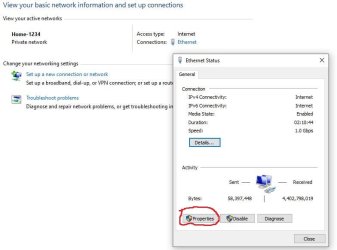
IPv6 is not on the Network Connections, you have to go to Network and Sharing Center, click on the link next to connections: either WiFi or Ethernet, on the popup click properties, scroll down to IPv6 and uncheck the box, click OK, reboot, reverse the process after you install Office Starter 2010, reboot.
Here's screenshots

Capture.JPG

Capture 2.JPG

Capture 3.JPG
 
Last edited:

My Computer

Computer type
PC/Desktop
Computer Manufacturer/Model Number
HP Desktop & Compaq Laptop
OS
Win 10 x64, Linux Lite, Win 7 x64, BlackArch, & Kali
Hard Drives
Samsung 850 Pro 256Gb,
Hitachi HDD 1Tb,
Crucial MX SSD 250Gb
Segate 3Tb USB 3.0 Ext. Backup HDD
Internet Speed
150Mbps dn, 20Mbps up
Antivirus
Avast Free, Malwarebytes Anti-Exploit & Anti-Ransomware
Browser
Firefox, Chrome, Opera, & VPN
Many thanks for your willingness to help. Unfortunately I could not follow your instructions regarding disabling IPv6 probably because you refer to the Edge browser, but -as I have said before- I have IE11. Please give me your instructions for IE11.
 

My Computer

Computer type
PC/Desktop
Computer Manufacturer/Model Number
HP
OS
Windows 7 64 bit
Antivirus
Norton
Many thanks for your willingness to help. Unfortunately I could not follow your instructions regarding disabling IPv6 probably because you refer to the Edge browser, but -as I have said before- I have IE11. Please give me your instructions for IE11.

Well that's a first for me. I previewed the post and all three snippets appeared. Now it showed RE Edge on the 2nd and 3rd capture. Weird. I corrected them. Now you should be able to follow the procedure.

Click on Start :orb: in search box type network and sharing, click on it when it appears. Next to connections click on Ethernet or WiFi depending on what you screen says, In the popup, click on properties, the find the IPv3 entry, and uncheck the checkbox. click on ok, close, close network and sharing via the x in upper-right hand corner.

Restart your computer. Now install Office Starter 2010, then follow the procedure again and check the checkbox next to IPv6, click OK, Click close, click the network and sharing X upper-right hand corner.
Restart computer, you should have a working copy of Office Starter 2010 now & your IPv6 setting as they were!

Snick
 

My Computer

Computer type
PC/Desktop
Computer Manufacturer/Model Number
HP Desktop & Compaq Laptop
OS
Win 10 x64, Linux Lite, Win 7 x64, BlackArch, & Kali
Hard Drives
Samsung 850 Pro 256Gb,
Hitachi HDD 1Tb,
Crucial MX SSD 250Gb
Segate 3Tb USB 3.0 Ext. Backup HDD
Internet Speed
150Mbps dn, 20Mbps up
Antivirus
Avast Free, Malwarebytes Anti-Exploit & Anti-Ransomware
Browser
Firefox, Chrome, Opera, & VPN
You say <<Next to connections click on Ethernet or WiFi >>. I don't see Connections etc. Reminder I have W7-64bit and I am using IE11. Thanks.
 

My Computer

Computer type
PC/Desktop
Computer Manufacturer/Model Number
HP
OS
Windows 7 64 bit
Antivirus
Norton
You say <<Next to connections click on Ethernet or WiFi >>. I don't see Connections etc. Reminder I have W7-64bit and I am using IE11. Thanks.

My computer is Win7 x64, IE11 (your internet browser) has nothing to do with accessing network and sharing.

Lower left corner of your screen, click start orb :orb:
In searchbox that will be just above the start orb, type network and sharing

Click on network and sharing then you should see the network and sharing window as in my post #33

Follow the instructions and screenshots in that post please.
 

My Computer

Computer type
PC/Desktop
Computer Manufacturer/Model Number
HP Desktop & Compaq Laptop
OS
Win 10 x64, Linux Lite, Win 7 x64, BlackArch, & Kali
Hard Drives
Samsung 850 Pro 256Gb,
Hitachi HDD 1Tb,
Crucial MX SSD 250Gb
Segate 3Tb USB 3.0 Ext. Backup HDD
Internet Speed
150Mbps dn, 20Mbps up
Antivirus
Avast Free, Malwarebytes Anti-Exploit & Anti-Ransomware
Browser
Firefox, Chrome, Opera, & VPN

My Computer

Computer type
PC/Desktop
Computer Manufacturer/Model Number
HP Desktop & Compaq Laptop
OS
Win 10 x64, Linux Lite, Win 7 x64, BlackArch, & Kali
Hard Drives
Samsung 850 Pro 256Gb,
Hitachi HDD 1Tb,
Crucial MX SSD 250Gb
Segate 3Tb USB 3.0 Ext. Backup HDD
Internet Speed
150Mbps dn, 20Mbps up
Antivirus
Avast Free, Malwarebytes Anti-Exploit & Anti-Ransomware
Browser
Firefox, Chrome, Opera, & VPN
Sorry, I followed your instructions. I got as far as Network and Sharing, but there is no <<connections>> there, neither a << link next to connections: either WiFi or Ethernet>>. So I could not follow your instructions thereafter.
 

My Computer

Computer type
PC/Desktop
Computer Manufacturer/Model Number
HP
OS
Windows 7 64 bit
Antivirus
Norton
I refer to #38. I got the message: <<Applies to Windows 7, 8, 8.1, & 10(all versions)
Office 2010 Starter Edition will not install. The files required to setup Microsoft Office 2010 cannot be loaded. Check your internet connection.>> My internet connection is fine. Difficult for me to follow videos. Can you send them to me as text?
 

My Computer

Computer type
PC/Desktop
Computer Manufacturer/Model Number
HP
OS
Windows 7 64 bit
Antivirus
Norton
Back
Top