Solved Re/Moving System Reserved - SSD+HD system

Synaptic Sam

New member
Local time
7:09 AM
Messages
26
Hi, I've got a brand new system setup with SSD and HD. Unfortunately when I installed Win 7 (64 bit Pro) I had both drives connected so the "System Reserved" 100 MB partition was placed on the HD.

Later on after some googling I learned that the proper way is to only connect the SSD when installing and afterwards to connect any other hard drives you may wish to add to your system. For more see:

"When you do your Windows 7 install make sure that there are no drives connected apart from the one you're going to install onto. If another drive is available then the install kit will put the reserved partition there instead of on the OS drive. "
[Solved] 100MB System Reserved Partition regarding clean install - Hard-Disks - Storage


"One word of advice I'd mention is to disconnect ALL of your drives EXCEPT the SSD when you install Windows. Windows will try to create a "recovery partition" on a different drive than the OS drive. When you boot the system you're actually booting from the recovery partition which then goes ahead and loads windows from the OS drive. The idea is that it your OS drive gets corrupted then you can still boot the recovery partition in order to perform a repair.

Unfortunately it means that both drives need to work in order to boot Windows. I personally prefer that everything you need to boot the system be on one drive, so I install windows without any other drives connected. This way it creates the recovery partition on the same drive as Windows (the SSD, in this case)."
Win 7 SSD - config-customize - windows-7

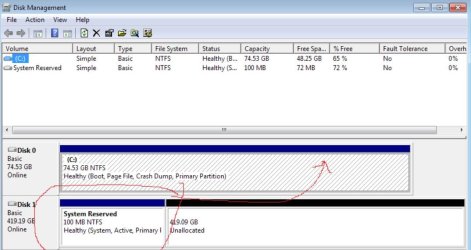
Here's what my disk management look like:
http://i.imgur.com/hFrDo.png

So my question is this. How can I best fix this situation?

Should I remove the 100 MB partition and try the repair method to have it be put on the SSD? I found this:

Moving the System Reserved partition in Windows 7. - Microsoft Answers


Or...............


Since the system is brand new with no data/applications on it yet should I do a brand new install by disconnecting the HD and installing fresh on the SSD (again)? this would force the system reserved partition on the same drive - and then connecting the platter drive to the system.

But if I do this, then will there be a problem since the HD will have the leftover system reserved partition still there?

Thanks in advance for your help!
 

My Computer

OS
Windows 7 64 bit Professional Edition
CPU
Intel Core i5 2300 Quad Core Processor
Motherboard
Gigabyte Z68A-D3-B3
Memory
G.SKILL Ripjaws X F3-12800CL9D-8GBXL 8GB
Graphics Card(s)
XFX Radeon HD 6850
Monitor(s) Displays
Dell U2311H
Screen Resolution
1920x1080
Hard Drives
Intel 80 GB SSD
WD Velociraptor 450 GB
PSU
Corsair Professional HX650W 650W ATX 12V 52A 24PIN ATX Modul
Case
Coolermaster Elite 370 Black Mid Tower ATX
Cooling
Corsair Cooling Air Series A70
Hello Synaptic Sam, welcome to Seven Forums!


Power down and disconnect Disk 1 and set the Disk 0 HDD as the second boot device after the CD/DVD drive and mark the Windows 7 partition as Active and do the 3 separate startup repairs, with restarts between each to (re)create the Windows System boot files to the C: partition.


My Computer

Computer Manufacturer/Model Number
* BFK Customs *
OS
W 7 64-bit Ultimate
CPU
Intel Q9550 Yorkfield
Motherboard
ASUS P5Q Pro
Memory
8GB Dominator 8500C5D
Graphics Card(s)
ATI : XFX 5870
Sound Card
Realtek HD Audio 7-1
Monitor(s) Displays
1x 47" LCD HDMI & 3x 26" LCD HDMI
Screen Resolution
1920x1080P & 1920x1200
Hard Drives
1x 80GB Intel X25-M G2 SSD : 1x 500GB & 1x 640GB WD Caviar Black(s)
PSU
Corsair 620HX
Case
Cooler Master RC-690
Cooling
Tuniq Tower 120, 2x 140mm and 3x 120mm case fans
Keyboard
Microsoft 500
Mouse
Razer Diamondback 3G
Internet Speed
14 Mb/s
Other Info
1x Koutech 3Gb/s SATA HDD Hot Swap Rack
For better help with problems, Can you post your specs.

system specs posted!


Hello Synaptic Sam, welcome to Seven Forums!


Power down and disconnect Disk 1 and set the Disk 0 HDD as the second boot device after the CD/DVD drive and mark the Windows 7 partition as Active and do the 3 separate startup repairs, with restarts between each to (re)create the Windows System boot files to the C: partition.


ok, let's see if I follow what you're saying (please be patient with a n00b!):

1. powerdown the computer
2. disconnect Disk 1
3. turn power on and through BIOS set Disk 0 as second boot after CD/DVD drive
4. after OS loads go into Disk Management and mark the Windows 7 partition (this is the OS install - not the "System Reserved" partition!) as Active
5. follow steps in the startup repair link you provide (run 3 separate times)

am I understanding you correctly? how would the system boot up without the system reserve partition? doesn't it need that for bootup?

Thanks!
 

My Computer

OS
Windows 7 64 bit Professional Edition
CPU
Intel Core i5 2300 Quad Core Processor
Motherboard
Gigabyte Z68A-D3-B3
Memory
G.SKILL Ripjaws X F3-12800CL9D-8GBXL 8GB
Graphics Card(s)
XFX Radeon HD 6850
Monitor(s) Displays
Dell U2311H
Screen Resolution
1920x1080
Hard Drives
Intel 80 GB SSD
WD Velociraptor 450 GB
PSU
Corsair Professional HX650W 650W ATX 12V 52A 24PIN ATX Modul
Case
Coolermaster Elite 370 Black Mid Tower ATX
Cooling
Corsair Cooling Air Series A70
am I understanding you correctly? how would the system boot up without the system reserve partition? doesn't it need that for bootup?

Thanks!

No the SysResv is not needed.


Mark the Windows 7 partition Active using disk management BEFORE you power down, just be sure you have a Windows 7 installation disk for the startup repairs beforehand as Windows will not start after you mark it active and before you do the startup repairs.

This will work for the startup repairs also.


My Computer

Computer Manufacturer/Model Number
* BFK Customs *
OS
W 7 64-bit Ultimate
CPU
Intel Q9550 Yorkfield
Motherboard
ASUS P5Q Pro
Memory
8GB Dominator 8500C5D
Graphics Card(s)
ATI : XFX 5870
Sound Card
Realtek HD Audio 7-1
Monitor(s) Displays
1x 47" LCD HDMI & 3x 26" LCD HDMI
Screen Resolution
1920x1080P & 1920x1200
Hard Drives
1x 80GB Intel X25-M G2 SSD : 1x 500GB & 1x 640GB WD Caviar Black(s)
PSU
Corsair 620HX
Case
Cooler Master RC-690
Cooling
Tuniq Tower 120, 2x 140mm and 3x 120mm case fans
Keyboard
Microsoft 500
Mouse
Razer Diamondback 3G
Internet Speed
14 Mb/s
Other Info
1x Koutech 3Gb/s SATA HDD Hot Swap Rack
Thank you for the clarification! yes, I have the Win 7 installation disc as well as the system repair disc. I assume I could use both but I'll use the original installation disc.

ok so the order is this:

1. Mark Disk 0 as Active
2. insert installation disc (to be used later)
3. power down system
4. disconnect Disk 1
5. turn power on
6. via BIOS change boot order to first, CD/DVD and then second, Disk 0
7. boot up will use the installation disc inserted earlier
8. follow instructions here and here

just want to make sure I don't make a mistake!


also, what do I do after this is done? that is when the system reserve partition is moved? do I plug the HD back on and format it to remove the residual system reserve partition that was originally put there?
thanks again
 

My Computer

OS
Windows 7 64 bit Professional Edition
CPU
Intel Core i5 2300 Quad Core Processor
Motherboard
Gigabyte Z68A-D3-B3
Memory
G.SKILL Ripjaws X F3-12800CL9D-8GBXL 8GB
Graphics Card(s)
XFX Radeon HD 6850
Monitor(s) Displays
Dell U2311H
Screen Resolution
1920x1080
Hard Drives
Intel 80 GB SSD
WD Velociraptor 450 GB
PSU
Corsair Professional HX650W 650W ATX 12V 52A 24PIN ATX Modul
Case
Coolermaster Elite 370 Black Mid Tower ATX
Cooling
Corsair Cooling Air Series A70
just want to make sure I don't make a mistake!


also, what do I do after this is done? that is when the system reserve partition is moved? do I plug the HD back on and format it to remove the residual system reserve partition that was originally put there?
thanks again


You're welcome.

There will be no SysResv after this, the Windows 7 C: will be "System Active"; if you care to recreate it have a look through these tutorials linked below for different methods of creating it; the SysResv partition is useful but not necessary.
After Windows 7 is booting good all on it's own, power down and reconnect the HDD and you can create partition(s) as you choose.

   Note

You can always extend the Windows partition to include the remaining unallocated space on the HDD / SSD or create additional Primary partitions or an Extended partition.
 

My Computer

Computer Manufacturer/Model Number
* BFK Customs *
OS
W 7 64-bit Ultimate
CPU
Intel Q9550 Yorkfield
Motherboard
ASUS P5Q Pro
Memory
8GB Dominator 8500C5D
Graphics Card(s)
ATI : XFX 5870
Sound Card
Realtek HD Audio 7-1
Monitor(s) Displays
1x 47" LCD HDMI & 3x 26" LCD HDMI
Screen Resolution
1920x1080P & 1920x1200
Hard Drives
1x 80GB Intel X25-M G2 SSD : 1x 500GB & 1x 640GB WD Caviar Black(s)
PSU
Corsair 620HX
Case
Cooler Master RC-690
Cooling
Tuniq Tower 120, 2x 140mm and 3x 120mm case fans
Keyboard
Microsoft 500
Mouse
Razer Diamondback 3G
Internet Speed
14 Mb/s
Other Info
1x Koutech 3Gb/s SATA HDD Hot Swap Rack
Hello Ray, the snip doesn't show EFI.


click to enlarge
no.JPG
 

My Computer

Computer Manufacturer/Model Number
* BFK Customs *
OS
W 7 64-bit Ultimate
CPU
Intel Q9550 Yorkfield
Motherboard
ASUS P5Q Pro
Memory
8GB Dominator 8500C5D
Graphics Card(s)
ATI : XFX 5870
Sound Card
Realtek HD Audio 7-1
Monitor(s) Displays
1x 47" LCD HDMI & 3x 26" LCD HDMI
Screen Resolution
1920x1080P & 1920x1200
Hard Drives
1x 80GB Intel X25-M G2 SSD : 1x 500GB & 1x 640GB WD Caviar Black(s)
PSU
Corsair 620HX
Case
Cooler Master RC-690
Cooling
Tuniq Tower 120, 2x 140mm and 3x 120mm case fans
Keyboard
Microsoft 500
Mouse
Razer Diamondback 3G
Internet Speed
14 Mb/s
Other Info
1x Koutech 3Gb/s SATA HDD Hot Swap Rack

My Computer

OS
Windows 7 64 bit Professional Edition
CPU
Intel Core i5 2300 Quad Core Processor
Motherboard
Gigabyte Z68A-D3-B3
Memory
G.SKILL Ripjaws X F3-12800CL9D-8GBXL 8GB
Graphics Card(s)
XFX Radeon HD 6850
Monitor(s) Displays
Dell U2311H
Screen Resolution
1920x1080
Hard Drives
Intel 80 GB SSD
WD Velociraptor 450 GB
PSU
Corsair Professional HX650W 650W ATX 12V 52A 24PIN ATX Modul
Case
Coolermaster Elite 370 Black Mid Tower ATX
Cooling
Corsair Cooling Air Series A70
just want to make sure I don't make a mistake!


also, what do I do after this is done? that is when the system reserve partition is moved? do I plug the HD back on and format it to remove the residual system reserve partition that was originally put there?
thanks again


You're welcome.

There will be no SysResv after this, the Windows 7 C: will be "System Active"; if you care to recreate it have a look through these tutorials linked below for different methods of creating it; the SysResv partition is useful but not necessary.
After Windows 7 is booting good all on it's own, power down and reconnect the HDD and you can create partition(s) as you choose.

   Note

You can always extend the Windows partition to include the remaining unallocated space on the HDD / SSD or create additional Primary partitions or an Extended partition.

Have you done the above?
 

My Computer

OS
ME/XP/Vista/Win7
Actually the steps are here unless you want to recreate the System Reserved partition which is not necessary:

Power down and disconnect Disk 1 and set the Disk 0 HDD as the second boot device after the CD/DVD drive and mark the Windows 7 partition as Active and do the 3 separate startup repairs, with restarts between each to (re)create the Windows System boot files to the C: partition.
Startup Repair - Run 3 Separate Times

Partition - Mark as Active (Method Two)
 

My Computer

Computer Manufacturer/Model Number
* BFK Customs *
OS
W 7 64-bit Ultimate
CPU
Intel Q9550 Yorkfield
Motherboard
ASUS P5Q Pro
Memory
8GB Dominator 8500C5D
Graphics Card(s)
ATI : XFX 5870
Sound Card
Realtek HD Audio 7-1
Monitor(s) Displays
1x 47" LCD HDMI & 3x 26" LCD HDMI
Screen Resolution
1920x1080P & 1920x1200
Hard Drives
1x 80GB Intel X25-M G2 SSD : 1x 500GB & 1x 640GB WD Caviar Black(s)
PSU
Corsair 620HX
Case
Cooler Master RC-690
Cooling
Tuniq Tower 120, 2x 140mm and 3x 120mm case fans
Keyboard
Microsoft 500
Mouse
Razer Diamondback 3G
Internet Speed
14 Mb/s
Other Info
1x Koutech 3Gb/s SATA HDD Hot Swap Rack
update! here is where things stand:
http://i.imgur.com/0FjrR.png

as you can see I ran the repair, it worked! then I shrunk the SSD by 200 (dunno why it gave me only 199?) and then followed the steps to create a new System Reserved partition.

now I'm about to shut down the system, re-connect the WD Velociraptor platter drive and then reformat it (erase the remnant System Reserved partition on there from the original Win 7 install).

Thank you guys! much appreciated. it was very easy once I knew what the heck I was supposed to do.

If there's anything else, let me know. Thanks again!
 

My Computer

OS
Windows 7 64 bit Professional Edition
CPU
Intel Core i5 2300 Quad Core Processor
Motherboard
Gigabyte Z68A-D3-B3
Memory
G.SKILL Ripjaws X F3-12800CL9D-8GBXL 8GB
Graphics Card(s)
XFX Radeon HD 6850
Monitor(s) Displays
Dell U2311H
Screen Resolution
1920x1080
Hard Drives
Intel 80 GB SSD
WD Velociraptor 450 GB
PSU
Corsair Professional HX650W 650W ATX 12V 52A 24PIN ATX Modul
Case
Coolermaster Elite 370 Black Mid Tower ATX
Cooling
Corsair Cooling Air Series A70
You need to make the SysResv "System Active" or the partition is useless, mark the SysResv Active and do the startup repairs before you reconnect the HDD.


click to enlarge
sr2.jpg
 

My Computer

Computer Manufacturer/Model Number
* BFK Customs *
OS
W 7 64-bit Ultimate
CPU
Intel Q9550 Yorkfield
Motherboard
ASUS P5Q Pro
Memory
8GB Dominator 8500C5D
Graphics Card(s)
ATI : XFX 5870
Sound Card
Realtek HD Audio 7-1
Monitor(s) Displays
1x 47" LCD HDMI & 3x 26" LCD HDMI
Screen Resolution
1920x1080P & 1920x1200
Hard Drives
1x 80GB Intel X25-M G2 SSD : 1x 500GB & 1x 640GB WD Caviar Black(s)
PSU
Corsair 620HX
Case
Cooler Master RC-690
Cooling
Tuniq Tower 120, 2x 140mm and 3x 120mm case fans
Keyboard
Microsoft 500
Mouse
Razer Diamondback 3G
Internet Speed
14 Mb/s
Other Info
1x Koutech 3Gb/s SATA HDD Hot Swap Rack

My Computer

OS
Windows 7 64 bit Professional Edition
CPU
Intel Core i5 2300 Quad Core Processor
Motherboard
Gigabyte Z68A-D3-B3
Memory
G.SKILL Ripjaws X F3-12800CL9D-8GBXL 8GB
Graphics Card(s)
XFX Radeon HD 6850
Monitor(s) Displays
Dell U2311H
Screen Resolution
1920x1080
Hard Drives
Intel 80 GB SSD
WD Velociraptor 450 GB
PSU
Corsair Professional HX650W 650W ATX 12V 52A 24PIN ATX Modul
Case
Coolermaster Elite 370 Black Mid Tower ATX
Cooling
Corsair Cooling Air Series A70
Yes now run the 3 startup repairs and then you'll see the difference. ;)
 

My Computer

Computer Manufacturer/Model Number
* BFK Customs *
OS
W 7 64-bit Ultimate
CPU
Intel Q9550 Yorkfield
Motherboard
ASUS P5Q Pro
Memory
8GB Dominator 8500C5D
Graphics Card(s)
ATI : XFX 5870
Sound Card
Realtek HD Audio 7-1
Monitor(s) Displays
1x 47" LCD HDMI & 3x 26" LCD HDMI
Screen Resolution
1920x1080P & 1920x1200
Hard Drives
1x 80GB Intel X25-M G2 SSD : 1x 500GB & 1x 640GB WD Caviar Black(s)
PSU
Corsair 620HX
Case
Cooler Master RC-690
Cooling
Tuniq Tower 120, 2x 140mm and 3x 120mm case fans
Keyboard
Microsoft 500
Mouse
Razer Diamondback 3G
Internet Speed
14 Mb/s
Other Info
1x Koutech 3Gb/s SATA HDD Hot Swap Rack

My Computer

OS
Windows 7 64 bit Professional Edition
CPU
Intel Core i5 2300 Quad Core Processor
Motherboard
Gigabyte Z68A-D3-B3
Memory
G.SKILL Ripjaws X F3-12800CL9D-8GBXL 8GB
Graphics Card(s)
XFX Radeon HD 6850
Monitor(s) Displays
Dell U2311H
Screen Resolution
1920x1080
Hard Drives
Intel 80 GB SSD
WD Velociraptor 450 GB
PSU
Corsair Professional HX650W 650W ATX 12V 52A 24PIN ATX Modul
Case
Coolermaster Elite 370 Black Mid Tower ATX
Cooling
Corsair Cooling Air Series A70
Perfect! :party:


Now reconnect the HDD (power down first) and then you can delete the old SysResv and re-partition the HDD in any manner you like, have a look at Method One of this one for additional storage ideas.


My Computer

Computer Manufacturer/Model Number
* BFK Customs *
OS
W 7 64-bit Ultimate
CPU
Intel Q9550 Yorkfield
Motherboard
ASUS P5Q Pro
Memory
8GB Dominator 8500C5D
Graphics Card(s)
ATI : XFX 5870
Sound Card
Realtek HD Audio 7-1
Monitor(s) Displays
1x 47" LCD HDMI & 3x 26" LCD HDMI
Screen Resolution
1920x1080P & 1920x1200
Hard Drives
1x 80GB Intel X25-M G2 SSD : 1x 500GB & 1x 640GB WD Caviar Black(s)
PSU
Corsair 620HX
Case
Cooler Master RC-690
Cooling
Tuniq Tower 120, 2x 140mm and 3x 120mm case fans
Keyboard
Microsoft 500
Mouse
Razer Diamondback 3G
Internet Speed
14 Mb/s
Other Info
1x Koutech 3Gb/s SATA HDD Hot Swap Rack

My Computer

OS
Windows 7 64 bit Professional Edition
CPU
Intel Core i5 2300 Quad Core Processor
Motherboard
Gigabyte Z68A-D3-B3
Memory
G.SKILL Ripjaws X F3-12800CL9D-8GBXL 8GB
Graphics Card(s)
XFX Radeon HD 6850
Monitor(s) Displays
Dell U2311H
Screen Resolution
1920x1080
Hard Drives
Intel 80 GB SSD
WD Velociraptor 450 GB
PSU
Corsair Professional HX650W 650W ATX 12V 52A 24PIN ATX Modul
Case
Coolermaster Elite 370 Black Mid Tower ATX
Cooling
Corsair Cooling Air Series A70
Back
Top