

TheHighRoad
New member
- Local time
- 9:34 AM
- Messages
- 14
Hello!
I'm having some annoying problems here.
1) In the leftmost Attached Thumbnail, it shows "My Pictures (4) D:\" with a drop-down. I am wondering why all My Documents, My Music, My Pictures and My Videos have this when no other folder does. Is there a way to get rid of it?
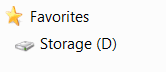
2) In the Attatched Image, it shows the favorites menu. I used to have Downloads and Desktop under favorites, I have no idea where they went. Is there some way I can restore them? [Not in the entire explorer on the left] Their icons are no longer in C:\Users\<my username>.
3) In the rightmost Attached Thumbnail, I have 3 sample folder's properties open. Each has the Read Only box filled. I am wondering if this is a problem, I don't see this on any of my other computers. This property goes for every folder I check in my operating system, just created, or otherwise. It also doesn't matter which drive it is on.
4) Even though I moved the location of My Documents to D:\My Documents from C:\Users\<my username> my programs can't find the folder. For example, Battlefield Bad Company 2 and Starcraft 2 aren't storing their settings in My Documents, so every time I launch the game I have to reconfigure, the graphics settings, log in (can't save log in information), sound settings, and key binds. I would have moved My Documents from D:\ back to C:\ but the icon for it has disappeared in C:\Users\<username>.
Bad Company 2 is creating a long list of folders BFBCS in the root of C:\ i.e. C:\BFBCS\BFBCS\BFBCS\BFBCS\BFBCS\BFBCS\BFBCS\BFBCS etc.
Side notes: C:\ SSD, D:\ HDD. This is a clean install 1 week old!!!
Thanks!
I'm having some annoying problems here.
1) In the leftmost Attached Thumbnail, it shows "My Pictures (4) D:\" with a drop-down. I am wondering why all My Documents, My Music, My Pictures and My Videos have this when no other folder does. Is there a way to get rid of it?
2) In the Attatched Image, it shows the favorites menu. I used to have Downloads and Desktop under favorites, I have no idea where they went. Is there some way I can restore them? [Not in the entire explorer on the left] Their icons are no longer in C:\Users\<my username>.
3) In the rightmost Attached Thumbnail, I have 3 sample folder's properties open. Each has the Read Only box filled. I am wondering if this is a problem, I don't see this on any of my other computers. This property goes for every folder I check in my operating system, just created, or otherwise. It also doesn't matter which drive it is on.
4) Even though I moved the location of My Documents to D:\My Documents from C:\Users\<my username> my programs can't find the folder. For example, Battlefield Bad Company 2 and Starcraft 2 aren't storing their settings in My Documents, so every time I launch the game I have to reconfigure, the graphics settings, log in (can't save log in information), sound settings, and key binds. I would have moved My Documents from D:\ back to C:\ but the icon for it has disappeared in C:\Users\<username>.
Bad Company 2 is creating a long list of folders BFBCS in the root of C:\ i.e. C:\BFBCS\BFBCS\BFBCS\BFBCS\BFBCS\BFBCS\BFBCS\BFBCS etc.
Side notes: C:\ SSD, D:\ HDD. This is a clean install 1 week old!!!
Thanks!
Attachments


My Computer
- Computer type
- PC/Desktop
- OS
- W 7 Professional x64

