Solved Reallocated Sector Count

PauloAgojo277

Virus Helper ! >_<
Member
Local time
10:35 PM
Messages
66
Location
Philippines
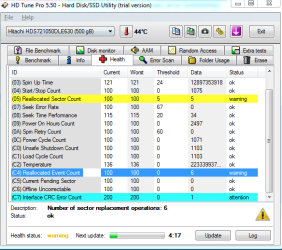
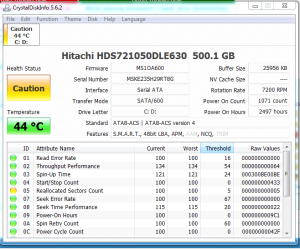
I Have A Hitachi HDD 500 GB .. And When I Open CrystalDiskInfo It Says Caution.. Reallocated Sector Count ..
Here Are Some Screenshots, What Can I Do With This? CAN I FIX THIS?
Because In The Philippines, Hard Drives are So expensive so please help :cry: :cry: :cry:
 

Attachments

  • hdd tune.PNG
    hdd tune.PNG
    24.9 KB · Views: 32
  • cdi.PNG
    cdi.PNG
    31.8 KB · Views: 30

My Computer

Computer type
PC/Desktop
Computer Manufacturer/Model Number
AsusTEK Computer INC.
OS
Windows Ultimate 32-bit x86 Service-Pack-1
CPU
Intel Pentium Dual Core CPU E5400 @2.70 Ghz 2.70Ghz
Motherboard
Asus P5G41T-M LX3
Memory
2.00 GB Kingston RAM
Graphics Card(s)
Nvidia Geforce GT 630 2GB DDR3
Sound Card
RealTek Audio HD Manager
Monitor(s) Displays
ViewSonic V1616wSERIES
Screen Resolution
1366x768
Hard Drives
WDC WD1600AAJS-00WAA0 ATA Drive - Old Hard Drive = 120 GB
Hitachi HDS721050DLE630ATA Drive - New Hard Drive = 500 GB
PSU
I Think Hitachi PSU
Case
HiP Case w/ Power Supply
Cooling
Intel Fan - CPU - Integrated Fan - GPU - Chassis Fan -
Keyboard
Cruiser Keyboard
Mouse
iMega Plus Mouse
Internet Speed
1.9 Mbps Up :D And 1.0 Upload/s :D
Antivirus
avast! Antivirus
Browser
Mozilla FireFox - Google Chrome 28 - Opera - Safari
Other Info
Games: 2000 - 2008 - Some (2014)

avast! 2038 = Paid!
This is a physical issue with the drive and there is fix other than replacing the drive.
But this is only a warning. A small number of reallocated sectors is not unusual and this isn't necessarily serious. Keep an eye on this to see if the numbers rise. Be sure you have a backup of all important data on the drive. Of course you should have this anyway. Very important.
 

My Computer

Computer type
PC/Desktop
Computer Manufacturer/Model Number
HP
OS
Windows 7 Pro 64 bit
CPU
Xeon W3520
Memory
8 GB
Graphics Card(s)
Nvidia Geforce 210
I'd go with LMiller7 suggestion, check if the number increases over this days or weeks, if it does, you can try HDD Regenerator to see if you can recover your bad sectors, now, take in mind that this will work if there is only some magnetic issues with the headers (interrupted operations that "cause bad sectors").

If that doesn't work, and bad sectors increase, then seems that the HDD came bad from factory and it probably has a surface defect that generates bad sectors, let's hope you can solve the issue with HDD regenerator, if not, check if you are under warranty and ask for a spare HDD.
 

My Computer

Computer type
PC/Desktop
Computer Manufacturer/Model Number
Assembled Desktop PC
OS
Microsoft Windows 7 Home Premium SP1 64-bit Build 7600
CPU
AMD Athlon 64 X2 5200+ Dual Core CPU @ 2.7 Ghz (Brisbane)
Motherboard
PCChips A13G+ v3.0
Memory
2x2 GB DDR2 PC-5300 (667 Mhz) Kingston ValueRAM
Graphics Card(s)
XFX ATI Radeon HD 4350 GPU (512 MB + 512 MB HM)
Sound Card
Realtek High Definition Audio Driver ALC660 @ MCP61S
Monitor(s) Displays
HP S2031 20" LED HD Widescreen Display Monitor
Screen Resolution
1600 x 900 px
Hard Drives
Maxtor Diamond Max 10 (160 GB, 7200 RPM, SATA-II Hard Disk)
Western Digital Scorpion Blue (250 GB, 5400 RPM, SATA-II External Hard Disk - Personal Data)
Toshiba MQ01ABD050 (500 GB, 5400 RPM, SATA-II External Hard Disk - Software & ISOs)
PSU
Pixxo Transformer 850W 80+ Certification PSU
Case
Compaq 5BW353 Case
Cooling
Many solutions, see other info...
Keyboard
Green Leaf (Mitzu) Standard Keyboard
Mouse
Microsoft USB Lasser Pointing Device
Internet Speed
10 MB
Antivirus
Avast Antivirus Free
Browser
Firefox, Chrome, Internet Explorer
Other Info
Windows Experience Index Result: 3.8 of 7.9.

Cooling solutions:
- AVC @ 2000/5000 RPM Copper Heatpipes (For Athlon 64 X2 6000+ CPU used in an Athlon 64 X2 5200+)
- Rear Fan 80 mm @ 2700 RPM for heat extraction
- Manhatan Chipset Cooler @ 4700/7200 RPM (For nVidia Chipset in MoBo)
- Foxconn @ 2500 RPM (Old Pentium III heatsink fan) in XFX ATI Radeon HD 4350
Paulo,
I think your HDD is probably on the way out. As suggested you should keep an eye on reallocated sector count over time. Make sure vital data is backed up in some other way. Important documents, photos etc at least drop them onto a DVD. I accept that HDDs are expensive in some situations but I think you need another.
 

My Computer

Computer type
PC/Desktop
Computer Manufacturer/Model Number
Own build
OS
Windows 7x64 Home Premium SP1
CPU
Intel i7 2600k
Motherboard
ASUS P8Z68 Deluxe
Memory
G.Skill Ripjaws (DDR3-1600) 2x4GB
Graphics Card(s)
Nvidia GeForce GTS 450; Intel HD Graphics 3000(GT2+)
Monitor(s) Displays
Dell Ultrasharp IPS panel U2311H, Samsung SyncMaster P2350
Screen Resolution
1920x1080
Hard Drives
Samsung 850 Pro SSD 256GB, Samsung SSD 840 120GB, Seagates 1TB Barracuda ST31000528AS x2
PSU
Seasonic M12II 520W
Case
Lian Li Lancool PC-K60
Cooling
Case: 1x120mm, 3x140mm CPU: Hyper 212+
Keyboard
Logitech MK520 (wireless)
Mouse
Logitech MK520
Internet Speed
6-7 Mbps
Antivirus
Norton Security Premium, Malwarebytes on 2 (MSE on 3rd PC)
Browser
FireFox
Other Info
Audio: Logitech Z523 2.1
Back
Top