Really need help w/ diskpart for win7 install

sebastian869

New member
Local time
4:32 PM
Messages
55
in middle of win 7 install and im trying to get around the generic win 7 x64 3 partitions ( installng to 250 gig ssd in 3 parts will kill my available space for games like COD do u guys think its worth it or should i install games to the raptor?) so looked it up online and managed to partition my C: ssd as primary and i dont know how to partition the reg D:
(what partiton type) really be great ful for advice here as iphone as pc sucks. thanks

ps when i list disk it shows both as nothing under "Dyn" dunno what that means and a star under "Gpt" for disk 1 the D: drive the raptor,
is the 3 partition EFI and is it better for life of ssd then single part.?
 

My Computer

Computer type
PC/Desktop
Computer Manufacturer/Model Number
selp built
OS
windows 7 x64 home premium
CPU
i7-4790k
Motherboard
Asrock extreme6 Z97
Memory
16GB Corsair CMZ16GX3M2A2133C10
Graphics Card(s)
swaping bad Asus 780ti GTX780TI-DC2OC-3GD5 for 970 or 980
Hard Drives
Samsung 850Pro MZ-7KE256BW, Wester Digital VelociRaptor WD 1000DHTZ 1TB 10,000 R.P.M. 64MB Cache
Antivirus
microsoft security essentials
Browser
explorer 11 and chrome/firefox
Windows does not set up 3 partitions, you do. You can partition the ssd any way you want, I would only create 1 partition on a 250 GB drive, all your data can go on the other drive/drives.

I would definitly install your games to another drive if you can.

That`s what I do, as long as you create disk images, restoring windows is no problem and your game data is right there, you won`t have to reinstall anything and your game progress will be right there where you were before the reimage.

Dyn usually means Dynamic, you don`t want that. Your disk should be initilazed as Basic.

http://www.sevenforums.com/tutorials/26829-convert-dynamic-disk-basic-disk.html
 

My Computer

Computer type
PC/Desktop
Computer Manufacturer/Model Number
Skylake Special #666
OS
Windows 10 Pro x64
CPU
Intel Core i7 6700K
Motherboard
Asus Sabertooth Z170 Mark 1
Memory
GSkill TridentZ RGB 16GB 3600 16-16-16-36
Graphics Card(s)
EVGA GTX 980 Ti SC x2
Sound Card
Realtek High Definition
Monitor(s) Displays
AOC G2460PG
Screen Resolution
1920 x 1080 144Hz
Hard Drives
Samsung 860 Pro 256GB, Seagate Barracuda 4TB x2
PSU
EVGA 1000 P2, EVGA White Custom Braided Cables
Case
Corsair Vengeance C70 Gunmetal Black
Cooling
Corsair H100i v2, Corsair ML120 x2, Thermal Grizzly Kryonaut
Keyboard
Logitech G910 Orion Spectrum
Mouse
Logitech G700s
Internet Speed
Verizon Fios Quantum Gateway 75/75
Antivirus
Windows Defender, Malwarebytes Free 3.8.3
Browser
Chrome
Other Info
Corsair SP120 x4, LG Blu-ray Drive, Durabrand HT-395 100 Watt Dolby Digital Amp, Corsair H2100 Wireless 7.1 Headset
If you have a UEFI BIOS, you have to have those partitions. If you have an MBR, you can do it on just 1 partition. But, the partitions will not take enough space to affect you putting or not putting games on the SSD. I always put them on a seperate drive anyway.
 

My Computers

System One System Two

  • Computer type
    PC/Desktop
    Computer Manufacturer/Model Number
    ALWAYS UNDER CONSTRUCTION
    OS
    Windows 11 Pro
    CPU
    Ryzen 9 5900X
    Motherboard
    Asus X570 Crosshair Viii Hero
    Memory
    32GB G Skill DDR4-3600
    Graphics Card(s)
    EVGA RTX 3080 FTW 3 Ultra
    Sound Card
    On Board/Sennheiser PC37X Headset
    Monitor(s) Displays
    3 X Asus 27"
    Screen Resolution
    2560x1440
    Hard Drives
    2 X 1 TB NVME drives
    PSU
    EVGA 850
    Case
    Phanteks Eclipse P400A
    Cooling
    EVGA 280 AIO
    Keyboard
    Logitech G510s/ Logitech G13
    Mouse
    Logitech G502
    Internet Speed
    24/1
    Antivirus
    ESET/MBAM Pro/SAS Pro
    Browser
    Chrome/ Firefox/ Edge
  • Computer type
    Laptop
    System Manufacturer/Model Number
    Dell 16 Plus
    OS
    Windows 11 Pro
    CPU
    Intel Ultra 9 288V
    Memory
    32 GB LPDDR5X 8533
    Monitor(s) Displays
    16" Mini-LED HDR600 Touch 90 Hz
    Screen Resolution
    2560X1600
    Hard Drives
    1 TB NVME
Thank You Steve, I only use Legacy.
 

My Computer

Computer type
PC/Desktop
Computer Manufacturer/Model Number
Skylake Special #666
OS
Windows 10 Pro x64
CPU
Intel Core i7 6700K
Motherboard
Asus Sabertooth Z170 Mark 1
Memory
GSkill TridentZ RGB 16GB 3600 16-16-16-36
Graphics Card(s)
EVGA GTX 980 Ti SC x2
Sound Card
Realtek High Definition
Monitor(s) Displays
AOC G2460PG
Screen Resolution
1920 x 1080 144Hz
Hard Drives
Samsung 860 Pro 256GB, Seagate Barracuda 4TB x2
PSU
EVGA 1000 P2, EVGA White Custom Braided Cables
Case
Corsair Vengeance C70 Gunmetal Black
Cooling
Corsair H100i v2, Corsair ML120 x2, Thermal Grizzly Kryonaut
Keyboard
Logitech G910 Orion Spectrum
Mouse
Logitech G700s
Internet Speed
Verizon Fios Quantum Gateway 75/75
Antivirus
Windows Defender, Malwarebytes Free 3.8.3
Browser
Chrome
Other Info
Corsair SP120 x4, LG Blu-ray Drive, Durabrand HT-395 100 Watt Dolby Digital Amp, Corsair H2100 Wireless 7.1 Headset
Windows does not set up 3 partitions, you do. You can partition the ssd any way you want, I would only create 1 partition on a 250 GB drive, all your data can go on the other drive/drives.

I would definitly install your games to another drive if you can.

That`s what I do, as long as you create disk images, restoring windows is no problem and your game data is right there, you won`t have to reinstall anything and your game progress will be right there where you were before the reimage.

Dyn usually means Dynamic, you don`t want that. Your disk should be initilazed as Basic.

http://www.sevenforums.com/tutorials/26829-convert-dynamic-disk-basic-disk.html
when i try installing win 7 it creats 3 partitions on its own i had to go online and find way around it the problem is i created a primary partiton for the ssd drive c but still have not created one for drive d ( the reg 1 tb) using diskpart cuz i dont know what partitin type i should make it (primary,logical or extended i thing theres one more) thats whats hanging me up
 

My Computer

Computer type
PC/Desktop
Computer Manufacturer/Model Number
selp built
OS
windows 7 x64 home premium
CPU
i7-4790k
Motherboard
Asrock extreme6 Z97
Memory
16GB Corsair CMZ16GX3M2A2133C10
Graphics Card(s)
swaping bad Asus 780ti GTX780TI-DC2OC-3GD5 for 970 or 980
Hard Drives
Samsung 850Pro MZ-7KE256BW, Wester Digital VelociRaptor WD 1000DHTZ 1TB 10,000 R.P.M. 64MB Cache
Antivirus
microsoft security essentials
Browser
explorer 11 and chrome/firefox
If you have a UEFI BIOS, you have to have those partitions. If you have an MBR, you can do it on just 1 partition. But, the partitions will not take enough space to affect you putting or not putting games on the SSD. I always put them on a seperate drive anyway.

sorry i dont get it i have a z97 extreme6 installing win 7 home premium i was told not to go with efi or gpt hd setting my issue is partitions. i have two hds one 250gig ssd and one 1tb raptor i creates on primary partiton on the ssd using diskpart i just dont know what what type of partitin should i use for the raptor. im guessing i cant creat primary? but if i let win 7 creat one it does 3 during win 7 install so i press shift f10 and use diskpart. do u know what partiton type should i use?

thanks
sebastian
im using iphone right now this blows
 

My Computer

Computer type
PC/Desktop
Computer Manufacturer/Model Number
selp built
OS
windows 7 x64 home premium
CPU
i7-4790k
Motherboard
Asrock extreme6 Z97
Memory
16GB Corsair CMZ16GX3M2A2133C10
Graphics Card(s)
swaping bad Asus 780ti GTX780TI-DC2OC-3GD5 for 970 or 980
Hard Drives
Samsung 850Pro MZ-7KE256BW, Wester Digital VelociRaptor WD 1000DHTZ 1TB 10,000 R.P.M. 64MB Cache
Antivirus
microsoft security essentials
Browser
explorer 11 and chrome/firefox
If the 1 TB disk is just a data disk and contains nothing from Windows, you should be able to make a single primary partition on it--either MBR or GPT. I think you could do that even if you have a UEFI motherboard.
 

My Computer

Computer type
PC/Desktop
Computer Manufacturer/Model Number
Ignatz Special; 4 speed manual gearbox; factory air conditioning; one of one
OS
Windows 7 Home Premium SP1, 64-bit
CPU
Intel Skylake i5-6600K, not overclocked
Motherboard
AsRock Z170M Extreme 4, micro ATX
Memory
8 GB HyperX DDR4-2666 (2 x 4 GB)
Graphics Card(s)
none; graphics are integrated on CPU
Sound Card
onboard: Realtek ALC1150; external: USB Behringer UF0-202
Monitor(s) Displays
Dell S2340M 23 inch IPS
Screen Resolution
1600 x 900
Hard Drives
System: Crucial MX100 series SSD, 128 GB;
Data: Samsung Spinpoint 103SJ, 1 TB;
Backup: WD Caviar Green WD30EZRX-00D8PB0, 3 TB
PSU
Rosewill SilentNight 500 watt fanless, semi-modular
Case
Antec Solo II
Cooling
Noctua NH-U12S; Noctua F12 intake, Noctua S12A exhaust
Keyboard
Microsoft 200 6JH-00001 USB
Mouse
Dell or Microsoft optical wired; USB
Antivirus
Microsoft Security Essentials and Malwarebytes Premium
Browser
Pale Moon
Other Info
All fans PWM; speeds at idle: CPU circa 500 rpm; intake circa 600 rpm; exhaust circa 600 rpm; CPU temps 27 idle and 47 C load in a warm room (27 C/81 F) when running Intel Extreme Tuning Utility stress test.
I see no reason not to create it as a primary partition/partitions.

And I would not break a 1TB drive into any more then 3 primary partitions.

You should not even have that drive plugged in when you do your install, unplug it.

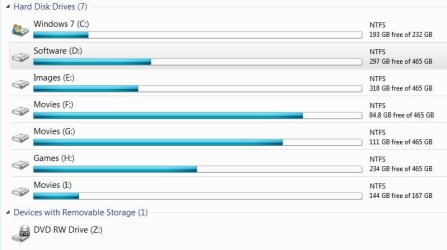
Plug it back in when your done, then what I do is rename my optical drive to Z, that way I can change my storage drives to the next corresponding letters after C.

Example:
 

Attachments

  • Capture.JPG
    Capture.JPG
    59.4 KB · Views: 0

My Computer

Computer type
PC/Desktop
Computer Manufacturer/Model Number
Skylake Special #666
OS
Windows 10 Pro x64
CPU
Intel Core i7 6700K
Motherboard
Asus Sabertooth Z170 Mark 1
Memory
GSkill TridentZ RGB 16GB 3600 16-16-16-36
Graphics Card(s)
EVGA GTX 980 Ti SC x2
Sound Card
Realtek High Definition
Monitor(s) Displays
AOC G2460PG
Screen Resolution
1920 x 1080 144Hz
Hard Drives
Samsung 860 Pro 256GB, Seagate Barracuda 4TB x2
PSU
EVGA 1000 P2, EVGA White Custom Braided Cables
Case
Corsair Vengeance C70 Gunmetal Black
Cooling
Corsair H100i v2, Corsair ML120 x2, Thermal Grizzly Kryonaut
Keyboard
Logitech G910 Orion Spectrum
Mouse
Logitech G700s
Internet Speed
Verizon Fios Quantum Gateway 75/75
Antivirus
Windows Defender, Malwarebytes Free 3.8.3
Browser
Chrome
Other Info
Corsair SP120 x4, LG Blu-ray Drive, Durabrand HT-395 100 Watt Dolby Digital Amp, Corsair H2100 Wireless 7.1 Headset
If the 1 TB disk is just a data disk and contains nothing from Windows, you should be able to make a single primary partition on it--either MBR or GPT. I think you could do that even if you have a UEFI motherboard.

yeah both disks were deleted partitions so no data is involved so ur saying to creat "primary" partitions using diskpart for both? (cuz i was wondering once windows installs what type of default partition would it make?)
thanks
 

My Computer

Computer type
PC/Desktop
Computer Manufacturer/Model Number
selp built
OS
windows 7 x64 home premium
CPU
i7-4790k
Motherboard
Asrock extreme6 Z97
Memory
16GB Corsair CMZ16GX3M2A2133C10
Graphics Card(s)
swaping bad Asus 780ti GTX780TI-DC2OC-3GD5 for 970 or 980
Hard Drives
Samsung 850Pro MZ-7KE256BW, Wester Digital VelociRaptor WD 1000DHTZ 1TB 10,000 R.P.M. 64MB Cache
Antivirus
microsoft security essentials
Browser
explorer 11 and chrome/firefox
yeah both disks were deleted partitions so no data is involved so ur saying to creat "primary" partitions using diskpart for both? (cuz i was wondering once windows installs what type of default partition would it make?)
thanks

Install Windows on the SSD with the 1 TB totally disconnected.

After the PC is up and running fine on the SSD only, re-connect the 1 TB.

At that point, you should be able to do pretty much whatever you want with the 1 TB--one partition or several. GPT or MBR.

You could use Diskpart to do that if you want to, but you certainly don't need to use Diskpart. You could just use Windows Disk Management or any other formatting/partitioning tool.

I'd just use one partition and I wouldn't worry about whether it was GPT or MBR. There's generally no reason to use more than 1 partition on a data disc, unless you have some unusual situation.

If the 1 TB were instead a larger drive, say 3 TB, you'd want to make sure it was initialized as GPT because Windows will not recognize more than about 2.2 TB on an MBR disc. But you don't have that problem since it is a 1 TB drive.
 

My Computer

Computer type
PC/Desktop
Computer Manufacturer/Model Number
Ignatz Special; 4 speed manual gearbox; factory air conditioning; one of one
OS
Windows 7 Home Premium SP1, 64-bit
CPU
Intel Skylake i5-6600K, not overclocked
Motherboard
AsRock Z170M Extreme 4, micro ATX
Memory
8 GB HyperX DDR4-2666 (2 x 4 GB)
Graphics Card(s)
none; graphics are integrated on CPU
Sound Card
onboard: Realtek ALC1150; external: USB Behringer UF0-202
Monitor(s) Displays
Dell S2340M 23 inch IPS
Screen Resolution
1600 x 900
Hard Drives
System: Crucial MX100 series SSD, 128 GB;
Data: Samsung Spinpoint 103SJ, 1 TB;
Backup: WD Caviar Green WD30EZRX-00D8PB0, 3 TB
PSU
Rosewill SilentNight 500 watt fanless, semi-modular
Case
Antec Solo II
Cooling
Noctua NH-U12S; Noctua F12 intake, Noctua S12A exhaust
Keyboard
Microsoft 200 6JH-00001 USB
Mouse
Dell or Microsoft optical wired; USB
Antivirus
Microsoft Security Essentials and Malwarebytes Premium
Browser
Pale Moon
Other Info
All fans PWM; speeds at idle: CPU circa 500 rpm; intake circa 600 rpm; exhaust circa 600 rpm; CPU temps 27 idle and 47 C load in a warm room (27 C/81 F) when running Intel Extreme Tuning Utility stress test.
I finally figured it out turned out it was bios setting on z97 extreme 6 i didnt put the second hd as boot drive (raptor) and i didnt add the raptor in bbs part as a second boot as normally i dont as it works fine with out it there after win is installed as its not boot drive and it stoped doing the 3 partitions when i changed the raptor back to mbr from GPT
 

My Computer

Computer type
PC/Desktop
Computer Manufacturer/Model Number
selp built
OS
windows 7 x64 home premium
CPU
i7-4790k
Motherboard
Asrock extreme6 Z97
Memory
16GB Corsair CMZ16GX3M2A2133C10
Graphics Card(s)
swaping bad Asus 780ti GTX780TI-DC2OC-3GD5 for 970 or 980
Hard Drives
Samsung 850Pro MZ-7KE256BW, Wester Digital VelociRaptor WD 1000DHTZ 1TB 10,000 R.P.M. 64MB Cache
Antivirus
microsoft security essentials
Browser
explorer 11 and chrome/firefox
This is why we told you to unplug that drive during the install process, no reason for it to be there.
 

My Computer

Computer type
PC/Desktop
Computer Manufacturer/Model Number
Skylake Special #666
OS
Windows 10 Pro x64
CPU
Intel Core i7 6700K
Motherboard
Asus Sabertooth Z170 Mark 1
Memory
GSkill TridentZ RGB 16GB 3600 16-16-16-36
Graphics Card(s)
EVGA GTX 980 Ti SC x2
Sound Card
Realtek High Definition
Monitor(s) Displays
AOC G2460PG
Screen Resolution
1920 x 1080 144Hz
Hard Drives
Samsung 860 Pro 256GB, Seagate Barracuda 4TB x2
PSU
EVGA 1000 P2, EVGA White Custom Braided Cables
Case
Corsair Vengeance C70 Gunmetal Black
Cooling
Corsair H100i v2, Corsair ML120 x2, Thermal Grizzly Kryonaut
Keyboard
Logitech G910 Orion Spectrum
Mouse
Logitech G700s
Internet Speed
Verizon Fios Quantum Gateway 75/75
Antivirus
Windows Defender, Malwarebytes Free 3.8.3
Browser
Chrome
Other Info
Corsair SP120 x4, LG Blu-ray Drive, Durabrand HT-395 100 Watt Dolby Digital Amp, Corsair H2100 Wireless 7.1 Headset
basically im wondering do i install drivers off dvd i made with all drivers first before i enable the items like audio or lan in the bios?
or do i enable lan/audio first then after it boots i install the drivers?

and in what order?
inf
audio
lan
intel management engine
etc.

i have z97 extreme 6
 

My Computer

Computer type
PC/Desktop
Computer Manufacturer/Model Number
selp built
OS
windows 7 x64 home premium
CPU
i7-4790k
Motherboard
Asrock extreme6 Z97
Memory
16GB Corsair CMZ16GX3M2A2133C10
Graphics Card(s)
swaping bad Asus 780ti GTX780TI-DC2OC-3GD5 for 970 or 980
Hard Drives
Samsung 850Pro MZ-7KE256BW, Wester Digital VelociRaptor WD 1000DHTZ 1TB 10,000 R.P.M. 64MB Cache
Antivirus
microsoft security essentials
Browser
explorer 11 and chrome/firefox
I answered that question in your other thread you created.

You should not be touching those things in the bios, there`s no need to.

The bios has nothing to do with drivers in the operating system.

Why would you ever even consider disabling lan or audio in the bios, how would you get out to the web or hear your speakers ????
 

My Computer

Computer type
PC/Desktop
Computer Manufacturer/Model Number
Skylake Special #666
OS
Windows 10 Pro x64
CPU
Intel Core i7 6700K
Motherboard
Asus Sabertooth Z170 Mark 1
Memory
GSkill TridentZ RGB 16GB 3600 16-16-16-36
Graphics Card(s)
EVGA GTX 980 Ti SC x2
Sound Card
Realtek High Definition
Monitor(s) Displays
AOC G2460PG
Screen Resolution
1920 x 1080 144Hz
Hard Drives
Samsung 860 Pro 256GB, Seagate Barracuda 4TB x2
PSU
EVGA 1000 P2, EVGA White Custom Braided Cables
Case
Corsair Vengeance C70 Gunmetal Black
Cooling
Corsair H100i v2, Corsair ML120 x2, Thermal Grizzly Kryonaut
Keyboard
Logitech G910 Orion Spectrum
Mouse
Logitech G700s
Internet Speed
Verizon Fios Quantum Gateway 75/75
Antivirus
Windows Defender, Malwarebytes Free 3.8.3
Browser
Chrome
Other Info
Corsair SP120 x4, LG Blu-ray Drive, Durabrand HT-395 100 Watt Dolby Digital Amp, Corsair H2100 Wireless 7.1 Headset
yeah both disks were deleted partitions so no data is involved so ur saying to creat "primary" partitions using diskpart for both? (cuz i was wondering once windows installs what type of default partition would it make?)
thanks

Install Windows on the SSD with the 1 TB totally disconnected.

After the PC is up and running fine on the SSD only, re-connect the 1 TB.

At that point, you should be able to do pretty much whatever you want with the 1 TB--one partition or several. GPT or MBR.

You could use Diskpart to do that if you want to, but you certainly don't need to use Diskpart. You could just use Windows Disk Management or any other formatting/partitioning tool.

I'd just use one partition and I wouldn't worry about whether it was GPT or MBR. There's generally no reason to use more than 1 partition on a data disc, unless you have some unusual situation.

If the 1 TB were instead a larger drive, say 3 TB, you'd want to make sure it was initialized as GPT because Windows will not recognize more than about 2.2 TB on an MBR disc. But you don't have that problem since it is a 1 TB drive.


thats what i was thinking about but it turned out changing it to mbr solved it doing 3 partition on its own and it then just did a primary for both and bios also played a role i have z97 extreme 6 and theres 2 things for hd one boot order and another bbs something showing it i guess the drives i have connected and when i added it there and the other things i mentioned all proba went away ,, i guess eufi isnt for 7 and others said not to do it till 8+ and probs disappeared,
thanks for help still on iphone pain in the ass
 

My Computer

Computer type
PC/Desktop
Computer Manufacturer/Model Number
selp built
OS
windows 7 x64 home premium
CPU
i7-4790k
Motherboard
Asrock extreme6 Z97
Memory
16GB Corsair CMZ16GX3M2A2133C10
Graphics Card(s)
swaping bad Asus 780ti GTX780TI-DC2OC-3GD5 for 970 or 980
Hard Drives
Samsung 850Pro MZ-7KE256BW, Wester Digital VelociRaptor WD 1000DHTZ 1TB 10,000 R.P.M. 64MB Cache
Antivirus
microsoft security essentials
Browser
explorer 11 and chrome/firefox
Back
Top