Hi guys
I've a Macbook Pro with the Win7 build 7000 running on it. Everything works fine except the microphone detection of the Realtek HD adapter. the macbook pro only has 2 jacks. one for the headphones and the other should be the mic/line-in.
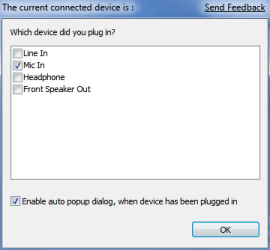
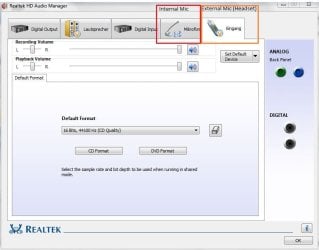
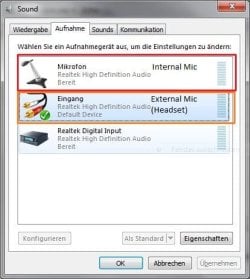
By plugging in the mic from my headset, the realtek audio manager just shows me an input device instead of the microphone.
The built-in mic from the macbook works fine, but I prefer using my headset for skype.
Is there any workaround to fix this issue? how can i "tell" the realtek audio manager, that the plugged device is a mic?
I already installed the lates realtek HD drivers (2.18) and tried to assign the mic/line-in manually over the registry (http://www.sevenforums.com/sound-audio/2197-realtek-hd-changing-jack-output-reassignments-fix.html), but nothing could solve this problem.
here are some screenshots which are describing the issue. yes it's a german installation
many thanks
dumdidum
I've a Macbook Pro with the Win7 build 7000 running on it. Everything works fine except the microphone detection of the Realtek HD adapter. the macbook pro only has 2 jacks. one for the headphones and the other should be the mic/line-in.
By plugging in the mic from my headset, the realtek audio manager just shows me an input device instead of the microphone.
The built-in mic from the macbook works fine, but I prefer using my headset for skype.
Is there any workaround to fix this issue? how can i "tell" the realtek audio manager, that the plugged device is a mic?
I already installed the lates realtek HD drivers (2.18) and tried to assign the mic/line-in manually over the registry (http://www.sevenforums.com/sound-audio/2197-realtek-hd-changing-jack-output-reassignments-fix.html), but nothing could solve this problem.
here are some screenshots which are describing the issue. yes it's a german installation
many thanks
dumdidum
Attachments
My Computer
- OS
- Windows 7 Build 7000