Realtek high definiton audio and Logitech Z-5500

Weak

New member
Local time
6:50 AM
Messages
5
Hi guys!
I just bought a 5.1 sound system (Logitech Z-5500) and I have realtek sound card.
The problems are:

  1. In 6 channel mode the center and the rear speakers are not working.
  2. In PLII Music, Movie mode the rear speakers are slightly distorted.
The questions are:

  1. This is a driver issue?
  2. How can I fix this?
I've tried almost everything but still nothing..

:cry:
 

My Computer My Computer

At a glance

Windows 7 Ultimate x64Intel(R) Core(TM)2 Duo CPU E8400 3.00GHz (2 C...8192MB DDR2NVIDIA GeForce 9600 GT
OS
Windows 7 Ultimate x64
CPU
Intel(R) Core(TM)2 Duo CPU E8400 3.00GHz (2 CPUs),~3.0GHz
Motherboard
P5W DH Deluxe
Memory
8192MB DDR2
Graphics Card(s)
NVIDIA GeForce 9600 GT
Sound Card
Realtek AC97
Monitor(s) Displays
Philips 200VW
Screen Resolution
1680x1050
Hard Drives
Seagate Barracuda 400GB
Weak, welcome to the Seven Forums.

Are you using the analogue or digital connection? With those speakers and using onboard sound, you would probably be better off using the digital connection, as the speakers are liable to have a better DAC in them than the onboard audio.

This is a driver issue?
Quite possibly is you tried and/or managed to install the Realtek drivers based on what you have listed in your specs. You show it as the AC'97 when your motherboard has the Realtek HD,

http://www.asus.com/Product.aspx?P_ID=m4cR4iaPdABNLtQa

of which you can find links for the latest version here,

http://www.sevenforums.com/sound-audio/3756-latest-realtek-hd-audio-driver-version.html

P.S. If you really want to get the most out of those speakers, you should look into getting a decent sound card and use the analogue connections on it.
 

My Computer My Computer

At a glance

Win 7 Ultimate x64FX-8350 @ 4.6 GHz so farADATA XPG V1 Series Black 8GB DDR3 1600Sapphire R9 270x Dual-X
Computer type
PC/Desktop
Computer Manufacturer/Model Number
Me
OS
Win 7 Ultimate x64
CPU
FX-8350 @ 4.6 GHz so far
Motherboard
Asus M5A97 EVO
Memory
ADATA XPG V1 Series Black 8GB DDR3 1600
Graphics Card(s)
Sapphire R9 270x Dual-X
Sound Card
Xonar DGX w/ Corsair Vengence 1300
Monitor(s) Displays
Acer S232HL Abid
Screen Resolution
1920x1080
Hard Drives
120 GB OCZ Vertex 3
500 GB Seagate 7200.12
PSU
Antec Earthwatts 650W Green
Case
Antec Three Hundred
Cooling
Cooler Master 212 EVO
Keyboard
Logitech G510
Mouse
Logitech G500s
Internet Speed
35000/3000
I'm using analogue connection, and yes I have the latest driver.
So if I want to fix my problem I have to buy optical or coaxial cable or buy a new sound card?

In my opinion 6 ch mode should work with analogue connection.
 

My Computer My Computer

At a glance

Windows 7 Ultimate x64Intel(R) Core(TM)2 Duo CPU E8400 3.00GHz (2 C...8192MB DDR2NVIDIA GeForce 9600 GT
OS
Windows 7 Ultimate x64
CPU
Intel(R) Core(TM)2 Duo CPU E8400 3.00GHz (2 CPUs),~3.0GHz
Motherboard
P5W DH Deluxe
Memory
8192MB DDR2
Graphics Card(s)
NVIDIA GeForce 9600 GT
Sound Card
Realtek AC97
Monitor(s) Displays
Philips 200VW
Screen Resolution
1680x1050
Hard Drives
Seagate Barracuda 400GB
You using the speaker fill option in the Realtek controls, or using the matrix mode (or any other stereo upmixing) in the speakers control pod?

Also are you testing with a stereo or a 5.1 source?

So if I want to fix my problem I have to buy optical or coaxial cable or buy a new sound card?

Didn't say it would fix your problem, said if you want to get the best sound from those speakers to get a sound card. No idea if it will work as you're expecting using the digital connection.

As far as a sound card goes, it will have a far better DAC in it than what is in the speakers and is used by the onboard audio. If you want to use a digital connection then a sound card is a waste of money unless it has a feature(s) that the onboard doesn't have, as when using a digital connection then it is the DAC in the speakers that is doing the digital to analogue conversion.
 

My Computer My Computer

At a glance

Win 7 Ultimate x64FX-8350 @ 4.6 GHz so farADATA XPG V1 Series Black 8GB DDR3 1600Sapphire R9 270x Dual-X
Computer type
PC/Desktop
Computer Manufacturer/Model Number
Me
OS
Win 7 Ultimate x64
CPU
FX-8350 @ 4.6 GHz so far
Motherboard
Asus M5A97 EVO
Memory
ADATA XPG V1 Series Black 8GB DDR3 1600
Graphics Card(s)
Sapphire R9 270x Dual-X
Sound Card
Xonar DGX w/ Corsair Vengence 1300
Monitor(s) Displays
Acer S232HL Abid
Screen Resolution
1920x1080
Hard Drives
120 GB OCZ Vertex 3
500 GB Seagate 7200.12
PSU
Antec Earthwatts 650W Green
Case
Antec Three Hundred
Cooling
Cooler Master 212 EVO
Keyboard
Logitech G510
Mouse
Logitech G500s
Internet Speed
35000/3000

My Computer My Computer

At a glance

Windows 7 Ultimate x64Intel(R) Core(TM)2 Duo CPU E8400 3.00GHz (2 C...8192MB DDR2NVIDIA GeForce 9600 GT
OS
Windows 7 Ultimate x64
CPU
Intel(R) Core(TM)2 Duo CPU E8400 3.00GHz (2 CPUs),~3.0GHz
Motherboard
P5W DH Deluxe
Memory
8192MB DDR2
Graphics Card(s)
NVIDIA GeForce 9600 GT
Sound Card
Realtek AC97
Monitor(s) Displays
Philips 200VW
Screen Resolution
1680x1050
Hard Drives
Seagate Barracuda 400GB
Don't have anything with Realtek audio on it here, so going to have to wait on someone that does for the proper settings. That said one thing I did notice from your screen shots,

soundman.jpg

you don't have the "sides" (which as far as I know is the same as rears in a 5.1 setting) selected. May be why your rears aren't working. Also make sure that it is set to 5.1 in the Windows playback settings.

Also the matrix mode is one of the settings in the control pod for the speakers, not from within Windows.
 

My Computer My Computer

At a glance

Win 7 Ultimate x64FX-8350 @ 4.6 GHz so farADATA XPG V1 Series Black 8GB DDR3 1600Sapphire R9 270x Dual-X
Computer type
PC/Desktop
Computer Manufacturer/Model Number
Me
OS
Win 7 Ultimate x64
CPU
FX-8350 @ 4.6 GHz so far
Motherboard
Asus M5A97 EVO
Memory
ADATA XPG V1 Series Black 8GB DDR3 1600
Graphics Card(s)
Sapphire R9 270x Dual-X
Sound Card
Xonar DGX w/ Corsair Vengence 1300
Monitor(s) Displays
Acer S232HL Abid
Screen Resolution
1920x1080
Hard Drives
120 GB OCZ Vertex 3
500 GB Seagate 7200.12
PSU
Antec Earthwatts 650W Green
Case
Antec Three Hundred
Cooling
Cooler Master 212 EVO
Keyboard
Logitech G510
Mouse
Logitech G500s
Internet Speed
35000/3000
Hmm.. I found something interesting, look:
http://img819.imageshack.us/img819/8517/choose.jpg
If i run test in 5.1 there i have only SL, SR instead of RL RR and those aren't working, but
if i run test in 7.1 there RL, RR are working. But in 7.1 mode the rear speaker still aren't working with winamp etc..
 

My Computer My Computer

At a glance

Windows 7 Ultimate x64Intel(R) Core(TM)2 Duo CPU E8400 3.00GHz (2 C...8192MB DDR2NVIDIA GeForce 9600 GT
OS
Windows 7 Ultimate x64
CPU
Intel(R) Core(TM)2 Duo CPU E8400 3.00GHz (2 CPUs),~3.0GHz
Motherboard
P5W DH Deluxe
Memory
8192MB DDR2
Graphics Card(s)
NVIDIA GeForce 9600 GT
Sound Card
Realtek AC97
Monitor(s) Displays
Philips 200VW
Screen Resolution
1680x1050
Hard Drives
Seagate Barracuda 400GB
But in 7.1 mode the rear speaker still aren't working with winamp etc.
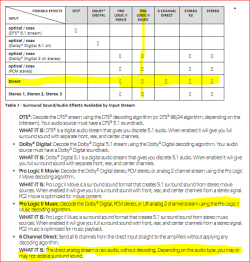
Unless the source is encoded in 5.1, all you will get is stereo without some ind of upmix/encoding. From the manual for those speakers,

z5500.PNG

to get surround sound out of a stereo source (seeing as for whatever reason the speaker fill option is missing) you need to set it to Pro Logic II (music or movie, whichever sounds better to you) on the speakers control pod.
 

My Computer My Computer

At a glance

Win 7 Ultimate x64FX-8350 @ 4.6 GHz so farADATA XPG V1 Series Black 8GB DDR3 1600Sapphire R9 270x Dual-X
Computer type
PC/Desktop
Computer Manufacturer/Model Number
Me
OS
Win 7 Ultimate x64
CPU
FX-8350 @ 4.6 GHz so far
Motherboard
Asus M5A97 EVO
Memory
ADATA XPG V1 Series Black 8GB DDR3 1600
Graphics Card(s)
Sapphire R9 270x Dual-X
Sound Card
Xonar DGX w/ Corsair Vengence 1300
Monitor(s) Displays
Acer S232HL Abid
Screen Resolution
1920x1080
Hard Drives
120 GB OCZ Vertex 3
500 GB Seagate 7200.12
PSU
Antec Earthwatts 650W Green
Case
Antec Three Hundred
Cooling
Cooler Master 212 EVO
Keyboard
Logitech G510
Mouse
Logitech G500s
Internet Speed
35000/3000
I see.. so 6 ch mode sucks.
PLII Music is ok but the rear speakers sometimes make some wierd noises.. I guess it's better if i buy an optical cable.
Thanks for the help.
 

My Computer My Computer

At a glance

Windows 7 Ultimate x64Intel(R) Core(TM)2 Duo CPU E8400 3.00GHz (2 C...8192MB DDR2NVIDIA GeForce 9600 GT
OS
Windows 7 Ultimate x64
CPU
Intel(R) Core(TM)2 Duo CPU E8400 3.00GHz (2 CPUs),~3.0GHz
Motherboard
P5W DH Deluxe
Memory
8192MB DDR2
Graphics Card(s)
NVIDIA GeForce 9600 GT
Sound Card
Realtek AC97
Monitor(s) Displays
Philips 200VW
Screen Resolution
1680x1050
Hard Drives
Seagate Barracuda 400GB
I also have the Z-5500 and have used it with win xp and realtek drivers. In XP the 6ch mode works correctly and all speakers play. Even when it's a stereo source. I have just upgraded to win7 pro and with the realtek driver I'm using atm I have same problem as Weak when i play music or watch movies. No sound from center and rear speakers. And it's with every mediaplayer I've tried. Winamp, VLC, IE, Firefox. All play stereo. But in realteks audio setup there's no problem with getting the test sound from center and rear.
 

My Computer My Computer

At a glance

Windows 7 Pro x64Intel i3 3,3GhzKingston 4GB DDR3 1333Mhz CL9MSI N9400GT MO512H
OS
Windows 7 Pro x64
CPU
Intel i3 3,3Ghz
Motherboard
Asus P8H61-M Pro rev 3 socket 1155 DDR3
Memory
Kingston 4GB DDR3 1333Mhz CL9
Graphics Card(s)
MSI N9400GT MO512H
Sound Card
Onboard Realtek
Monitor(s) Displays
Hannstar 19"
Hard Drives
Seagate Barracuda 500GB ST500DM002
PSU
550W
Back
Top