Recovery Partition - Create

   Warning
THIS IS NOT INTENDED TO REPLACE YOUR WINDOWS 7 DVD, HARD DRIVES FAIL, AND YOU SHOULD ALWAYS HANG ONTO THE DISK, THIS IS SIMPLY TO SPEED UP THE PROCESS OF REINSTALLING OR DOING A RECOVERY

This recovery partition will only be available to you assuming that your bootmanager is in tact, if it becomes corrupted it will be inaccessible just like your copy of windows, another good reason for hanging on to the original disk


   Note
it is recommended that you allow windows to create the 100MB System reserved partition upon installation if you plan to do this or you will have to repeat it everytime you reinstall


1. Download Easy BCD 2.0 from here: EasyBCD 2.0 Beta Builds - The NeoSmart Forums (you will need to register on the forum first)

2. open disk management, (type "partition" into the start menu its the first option that comes up)

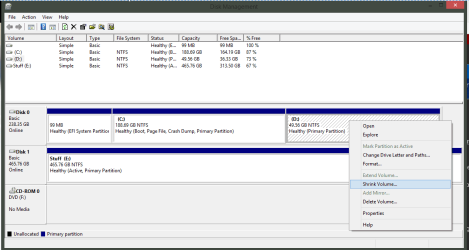
3a Right click a partition with free space, and click "Shrink Volume" when it asks you to select how much space to shrink by allocate 4GB or 4096MB

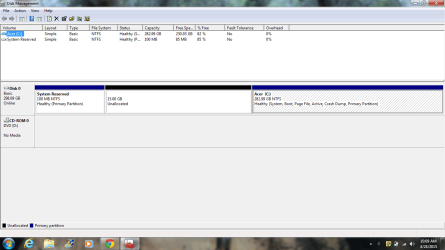
3b Right Click the Unallocated Space and Click "New Simple Volume"

4. click ok through the next few screens, i recommend assigning it letter Z:\ so you dont get confused and accidentally delete it or save other files here

5. place your Windows 7 DVD in your drive and go to Computer, right click and then click Open
NOTE: At this point please make sure you have "hide protected operating system files" DISABLED as it occasionally corrupts the copy, to do this press alt in any explorer window, then click tools>folder options>views>hide protected operating system files.

6. Copy the entire contents of the DVD to your Z:\ Partition

7. open Easy BCD and click "add/remove entries" click the tab labelled WinPE,
When it asks for a path browse to "Z:\sources\boot.wim" and click ok, then click "add new entry"
NOTE: At this point there is a good chance easybcd will tell you that the operation failed, just click ok and do it again, from what i can see this is simply its way of asking if your sure, and it will work 2nd time around.

8. thats it your done, when you reboot you will have 2 options, Windows 7, and NST WinPE Image, NST WinPE image is your recovery partition and will act as if you'd put the disk in.

   Note
It has come to my attention that Windows has an annoying habit of corrupting the Recovery Partition, especially after Disk Cleanups and Defrags. To get around this Open Disk Management (type it into the start menu) and right click your Recovery Partition, remove the letter so that windows cant see it any more. (Don't worry it will still boot, this just stops Windows from writing files to it)


   Information
This tutorial is the intellectual property of (c)2009 Martin Joy a.k.a severedsolo and is only authorised to be hosted on sevenforums.com This tutorial is not to be copied without my explicit consent and when consent is granted the original author must be credited along with a link to this tutorial


Last edited by a moderator:
That's correct, it's plugged into the back of the computer. I don't mean to hijack this thread so I'm happy to post about this issue elsewhere if I need to.
 

My Computer My Computer

OS
Windows 7 Ultimate x64
Do you have a wired mouse and keyboard USB or ps2 that you can use.
 

My Computer My Computer

OS
ME/XP/Vista/Win7
I'm an idiot. That's the simple solution to my problem. I don't have a wired keyboard but I'll get my hands on one if I ever need to use the recovery. Thanks, theog.
 

My Computer My Computer

OS
Windows 7 Ultimate x64
Absolutely perfect. I have wondered how this was done for a long time now and at long last it's explained. Thank you ;)

1 question I have is: How do companies like HP and Dell etc etc add software to there recovery partitions so when you reinstall windows 7 it installs the software to...?

Would be very interesting if someone could explain how its done and is it possible we could do it ourselves....?

Thanks again for your tutorial ;)
 

My Computer My Computer

Computer Manufacturer/Model Number
HP Pavilion Case
OS
Windows 7 Pro x64
CPU
AMD Athlon 64 x2 Dual Core Processor 5000+ 2.60 GHz
Motherboard
Pegatron - Violet 3.02
Memory
8 Gig
Graphics Card(s)
GeForce GT 240
Sound Card
Realtek HD
Monitor(s) Displays
26 Inch and 19 Inch Dual Monitor
Screen Resolution
1920 X 1200 -- 1440 X 900
Hard Drives
Internal 500 GB Sata Drive and 1TB Hatachi External HD & 1TB Western Digital Network Drive
PSU
550 Watts
Case
HP Pavilion
Cooling
4" and 5" Fans
Keyboard
Logitech Solar K750
Mouse
Microsoft Wireless 3500
Internet Speed
50 Meg Fibre Optic Cable Broadband
Other Info
Samsung DP-U350 - 23" Touch Screen PC
To my knowledge most companies take their "Ideal" Machine then capture an image of that machines files and use a tool called ImageX from Microsoft to distribute it during install ;)

What is ImageX?

As for doing it yourself it might be possible , haven't really thought about it but I would stick to System Images as they are easier to manage :)

Some companies and schools use the same thing or they might use a .wim Image on a network which is like a really big ISO file

Josh
 

My Computer My Computer

Computer type
PC/Desktop
Computer Manufacturer/Model Number
Custom Built
OS
Windows 7 Professional x64 SP1 ; Windows Server 2012 R2 Standard
CPU
Intel Core i5 2400 @ 3.10GHz
Motherboard
Foxconn H67MP-S/-V/H67MP
Memory
8.0GB DDR3 @ 665MHz (2GBx4)
Graphics Card(s)
AMD Radeon HD 6870
Sound Card
Realtek High Definition Audio
Monitor(s) Displays
AOC 2243W & SMB1930NW
Screen Resolution
1440x900 & 1920x1080
Hard Drives
977GB Seagate ST31000524AS ATA Drive (SATA)
250GB WD iSCSI attached Drive
PSU
750W Gaming PSU
Case
Novatech Night
Cooling
Fan
Keyboard
Dell Standard PS/2 Keyboard
Mouse
R.A.T 07 Gaming Mouse
Internet Speed
Download: 10 Mbps Ping: 30ms Upload: 0.81 Mbps
Browser
Google Chrome
Other Info
Optiarc DVD RW AD-5260S ATA Device
To my knowledge most companies take their "Ideal" Machine then capture an image of that machines files and use a tool called ImageX from Microsoft to distribute it during install ;)

What is ImageX?

As for doing it yourself it might be possible , haven't really thought about it but I would stick to System Images as they are easier to manage :)

Some companies and schools use the same thing or they might use a .wim Image on a network which is like a really big ISO file

Josh

Thanks Josh I always wondered what they did to add certain software to the partitions. What I was thinkinf of is adding office 2010 and see if it would install when I next run the partition. Also Adobe Master Suite CS5 because there pretty big programs and I always hate installing them. :confused:
 

My Computer My Computer

Computer Manufacturer/Model Number
HP Pavilion Case
OS
Windows 7 Pro x64
CPU
AMD Athlon 64 x2 Dual Core Processor 5000+ 2.60 GHz
Motherboard
Pegatron - Violet 3.02
Memory
8 Gig
Graphics Card(s)
GeForce GT 240
Sound Card
Realtek HD
Monitor(s) Displays
26 Inch and 19 Inch Dual Monitor
Screen Resolution
1920 X 1200 -- 1440 X 900
Hard Drives
Internal 500 GB Sata Drive and 1TB Hatachi External HD & 1TB Western Digital Network Drive
PSU
550 Watts
Case
HP Pavilion
Cooling
4" and 5" Fans
Keyboard
Logitech Solar K750
Mouse
Microsoft Wireless 3500
Internet Speed
50 Meg Fibre Optic Cable Broadband
Other Info
Samsung DP-U350 - 23" Touch Screen PC
To my knowledge most companies take their "Ideal" Machine then capture an image of that machines files and use a tool called ImageX from Microsoft to distribute it during install ;)

What is ImageX?

As for doing it yourself it might be possible , haven't really thought about it but I would stick to System Images as they are easier to manage :)

Some companies and schools use the same thing or they might use a .wim Image on a network which is like a really big ISO file

Josh

Thanks Josh I always wondered what they did to add certain software to the partitions. What I was thinkinf of is adding office 2010 and see if it would install when I next run the partition. Also Adobe Master Suite CS5 because there pretty big programs and I always hate installing them. :confused:

It IS possible, but honestly... not really worth it. You can add programs to the recovery partition/iso using this: Welcome to RT Se7en Lite - Slipstream Service Pack,Integrate Updates,Integrate Drivers,Integrate LP,Remove Components,Enable or Disable features,Unattended Setup,Apply Tweaks,Add Icons,Wallpapers,Themes,Bootable USB or DVD but really all it does, is just install the programs after installation is completed. Its no quicker than doing it yourself.
 

My Computer My Computer

Computer type
PC/Desktop
Computer Manufacturer/Model Number
Medion Erazer (note to self: insert model number) - with custom additions
OS
Windows 10 Pro x64
CPU
Intel Core i5 7400 @ 3.00GHz
Motherboard
OEM supllied with PC
Memory
8GB 2133Mhz DDR4 (OEM supplied)
Graphics Card(s)
Gygabyte Windforce GTX 1050Ti (Factory Overclocked)
Sound Card
Realtek
Monitor(s) Displays
Acer Al1980 + HKC
Screen Resolution
1360*768(HKC) / 1280*1024(Acer)
Hard Drives
1TB Toshiba
1TB WD Caviar Green
120GB Samsung Evo 840
PSU
OEM supplied (no power rating on case)
Case
OEM Supplied
Cooling
Stock
Keyboard
Logitech Wireless
Mouse
Logitect Wireless
Internet Speed
40Mb/s Down 10Mb/s Up
Antivirus
Defender
Browser
Firefox
The best way is to get your system setup how you like it and get an image backup.

This free backup program works very well: Macruim Reflect

Any problems and you can restore your backup image and your system will be exactly how it was the day you took the backup image, all programs installed etc.
 

My Computer My Computer

Computer type
PC/Desktop
Computer Manufacturer/Model Number
76~2.0
OS
Windows 7 Ult x64 - SP1/ Windows 8 Pro x64
CPU
Intel Core i5-3570K 4.6GHz
Motherboard
Gigabyte GA-Z77X UD3H, f18
Memory
8GB (2X4GB) DDR3 1600 Corsair Vengeance CL8 1.5v
Graphics Card(s)
Sapphire HD 7770 Vapor-X OC 1GB DDR5
Sound Card
Onboard VIA VT2021
Monitor(s) Displays
22" LCD Dell
Screen Resolution
1680x1050
Hard Drives
Samsung 840Pro 128GB SSD,
Seagate Barracuda 500GB SATA2 7200rpm 32MB cache, Seagate Barracuda 1TB SATA2 7200rpm 32MB cache,
PSU
Corsair HX650W
Case
Cooler Master Storm Scout
Cooling
Corsair H80 2x12cm Noctua NF P12 , 2x14cm case fans
Keyboard
Logitech Wave
Mouse
CM Sentinel
Internet Speed
Dismal
Antivirus
Avast
Browser
Opera Next
Other Info
Haswell laptop: HP Envy 17t-j, i7-4700MQ, GeForce 740M 2GB DDR3, 17.3" Full HD 1920x1080, 16GB RAM, Samsung 840 Pro 128GB, 1TB Hitachi 7200 HDD,
Desktop: eSATA ports,
External eSATA Seagate 500GB SATA2 7200rpm,
External WD USB 500GB
Thanks guys for your help, I will get it running exactly how I want it and try it next time I have to reinstall. I done a clean install a few days ago now after getting BSoD and not being able to put it right so clean install was the only answer.

Again thank you for your help ;)
 

My Computer My Computer

Computer Manufacturer/Model Number
HP Pavilion Case
OS
Windows 7 Pro x64
CPU
AMD Athlon 64 x2 Dual Core Processor 5000+ 2.60 GHz
Motherboard
Pegatron - Violet 3.02
Memory
8 Gig
Graphics Card(s)
GeForce GT 240
Sound Card
Realtek HD
Monitor(s) Displays
26 Inch and 19 Inch Dual Monitor
Screen Resolution
1920 X 1200 -- 1440 X 900
Hard Drives
Internal 500 GB Sata Drive and 1TB Hatachi External HD & 1TB Western Digital Network Drive
PSU
550 Watts
Case
HP Pavilion
Cooling
4" and 5" Fans
Keyboard
Logitech Solar K750
Mouse
Microsoft Wireless 3500
Internet Speed
50 Meg Fibre Optic Cable Broadband
Other Info
Samsung DP-U350 - 23" Touch Screen PC
I would just like to thank you for the great write up .
It helped me get a friends laptop back up in good working order after a hard drive crash.:party:
 

My Computer My Computer

Computer type
Laptop
Computer Manufacturer/Model Number
Dell
OS
windows vista home 23bit
When I choose windows 7 recovery, is freeze the PC. Why? GPT is supported??
 

My Computer My Computer

Computer type
PC/Desktop
OS
Windows 7 Enterprise SP1 x64
CPU
i5-3570K @ 3.6 Ghz
Motherboard
H61M-DGS
Memory
Gskill Ripjaws X 1600 @ 9-9-9-24-2N
Graphics Card(s)
VTX3D HD 7770 @ 1100/1250
Sound Card
Integrated
Monitor(s) Displays
BenQ G922HDL
Screen Resolution
1366x768
Hard Drives
Crucial M4 SSD 128GB
Samsung F3 Spinpoint HD103SJ 1TB
PSU
Bequiet! L8 430W
Case
LianLi PC-7F
To be perfectly honest I've never tried this with GPT, it may not work. I don't even know if EasyBCD supports GPT
 

My Computer My Computer

Computer type
PC/Desktop
Computer Manufacturer/Model Number
Medion Erazer (note to self: insert model number) - with custom additions
OS
Windows 10 Pro x64
CPU
Intel Core i5 7400 @ 3.00GHz
Motherboard
OEM supllied with PC
Memory
8GB 2133Mhz DDR4 (OEM supplied)
Graphics Card(s)
Gygabyte Windforce GTX 1050Ti (Factory Overclocked)
Sound Card
Realtek
Monitor(s) Displays
Acer Al1980 + HKC
Screen Resolution
1360*768(HKC) / 1280*1024(Acer)
Hard Drives
1TB Toshiba
1TB WD Caviar Green
120GB Samsung Evo 840
PSU
OEM supplied (no power rating on case)
Case
OEM Supplied
Cooling
Stock
Keyboard
Logitech Wireless
Mouse
Logitect Wireless
Internet Speed
40Mb/s Down 10Mb/s Up
Antivirus
Defender
Browser
Firefox
I am not understanding Step 3a. Can someone explain it to me?
 

My Computer My Computer

Computer type
Laptop
Computer Manufacturer/Model Number
Acer 5250-0450
OS
Windows 10 Home 64-bit
CPU
AMD E-350 Zacate 40nm Technology
Motherboard
Acer HMA51-BZ (Socket FT1)
Memory
4 GB DDR3 Memory
Graphics Card(s)
1909MB ATI AMD Radeon HD
Sound Card
Conexant High Definition Audio
Monitor(s) Displays
Generic PnP Monitor (1366x768@60Hz)
Hard Drives
320 GB HDD
Mouse
ONN Wireless Mouse
Antivirus
Norton Internet Security Online
Browser
Microsoft Edge, Internet Explorer 11, and Google Chrome
Other Info
Other Computers:

Laptop: Acer Aspire 5749 Series

Desktop: Acer Aspire XC603G Series
Jesse, when you have disk management open, right click and choose shrink in the context as shown here

3A.PNG
 

My Computer My Computer

Computer type
PC/Desktop
Computer Manufacturer/Model Number
Dude Build
OS
Windows 10 Pro X64
CPU
Intel(R) Core(TM) i5-3570K CPU OC@ 4.5GHZ Turbo
Motherboard
MSI Z77A-G45 Gaming
Memory
8.00 GB DDR3 1600Mhz
Graphics Card(s)
MSI Gaming X GTX 1070
Sound Card
Realtek High Definition
Monitor(s) Displays
Dell S23O9W, HP L1710
Screen Resolution
DELL-1920 x 1080 HP-1280 x1024
Hard Drives
Crucial m4 256 SSD, WD 7200RPM 500GB WD 1TB
PSU
Seasonic X650 GOLD
Case
Zalman Z12
Cooling
Antec Kuhler 920
Keyboard
Logitech
Mouse
MSI DS100 Interceptor
Internet Speed
50 down and 5 up
Antivirus
MSE
Browser
Chrome, IE 11
Other Info
Logitech X-620 Speakers
Dude, I will send you a screenshot of my disk management. This way you can tell me which one I need to choose.
 

My Computer My Computer

Computer type
Laptop
Computer Manufacturer/Model Number
Acer 5250-0450
OS
Windows 10 Home 64-bit
CPU
AMD E-350 Zacate 40nm Technology
Motherboard
Acer HMA51-BZ (Socket FT1)
Memory
4 GB DDR3 Memory
Graphics Card(s)
1909MB ATI AMD Radeon HD
Sound Card
Conexant High Definition Audio
Monitor(s) Displays
Generic PnP Monitor (1366x768@60Hz)
Hard Drives
320 GB HDD
Mouse
ONN Wireless Mouse
Antivirus
Norton Internet Security Online
Browser
Microsoft Edge, Internet Explorer 11, and Google Chrome
Other Info
Other Computers:

Laptop: Acer Aspire 5749 Series

Desktop: Acer Aspire XC603G Series
Dude, which of these partitions do I need to choose?
 

Attachments

  • Disk Management.png
    Disk Management.png
    44.1 KB · Views: 189

My Computer My Computer

Computer type
Laptop
Computer Manufacturer/Model Number
Acer 5250-0450
OS
Windows 10 Home 64-bit
CPU
AMD E-350 Zacate 40nm Technology
Motherboard
Acer HMA51-BZ (Socket FT1)
Memory
4 GB DDR3 Memory
Graphics Card(s)
1909MB ATI AMD Radeon HD
Sound Card
Conexant High Definition Audio
Monitor(s) Displays
Generic PnP Monitor (1366x768@60Hz)
Hard Drives
320 GB HDD
Mouse
ONN Wireless Mouse
Antivirus
Norton Internet Security Online
Browser
Microsoft Edge, Internet Explorer 11, and Google Chrome
Other Info
Other Computers:

Laptop: Acer Aspire 5749 Series

Desktop: Acer Aspire XC603G Series
Read through the steps. I suggest looking up videos to watch too
 

My Computer My Computer

Computer type
PC/Desktop
Computer Manufacturer/Model Number
Dude Build
OS
Windows 10 Pro X64
CPU
Intel(R) Core(TM) i5-3570K CPU OC@ 4.5GHZ Turbo
Motherboard
MSI Z77A-G45 Gaming
Memory
8.00 GB DDR3 1600Mhz
Graphics Card(s)
MSI Gaming X GTX 1070
Sound Card
Realtek High Definition
Monitor(s) Displays
Dell S23O9W, HP L1710
Screen Resolution
DELL-1920 x 1080 HP-1280 x1024
Hard Drives
Crucial m4 256 SSD, WD 7200RPM 500GB WD 1TB
PSU
Seasonic X650 GOLD
Case
Zalman Z12
Cooling
Antec Kuhler 920
Keyboard
Logitech
Mouse
MSI DS100 Interceptor
Internet Speed
50 down and 5 up
Antivirus
MSE
Browser
Chrome, IE 11
Other Info
Logitech X-620 Speakers
Okay
 

My Computer My Computer

Computer type
Laptop
Computer Manufacturer/Model Number
Acer 5250-0450
OS
Windows 10 Home 64-bit
CPU
AMD E-350 Zacate 40nm Technology
Motherboard
Acer HMA51-BZ (Socket FT1)
Memory
4 GB DDR3 Memory
Graphics Card(s)
1909MB ATI AMD Radeon HD
Sound Card
Conexant High Definition Audio
Monitor(s) Displays
Generic PnP Monitor (1366x768@60Hz)
Hard Drives
320 GB HDD
Mouse
ONN Wireless Mouse
Antivirus
Norton Internet Security Online
Browser
Microsoft Edge, Internet Explorer 11, and Google Chrome
Other Info
Other Computers:

Laptop: Acer Aspire 5749 Series

Desktop: Acer Aspire XC603G Series

My Computer My Computer

Computer type
Laptop
Computer Manufacturer/Model Number
Acer 5250-0450
OS
Windows 10 Home 64-bit
CPU
AMD E-350 Zacate 40nm Technology
Motherboard
Acer HMA51-BZ (Socket FT1)
Memory
4 GB DDR3 Memory
Graphics Card(s)
1909MB ATI AMD Radeon HD
Sound Card
Conexant High Definition Audio
Monitor(s) Displays
Generic PnP Monitor (1366x768@60Hz)
Hard Drives
320 GB HDD
Mouse
ONN Wireless Mouse
Antivirus
Norton Internet Security Online
Browser
Microsoft Edge, Internet Explorer 11, and Google Chrome
Other Info
Other Computers:

Laptop: Acer Aspire 5749 Series

Desktop: Acer Aspire XC603G Series
Hi. I am new here. ����

Its 2021. And I just found this forum and Win7 Recovery tutorial. And the end is I just did it to my Win7. ��
 

My Computer My Computer

Computer type
PC/Desktop
Computer Manufacturer/Model Number
HP, Toshiba, Lenovo
OS
All Windows
CPU
Intel Pentium 4, Core Duo, Celeron
Motherboard
-
Memory
3, 3, 2
Graphics Card(s)
Internals
Hard Drives
HDD
Antivirus
AVG Free, Avast Free, SMADAV
Browser
-
Back
Top