Solved Recycle Bin is corrupt?

guice

New member
Local time
3:49 PM
Messages
8
Every time I try to access my D:\ in any fashion, Windows 7 keeps telling me my Recycle Bin on my D:\ is corrupt and would it like me to fix it. I hit yes, but it still keeps prompting me.

Now the kicker: I don't use Recycle Bin. This is my alternate drive which I use on XP and now Windows 7. I have Recycle Bin setup to immediately delete. There is no Recycle Bin on D:\.

Has anybody else experienced this? I don't see any posts on the forums. A search on "Recycle bin" came up with 4 unrelated posts.

I don't know if this happens on my normal C:\ for XP as it Windows 7 doesn't mount it (but that's a different discussion).
 

My Computer

OS
Windows 7
It's probably because you have Recycle Bin set to delete or something. Really I've never heard of anything like this.
 

My Computer

Computer Manufacturer/Model Number
HP G60-230US Notebook
OS
Seven 7000 64-Bit
CPU
Intel Mobile Core 2 Duo P7350
Motherboard
Winstron 3612
Memory
3GB DDR2
Graphics Card(s)
Intel Mobile 45 Express
Sound Card
Conexant High Definition
Monitor(s) Displays
HP 16" Widescreen
Screen Resolution
1366x768
Hard Drives
Western Digital 320 GB
PSU
Microsoft AC Adapter*
Case
HP Notebook Imprint Finish Case
Keyboard
Standard PS/2 Keyboard*
Mouse
Synaptics Touch Pad
Internet Speed
Verizon DSL
Other Info
* Indicates actual brand unknown
A clarification: it actually only happens when ever I do a properties on D:\, delete files or go into the Recycle Bin itself.

I do, however, set to delete immediately for both drives.
 

My Computer

OS
Windows 7
Is there any way to change the settings so it doesn't delete immediately? See if it's directly related to that?
 

My Computer

OS
7 Professional x64 - SP1
CPU
Phenom II x4 955BE
Motherboard
Asus M4A88TD-V
Memory
2 x 4GB GSkill Ripjaws DDR3-1333
Graphics Card(s)
XFX Radeon 5770
Monitor(s) Displays
Samsung P2770HD - 27"; Samsung 953BW - 19"
Screen Resolution
1920x1080; 1440x900
Hard Drives
Corsair Force Series 3 180 GB; Samsung 7200RPM/500GB; Samsung 5400RPM/2TB (Backup)
PSU
Antec BP550 (80+ Cert.)
Case
Cooler Master HAF 912
Cooling
Cooler Master Hyper 212 Plus + 5x120mm fans
Keyboard
Logitech K750 Solar
Mouse
Razer Mamba
Is there any way to change the settings so it doesn't delete immediately? See if it's directly related to that?
Tried it; still errors. I even ran a disk check; still errors.
 

My Computer

OS
Windows 7
And the problem happens in Both XP and 7? Or just 7?
 

My Computer

Computer Manufacturer/Model Number
HP G60-230US Notebook
OS
Seven 7000 64-Bit
CPU
Intel Mobile Core 2 Duo P7350
Motherboard
Winstron 3612
Memory
3GB DDR2
Graphics Card(s)
Intel Mobile 45 Express
Sound Card
Conexant High Definition
Monitor(s) Displays
HP 16" Widescreen
Screen Resolution
1366x768
Hard Drives
Western Digital 320 GB
PSU
Microsoft AC Adapter*
Case
HP Notebook Imprint Finish Case
Keyboard
Standard PS/2 Keyboard*
Mouse
Synaptics Touch Pad
Internet Speed
Verizon DSL
Other Info
* Indicates actual brand unknown
Hi guice,

There is a hidden recycle bin folder for every drive.

You can delete the corrupted one by typing the following into an elevated command prompt

rd /s /q D:\$Recycle.bin

Where D is the letter of the drive you want to delete it from

See: Recycle Bin Corrupted - Cannot Delete File or Folder - Vista Forums

Hope it helps

siw2
 
Last edited by a moderator:

My Computers

System One System Two

  • Computer type
    PC/Desktop
    OS
    7 X64
    CPU
    i5 8400
    Motherboard
    gigabyte b365m ds3h
    Memory
    2x8gb 3200mhz
    Hard Drives
    various
    PSU
    pure power 11 400w cm
    Case
    Coolermaster
    Cooling
    cryorig m9i
  • Computer type
    PC/Desktop
    OS
    7x64
    CPU
    g5400
    Motherboard
    ga b365m ds3h
    Memory
    8gb ddr4 2400
    PSU
    xfx pro 450w
Last edited by a moderator:

My Computer

OS
Windows 7
Hi guice,

Glad it worked for you

SIW2:D:D:D
 

My Computers

System One System Two

  • Computer type
    PC/Desktop
    OS
    7 X64
    CPU
    i5 8400
    Motherboard
    gigabyte b365m ds3h
    Memory
    2x8gb 3200mhz
    Hard Drives
    various
    PSU
    pure power 11 400w cm
    Case
    Coolermaster
    Cooling
    cryorig m9i
  • Computer type
    PC/Desktop
    OS
    7x64
    CPU
    g5400
    Motherboard
    ga b365m ds3h
    Memory
    8gb ddr4 2400
    PSU
    xfx pro 450w
Thanks! I was having this same problem.
 

My Computer

Computer Manufacturer/Model Number
MeMyself&I
OS
Windows 7 RC 1 Build 7100 x64
CPU
Intel E8500 @ 4.19
Motherboard
Asus Maximus II Formula
Memory
4 x 2gb GeIL PC2-8500 DDR2-1066
Graphics Card(s)
POWERCOLOR AX4870 Radeon HD 4870 512MB
Sound Card
Asus SupremeFX XFi
Monitor(s) Displays
Sceptre 24" Widescreen LCD
Screen Resolution
1920x1200
Hard Drives
(1) Seagate Barracuda 500 GB SATA2 32MB cache
(2) Seagate Barracuda 1 TB SATA2 32MB cache in RAID 0
PSU
Enermax Galaxy 1000W
Case
Lian Li V1200-Black
Cooling
Noctua NH-U12P with Noctua NF-P12 Fans in Push-Pull config
Keyboard
DasKeyboard
Mouse
Logitech G3
Internet Speed
12MB down / 2MB up
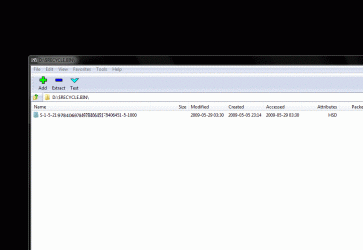
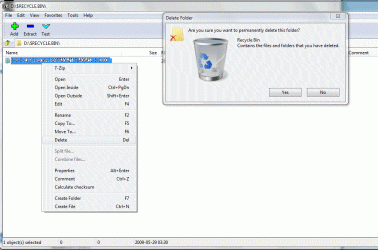
whenever I have this problem, or want to delete items that didn't get deleted, even though the bin says empty, I use 7zip and navigate to the bin, also after upgrading or re-imaging your OS, using the existing partitions, you'll have mutiple folders like this in your bin.
I just delete all the folders in the bins and they get instantly rebuilt, no harm done.
7zip's GUI is a powerful browser, open C:\Windows\Downloaded Program Files\ and you see goodies that are not there in Windows explorer.
;)
 

Attachments

  • Phen II Win 7027.gif
    Phen II Win 7027.gif
    67.2 KB · Views: 450
  • Phen II Win 7028.gif
    Phen II Win 7028.gif
    108.9 KB · Views: 478

My Computer

Computer Manufacturer/Model Number
ME!
OS
Windows 7 SP1 Ultimate 64bit
CPU
AMD Phenom II X4 940
Motherboard
ASUS M4A79 Deluxe (BIOS 3603)
Memory
OCZ PC8500 Platinum 4GB
Graphics Card(s)
Sapphire HD4870 1GB 256-bit GDDR5
Sound Card
HT Omega Claro
Monitor(s) Displays
ViewSonic G220fb still rocks
Screen Resolution
1600x1200@85hz
Hard Drives
160GB Seagate 7200.10 Sata
150GB WD Raptor 10,000rpm Sata
PSU
Corsair TX950W
Cooling
Zalman 9700NT
Keyboard
Logitech Standard
Mouse
Microsoft SideWinder
Internet Speed
5.26MB down 0.86MB up
Other Info
APC BackUps 900VA
That is your user SID in the registry relating to your user account.

You do not want to delete that entry
 

My Computer

Computer Manufacturer/Model Number
Cheap $399.00 E-Machine
OS
Windows 7 Pro & Vista Home Premium
CPU
Athlon 64 3800+ (Orleans) 2.40GHz
Motherboard
Winfast
Memory
2GB DDR2 RAM DIMM
Graphics Card(s)
NVIDIA GeForce 8500 GT 512 MB memory HDMI out
Sound Card
creative X-Fi Exteme 7..1 channel
Monitor(s) Displays
Acer V223W 22" widescreen DVI
Screen Resolution
1680x1050
Hard Drives
WDC WD5 500GB
WDC WD25 250GB
PSU
OCZ 550 watt
Case
Gateway
Cooling
2 fans
Keyboard
Dell
Mouse
Sony Vaio
Internet Speed
18MB/s down - .72MB /s up
This has been happening to me like crazy. I've done 5 installs of RC on 2 different PCs. I've had so much trouble with this thing its nuts. I'd give up but I'm using it for Media Center and dont have a copy of Vista (thank god). I've done the command prompt stuff and it works. but when I restart the PC after fixing it, its right back. I just ended up reformatting since something in 7 was making my network go nuts. It fixed it, well then that install had some crazy problem of not letting me into Media Center without an error forcing me to close (my C drive had become inaccessable to me also WTF?) I just reformatted again this morning and after a few updates and installs its now doing it again. :mad: Is 7 not as good as I thought it would be? I know im using the RC but I hope they fix all of this when it finally comes out.
 

My Computer

OS
Windows 7 RC 7100 Build
Last edited by a moderator:

My Computer

OS
Windows 7 Professional X64
CPU
AMD Phenom II X6
Motherboard
ASUS TeK M4N68T-M-V2
Memory
4GIG
Graphics Card(s)
NVIDIA nForce2 Ultra 400
Sound Card
NVIDIA
Monitor(s) Displays
Acer23/Dual with/Samsung SyncMaster 910T
Screen Resolution
1280x1024
Hard Drives
2TB
Ive tried this but I get Access is denied I am running as admin so I dont know whats wrong
 

My Computer

OS
windows 7
Try turning off UAC - see if that helps.

Turn it back on after.
 

My Computers

System One System Two

  • Computer type
    PC/Desktop
    OS
    7 X64
    CPU
    i5 8400
    Motherboard
    gigabyte b365m ds3h
    Memory
    2x8gb 3200mhz
    Hard Drives
    various
    PSU
    pure power 11 400w cm
    Case
    Coolermaster
    Cooling
    cryorig m9i
  • Computer type
    PC/Desktop
    OS
    7x64
    CPU
    g5400
    Motherboard
    ga b365m ds3h
    Memory
    8gb ddr4 2400
    PSU
    xfx pro 450w
for whatever reason that worked thanks alot no more annoying popup when 7 boots1 more issue with drivers and im good
 

My Computer

OS
windows 7
You're welcome - glad it worked for you. :D
 

My Computers

System One System Two

  • Computer type
    PC/Desktop
    OS
    7 X64
    CPU
    i5 8400
    Motherboard
    gigabyte b365m ds3h
    Memory
    2x8gb 3200mhz
    Hard Drives
    various
    PSU
    pure power 11 400w cm
    Case
    Coolermaster
    Cooling
    cryorig m9i
  • Computer type
    PC/Desktop
    OS
    7x64
    CPU
    g5400
    Motherboard
    ga b365m ds3h
    Memory
    8gb ddr4 2400
    PSU
    xfx pro 450w
Had the same problem after turning the UAC off. The problem seems to have stop after turning UAC back on and restarting the PC.

Thanks
 

My Computer

Computer Manufacturer/Model Number
Acer /Aspire X3910
OS
Windows 7 Home Premium 64bit
CPU
Intel Pentium processor E5700
Motherboard
Not sure
Memory
4GB DDr3
Graphics Card(s)
Intel GMA X4500
Sound Card
Intel HD Audio/ Realtek HD Audio
Monitor(s) Displays
Refurbished old tube model
Hard Drives
C:\ drive 640GB
PSU
Not sure
Case
Metal
Cooling
Not sure
Sorry to bring a bit of an old thread back to life but it was the first one i come across after a search.

Anyway i am getting this a lot with my E: drive which is my secondary. Usually on startup. I also always have UAC turned off (Have done since i started using Win 7 months ago). Is there a solution for this as it is starting to get on my nerves. I have tried everything in this thread up to now with limited results...
 

My Computer

Computer type
PC/Desktop
Computer Manufacturer/Model Number
Self Built
OS
Windows 10 Pro x64
CPU
Intel i7 2600K @ 4.4GHz
Motherboard
Asus P8Z77-V LX2
Memory
16GB Corsair Vengeance Pro DDR3 1600 MHz
Graphics Card(s)
ZOTAC GTX 1070 AMP Edition
Sound Card
Asus Xonar D2
Monitor(s) Displays
Viewsonic 24" VX2439WM LCD/LG 22" W2261VP LCD
Screen Resolution
1920x1080 DVI 1080p 16:9 on both screens
Hard Drives
1x SanDisk Extreme 120GB SSD SATA III (OS), 1x Samsung EVO 250GB SSD SATA III (Games), 1x Seagate Barracuda 1TB SATA III (Storage)
PSU
Corsair TX850W
Case
Corsair Carbide 200R
Cooling
3x 120mm Fans (Front, Bottom and Rear)
Keyboard
Roccat Isku
Mouse
Corsair M65 RGB
Internet Speed
Virgin Media 100Mb
Antivirus
Windows Defender
Browser
Firefox
Other Info
Logitech Z640 5.1 Speakers. Kingston HyperX Cloud Headset. M-Audio Oxygen 25/88 Keystation ES Midi Keyboard's
Back
Top