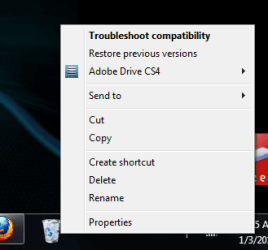
Recycle Bin - Pin to Taskbar

How to Pin the Recycle Bin to the Windows 7 Taskbar


   Information
The Recycle Bin provides a safety net when deleting files or folders. When you delete any of these items from your hard disk, Windows places it in the Recycle Bin and the Recycle Bin icon changes from empty to full.

This will show you how to create a Recycle Bin shortcut with Empty Recycle Bin in the context menu, and how to pin this shortcut to the taskbar as a toolbar.

   Note
Removable drives do not use or have a Recycyle Bin. Files deleted from removable drives are permanently deleted instead.


EXAMPLE: Recycle Bin Unpinned and Pinned from the Taskbar

Taskbar-1.PNG

Taskbar-2.PNG

Taksbar_Left.jpg
Here's How:
1. Make sure the Recycle Bin is on the desktop.
Recycle Bin on desktop.PNG
2. Right click on the desktop and select New and Folder , then rename it anything you like. (i.e. Trash Bin)
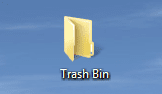
New Folder on desktop.PNG
3. Drag & drop the Recycle Bin on the new Folder to create a shortcut.
NOTE: You could also Pin to Start Menu this new Recycle Bin shortcut by pressing and holding Shift, then right click on the shortcut, and click on Pin to Start Menu.
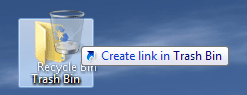
Drag & drop recycle bin.png
4. Save the new Folder (containing Recycle Bin shortcut) to the directory of your choice (i.e. C:\Trash Bin) by dragging and dropping.
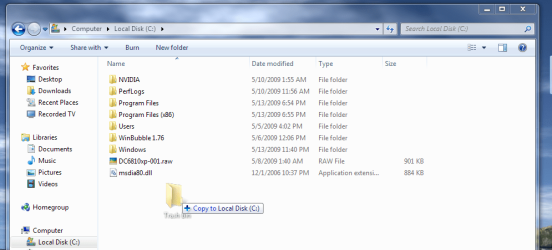
Drag & drop new Folder.png
5. UnLock the taskbar.

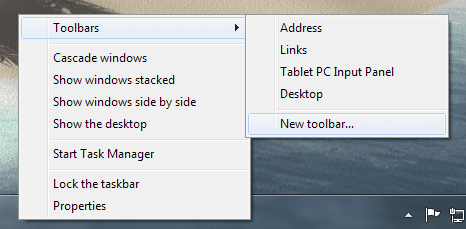
6. Right-click on the taskbar and select Toolbar and New toolbar...
Toolbars-New toolbar.png
7. Navigate to the location you saved the New Folder (Ex: Trash Bin), select it and click on the Select Folder button.
Choose a folder.png
8. This places the new Toolbar and a Separator (dotted lines) on the taskbar.
New Toolbar and Separator.PNG
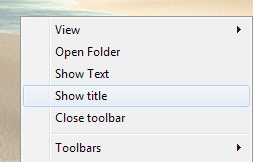
9. Right click on the Separator and uncheck Show Text and Show Title.
Show title.png
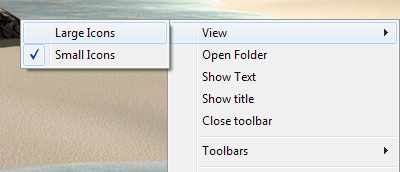
10. Right click on the Separator and select View and Large Icons.
Large Icons.png
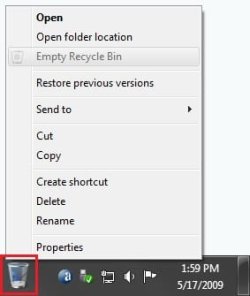
11. You now have the Recycle Bin pinned to the taskbar.
Recycle_Bin.jpg
12. To Keep the Recycle Bin on Right Side of Taskbar
A) Left click on the Separator to the left of the folder and hold, then drag it to the left and right to make any adjustments to how you want the Recycle Bin positioned on the right side of the taskbar. (See screenshot above)

B) Release the left click when done.

C) Go to step 14.
13. To Have the Recycle Bin on Left Side of Taskbar
A) Left click on the Separator of the pinned taskbar programs on the far left side and hold, then drag it to the right past the Recycle Bin and release. (See screenshot below)

Left-1.jpg
B) Left click on the Separator of the pinned taskbar programs on the now right side and hold, then drag it to the left next to the Recycle Bin and release. (See screenshot below)

Left-2.jpg
14. Lock the taskbar.

15. Remove the Recycle Bin from the desktop.

   Note
You do know that when you drag & drop copied shortcuts from the Start Menu in with the Recycle Bin shortcut, that those automatically become Quick Launch items beside the Recycle Bin. By doing it that way you can "kill two birds with one stone".(See screenshot below)

Recycle Bin - Quick Launch Combo.PNG
Enjoy,


Last edited by a moderator:
using the small icon works, its not as nice as the big one but it does the trick
 

My Computer

Computer Manufacturer/Model Number
Gateway T-1628
OS
windows 7 home premium sp1 x86
CPU
AMD Turion 64 x2 Mobile Technology 2.0 GHz
Motherboard
GATEWAY (Socket M2/S1G1) ATI RS690/RS690M Chipset
Memory
3gb DDR2 RAM
Graphics Card(s)
ATI Radeon x1200 series
Sound Card
SigmaTel High Def audio
Monitor(s) Displays
Generic PnP Monitor
Screen Resolution
1280x800
Hard Drives
250gb Western Digital
Gohardsupreme,

I'm happy that will do the trick for you. Sorry that there doesn't seem to be another workaround for it.
 

My Computer

Computer type
PC/Desktop
Computer Manufacturer/Model Number
Self built custom
OS
64-bit Windows 11 Pro for Workstations
CPU
Intel i7-8700K OC'd to 5 GHz
Motherboard
ASUS ROG Maximus XI Formula Z390
Memory
64 GB (4x16GB) G.SKILL TridentZ RGB DDR4 3600 MHz
Graphics Card(s)
ASUS ROG-STRIX-GTX1080TI-O11G-GAMING
Sound Card
Integrated
Monitor(s) Displays
2 x Samsung Odyssey G7 27"
Screen Resolution
2560x1440
Hard Drives
1TB Samsung 990 PRO M.2,
4TB Samsung 990 PRO PRO M.2,
TerraMaster F8 SSD Plus NAS
PSU
Seasonic Prime Titanium 850W
Case
Thermaltake Core P3
Cooling
Corsair Hydro H115i
Keyboard
Logitech wireless K800
Mouse
Logitech MX Master 4
Internet Speed
2 Gb/s Download and 100 Mb/s Upload
Antivirus
Malwarebyte Anti-Malware Premium
Browser
Google Chrome
Other Info
Logitech Z625 speaker system,
Logitech BRIO 4K Pro webcam,
HP Color LaserJet Pro MFP M477fdn,
APC SMART-UPS RT 1000 XL - SURT1000XLI,
Galaxy S23 Plus phone
thanks for the help its not a big deal. i can deal with it
 

My Computer

Computer Manufacturer/Model Number
Gateway T-1628
OS
windows 7 home premium sp1 x86
CPU
AMD Turion 64 x2 Mobile Technology 2.0 GHz
Motherboard
GATEWAY (Socket M2/S1G1) ATI RS690/RS690M Chipset
Memory
3gb DDR2 RAM
Graphics Card(s)
ATI Radeon x1200 series
Sound Card
SigmaTel High Def audio
Monitor(s) Displays
Generic PnP Monitor
Screen Resolution
1280x800
Hard Drives
250gb Western Digital
Thanks for the tip! I tried adding rep, but it won't let me for some reason...
 

My Computer

Computer Manufacturer/Model Number
Cyberpower, Inc.
OS
Windows 7 Professional (x64)
CPU
AMD Phenom II X4 955 Black Edition
Motherboard
Gigabyte AMD MA770T-UD3P AM3 DDR3 1666+/1333/1066
Memory
6GB (3 x 2GB) Kingston DDR3 1333 SDRAM
Graphics Card(s)
NVIDIA GeForce GTX 260
Sound Card
Onboard 7.1 Sound
Monitor(s) Displays
Samsung 24" SyncMaster 2422
Screen Resolution
1920 x 1200
Hard Drives
500GB Sata II 3.0GB 16MB 7200RPM,
Western Digital 1TB USB 2.0 External Hard Drive
PSU
Kingwin 700 Watt Power Supply
Case
Silver X-Cruiser 2 Mid No Power
Cooling
Asetek 120MM Watercooler
Keyboard
HTK-1001
Mouse
Razer Viper
Internet Speed
Incoming: 2496 kbps, Outgoing: 512 kbps
Solid! Now my desktop is totally cleared!
 

My Computer

Computer Manufacturer/Model Number
coolfire
OS
7 Home Premium x64
CPU
Intel(R) Core(TM)2 Quad CPU Q8300 @ 2.50GHz
Motherboard
GIGABYTE GA-G31M-ES2L
Memory
4.00 GB
Graphics Card(s)
Inno3D® GeForce™ 9800 GT
Sound Card
Onboard
Monitor(s) Displays
Philips 240SW9
Screen Resolution
1920 x 1200 pixels
Hard Drives
Hitachi HDP725050GLA360 500GB
Internet Speed
10Mbps downstream & 1Mbps upstream
Really useful thanks :)
 

My Computer

Computer Manufacturer/Model Number
Microsoft
OS
Windows 7 Ultimate x32
CPU
AMD Athlon
Motherboard
Gigabyte
Memory
Kingston
Graphics Card(s)
Ati Radeon 9950
Monitor(s) Displays
Philips
Hard Drives
1-160GB and 1-80GB
Keyboard
A4Tech X7
Mouse
A4Tech X7
Internet Speed
~25MB/s D and ~15MB/s U
All I did was pin it inside my Windows Explorer and it works fine for me.

But thanks for the tutorial, seems like I will have to try it out sometime.
 

My Computer

Computer Manufacturer/Model Number
Custom Build
OS
Windows 7 Ultimate 64 bit & Ubuntu 10.04
CPU
AMD Athlon 64 X2 5000+ (with all 4 cores unlocked) @ 2.75GHz
Motherboard
Gigabyte MA785G-UD3H
Memory
4 GB Mushkin Blackline DDR2
Graphics Card(s)
Onboard graphics (ATI Radeon HD 4200)
Sound Card
Onboard HD Audio
Monitor(s) Displays
22" Envision LCD
Hard Drives
1x250GB Seagate
1x120GB Seagate 2.5" external
PSU
Rosewill Performance @ 600W
Case
Coolermaster Centurion 531
Cooling
1 120mm Front blue LED fan, Stock AMD cooler on CPU
Keyboard
Logitech Wireless Keyboard Y-RC14
Mouse
Logitech MX700
Other Info
This is my first build :D Glad I got a Quad core out of a 45nm die Athlon.
hey i have a problem, i pinned the recycle bin already it now it wont delete from my desktop
 

My Computer

OS
Windows Seven Ultimate
Aarkan Welcome to SevenForums
Did you follow the link provided in step number 15 of the tutorial? You must unselect recycle bin from default desktop icons. Good luck to you.
 

My Computer

Computer Manufacturer/Model Number
Gateway GT5692
OS
Windows 7 Ulti. x64
CPU
AMD Phenom 8450 triple-core 2.10 ghz
Memory
4GB
Graphics Card(s)
ATI Radion HD 3200
Monitor(s) Displays
Gateway FPD1775W
Screen Resolution
1280x720
Hard Drives
465.6613 Gibibytes
thanks!

lol, i hadn't seen the note XD, thanks alot for the tutorial!
 

My Computer

OS
Windows Seven Ultimate
Your welcome. I like this tweek as I have no icons on the desktop. If I find that I need to I can put a icon in the toolbar part of this and use it as a quick launch bar. Enjoy!
 

My Computer

Computer Manufacturer/Model Number
Gateway GT5692
OS
Windows 7 Ulti. x64
CPU
AMD Phenom 8450 triple-core 2.10 ghz
Memory
4GB
Graphics Card(s)
ATI Radion HD 3200
Monitor(s) Displays
Gateway FPD1775W
Screen Resolution
1280x720
Hard Drives
465.6613 Gibibytes
Thank you very much! This tutorial has made my desktop cleaner now.:)
 

My Computer

Computer Manufacturer/Model Number
Neo Vivid V2121
OS
Windows 7 Ultimate 32-bit Version 6.1 (build 7600.16385)
CPU
Intel Pentium Dual CPU T2390 @ 1.86GHz
Motherboard
SiS M720SR
Graphics Card(s)
SiS Mirage 3 Graphics SiS627 series
Sound Card
Built-in
Monitor(s) Displays
Generic PnP Monitor
Screen Resolution
1280x800
Hard Drives
Fujitsu MHZ2160BH G1 ATA Device 160GB
Keyboard
Standard PS/2 Keyboard
Mouse
Synaptics PS/2 Port Pointing Device
It's made me want to empty the trash every time I see the icon in the taskbar!
 

My Computer

Computer Manufacturer/Model Number
Assembled by me
OS
Windows 7 Professional 64-bit
CPU
Intel Core i7-960 Bloomfield 3.2GHz 8MB L3 Cache Quad-Core
Motherboard
ASUS P6X58D Premium LGA 1366 Intel X58 SATA 6Gb/s USB 3.0
Memory
12 gb Corsair Dominator DDR3 1866 (PC3 15000) Triple Channel
Graphics Card(s)
XFX Radeon HD 5770 1GB 128-bit DDR5
Sound Card
Asus Essence STX Audiophile Heaven!
Monitor(s) Displays
ViewSonic VP201b
Screen Resolution
1600 x 1200
Hard Drives
(1) Crucial Real SSD C300
(2) WD Velociraptor 300gb
(1) Seagate DB35 750gb
PSU
Seasonic 750 Gold
Case
Lian Li 2100
Cooling
Noctua
Keyboard
Microsoft Wireless Comfort 5000
Mouse
Logitech USB Trackman Wheel
Internet Speed
1gp/s
i meant cant we change the the recycle bin icon (like use a different icon, not using the small icon option) that is 40pixels high? would that solve the problem?
No matter what is the size of the icon if you set large icons the height of the task bar is increased and the gap will always be there.
As a proof try to enable the toolbar "links" that by default is empty and set large icons. The gap will be created. And btw the gap disappears magically if you unlock the toolbar, increase height, move it to the opposite side of the screen, resize it to minimum height and move it back to the original position. The problem is that when you reboot the gap reappears.
So it is a stupid bug that was reported to microsoft before the final release.
This and the fact that you can't pin whatever you want to the taskbar (among the other problems) shows that microsoft programmers are not passionate about what they do.
 

My Computer

Computer type
PC/Desktop
OS
Windows 7 Professional x64
Ok so I did this, was able to make the icon show up on the toolbar, hid the folder with the shortcut in it in the c: drive, but when I right click the icon on my toolbar to empty it, I'm given all of these other BS options, but not the one to empty it...

Untitled.png

EDIT:
Now out of no where the icon I made for the dock has disappeared?
 
Last edited by a moderator:

My Computer

Computer Manufacturer/Model Number
Built it myself
OS
Windows 7 64 & Ubuntu 64
CPU
Intel Quad Core Q6600 2.40GHz
Motherboard
Asus
Memory
8g
Graphics Card(s)
Nvidia 9600 GT & 9800 GT
Sound Card
Turtle Beach 5.1
Monitor(s) Displays
Three 19" Dell's & one 46" Samsung 750
Hello Johnny,

Did you delete or move the folder (step 4) that you created afterwards?
 

My Computer

Computer type
PC/Desktop
Computer Manufacturer/Model Number
Self built custom
OS
64-bit Windows 11 Pro for Workstations
CPU
Intel i7-8700K OC'd to 5 GHz
Motherboard
ASUS ROG Maximus XI Formula Z390
Memory
64 GB (4x16GB) G.SKILL TridentZ RGB DDR4 3600 MHz
Graphics Card(s)
ASUS ROG-STRIX-GTX1080TI-O11G-GAMING
Sound Card
Integrated
Monitor(s) Displays
2 x Samsung Odyssey G7 27"
Screen Resolution
2560x1440
Hard Drives
1TB Samsung 990 PRO M.2,
4TB Samsung 990 PRO PRO M.2,
TerraMaster F8 SSD Plus NAS
PSU
Seasonic Prime Titanium 850W
Case
Thermaltake Core P3
Cooling
Corsair Hydro H115i
Keyboard
Logitech wireless K800
Mouse
Logitech MX Master 4
Internet Speed
2 Gb/s Download and 100 Mb/s Upload
Antivirus
Malwarebyte Anti-Malware Premium
Browser
Google Chrome
Other Info
Logitech Z625 speaker system,
Logitech BRIO 4K Pro webcam,
HP Color LaserJet Pro MFP M477fdn,
APC SMART-UPS RT 1000 XL - SURT1000XLI,
Galaxy S23 Plus phone
Hi, All. I'm running Win 7 in a Bootcamp partition on my MacBook Pro (FUN FOR PC GAMING!). I have the tastbar on the Mac side on the RIGHT of the screen - and have put the Win 7 one there too. BUT, now that I have my Win 7 Recycle Bin on the Taskbar - it is not centered - is on the far left and makes the Taskbar 1/3 fatter than it needs to be. Any way to change that?
Thanks! LongJnSilver
 

My Computer

Computer Manufacturer/Model Number
MacBook Pro Unibody
OS
Windows 7
CPU
2.53 GHZ
Memory
4 GB
Monitor(s) Displays
24" Cinema Disply
Hard Drives
320 GB
Mac OS X Snow Leopard
Windows XP Pro via VMWare Fusion
Windows 7 in 120 GB Bootcamp partition
Hi, All. I'm running Win 7 in a Bootcamp partition on my MacBook Pro (FUN FOR PC GAMING!). I have the tastbar on the Mac side on the RIGHT of the screen - and have put the Win 7 one there too. BUT, now that I have my Win 7 Recycle Bin on the Taskbar - it is not centered - is on the far left and makes the Taskbar 1/3 fatter than it needs to be. Any way to change that?
Thanks! LongJnSilver

On step 10 of this tutorial it shows how to change the icon size to view small.
 

My Computer

Computer type
PC/Desktop
Computer Manufacturer/Model Number
Self Built
OS
Win 10 Pro x64
CPU
Intel I5-2500K @3.3GHz
Motherboard
Asrock P67 Extreme4
Memory
16GB G.Skill Ripjaws X (4x4GB)
Graphics Card(s)
EVGA GeForce 750 Ti SC 2GB
Sound Card
ASUS Xonar DG 5.1 Channels 24-bit 96KHz PCI Interface Sound
Monitor(s) Displays
auria eq2367
Screen Resolution
1920 x 1080
Hard Drives
250GB Samsung 850 EVO SSD
1TB WD Blue
1TB Hitachi
PSU
SeaSonic X 650W 80 Plus Gold
Case
Corsair Obsidian 750D
Cooling
Corsair H60, Three 140mm case fans
Keyboard
Logitech Wireless Keyboard K520
Mouse
Logitech Wireless Mouse M310
Internet Speed
Wave Broadband ~ 100 dn 5 up
Antivirus
Windows Defender, Malwarebytes Premium
Browser
Edge, IE11, Chrome
Other Info
Laptop specs: HP g7-1365dx /
CPU: AMD A6-3420M APU with Radeon(tm) HD Graphics /
RAM: Crucial 8Gb (2x4Gb) /
SSD: Crucial M4-CT128M4SSD2 ATA Device/ FW 000F /
GFX: AMD Radeon HD 6520G /
OS: Windows 10 Pro x64
icons are small already - it's the toolbar

It's the toolbar itself that is too wide - wider than it needs to be to
house the icons if I could get them to line up in the middle. I guess I'm
being too picky. - LongJnSilver -
 

My Computer

Computer Manufacturer/Model Number
MacBook Pro Unibody
OS
Windows 7
CPU
2.53 GHZ
Memory
4 GB
Monitor(s) Displays
24" Cinema Disply
Hard Drives
320 GB
Mac OS X Snow Leopard
Windows XP Pro via VMWare Fusion
Windows 7 in 120 GB Bootcamp partition
Back
Top